by Infomatix - Product Type: Component / Application / .NET Compact Framework / JavaBean / Wizard / Developer Application / Server Application / Windows Service
in Wireless, Handheld and Mobile
Other information on this page is shown for historical reference only and may have changed considerably since.
mobiaccess Development Framework by Infomatix
URLs: mobiaccess-development-framework, mobiaccess development framework, mobiaccessdevelopmentframework, infomatix
Easily create mobile applications for data collection. Mobiaccess Developer Framework enables developers to easily create mobile applications for data collection without extensive knowledge on mobile development. Using the mobiaccess framework, applications can be created or ported to the following clients: Laptops running Windows, Windows Mobile PDA-s PPC 2003 or later, Blackberry with OS 4.0 or higher, Symbian-based phones, Windows-enabled smart phones, MIDP 2.0 compatible J2ME mobile phones.
Mobiaccess is a mobile development framework that enables developers to easily create mobile applications for data collection without extensive knowledge of mobile development. It also handles data replication (mobiSync) and data visualization (mobiVision).
Possibilities for developers using mobiaccess framework:
Create custom Downloadable, Resellable applications for any mobile device using the framework
Migrate any data structure to the mobile clients and let their users modify it online and offline
Extend the built-in mobiVision user interface on the desktop to build a customized data-driven application
Develop plug-ins for the mobiVision Mobile for your favourite kind of device and build a custom data-collection or field-administration application
Use special plug-ins to support printing, barcodes, GPS and other utilities
Automate work-flows and data validation in the field using the rules of mobiaccess
Reduce development time by 80% for data-oriented application development
Components
Mobiaccess has several independent components and modules. For the supported mobile platforms (Windows Mobile PDA, Smartphones and industrial data collector terminals; Symbian, BlackBerry and J2ME phones) mobiVision Mobile is the end-user interface. For Tablet PCs, Notebooks and Desktops mobiVision Desktop is the visualization tool. As well as it is the management interface for the synchronization process and right management. The synchronization process is operated by synchronization server (mobiSync Server) and clients (mobiSync mobile and mobiSync Desktop clients).
MobiSync is a generic mobile synchronization framework for relational databases
MobiSync is a data synchronization framework that enables customers to replicate any database to their mobile devices. The complex system can serve 100% of a business professional needs with the following features:
Configurable through wizards or SQL
Intelligent tracking of table dependencies and relationships
Configurable rights and table-sets for different client-types
Possibility of different sync scenarios, which can be optimized for the network environment
Manual or periodic synchronization in the background
Optimized for frequent synchronization
Works through any TCP/IP connection (GPRS, WLAN, LAN or Internet)
Intelligent tracking of changes in the database
Can use industrial standard SSL for communication between client and server to support security
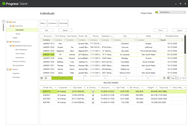
MobiVision Desktop - Data visualization tool for desktop, laptop and Tablet PCs
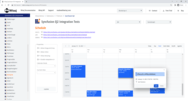
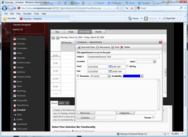
With the user-friendly interface of mobiVision Desktop, end-users can comfortably manage their own databases and applications, or use it to modify or query data too. With the great range of supported features, developers are able to create professional applications and end-users are provided with a great user experience:
Easy-to-use panels for visualizing data
Configurable through GUI interface
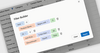
Flexible Excel-style filtering
Supports customization by end users
Extensive User Access Rights Management
Built-in data validation and relationship handling
Users may visually format special data ranges
Events may be colour-coded for the user
Supports Data Table, View and Stored Procedure execution
Supports external library API to integrate third-party extensions seamlessly
Platform-specific plug-ins can be written independently
XML format supported for flexible configuration
MobiVision Mobile - Data visualization tool for mobile devices
MobiVision Mobile, the user interface for all mobile devices supported by mobiaccess, transfers the flexibility of the laptop interface to the mobile while maintaining the functionality of each device:
Configurable through a GUI interface
Multiple skins to enhance the user experience
Defined standard set of functionality for easy portability across platforms
Ability to exploit the potentials of a specific mobile device
Same system configuration for all mobile devices
Extensive User Access Rights Management
Built-in data validation and relationship handling
Configurable visual formats for special data ranges
Events may be colour-coded for the user
Supports external library API to integrate third-party extensions seamlessly
Easy configurability through synchronized data tables and XML files
Platform-specific plug-ins can be written independently
Optimized for smaller screens
Optimized for limited resources
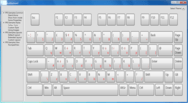
Wide range of input-methods supported
Add-ins
Mobiaccess Add-ins are small extensions that add new functionality to the Mobiaccess Development framework. They allow you to customize mobiaccess to fit your own needs and preferences. Requirements: To use the add-ins properly, mobiAccess Administration Suite 2.0 or the latest available version will be needed (Administration Suite standalone, or mobiAccess Developer Pack).
The following Add-ins are available:
Condition
SMS
Digital Signature
Photo
Condition Add-in for MobiVision:
Simple extension to set up conditional processes in mobiVision mobile configurations. With this tool the application will be able to respond differently to occurances, or call in different functions. For example at a Combo-box based questionnaire the previous answer determines the possible answers in the next task, and other add-ins can also be called. Only works with mobiaccess version 1.0.3. (or later).
Supported platforms:
Windows Mobile 5 and 6 PDAs (normal or smartphone editions)
Windows Mobile 5 and 6 Smartphones
Pocket PC 2003 PDAs (normal or smartphone editions)
Nokia Communicator (S80 platform)
Nokia Phones with S60 3rd ed. platform
BlackBerries
J2ME Phones (MIDP 2.0, CLDC 1.1)
SMS Add-in for mobiAccess
A very useful add-in which can be easily integrated into mobiVision. The purpose is to be able to send short massages via a mobiVision solutions. Text messages can be sent to one or more recipients simultaniously, without any content limitations (for example 160 characters). There is no limitation for the content of the message. So with this addin you can send special service messages for any backend and readable messages too.
Fully functional implementation:
WM5/WM6 phone edition and smartphones
PPC2003 phone edition
S60/S80
J2ME/BlackBerry
Not supported platforms:
Simple WM5/WM6
Desktop
Digital Signature Add-in
The main purpose of Digital Signature Add-in is to get and display signatures (or any graph) to and from any database and configuration. Simple capture and display tool, without writing recognition and picture (signature) comparison. The main purpose of Digital Signature Add-in is to get and display signatures (or any graph) to and from any database and configuration. Simple capture and display tool, without writing recognition and picture (signature) comparison.
Fully Functional Implementation:
WM5/WM6
PPC2003
Desktop
Limited Implementation (Display and delete/null only):
Smartphones
S60
S80
J2ME, BlackBerry
Photo Add-in
The goal of the photo add-in is to provide a standalone purchasable add-in to our customers with which they can take photos if the used device has a camera. The customers can configure the addin (with many parameters) for a button, menu, popup or sysmenu item.
Supported Platforms:
Window CE 5.0
WM5/WM6 phone edition and smartphones with camera
S60/S80
J2ME/BlackBerry
Customers can configure the addin (with many parameters) for a button, menu, popup or sysmenu item.
Easily create mobile applications for data collection.
Evals & Downloads: Read the mobiaccess Developer Framework Overview document, Read the mobiaccess Mobile Clients documentation, Read the mobiaccess Developer Framework End User License Agreement
Operating System for Deployment: Windows Vista, Windows XP, Windows Server 2003, Windows 2000, Windows CE .NET, Symbian OS 9.x, Symbian OS 7.x, S60 Platform, Nokia Series 60
Architecture of Product: 32Bit, 64Bit
Product Type: Component, Application
Component Type: .NET Compact Framework, JavaBean
Application Type: Wizard, Developer Application, Server Application, Windows Service
Built Using: Visual Basic V6.0, Visual C# .NET, Borland(R) Delphi[TM] 7, Java 2 SDK (JDK 1.4), .NET Framework 2.x
Compatible Containers: Microsoft Visual Studio 2005, Microsoft Visual Studio 6.0, Microsoft Visual Basic 2005, Microsoft Visual Basic 6.0, Microsoft Visual C++ 2005, Microsoft Visual C++ 6.0, Microsoft Visual C# 2005, Delphi 7.0, .NET Framework 2.0, Eclipse V3.3
Keywords: mobi access mobiaccess aces acces data sync synchronize update mobiacces mobiacess mobiaces
Infomatix
Wireless Handheld Mobile hand held wire less
Entry data-entry
Database DB Management