by Webyog - Product Type: Application
MONyog by Webyog
URLs: monyog, webyog
MySQL Monitor and Advisor. MONyog MySQL Monitor and Advisor is a "MySQL DBA in a box" that helps MySQL DBAs manage more MySQL servers, tune their current MySQL servers and fix problems with their MySQL database applications before they can become serious problems or costly outages. MONyog pro-actively monitors enterprise database environments and provides expert advice on how even those new to MySQL can tighten security, optimize performance and reduce downtime of their MySQL powered systems. MONyog is designed to help companies scale their existing MySQL DBA resources by providing a single, consolidated view of health, security, performance and availability of all of their MySQL servers. It pro-actively monitors all MySQL servers using a set of predefined expert advisors, to identify and alert DBAs of problems, security vulnerabilities and tuning opportunities so they can be acted upon well in advance of a problem or outage occurring.
What is MONyog - MySQL Monitor and Advisor?
MONyog MySQL Monitor and Advisor is a "MySQL DBA in a box'' that helps MySQL DBAs manage more MySQL servers, tune their current MySQL servers and find and fix problems with their MySQL database applications before they can become serious problems or costly outages.
MONyog pro-actively monitors enterprise database environments and provides expert advice on how even those new to MySQL can tighten security, optimize performance and reduce downtime of their MySQL powered systems.
Get information before the server runs out of resources.
As a MONyog user you will know in advance if server resources will soon be running short. You can plan a hardware replacement or upgrade well in advance of time and not when it is almost too late or just too late. The metrics about the server that MONyog gives you will also help you to decide what to upgrade: Faster CPU, More RAM, Faster disc systems - or maybe only remove another program from the computer where the MySQL server is running.
Identify the SQL statements that run slow.
MONyog provides a log analysis module, a 'query sniffer' and a 'processlist watcher' that makes it easy to identify the statements and applications that run slowly on the server. This includes various filtering and EXPLAIN options for an efficient workflow when you want to optimize your applications.
Monitor the MySQL Error log.
Monitoring the MySQL error log is absolutely critical for any MySQL DBA. MONyog is one of the first MySQL Monitoring Tools to monitor the MySQL Error logs and optionally notify you of changes to it.
Monitor queries in real-time and snipe long running queries.
MONyog provides a set of tools for finding problem SQL (Slow Query Log, SHOW PROCESSLIST snapshots, MySQL Proxy, etc). These tools are great if you want to find problem SQL in an application and tune those queries. However, using these tools to find problems is almost always a post-mortem exercise. In certain situations you may want real-time notifications for long running queries; MONyog gives you exactly that. MONyog can continuosly monitor queries in real-time and send notifications for queries that take more than a specified amount of time to execute. You can also specify an option to kill such queries.
Get alerts for what you want and when you want.
MONyog can send you alerts over mail or SNMP. Some features of the alerting system are:
It uses the concept of "Delayed alert notifications". It can now be defined that a problem must have existed for a number of sample intervals continuously (in a row) for an alert to be sent. A global setting for each server is available from the GUI. For individual counters the global setting can be overridden by defining the RetryOverride (like 'RetryOverride:3') property of the (JavaScript) counter definition.
You can also choose to be notified when MONyog detects that a problem, which existed previously, has been resolved.
Compare between the editions of MONyog MySQL Monitor and Advisor
The following table shows the features included in the different editions of MONyog.
UltimateEnterpriseProfessional
Multi-User Management
Filter access to specific servers for individual users New!•--
Specify different permissions for different users New!•--
Find Problem SQL by
Querying MySQL Proxy••-
Analysing General Query Log••-
Analysing Slow Query Log••-
Issuing SHOW PROCESSLIST at regular intervals•••
Additionally all the above reports can be exported as CSV••-
Security
Detect MySQL hacking attempts•--
Identify and fix security vulnerabilities•--
Monitor Replication
Get alerts when replication lags behind or if slave has stopped•--
Replication Log details for replication trouble shooting•--
Server Optimization
Deadlock monitoring New!•--
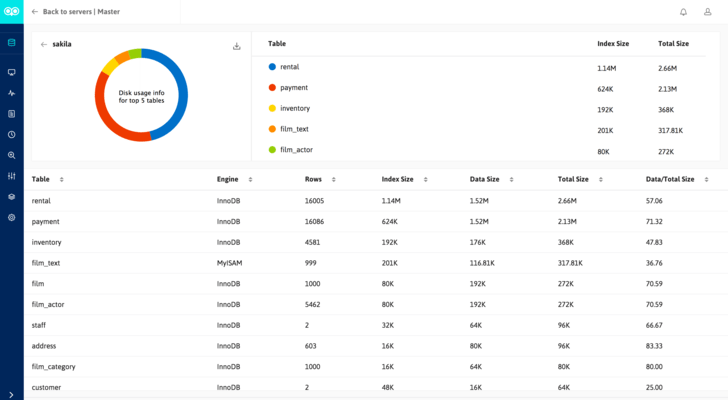
Server Disk Usage Information••-
Completely new set of advisors•••
Monitoring Tools for MySQL Community and Enterprise Servers•••
History/Trend Analysis•••
Quick Performance Tuning and Optimization•••
Analyze MySQL and OS performance data collected over a period of time•••
Error Log Monitoring•••
Multi-platform Support
Monitor MySQL on any platform•••
Available on Windows and Linux•••
Support for both 64-bit and 32-bit Linux•••
Both RPM and Non RPM Package•••
Licensing
Perpetual Licensing•••
Company wide Unlimited licensing at very attractive prices•••
User Friendly GUI
AJAX interface•••
Simple Descriptions for all performance metrics. Helps you learn MySQL Internals•••
Fully customizable using Javascript and MONyog Object Model•••
Compare unlimited MySQL servers side-by-side on Real time Dashboard•••
Enterprise dashboard helps identify problems quickly•••
Misc Features
Shows Processlist displaying information on running queries as per execution time•••
Inbuilt web-server•••
Does not force to install multiple web-servers & language runtimes like other tools•••
SSH Tunneling Support•••
Get proactive alerts via email and SNMP Traps•••
MONyog 4.81
Bug fixes:
Custom SQL Objects (CSO) with a large result set could fail to display content in Monitors/Advisors page.
Specifying the “Key Column” field has now been made mandatory while adding a new CSO. If not specified the CSO will not save.
Small UI fixes.
MONyog 4.02
Bug fixes:
Fixed a performance regression issue (introduced in 4.0) in HISTORY/TREND analysis.
Fixed an issue where Dashboard charts were not always populated properly with ‘old’ data when the Dashboard page was opened. The chart itself and the data-series for the chart are independent data streams which were not always ‘combined’ correctly.
The process-level MONyog stack size on Linux is now always expandable up to 10 MB (Linux kernel default) even if the user has defined another value. We had a report where MONyog would crash with a very low user setting (and this is basically an OS issue and not a MONyog issue).
If a MONyog build with a ‘lower’ license than ULTIMATE was installed ‘on top’ of the TRIAL some ULTIMATE functionalities would still run in the background – but not controllable by user. MONyog continued to collect data internally for counters not applicable to ENT or PRO edition and the MONyog.log would log errors irrelevant for the license model
MONyog 4.01
Bug fixes:
Implemented code that makes OpenSSL (which is used by our SSH library) explicitly thread-safe, thus fixing an issue where specific cryptographic function calls under very heavy load could cause a crash.
Fixed a SQLite corruption issue on Windows due to which MONyog service failed to stop.
If both values for ‘user’ and ‘host’ were filtered in processlist-based sniffer the interface would display NULL for both.
MONyog 4.0
Features:
Compare Configuration: This feature enables the user to compare changes in configuration between two instances of MySQL. Through this feature, the user will gain a greater insight on why one server is performing better than the other as far as server configuration is concerned.
Track Changes: This feature enables users to track changes to my.ini/my.cnf of a MySQL server over a period of time and compare changes between revisions.
Added a new interface for customizing Monitors/Advisors and Dashboard charts requiring less knowledge of JavaScript than what was the case before.
When upgrading an installation with customized Monitors/Advisors and Dashboard charts a 'conflict resolver' will now guide user to either migrate his old changes or discard them.
All cache hit rate related monitors/advisors have been changed to display cache miss rate information as it more relevant when tuning databases. Also the advisor text for these monitors/advisors has been improved.
Bug fixes:
Fixed some issues with specific counters including issues where ‘undefined’ or ‘NaN’ were returned incorrectly.
Graphs in ‘all time’ and ‘delta’ timeframes for the counter ‘Cache Misses’ for as well InnoDB Cache, MyISAM key cache and Query cache groups were not displaying but threw the error “Invalid XML data” (these counters were added in beta 1).
Previously accepted values for the “ChartValue” property in Dashboard charts were “Current” and “Latest”. This has caused confusion since both terms mean the same thing in this context, although technically “Current” refers to the current value of the metric and “Latest” to the “Delta” value. Moreover, the documentation mentions “Actual” and “Delta” as accepted values. To eliminate this confusion, the “ChartValue” property now accepts the values “Current” and “Delta” – “Current” referring to the current value of the metric, and “Delta” to the difference in the metric between the previous two collections.
Monitors/Advisors Customization: The Group Name of a Monitor/Advisor can now be changed only when a new, custom, counter is created; once set it cannot be changed. Changing Group Names of Monitors/Advisors shipped with MONyog is not allowed.
All cache hit rate related monitors/advisors have been changed to display cache miss rate information as it more relevant when tuning databases. Also the advisor text for these monitors/advisors has been improved.
MySQL Monitor and Advisor.
Pricing: MONyog and SQLyog - Combo Pack with Premium Support Enterprise Unlimited Combo Pack with Premium Support, MONyog and SQLyog - Combo Pack with Premium Support Ultimate Unlimited Combo Pack with Premium Support, MONyog 4.8.1 Professional with Premium Support Single MySQL Server License - includes 1 year of free upgrades (both minor and major) and Premium Support, MONyog 4.8.1 Professional with Premium Support 2 MySQL Server License - includes 1 year of free upgrades (both minor and major) and Premium Support, MONyog 4.8.1 Professional with Premium Support 5 MySQL Server License - includes 1 year of free upgrades (both minor and major) and Premium Support, MONyog 4.8.1 Professional with Premium Support 10 MySQL Server License - includes 1 year of free upgrades (both minor and major) and Premium Support, MONyog 4.8.1 Enterprise with Premium Support Single MySQL Server License - includes 1 year of free upgrades (both minor and major) and Premium Support, MONyog 4.8.1 Enterprise with Premium Support 2 MySQL Server License - includes 1 year of free upgrades (both minor and major) and Premium Support, MONyog 4.8.1 Enterprise with Premium Support 5 MySQL Server License - includes 1 year of free upgrades (both minor and major) and Premium Support, MONyog 4.8.1 Enterprise with Premium Support 10 MySQL Server License - includes 1 year of free upgrades (both minor and major) and Premium Support, MONyog 4.8.1 Enterprise with Premium Support Unlimited MySQL Server License - includes 1 year of free upgrades (both minor and major) and Premium Support, MONyog 4.8.1 Ultimate with Premium Support Single MySQL Server License - includes 1 year of free upgrades (both minor and major) and Premium Support, MONyog 4.8.1 Ultimate with Premium Support 2 MySQL Server License - includes 1 year of free upgrades (both minor and major) and Premium Support, MONyog 4.8.1 Ultimate with Premium Support 5 MySQL Server License - includes 1 year of free upgrades (both minor and major) and Premium Support, MONyog 4.8.1 Ultimate with Premium Support 10 MySQL Server License - includes 1 year of free upgrades (both minor and major) and Premium Support, MONyog 4.8.1 Ultimate with Premium Support Unlimited MySQL Server License - includes 1 year of free upgrades (both minor and major) and Premium Support, MONyog 4.8.1 Professional without Premium Support Single MySQL Server License - includes 1 year of free upgrades (both minor and major) and 1 month installation support, MONyog 4.8.1 Professional without Premium Support 2 MySQL Server License - includes 1 year of free upgrades (both minor and major) and 1 month installation support, MONyog 4.8.1 Professional without Premium Support 5 MySQL Server License - includes 1 year of free upgrades (both minor and major) and 1 month installation support, MONyog 4.8.1 Professional without Premium Support 10 MySQL Server License - includes 1 year of free upgrades (both minor and major) and 1 month installation support, MONyog 4.8.1 Enterprise without Premium Support Single MySQL Server License - includes 1 year of free upgrades (both minor and major) and 1 month installation support, MONyog 4.8.1 Enterprise without Premium Support 2 MySQL Server License - includes 1 year of free upgrades (both minor and major) and 1 month installation support, MONyog 4.8.1 Enterprise without Premium Support 5 MySQL Server License - includes 1 year of free upgrades (both minor and major) and 1 month installation support, MONyog 4.8.1 Enterprise without Premium Support 10 MySQL Server License - includes 1 year of free upgrades (both minor and major) and 1 month installation support, MONyog 4.8.1 Enterprise without Premium Support Unlimited MySQL Server License - includes 1 year of free upgrades (both minor and major) and 1 month installation support, MONyog 4.8.1 Ultimate without Premium Support Single MySQL Server License - includes 1 year of free upgrades (both minor and major) and 1 month installation support, MONyog 4.8.1 Ultimate without Premium
Evals & Downloads: Download the MONyog 4.81 evaluation on to your computer - Expires after 30 days
Operating System for Deployment: Windows Server 2008, Windows Vista, Windows XP, Windows Server 2003, Windows ME, Windows 2000
Architecture of Product: 32Bit
Product Type: Application
Compatible Containers: MySQL 5.0
Keywords: Webyog Softworks
Database DB Reporting Report reports
Database DB Management
Part numbers: PC-535245-434389 535245-434389 PC-535245-434390 535245-434390 PC-535245-434348 535245-434348 PC-535245-434349 535245-434349 PC-535245-434350 535245-434350 PC-535245-434351 535245-434351 PC-535245-434352 535245-434352 PC-535245-434353 535245-434353 PC-535245-434354 535245-434354 PC-535245-434355 535245-434355 PC-535245-434356 535245-434356 PC-535245-434357 535245-434357 PC-535245-434358 535245-434358 PC-535245-434359 535245-434359 PC-535245-434360 535245-434360 PC-535245-434361 535245-434361 PC-535245-434368 535245-434368 PC-535245-434369 535245-434369 PC-535245-434370 535245-434370 PC-535245-434371 535245-434371 PC-535245-434372 535245-434372 PC-535245-434373 535245-434373 PC-535245-434374 535245-434374 PC-535245-434375 535245-434375 PC-535245-434376 535245-434376 PC-535245-434377 535245-434377 PC-535245-434378 535245-434378 PC-535245-434379 535245-434379 PC-535245-434380 535245-434380 PC-535245-434381 535245-434381
Publisher
Primary Category
Related Products
Related Categories