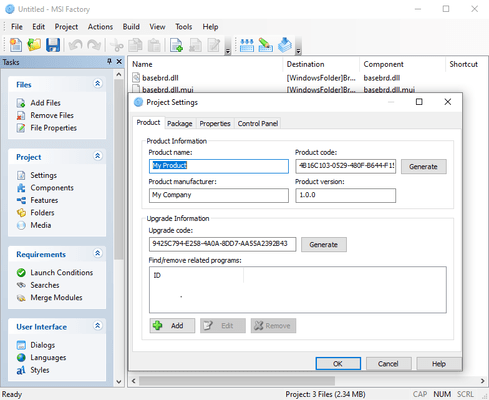
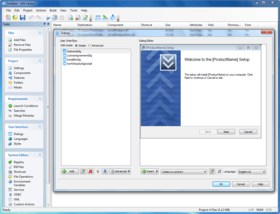
Screenshot Preview

MSI Factory

by Indigo Rose - Product Type: Application

Create 100% pure Microsoft Windows Installer (.MSI) format software installers. MSI Factory makes the task of creating professional installers faster, easier and hassle-free. MSI Factory includes advanced installer capabilities plus the next generation power of WiX, an intelligent development environment, a revolutionary fully scriptable .EXE bootstrap wrapper. MSI Factory is easy to use, you aren't forced to deal with the complexity of MSI database tables, sequences and components, simply drop in the application files, customize a few dialog boxes using the visual dialog editor and then click build. MSI Factory creates a single installer that works on any version of Windows from 95 to Windows 7.


Average Review:   based on 1 review.
From
$387.10

Our regular prices are shown below. Please logon to see your discounted prices.

Price in

MSI Factory V2.1.1020.0

Add to Cart $ 387.10 1 Developer License (Includes 6 Months Maintenance Plan including all major and minor updates)
Mfr. Part No: MSIFACT
Download (45.1 MB)
Add to Cart $ 975.10 5 Developer Team Pack (Includes 6 Months Maintenance Plan including all major and minor updates)
Mfr. Part No: MSIFACT-5
Download (45.1 MB)

MSI Factory V2.1.1020.0 Upgrade

Add to Cart $ 270.97 1 Developer License Upgrade from previous version Verify Download (20 KB)
Add to Cart $ 682.57 5 Developer Team Pack License Upgrade from any 3 or 5 Team Licenses Previous Version Verify Download (20 KB)

MSI Factory 1 Year Renewal

Add to Cart $ 270.97 1 Developer Maintenance Renewal (Available for current subscribers or if you have the latest version) Verify Download (20 KB)
Add to Cart $ 682.57 3 to 5 Developer Maintenance Renewal Verify Download (20 KB)

Our prices include ComponentSource technical support and, for most downloadable products, an online backup and a FREE upgrade to the new version if it is released within 30 days of your purchase.  All sales are made on our standard Terms and Conditions and subject to our Return Policy. Please contact us if you require any licensing option not listed, including volume licensing and previous versions.

Our regular prices are shown above. Please logon to see your discounted prices.

What's new in MSI Factory 2.1.1020.0:

  • Feature: Updated the WiX distribution to version 3.5.2519.0.
  • Feature: Added 4 new items to the System.GetOSVersionInfo Luascript action - "Server2003R2", "XPMediaCenterEdition", "StarterEdition", "TabletPCEdition".
  • Feature: Added the Local Application Data folder "SHF_APPLICATIONDATA_LOCAL" to the Shell.GetFolder Luascript action.
  • Fix: Due to a change in Wix, MSI Factory now requires .NET Framework 3.5 SP1 or later at design-time to build. As a result checks during the build process were added to provide this information instead of a cryptic Wix error.
  • Fix: Fixed a bug in the MSI.GetFileVersion action where improper results were being returned.
  • Fix: Fixed a bug where file icons would not be shown in the file list in specific situations.
  • Fix: Fixed a bug where the Folder.DeleteTree callback function was not being called.
  • Fix: Made it so that the deferred LuaSCript action accepts a delimited string as the CustomActionData value allowing developers to pass extra data to their deferred actions.
  • Fix: Fixed a bug where codepages were not being allowed to be larger then 9999.
  • Fix: Fixed a bug where the SummaryCodepage attribute was not being set properly.

What's New in MSI Factory 2.1.1011:

  • Added SW_HIDE window mode to File.Run, File.RunAs and Shell.Execute actions in the bootstrapper and luascript dll.
  • Added support for Windows Vista SP2 and Windows Server 2008 SP2 to the Launch Conditions OS tree.
  • Updated the WiX distribution to version 3.5.1909.0.
  • Updated lzma.exe to version 4.65.
  • Fix: Fixed a bug where if the File.GetShortName action failed, a string containing garbage would be returned. Failure can occur if the file does not exist.
  • Fix: Fixed a bug where the second parameter of the Table.Sort action wasn't being handled properly.
  • Fix: Fixed a bug where the _IgnoreInvalidCertificate undocumented global would not ignore certificate revocation errors.
  • Fix: Fixed a bug in both versions of the dotnet35 dependency module script where a parameter of File.RunOnReboot was using _SourceFolder instead of just _SourceFilename.
  • Fix: Fixed a bug where the Advertise checkbox for Create Shortcut actions was not working properly.
  • Fix: Removed the ability to insert properties into the shortcut description field.
  • Fix: Fixed a bug on Windows 7 where not saving a project before creating a new project would sometimes cause a crash.

What's New in MSI Factory 2.1.1009:

  • Added support for Windows Server 2008 R2 to the System.GetOSName action and Launch Conditions.
  • Added support for Windows Restart messages to the MSI Factory design environment and distributed tools.
  • Added the "/LCID" unattended build command line option that allows you to set the LCID of the language to use when performing an unattended build.
  • Updated the WiX distribution to version 3.5.1030.0.
  • Added compatibility section to all application manifests for Windows 7.
  • Fix: Updated the autoproxy support in HTTP actions to correctly use the INTERNET_PER_CONN_AUTOCONFIG_URL setting.
  • Fix: Fixed a bug where a final CRLF was throwing off the Crypto action's Base64 decoding.
  • Fix: Increased the maximum possible number of characters that can be read in when using the INIFile.GetValueNames action.
  • Fix: Fixed a bug where the HTTP.Sumbit action was not working properly with invalid certificates and the undocumented _IgnoreInvalidCertificate variable set to true.
  • Fix: Made it so that the File.Install action would not overwrite files protected by Windows File Protection (WFP).
  • Fix: Fixed a bug where the HTTP.TestConnection action was not using AutoProxy or setting proxy information properly.
  • Fix: Fixed a bug where the File.Find action would sometimes fail when the executable was on a CD-ROM.

What's New in MSI Factory 2.1.1007:

  • Updated the WiX distribution to version 3.5.0704.0.
  • Added Windows 7 support to the System.GetOSName action.
  • Added Windows 7 support to the Launch Conditions Operating System condition tree.
  • Made it so that invalid certificates can be ignored in the bootstrapper and LuaScript DLL through the use of an undocumented variable called _IgnoreInvalidCertificate.
  • Fix: Made it so that the HTTP Error Dialog will be displayed (if allowed) if an invalide certificate is encountered.
  • Fix: Fixed a bug where File.GetSize would return an incorrect file size for files larger then 4.7GB.
  • Fix: Fixed a bug where Shell.Execute was incorrectly setting an error code.
  • Fix: Fixed a bug where REG_DWORD values larger then MAX_INT were not being written to the registry properly.
  • Fix: Fixed a bug where blank usernames were incorrectly being written into the Wix files. Now if a usename is blank it will be left out.
  • Fix: Fixed a bug where a TODO dialog was incorrectly being shown.
  • Fix: Fixed a problem where typing into the edit control on the InstallDirDlg was not setting INSTALLDIR properly in some situations.
  • Fix: Fixed a bug where PathEdit controls were not allowing you to publish events.
  • Fix: Fixed a bug where file and folder searches were sometimes getting the same DirectorySearch Id.
  • Fix: Fixed a bug where a deprecated attribute name was being used in the Copy Files (CopyFile Element) file operation causing a potential build error.
  • Fix: Fixed a bug where a warning would be shown during the build related to the Package/Platform attribute.
  • Fix: Fixed a bug where the File Search "Depth" option was not working properly if it was greater than 0.
  • Fix: Fixed a bug where using INI File System Editors would result in malformed XML in project files.
  • Fix: Fixed a bug where using Create Shortcut System Editors would result in malformed XML in project files.
  • Fix: Made it so that fragments can be specifed using paths relative to the project file.
  • Fix: Added some minor validation to the Run Executable custom action.
  • Fix: Made it so that System.GetOSName would return Windows 7 on Windows 7 when called via the LuaScript DLL custom action.
  • Fix: Fixed the launch conditions to work with Windows Server 2008 and Windows 7.
  • Fix: Fixed a tab order problem on the CollectUserInformationDlg Dialog.

What's New in MSI Factory 2.1.1005:

  • Updated the WiX distribution to version 3.0.4422.0.
  • Added the ability to automatically include the template.ini on the commandline of the SQLExpress 2005 bootstrap dependency module.
  • Fixed: Fixed an incorrect download link in the SQL Server 2005 Express dependency description.
  • Fixed: Fixed a bug where HTTP.Download actions would cause a crash at runtime.
  • Fixed: Fixed an issue with the Windows Vista SP1 detection.
  • Fixed: Fixed a build warning referring to "intel" as being deprecated in the current Wix version.
  • Fixed: Fixed a problem where the path to the build log was not being expanded for variables properly.
  • Fixed: Fixed a problem where files downloaded behind a proxy would sometimes be cached.

What's New in MSI Factory 2.1.1002:

  • Updated the WiX distribution to version 3.0.4214.0.
  • Added 7 new folders that can be returned by the Shell.GetFolder action in the bootstrapper and LuaScript DLL.
  • Added action to bootstrapper and LuaScript DLL: System.GetOSProductInfo.
  • Added OS detection support for Windows XP SP3 and Windows Server 2008 to the Launch Conditions.
  • Added a new parameter called "WaitForReturn" as well as return code support to the Shell.Execute action in the bootstrapper and LuaScript DLL.
  • Added the "Media" column to the main MSI Factory view.
  • Made it so that the code signing output is redirected to the build output.
  • Fixed: A bug where the LUAScript custom action was not working properly when referenced from multiple controls on a dialog.
  • Fixed: Fixed an issue with the Windows Server 2003 launch condition.
  • Fixed: Fixed an issue with the bootstrapper and LuaScript DLL where it would not run on Windows 9X systems. They will now both run on Windows 95 and up with Internet Explorer 4.01 (Version 4.72.2106.8) or later installed.
  • Fixed: Fixed an error where the IIS Web Application Extension was not saving the verb properly.
  • Fixed: Fixed an error in the Indigo Rose Script Editor where the tabs were losing focus.

MSI Factory incorporates a rich feature set to assist developers with the complex productivity challenges associated with developing MSI installer packages. Some features include:
  • Industry Standard - Creates 100% pure Windows Installer packages (.MSI) with optional fully scriptable single-file setup.exe bootstrap wrapper.
  • Next Generation- The only visual setup builder to fully leverage WiX 3.0 (Windows Installer XML) compiler technology for creating MSI installers in a faster and more intuitive way. Now developers can integrate the same technology Microsoft uses internally for creating installers for products like Microsoft Office, SQL Server™, BizTalk and Windows Live Messenger without having to hand code the XML.
  • Intelligent Development - MSI Factory's visual IDE focuses you on the files you want to distribute, rather than on abstract concepts like components, features, sequences and GUIDs.
  • Vista Compatible- Make a single installer that is compatible with all Windows systems, including Vista, XP, Server 2003, 2000, ME, 98 and 95.
  • Bootstrap Wrapper - Unique fully scriptable .EXE bootstrap wrapper with LZMA compression and 200+ actions including HTTP downloads for unprecedented flexibility in an MSI based installer.
  • WiX - Generate Windows Installer XML (WiX) compatible source projects with integrated support for WiX fragments and extensions.
  • Rapid Installer Development - Simply drag and drop your files onto the project window, and click on the build button. You'll be up and running in minutes.
  • Merge Modules - Easily add third-party runtime engines and support files with drop-in support for industry standard merge modules (.MSM).
  • LZMA Compression- Integrated into the .EXE bootstrap wrapper to ensure the smallest installers possible.
  • Visual Dialog Editor - For quickly customizing the user interface. Includes 22 different control types (check boxes, radio buttons, bitmaps, edit fields, list boxes, selection trees, icons, scrollable text, etc.) for creating fully custom dialogs.
  • .NET Ready - Automatic bootstrap installation of the .NET and .MSI runtimes.
  • System Editors - Extensive list of actions including: registry editing, shortcut icons, file operations, INI files, environment variables, custom VBScript/JScript, file permissions, installing and controlling services, XML editing, working with ODBC and much more.
  • Project Wizard - Walk through the creation of a professional software installer complete with custom dialogs, maintenance mode and a full uninstaller.
  • CD/DVD - Create installers that span multiple CD/DVD discs using the Media Manager to assist you with the layout.
  • Internet - Integrated Authenticode signing ensures Internet download compatibility.
  • Multilingual - A unique language selector is included in the visual dialog editor, making it easy to create multilingual user interfaces and modify translations at will.
  • Latest Technology - Installers made with MSI Factory work on all Windows systems and are fully MSI compatible. With next generation WiX 3.0 compiler technology and support for MSI 4.0 at your disposal, you're working with the latest and greatest.
  • Enterprise Ready- Essential features for team and enterprise development include automated builds, preprocessor defines, pre/post build steps and integrated support for WiX fragments and extensions.

Setup Factory vs. MSI Factory

The fundamental architectural difference between the two products is that Setup Factory uses its own proprietary, self-contained setup engine to perform the installation. It includes a powerful built-in scripting language to control the installation procedurally. As such, it is very flexible and configurable. MSI Factory on the other hand, creates Windows Installer packages (MSI files) that are interpreted and run by the Windows Installer Service which must be pre-installed on the end user’s system. Like all standard MSI installers, these are essentially database files that describe the installation in a declarative fashion, and must abide by the rules of the Windows Installer technology.


Product Search

Enter search words:

Quick Links

Publisher

Primary Category

Related Products

Award