by PEERNET - Product Type: Application
PEERNET File Conversion Center by PEERNET
URLs: peernet-file-conversion-center, peernet file conversion center, peernetfileconversioncenter, peernet
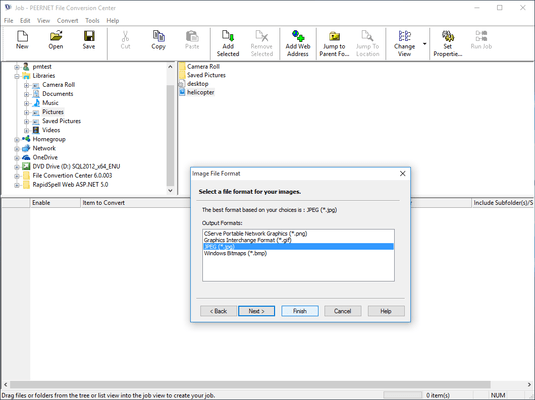
Convert documents and more into quality images or PDF files. PEERNET File Conversion Center is a Microsoft Windows application that enables you to quickly and easily convert documents, spreadsheets, Web pages, PostScript files, and more into images (such as TIFF, JPG, BMP, and GIF) or Adobe PDF files. You can also use File Conversion Center to convert files from one image type to another or print files to one or more printers, all at the same time.
File Conversion Center features are integrated into both your desktop and your Windows Explorer application, enabling you to convert files and folders as easily as you would copy, paste, and delete them. Either right-click on a file or folder in Windows Explorer and select a conversion option from the Convert To menu.
Alternatively, drag and drop the files and folders onto a desktop converter bin (one of the Convert To icons installed on your desktop).
It's that simple.
You can use the File Conversion Center to convert files to various image formats, convert files to Adobe PDF documents, or print files to one or more printers. You can even convert your documents to image or Adobe PDF files and print the documents to your favorite printer(s), all at the same time.
With File Conversion Center you can convert any of the supported input formats to any one of the supported output formats as listed below. As well, any of the supported input formats can be printed directly to any number of printers.
You can use the File Conversion Center to convert any of the following file types . . .
Microsoft Word files (*.doc, *.rtf, *.txt, *.wri, *.log)
Microsoft Excel files (*.xls, *.xlw, *.xlc)
Microsoft PowerPoint files (*.ppt, *.pps)
HTML files (*.htm, *.html, *.shtm, *.shtml)
Adobe PDF files (*.pdf)
PostScript files (*.ps)
Web addresses (http://www.webpage.com)
JPEG image files (*.jpg)
TIFF image files (*.tif)
Windows Bitmap image files (*.bmp)
ZSoft PCX image files (*.pcx)
ZSoft DCX image files (*.dcx)
CServe Portable Network Graphics files (*.png)
Graphics Interchange Format image files (*.gif)
. . . into any of these image file types . . .
Adobe PDF files (*.pdf)
JPEG image files (*.jpg)
TIFF image files (*.tif)
Windows Bitmap image files (*.bmp)
ZSoft PCX image files (*.pcx)
ZSoft DCX image files (*.dcx)
CServe Portable Network Graphics files (*.png)
Graphics Interchange Format image files (*.gif)
Note that PEERNET File Conversion Center requires the appropriate applications be installed on your system in order to handle the selected input format. For example, Microsoft Word 95 or higher is required to convert Word documents, Internet Explorer 4.0 or higher is required to convert HTML files or Web addresses, and Adobe Reader 4.0 or higher is required to convert Adobe PDF documents.
PEERNET File Conversion Center Product Features include the following:
Integrated with your desktop
File Conversion Center features are integrated into both your desktop and your Windows Explorer application, enabling you to convert files and folders as easily as you would copy, paste, and delete them. Either right-click on a file or folder in Windows Explorer and select a conversion option, or drag and drop files and folders onto a desktop converter bin icon. The conversion begins processing in seconds.
Extensive list of supported file types
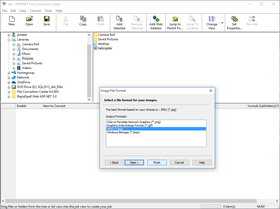
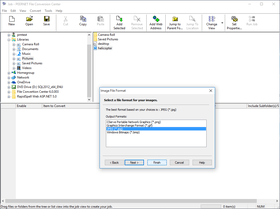
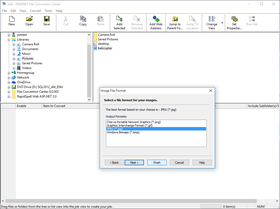
Most popular document and image file formats are supported by the PEERNET File Conversion Center. Convert Microsoft Office documents and spreadsheets, Adobe PDF files, PostScript files, and Web pages into such image file formats as TIFF, JPG, GIF, PNG, and BMP. As well, you can convert from one image file type to another, making File Conversion Center a complete conversion solution.
Optimize your converted image files
Converted image files can be optimized for use in archiving, faxing, displaying on screen, displaying in a Web browser, or customized to best suit your specific requirements.
Convert and print at the same time
You can convert documents into image files and send them to your office printer with the same mouse click, simplifying your workflow process and saving you time.
Powerful batch-processing utility
The File Conversion Center application interface can be used to convert batch jobs of files, folders, and web addresses, both save and load jobs, and perform other advanced tasks. As well, File Conversion Center supports the conversion of files and folders from your system command line.
User-friendly application interface
Step-by-step video tours, online Help, and extensive product documentation guide you through the conversion process, from creating context menu items and converter bins, to selecting your output type, and through more advanced tasks.
What's New PEERNET File Conversion Center 4.0.008
Support added for:
Adobe Acrobat and Reader X (10.0.01)
Internet Explorer 9.0 Release Candidate
GhostScript 9.01
File Conversion Center no longer unresponsive when
using Word Macros
working with HTML files in a Window 7 system with Protected Mode enabled in Internet Exporer 8.0.
Fixed Window 7 compatibility issue with Convert to menu.
Expanded Error Messages in Log File
What's New PEERNET File Conversion Center 4.0.007
Support added for:
Adobe Acrobat and Reader 9.3.3, 9.3.4 and 9.4
GhostScript 9.00
What's New PEERNET File Conversion Center 4.0.006
Support added for:
Office 2010
Adobe Acrobat and Reader 9.3, 9.3.1 and 9.3.2
GhostScript 8.71
What's New PEERNET File Conversion Center in V4.0.005
Support added for:
Windows 7
Windows Server 2008 R2
Windows Server 2008(SP2)
Windows Vista (SP2)
GhostScript 8.64
What's New PEERNET File Conversion Center in V4.0.004
Windows Server 2008 R2 ready.
Windows Internet Explorer 8 ready.
Added support for Adobe Acrobat and Reader 9.0.
Added full support for unicode in file names, log files, result files and visual interface.
Added additional checking to the PDF document conversion process to better indicate reasons for PDF documents failing to convert.
Resolved issue where converting Office 2003 documents to Office 2007 sometimes showed repair dialog.
Resolved issue where the text is shifted up and to the left when an Office 2003 document with revision tracking is printed using Office 2007.
Resolved issue where Convert To Menu was missing on Windows 2003 x64, Windows XP x64 and Vista x64 platforms.
Resolved issue where with file names containing ellipse (...) characters in their name.
Resolved issue where some GIF images were failing conversion to TIFF.
What's New in PEERNET File Conversion Center V4.0
FileConversion Center now handles files dynamically by their file type (based on their extension). As new file types that can be opened and printed by one of the supporting applications are encountered, they are added to the list. This is different from previous versions where File Conversion Center could only convert a subset of file types
Added support for Windows Vista
Added support for Adobe Reader 8 and Adobe Acrobat 8
Added support for GhostScript up to version 8.60
Files added in the advanced batch interface are now processed in the order in which they appear in the list
Fixed problem where very large jobs (10,000 files or more) would take a very long time to initialize before starting to convert
What's New in PEERNET File Conversion Center V3.0
Adobe Reader 7.0, Acrobat 7.0, and Acrobat 7.0 Trial Version now supported
Ghostscript 8.51 now supported
Installation now includes Simplified Chinese, Traditional Chinese, Russian, Dutch, Swedish, and Korean in addition to the already included English, French, German, Italian and Spanish to prevent user from needing their Windows CD
Fixed issue that prevented different users from simultaneously performing conversions through Terminal Service sessions
Enhanced error handling of password protected PDF files, PDF files with no print permission, and Version 7 PDF files opened in earlier versions of Acrobat
Added support for scaling of PDF documents to the closest matching paper size
Added ability to recover from broken communication with Adobe Reader or Acrobat. All errors are reported to the log file for the job
Program no longer changes the default printer when converting Microsoft Word, PowerPoint and Excel documents
Improved performance of image to image conversion by processing trim, crop, copy and color optimization code only when necessary
Added timeout logic to prevent application from hanging while waiting for response from File Conversion Center printer. The timeout occurs after five minutes of inactivity. An error is reported to the log file
Introduced new error message for users with insufficient privileges. In order to perform conversions, users must have Manage Printers access for the File Conversion Center printer. All permission errors are now reported to the log file for the job
Implemented two-minute timeout logic to counter web pages with advertising channels that never complete loading. Because conversion cannot start until page is loaded, we now timeout and report an error to the log file
Improved communication with Internet Explorer to help detect when entire document has spooled and conversion can begin
Fixed advanced user interface issue where first two columns of main grid would randomly change size
Fixed DCX to PDF conversion issue causing pages to be inverted when fax mode was enabled
Fixed command line conversion issue causing application to wait an extra ten seconds before closing
Fixed issue causing Excel files to hang in the middle of processing
Fixed text layout in dialogs on Foreign Language versions of Windows
Fixed text display in log file and job summary views on Foreign Language versions of Windows
Convert documents and more into quality images or PDF files.
Pricing: File Conversion Center 4.0.008 Without On-Going Support 1 User License, File Conversion Center 4.0.008 Without On-Going Support 1 User License, price per User from 2 - 4 Users, File Conversion Center 4.0.008 Without On-Going Support 1 User License, price per User from 5 - 9 Users, File Conversion Center 4.0.008 Without On-Going Support 1 User License, price per User from 10 - 24 Users, File Conversion Center 4.0.008 Without On-Going Support 1 User License, price per User for 25+ Users, File Conversion Center 4.0.008 On-Going Support Included 1 User License, File Conversion Center 4.0.008 On-Going Support Included 1 User License, price per User from 2 - 4 Users, File Conversion Center 4.0.008 On-Going Support Included 1 User License, price per User from 5 - 9 Users, File Conversion Center 4.0.008 On-Going Support Included 1 User License, price per User from 10 - 24 Users, File Conversion Center 4.0.008 On-Going Support Included 1 User License, price per User for 25+ Users
Evals & Downloads: Read the PEERNET File Conversion Center License Agreement, Read the PEERNET File Conversion Center quick start guide - Requires Acrobat Reader, Read the PEERNET File Conversion Center user guide - Requires Acrobat Reader, Download the PEERNET File Conversion Center 4.0.008 evaluation on to your computer - Expires after 30 days
Operating System for Deployment: Windows 7, Windows Server 2008, Windows Vista, Windows XP, Windows Server 2003, Windows 2000
Architecture of Product: 32Bit
Product Type: Application
Built Using: MFC V4.2 / V6.0
Compatible Containers: Microsoft Office 2007, Microsoft Office 2003, Microsoft Office XP, Microsoft Office 2000, Microsoft Internet Explorer 6.0, Microsoft Internet Explorer 5.5, Microsoft Internet Explorer 5.0, Microsoft Internet Explorer 4.0
Product Class: Component Development Tools
Keywords: File Convert conversion docs doc converting pdfs
PEERNET
Conversion Convert converts converting
Image images Compression compress compresses Conversion convert converting converts conversions
Part numbers: PC-515104-365187 515104-365187 PC-515104-365188 515104-365188 PC-515104-365189 515104-365189 PC-515104-365190 515104-365190 PC-515104-365191 515104-365191 PC-515104-365192 515104-365192 PC-515104-365193 515104-365193 PC-515104-365194 515104-365194 PC-515104-365195 515104-365195 PC-515104-365196 515104-365196
Publisher
Primary Category
Related Products
Related Categories