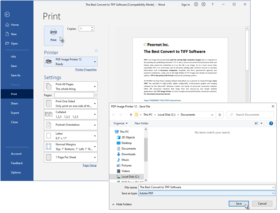
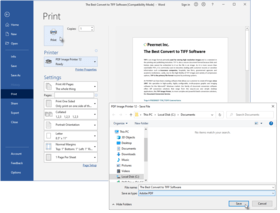
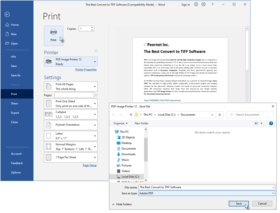
Screenshot Preview

PDF Image Printer - Summary

by PEERNET - Product Type: Driver

Summary

PDF Image Printer by PEERNET

URLs: peernet-pdf-image-printer, peernet pdf image printer, peernetpdfimageprinter, peernet

Convert anything into high-quality PDF Documents. PDF Image Printer allows you to create non-searchable Adobe® Portable Document Format documents. It is as simple as printing to your desktop. An advanced PDF print driver, PDF Image Printer is ideal for creating web-ready files, electronic document distribution, and archiving, providing high-quality Adobe® PDF output, and ensuring that created files are readable by standard PDF viewers (for example, Adobe® Reader). It’s a quick and an easy way to convert documents into a PDF document.

Features:

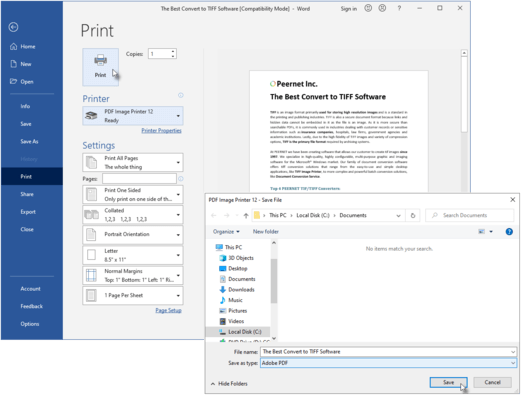
With PDF Image Printer, converting a document into a high-quality PDF document is as easy as 1-2-3 . . .

1) Start your application, and open the document you want to convert

2) Print your document, but instead of your standard printer, select PDF Image Printer printer

3) When prompted, select where you want to save the PDF document, and you're done

You can customize your PDF Image Printer print driver to produce the exact outputted images you require through its many user configurable printing preferences.

Printing preference options for the PDF Image Printer print driver include the following:

Compression options

Select from multiple compression options for color images, indexed images, greyscale images, and monochrome images.

Further customize the file size of your output with extensive color reduction options (reduce to optimal palette, reduce to greyscale palette, reduce to black and white, and none.

Image options

Rotate your output as required (0, 90, 180, and 270 degrees).

Produce your output at a resolution of 1200, 720, 600, 400, 360, 300, 240, 200, 150, 120, 100, 75, 60, or 50 dots per inch.

PDF security options

Enable security for the PDF documents you create, and set an encryption level of either 40-bit or 128-bit.

Set desired permissions for the PDF documents you create, selecting whether users can copy text and graphics, print the document, change the document, and add or change comments and form fields.

Set passwords for the PDF documents you create, and specify whether a password is required to open or change the document.

Email options

Enable email options to automatically attach your output to an email message, ready for sending.

Populate the To, CC, BCC, Subject, and Message fields of the email message with defaulted text.

Run options

Specify commands to be run at the start of the print job, at the end of the print job, at each page, and on file close.

File naming options

Set a default directory and file name for all driver output, or have the driver prompt you for this information when the print job is run.

Using advanced file naming, select or create profiles that set the file naming format you need.

Save options

Select either serialized (each page of the document saved as an individual file) or multi-page (entire document saved as a single, multi-page file) output.

Advanced options

Set a custom paper size for your output, and adjust your printer area margins as required.

Set the left/right and top/bottom hardware margins that best suit your needs.

What's new in PDF Image Printer 9.0.013

Improved performance of printing lots of small documents in a row.

Improved performance of text extraction.

Fixed issue with COM API reporting jobs not completed when no jobs in print queue, introduced by Windows 7 and Windows 2008 SP1.

What's new in PDF Image Printer 9.0.012

New feature added to support rendering pages at resolution of printer when in Fax Mode. This feature is enabled by default. It solves the problem of Excel documents creating more pages when forced to rendered document at Fax resolution (200 dpi) as was default in prior releases

Enhanced support of paper selection based on paper width and height. A few products do not always select paper type (Letter, A4, etc.) but instead only use the width and height of the paper. Product now matches postscript printer driver behaviour for this situation

For PNSrv9 COM users, improved speed of creating printer pool, enhanced clean-up of ports and printers to ensure all registry keys removed

What's New in PDF Image Printer 9.0.011

Support added for:

Windows 7 (SP1)

Internet Explorer 9.0

Adobe Acrobat and Reader X (10.0.xx)

New features and fixes:

New feature added to allow creation of PDF/A-1b standard complaint PDF documents.

New feature added to support saving sent messages in the sent folder when using extended MAPI.

Resolved issue with memory leak in spooler (spoolsv.exe) process.

What's New in PDF Image Printer 9.0.010

Resolves issues in the PNSrv9 COM Interface where the SetTIFFCompressionOptions method did not correctly configure compression to JPEG in TIFF when called with any of the JPEG compression options as follows:

pnColorCompressionMethod.pnColorCompressionJPEG[High|Medium|Low]Quality

pnIndexedCompressionMethod.pnIndexedCompressionJPEG[High|Medium|Low]Quality

pnGreyscaleCompressionMethod.pnGreyscaleCompressionJPEG[High|Medium|Low]Quality

which resulted in only LZW compressed images instead of JPEG compressed images in TIFF files.

What's New in PDF Image Printer 9.0.009

Resolved conversion performance/speed issue found on computers with no internet access.

What's New in PDF Image Printer 9.0.008

Added feature to allow enabling Fax Mode to use a full 256 greyscale palette when dithering to black and white. The default is still to use a 64 greyscale palette to reduce size of fax and eliminate low intensity colors used normally to shape areas.

Added feature to allow setting the Control String prefix and suffix to a single unicode character value. By using this feature, products like Crystal Reports 11 and Adobe Reader can be configured so the product recognizes control strings. The default prefix of '~0%' and suffix '?' are used if this feature is not in affect.

What's New in PDF Image Printer 9.0.007

Resolved a multi-thread issue causing trial watermark to appear randomly on output when printer used in highly threaded application on computers with more then 4 CPUs.

What's New in PDF Image Printer 9.0.006

Resolved another issue with paper sizes off by 1 pixel when user paper size specified instead of form name.

What's New in PDF Image Printer 9.0.005

Resolved issues in Fax Mode with paper sizes off by 1 pixel.

Added support to detect pre-rotated forms like 'A4 Rotated', so operation like rotated landscape pages will be applied correctly to these paper sizes.

Enhanced watermark brightness to allow full range from -100 to 100 for improved control.

Resolved issues with PrintRange, SkipPage, and watermark control strings.

Resolved issue with $copies variable not reporting correct number of copies selected during print operation.

What's New in PDF Image Printer 9.0.004

Fixed spooled page count for PNSrv9 COM users on Windows 2008 systems.

What's New in PDF Image Printer 9.0.003

Fixed auto selecting of paper size in fax mode to when paper is printed landscape.

What's New in PDF Image Printer 9.0.002

Added new feature to support auto selecting of paper size in fax mode based on first page of document.

What's New in PDF Image Printer 9.0.001

PDF Image Printer 9.0 has been upgraded and enhanced to unify the driver with PEERNET's family of image printer drivers, TIFF Image Printer and Raster Image Printer. All drivers now share the same user interface, options and most features as applicable.

Technical Enhancements Include:

Improved the performance of the printer driver to take advantage of parallel processing capabilities on multi-core machines.

Custom paper size improved, major improvement for those working with large paper or rotated paper sizes such as AutoCad users.

Added the ability to create faxable images:

Supports creating Profile F and Profile S monochrome fax images, and Profile C color fax images.

Fax images can be created in Letter, Legal, A4(ISO), A3(ISO) and B4(ISO) paper sizes.

Customize fax image scaling and its alignment on the fax-sized page.

Supports the following fax resolutions: 100 x 100, 200 x 100, 200 x 200, 204 x 98, 204 x 196, 300 x 300, 400 x 400, 408 x 391, 204 x 391, 300 x 600, 400 x 800, 600 x 600, 600 x 1200, 1200 x 1200.

A reduced fax mode palette is used when creating Profile F and Profile S fax images.

New Color Reduction options have been added to give greater control over the output files:

Reduce to 256 color palette will reduce each page to a maximum of 256 colors.

Reduce to 16 color palette will reduce each page to a maximum of 16 colors.

Reduce to optimal palette, 256 colors max will reduce each page to its minimum number of colors with a maximum of 256 colors.

Reduce to optimal palette, 16 colors max will reduce each page to its minimum number of colors with a maximum of 16 colors.

Output file type, color reduction and dithering methods are now all controlled on the Save tab to make it easier to select the output file type.

Fixes Include:

Error 1798 during installation; updated the install file.

Arabic and Tibetan script produced error when used in the filename field.

Watermark feature now available in PDF Image Printer 9.0.

Fixed problem of Custom Paper Right margin not working correctly.

Error log now created when Error Log field is left blank.

What's New in PDF Image Printer 8.0.004

Rollout of additional license/pricing models to meet the wide range of needs of customers. Note all editions include the Developer APIs (COM, Script, ...) at no additional cost.

End User Edition (per User License)

Unlimited End User Edition (per User License)

Service License (per Server License)

What's New in PDF Image Printer 8.0.002

Now includes PNSrv8 COM Interface

The PNSrv8 COM Interface was designed to make it easier for you, the developer, to programmatically control the PDF Image Printer through your .NET applications by providing the ability to control and communicate with the PDF Image Printer 8.0 during the printing and file creation process. It replaces and greatly enhances the older script file methodology used in the previous versions of the printer.

Added the ability to do page and image processing:

Automatically trim page margins based on a customizable intensity level

Crop and discard image margins or crop and keep an inside area of the image

Adjust the image brightness level

Copy all or part of the image to a new page of the same or different size, and choose scaling and alignment of the new image.

New image resampling features allow you to scale the output image to a particular width and height. The new dimensions can be set using:

Pixels

as a percentage of the original size

or by setting a new image resolution (DPI).

All printing is processed synchronously with the print job in the print spooler. The print job is held in the print queue until the PDF file is created and is ready for further processing. This is different from the previous versions of the driver and should simplify the automation process for application developers who are watching the printer queue to determine when the PDF file is created.

Control Strings can now be enabled or disabled. Control Strings are disabled when PDF Image Printer 8.0 is installed

Improved the text extraction algorithm and added new features:

Added text layout options to better preserve the formatting of the text in the original document

Text extraction files encoded as ANSII, UTF-8 or UTF-16

Emulate Windows, Unix or Mac end-of-line encoding

Emit page breaks in the text file

Units for custom paper size, image processing and page processing are now entered as inches (English units) or centimeters (Metric units).

What's New in V7.0.014

Minor release to support faster computers.

What's New in V7.0.013

With this release, the PDF Image Printer 7.0 processing model is now identical to the PEERNET.DRV ePDF 6.0 printing model. The default installation is back to spool document and start printing immediately.

What's New in V7.0

Support for Windows XP Professional x64 Edition and Windows 2003 x64 Edition that supports both AMD64 and Intel Extended Memory 64 Technology (EM64T) - This product does not support Itanium-based Systems (IA64)

All processing of strings and file names are now fully UNICODE compliant throughout the architecture. This resolves several issues on Chinese and Japanese Windows as well as other version of Windows using UNICODE languages

The print process has been architected to support printing without the possibility of the print queue locking up or users blocking each other when printing at the same time from within a terminal server client session

Added a Copy Printer program that supports creating copies of the PDF Image Printer 7.0 and makes it a breeze to create copies of the printer with different default settings

Convert anything into high-quality PDF Documents.

Pricing: PDF Image Printer 9.0.013 End User Edition - Without On-Going Support 1 User License, PDF Image Printer 9.0.013 End User Edition - Without On-Going Support 1 User License, price per User from 2 - 4 Users, PDF Image Printer 9.0.013 End User Edition - Without On-Going Support 1 User License, price per User from 5 - 9 Users, PDF Image Printer 9.0.013 End User Edition - Without On-Going Support 1 User License, price per User from 10 - 24 Users, PDF Image Printer 9.0.013 End User Edition - Without On-Going Support 1 User License, price per User from 25 or more Users, PDF Image Printer 9.0.013 End User Edition - On-Going Support Included 1 User License, PDF Image Printer 9.0.013 End User Edition - On-Going Support Included 1 User License, price per User from 2 - 4 Users, PDF Image Printer 9.0.013 End User Edition - On-Going Support Included 1 User License, price per User from 5 - 9 Users, PDF Image Printer 9.0.013 End User Edition - On-Going Support Included 1 User License, price per User from 10 - 24 Users, PDF Image Printer 9.0.013 End User Edition - On-Going Support Included 1 User License, price per User from 25 or more Users

Evals & Downloads: Read the PDF Image Printer Quick Start Guide, Read the PDF Image Printer User Guide, Read the PDF Image Printer License Agreement, Download the PDF Image Printer 9.0.013 evaluation on to your computer - Expires after 30 days

Operating System for Deployment: Windows 7, Windows Server 2008, Windows Vista, Windows XP, Windows Server 2003, Windows 2000

Architecture of Product: 32Bit, 64Bit

Product Type: Driver

Built Using: MFC V4.2 / V6.0

Compatible Containers: Microsoft Visual Studio .NET 2003, Microsoft Visual Studio .NET, Microsoft Visual Studio 6.0, Microsoft Visual Studio 97, Microsoft Visual Basic .NET 2003, Microsoft Visual Basic .NET, Microsoft Visual Basic 6.0, Microsoft Visual Basic 5.0, Microsoft Visual Basic 4.0, Microsoft Visual Basic 3.0, Microsoft Visual C++ .NET 2003, Microsoft Visual C++ .NET, Microsoft Visual C++ 6.0, Microsoft Visual C++ 5.0, Microsoft Visual C++ 4.0, Microsoft Visual C# .NET 2003, Microsoft Visual C# .NET, Microsoft Visual J++ 6.0, Microsoft Visual J++ 1.1, Microsoft Visual InterDev 6.0, Microsoft Visual InterDev 1.0, Microsoft Visual FoxPro 6.0, Microsoft Visual FoxPro 5.0, Microsoft ActiveX Control Pad, Microsoft Office 2003, Microsoft Office XP, Microsoft Office 2000, Microsoft Office 97, Microsoft Access 2003, Microsoft Access 2002, Microsoft Access 2000, Microsoft Access 97, Microsoft Access 95, Microsoft Access 2.0, Microsoft SQL Server 2000, Microsoft SQL Server 7.0, Microsoft SQL Server 6.5, Microsoft Outlook 2002, Microsoft Outlook 2000, Microsoft Outlook, Microsoft Repository, Microsoft Exchange Server 5.5, Microsoft Exchange Server 5.0, Microsoft Site Server

Keywords: pdf conversion driver print convert

PEERNET

pdf

Conversion Convert converts converting

Part numbers: PC-514407-395092 514407-395092 PC-514407-395093 514407-395093 PC-514407-395094 514407-395094 PC-514407-395095 514407-395095 PC-514407-395096 514407-395096 PC-514407-395097 514407-395097 PC-514407-395098 514407-395098 PC-514407-395099 514407-395099 PC-514407-395100 514407-395100 PC-514407-395101 514407-395101

Product Search

Enter search words:

Quick Links

Publisher

Primary Category

Related Products

Related Categories