by PEERNET - Product Type: Driver
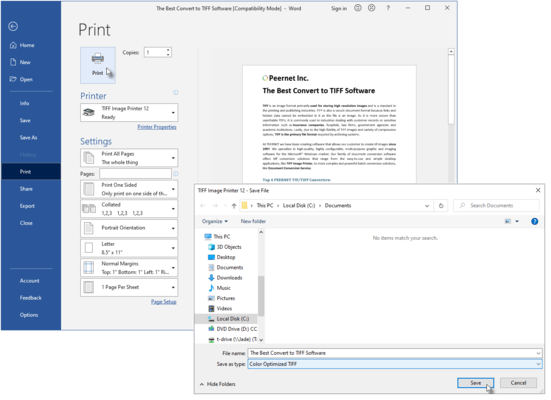
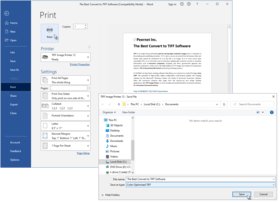
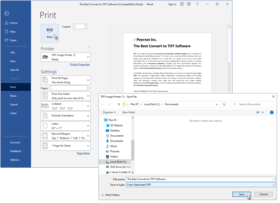
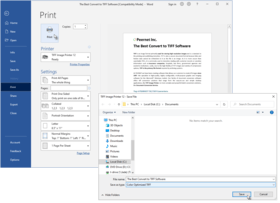
Convert anything into a high-quality TIFF image. With TIFF Image Printer, if you can print it, you can distribute or archive it electronically as a high-quality TIFF image file; word processing documents, graphic application files, accounting spreadsheets, legal files, and more. TIFF Image Printer provides high quality TIFF output while ensuring that created files are readable by standard image viewers. Creating a TIFF image file using TIFF Image Printer is as simple as printing to your desktop printer.
Our regular prices are shown below. Please logon to see your discounted prices.
| Add to Cart | $ 127.35 | 1 User License | Download (10.0 MB) | |
| Add to Cart | $ 120.98 | 1 User License, price per User from 2 - 4 Users | Download (10.0 MB) | |
| Add to Cart | $ 101.88 | 1 User License, price per User from 5 - 9 Users | Download (10.0 MB) | |
| Add to Cart | $ 89.15 | 1 User License, price per User from 10 - 24 Users | Download (10.0 MB) | |
| Add to Cart | $ 76.41 | 1 User License, price per User from 25 or more Users | Download (10.0 MB) |
| Add to Cart | $ 171.92 | 1 User License | Download (10.0 MB) | |
| Add to Cart | $ 163.33 | 1 User License, price per User from 2 - 4 Users | Download (10.0 MB) | |
| Add to Cart | $ 137.54 | 1 User License, price per User from 5 - 9 Users | Download (10.0 MB) | |
| Add to Cart | $ 115.89 | 1 User License, price per User from 10 - 24 Users | Download (10.0 MB) | |
| Add to Cart | $ 99.33 | 1 User License, price per User from 25 or more Users | Download (10.0 MB) |
Our prices include ComponentSource technical support and, for most downloadable products, an online backup and a FREE upgrade to the new version if it is released within 30 days of your purchase. All sales are made on our standard Terms and Conditions and subject to our Return Policy. Please contact us if you require any licensing option not listed, including volume licensing and previous versions.
Our regular prices are shown above. Please logon to see your discounted prices.
What's new in TIFF Image Printer 9.0.013
What's new in TIFF Image Printer 9.0.012
What's New in TIFF Image Printer 9.0.011
Support added for:
New features and fixes:
What's New in TIFF Image Printer 9.0.010
pnColorCompressionMethod.pnColorCompressionJPEG[High|Medium|Low]Quality
pnIndexedCompressionMethod.pnIndexedCompressionJPEG[High|Medium|Low]Quality
pnGreyscaleCompressionMethod.pnGreyscaleCompressionJPEG[High|Medium|Low]Quality
which resulted in only LZW compressed images instead of JPEG compressed images in TIFF files.
What's New in TIFF Image Printer 9.0.009
What's New in TIFF Image Printer 9.0.008
were not being recognized.
What's New in TIFF Image Printer 9.0.007
What's New in TIFF Image Printer 9.0.006
What's New in TIFF Image Printer 9.0.005
What's New in TIFF Image Printer 9.0.004
Fixed spooled page count for PNSrv9 COM users on Windows 2008 systems.
What's New in TIFF Image Printer 9.0.003
Fixed auto selecting of paper size in fax mode to when paper is printed landscape.
What's New in TIFF Image Printer 9.0.002
Added new feature to support auto selecting of paper size in fax mode based on first page of document.
What's New in TIFF Image Printer 9.0.001
TIFF Image Printer 9.0 has been upgraded and enhanced to unify the driver with PEERNET's family of image printer drivers, PDF Image Printer and Raster Image Printer. All drivers now share the same user interface, options and most features as applicable.
Technical Enhancements Include:
Improved the performance of the printer driver to take advantage of parallel processing capabilities on multi-core machines.
Custom paper size improved, major improvement for those working with large paper or rotated paper sizes such as AutoCad users.
New Color Reduction options have been added to give greater control over the output files:
Output file type, color reduction and dithering methods are now all controlled on the Save tab to make it easier to select the output file type.
Fixes Include:
What's New in TIFF Image Printer 8.0.018
Rollout of additional license/pricing models to meet the wide range of needs of customers. Note all editions include the Developer APIs (COM, Script, ...) at no additional cost.
What's New in TIFF Image Printer 8.0.015
What's New in TIFF Image Printer 8.0.014
Support added for:
Fixed and updated:
What's New in TIFF Image Printer 8.0.005?
What's New in TIFF Image Printer 8.0.004
Added or Fixed:
What's New in TIFF Image Printer V8.0.003 ?
Release of the PNSrv8 COM Interface
The PNSrv8 COM Interface was designed to make it easier for you, the developer, to programmatically control the TIFF Image Printer through your .NET applications by providing the ability to control and communicate with the TIFF Image Printer 8.0 during the printing and file creation process. It replaces and greatly enhances the older script file methodology used in the previous versions of the printer.
The COM object provides the following control:
Added and fixed:
Following Text Extraction items have been corrected:
What's New in TIFF Image Printer V8.0?
TIFF Image Printer 8.0 was developed for and supports Microsoft Windows 2008, Windows Vista (up to SP1), Windows 2003 (up to SP2), Windows XP (up to SP3) and Windows 2000 (up to SP4)Rollup#1.
TIFF Image Printer 8.0 can be licensed on Microsoft Windows 2008, Windows Vista, Windows 2003, Windows XP and Windows 2000.
Platform updates in TIFF Image Printer 8.0
Updated and enhanced fax support:
Added the ability to do page and image processing:
New image resampling features allow you to scale the output image to a particular width and height. The new dimensions can be set using:
Pixels
All printing is processed synchronously with the print job in the print spooler. The print job is held in the print queue until the TIFF file is created and is ready for further processing. This is different from the previous versions of the driver and should simplify the automation process for application developers who are watching the printer queue to determine when the TIFF file is created.
Improved the text extraction algorithm and added new features:
A reduced fax mode palette is now used when creating Profile S and Profile F fax format TIFF images.
Units for custom paper size, image processing and page processing are now entered as inches (English units) or centimeters (Metric units).
Fixed the following issues:
What's New in TIFF Image Printer V7.0?
Features:
With eTIFF, converting a document into a high-quality TIFF image file is as easy as 1-2-3 . . .
For users requiring custom TIFF images that meet a specific business requirement you can set the printing preferences for your TIFF Image Printer to produce the exact outputted images you require.
Printing preference options for TIFF Image Printer include the following:
Compression options
Select from multiple compression options for color images, indexed images, greyscale images, and monochrome images.
Further customize the file size of your outputted images with extensive color reduction options (reduce to optimal palette, reduce to greyscale palette, reduce to black and white, and none.
Image options
Rotate your output images as required (0, 90, 180, and 270 degrees).
Produce your images at a resolution of 1200, 720, 600, 400, 360, 300, 240, 200, 150, 120, 100, 75, 60, or 50 dots per inch.
Watermark options
Select a saved graphic file for use as a watermark on either the first page or all pages of your outputted images.
Stretch, tile, or center the watermark.
Set a different watermark for portrait and landscape pages.
Email options
Enable email options to automatically attach your outputted images to an email message, ready for sending.
Populate the To, CC, BCC, Subject, and Message fields of the email message with defaulted text.
Fax image options
Produce fax-ready images using either Profile F or Profile S.
Select the fax resolution that best suits your requirements (408 x 391, 400 x 400, 300 x 300, 204 x 196, 204 x 98, 200 x 200, or 200 x 100 dots per inch).
File naming options
Set a default directory and file name for all driver output, or have the driver prompt you for this information when the print job is run.
Using advanced file naming, select or create profiles that set the file naming format you need.
Save options
Select either serialized (each page of the document saved as an individual image) or multi-page (entire document saved as a single, multi-page image) output.
Append outputted images to an existing file.
Run options
Specify commands to be run at the start of the print job, at the end of the print job, at each page, and on file close.
Publisher
Primary Category
Related Products
Related Categories