by Dart Communications - Product Type: Component / ASP.NET WebForms
PowerWEB File Upload for ASP.NET by Dart Communications
URLs: powerweb-file-upload-asp-net, powerweb file upload asp net, powerwebfileuploadaspnet, dart
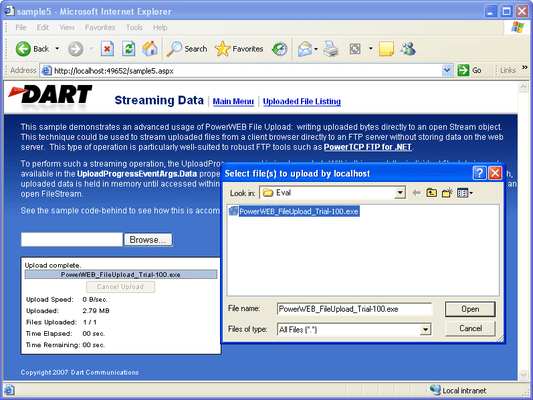
Add file upload functionality to your ASP.NET application, including real-time progress reporting and server-side streaming. PowerWEB File Upload for ASP.NET uses Ajax techniques to transfer files from browser to web server while minimizing the server memory footprint. It allows you to stream files to disk, memory, or any Stream interface for advanced applications such as a direct file upload to an FTP server. Additionally, the look and feel of File Upload controls can be customized with custom fonts and images to seamlessly blend into your website design.
PowerWEB File Upload includes:
4 Web server controls
Full MS Help 2.0 Documentation, including extensive examples
UploadManager - Used to configure page-level upload behaviour, including upload destination and streaming behaviour
Upload - The interactive upload control which allows end-users to select files and initiate a file transfer
OpenFileDialog - A control which can be attached to browser elements, to provide custom open file dialog and upload behaviour
ProgressPanel - A fully customizable panel which displays file upload statistics and progress bar for each file included in an upload operation
Compared to the native ASP.NET HtmlInputFile control, the PowerWEB File Upload control:
Can upload multiple files
Is a visual control that can be styled
Uses Ajax to upload files, eliminating the full-page refresh
Streams files to memory, disk, or any other streaming interface (to eliminate large memory allocations on the server)
Allows the user to cancel the upload at any time
PowerWEB File Upload also includes advanced web controls that enhance your users' experience:
True drag/drop/run operation is provided, automatically modifying the web.config file in the design-time environment
The OpenFile control allows the user to select multiple files within a single dialog box
The ProgressPanel control can be styled and customized for any application
What's new in PowerWEB File Upload for ASP.NET V4.0?
New FileSelected event. It is raised after files are selected in the browse dialog when AutoPostback is false. Provides selected filenames server-side.
New Timeout property that can be set to ensure the control will not wait infinitely for data from the browser.
New UploadFailed event that is raised when the entire upload operation has failed.
New ProgressBarLocation property on the ProgressPanel, for customizing the positioning of the progress bar relative to the status labels.
Selected files that exceed the specified MaxFileSize now fail immediately, instead of uploading until the limit is reached, in most cases.
New sample integrating File Upload with the PowerTCP SFTP component is now included.
What's new in PowerWEB File Upload for ASP.NET V1.3.3?
Added VS.NET 2010 versions of the samples and 2010 Integrated Help.
What's new in PowerWEB File Upload for ASP.NET V1.3.2?
Product fixes in this release:
CPU usage on the Visual Studio Test Server no longer maxes out and remains maxed out when uploads are cancelled.
Standard Posts no longer cause a null ref exception in apps hosted on IIS7.
Add file upload functionality to your ASP.NET application, including real-time progress reporting and server-side streaming.
Pricing: PowerWEB File Upload for ASP.NET V4.0 1 Developer License - includes 30 Days Standard Support does not include Updates/Upgrades, PowerWEB File Upload for ASP.NET V4.0 4 Developer License - includes 30 Days Standard Support does not include Updates/Upgrades, PowerWEB File Upload for ASP.NET V4.0 8 Developer License - includes 30 Days Standard Support does not include Updates/Upgrades, PowerWEB File Upload for ASP.NET V4.0 - with Subscription 1 Developer License - includes One Year Standard Support and Updates/Upgrades, PowerWEB File Upload for ASP.NET V4.0 - with Subscription 4 Developer License - includes One Year Standard Support and Updates/Upgrades, PowerWEB File Upload for ASP.NET V4.0 - with Subscription 8 Developer License - includes One Year Standard Support and Updates/Upgrades, PowerWEB File Upload for ASP.NET Subscription Renewals 1 Developer Subscription Renewal - Pre Expiry - includes One Year Standard Support and Updates/Upgrades, PowerWEB File Upload for ASP.NET Subscription Renewals 4 Developer Subscription Renewal - Pre Expiry - includes One Year Standard Support and Updates/Upgrades, PowerWEB File Upload for ASP.NET Subscription Renewals 8 Developer Subscription Renewal - Pre Expiry - includes One Year Standard Support and Updates/Upgrades, PowerWEB File Upload for ASP.NET Source Code Source Code - delivered separately (requires a Developer License)
Evals & Downloads: Read the PowerWEB FileUpload for ASP.NET help file, Read the PowerWEB FileUpload for ASP.NET License Agreement, Download the PowerWEB File Upload for ASP.NET V4.0 evaluation on to your computer - Expires After 7 Days
Operating System for Deployment: Windows 7, Windows Vista, Windows XP
Architecture of Product: 32Bit, 64Bit
Product Type: Component
Component Type: ASP.NET WebForms
Compatible Containers: Microsoft Visual Studio 2010, Microsoft Visual Studio 2008, Microsoft Visual Studio 2005, Microsoft Visual Studio .NET 2003, Microsoft Visual Basic 2010, Microsoft Visual Basic 2008, Microsoft Visual Basic 2005, Microsoft Visual Basic .NET 2003, Microsoft Visual C++ 2010, Microsoft Visual C++ 2008, Microsoft Visual C++ 2005, Microsoft Visual C++ .NET 2003, Microsoft Visual C# 2010, Microsoft Visual C# 2008, Microsoft Visual C# 2005, Microsoft Visual C# .NET 2003, .NET Framework 4.0, .NET Framework 3.5, .NET Framework 3.0, .NET Framework 2.0, .NET Framework 1.1
Keywords: power web fileupload
Dart Communications
upload uploading uploaded download downloading downloaded transfer transferring transferred
Part numbers: PC-517871-422507 517871-422507 PC-517871-422518 517871-422518 PC-517871-422520 517871-422520 PC-517871-422510 517871-422510 PC-517871-422522 517871-422522 PC-517871-422524 517871-422524 PC-517871-422513 517871-422513 PC-517871-422526 517871-422526 PC-517871-422528 517871-422528 PC-517871-422516 517871-422516
Mfr. Part No: P-4310-LIC P-4310-SOURCE P-4310-SUB P-4310-SUB-RENEW
Publisher
Primary Category
Related Products