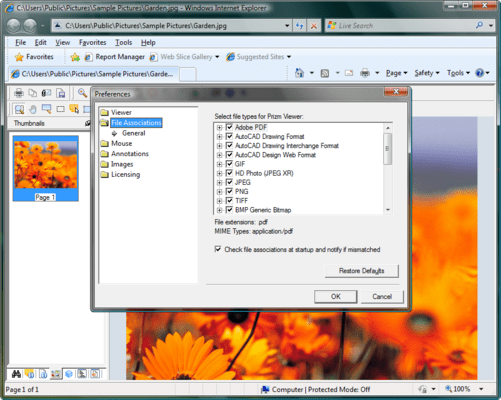
Screenshot Preview

Prizm Viewer

by Accusoft (formerly Pegasus Imaging Corp.) - Product Type: Add-In

Browser based image viewer. Prizm Viewer adds powerful document viewing to your Web browser. Display, annotate, e-mail, print, and export single and multi-page TIFF, PDF, CAD, JPEG, and many other files, all from within a single user interface. Prizm Viewer users have access to all product features after a simple installation. Administrative tools expose Prizm Viewer's extensive flexibility and full benefites, enabling the creation of Enterprise Solutions for document delivery and collaboration.

From
$93.10

Our regular prices are shown below. Please logon to see your discounted prices.

Price in

Prizm Viewer v9 Client License (Includes 90 days of E-mail support)

Add to Cart $ 93.10 1 User Client License, per user from 1 to 4 users Download (27.1 MB)
Add to Cart $ 85.26 1 User Client License, per user from 5 to 9 users (minimum quantity 5) Download (27.1 MB)
Add to Cart $ 78.40 1 Client Runtime License, price per client (10 to 24) (minimum quantity 10) Download (27.1 MB)
Add to Cart $ 72.52 1 Client Runtime License, price per client (25 to 49) (minimum quantity 25) Download (27.1 MB)

Prizm Viewer v9 with PDF Client License (Includes 90 days of E-mail support)

Add to Cart $ 132.30 1 User Client License, per user from 1 to 4 users Download (74.9 MB)
Add to Cart $ 121.52 1 User Client License, per user from 5 to 9 users (minimum quantity 5) Download (74.9 MB)
Add to Cart $ 111.72 1 Client Runtime License, price per client (10 to 24) (minimum quantity 10) Download (74.9 MB)
Add to Cart $ 102.90 1 Client Runtime License, price per client (25 to 49) (minimum quantity 25) Download (74.9 MB)

Prizm Viewer v9 Server License (Includes 90 days of E-mail support)
Server Licenses are licensed per core, annually. Minimum 2 core per server.

Add to Cart $ 2,053.10 1 Server (CPU) Deployment License (Minimum quantity 2 per server) Download (27.1 MB)

Prizm Viewer v9 Server License with PDF (Includes 90 days of E-mail support)
Server Licenses are licensed per core, annually. Minimum 2 core per server.

Add to Cart $ 2,543.10 1 Server with PDF (CPU) Deployment License (Minimum quantity 2 per server) Download (74.9 MB)

Prizm Viewer v9 Annotation Server CPU (up to 4 cores) License (Includes 90 days of E-mail support)

Add to Cart $ 975.10 1 Server (CPU) Deployment License (Minimum quantity 2 per server) Download (74.9 MB)

Prizm Viewer Galleon Support

Add to Cart $ 18.62 1 Client Galleon Support License Download (29 KB)
Add to Cart $ 26.46 1 Client with PDF Galleon Support Download (29 KB)
Add to Cart $ 410.62 1 Server Galleon Support License Download (29 KB)
Add to Cart $ 508.62 1 Server with PDF Galleon Support License Download (29 KB)
Add to Cart $ 195.02 1 Annotation Server Galleon Support License Download (29 KB)

Our prices include ComponentSource technical support and, for most downloadable products, an online backup and a FREE upgrade to the new version if it is released within 30 days of your purchase.  All sales are made on our standard Terms and Conditions and subject to our Return Policy. Please contact us if you require any licensing option not listed, including volume licensing and previous versions.

Our regular prices are shown above. Please logon to see your discounted prices.

What's new in Prizm Viewer v9:

  • Expansion of Poster Printing capabilities - Enables additional control over printing large engineering drawings on printers that only support smaller paper sizes
  • Enhanced support for 2-up and 4-up document printing - Allows printing of multiple image pages on a single piece of paper
  • Support for Windows 7

Prizm Viewer v8 adds document viewing to Internet Explorer and Firefox browsers.

  • Automatically open TIFF, PDF, CAD, JPEG 2000, and many other image types with one viewer
  • Rapidly view any area of large images
  • Create annotations and store on your computer, or a Web server (using Prizm Annotation Server)
  • Print, export, and e-mail your images
  • Customize your toolbars, menus, and viewing options
  • Use keyboard, mouse, and thumbnail navigation
  • PDF edition supports bookmarks and text search
  • Smaller PDF file size with bitonal image export

Prizm Viewer displays images your browser can’t.
Comprehensive viewing features go beyond common display tools (zoom, rotate, pan), to add thumbnail navigation, poster printing, image export, and many others. With Prizm Viewer you can attach comments (annotations) to any file without changing the original. Extensive configuration options let you customize your toolbars, menus, initial display settings, etc.

Supported Image File Formats
View single and multi-page TIFF and PDF (with PDF edition), PDF/A, JPEG, GIF, CAD, HD Photo, CALS, PCX / DCX, JPEG 2000, IBM AFP, WSQ and others. Easily configure which types you open with Prizm Viewer.

Annotations

  • Popular annotations include Text, Note, Highlight, Lines, Arrows, Rubber Stamps, Polygons, Ellipses, and others
  • A descriptive note can be included within each annotation, displayed when the mouse is placed over it
  • Annotations can be saved on your PC, or on the Web using the optional Prizm Annotation Server for document collaboration
  • Annotations can be exported inside TIFF or PDF files, burned into images, or saved separately

Virtual Multi-page Documents
Web sites can share "virtual documents" made from collections of individual images. These Image List Files can include different file types, yet are viewed just like multi-page images.

  • Quickly view a group of related documents like one multi-page file
  • Batch print collections of documents without having to view each document
  • "Save as" a local file – Export Image List Files as multi-page TIFF or PDF files, even when they contain other image types

Advanced Viewing Tools

  • Flying Magnifier lets you zoom a particular area of the image
  • Reference Window provides a “birds eye view” and can be dragged to position the image

Advanced Navigation Tools
Use your mouse, keyboard, menus and controls to quickly move between images

  • Thumbnail navigation – Use your mousewheel, or click on the thumbnail to jump to a page.
  • The Table of Contents window can be used to quickly navigate through Image List Files and PDFs (PDF edition)
  • Search for text anywhere in a searchable PDF file and click to view that page (PDF edition)

New for Prizm Viewer v8 Users

Additional File Formats
Several additional file formats are now supported including vector-based CAD (DWG, DXF and DWF), optional PDF up to version 1.7, JPEG 2000, AFP (including MO:DCA, PTOCA and ABIC), JBIG2, HD Photo (JPEG XR), Camera Raw and WSQ. Users and administrators may select file types to associate with Prizm Viewer, while System Administrators can designate custom MIME types and file extensions using the new Configuration Application. Prizm Viewer continues to support TIFF, JPEG, PDF, GIF, PNG and many other industry-standard formats.

Updated User Interface
The user interface has been completely updated, providing new toolbars, graphics, and adding docking windows. Users may customize their toolbars to show the tools they most often use, and arrange the toolbars and docking windows in the manner that makes them most effective in their work.

Support for Windows Vista, Server 2003 and 2008
Prizm Viewer v8 adds support for Windows Vista, Server 2003 and Server 2008 with Internet Explorer 6/7/8 and Firefox 1.5/2/3 browsers. Support continues for Windows 2000 and XP.

Thumbnail Image Views & Navigation
A new thumbnail image view is provided, displaying scrollable thumbnail images of all pages in a multi-page TIFF, PDF or all pages in an Image List File. Users may navigate to any individual page by simply clicking on the representative thumbnail.

Improved Viewing Options & Technology
Improved display features include new anti-aliasing, smoothing and brightness/contrast adjustment capability, plus users will experience Accusoft Pegasus' patented enhanced JPEG decoding algorithms. Prizm Viewer now utilizes Accusoft Pegasus's ImagXpress engine for image display, annotate and print.

PDF Text Search
The PDF edition now allows users to search for text strings within searchable PDF files. Users can easily click and navigate to the pages containing the search terms. Individual search hits are highlighted in the page for easy location.

Table of Contents Display & Navigation
Image List Files can now include a hierarchical Table of Contents for each page referenced in an Image List, allowing users to easily navigate to entries they select. Users can also navigate to their selected pages for PDFs or List Files that include TOCs.

Keyboard & Mouse Wheel Navigation
Support for keyboard and mouse control has been added, allowing users to navigate using Home, End, and Page Up and Down, or alternatively to use the mouse wheel to scroll through pages. Users can also use Ctrl-mouse wheel to zoom in and out. Keyboard support includes support for cutting, copying, and pasting annotations using the keyboard.

Configurable Viewing Settings for Image, PDF & CAD
Users may select their default display preferences for each of four main document types (bitonal image, color image, PDF and CAD) allowing them to define the best viewing options for their individual needs.

Updated Export & Email Features
The Export feature has been modified to improve usability and to reduce PDF file sizes with bitonal image exports. Viewed documents may be exported as TIFF or PDF files, or in their native format, and easily saved to local or network locations, or attached to emails. Users can easily launch common email clients, automatically attaching their currently viewed document.

Retain Page View While Paging
Users may opt to retain current page display settings while paging. The current zoom factor, image position and rotation settings can be automatically applied to each page in a multi-page file or Image List File. Alternatively, Prizm Viewer can be instructed to remember each page's last view as you page forward and backward, making it easy to return to previous views.

Poster Printing
Prizm Viewer now offers a "Poster" printing option. Poster printing allows oversize images such as large engineering drawings to be printed at full resolution across multiple sheets of paper. User settings are provided to define image overlap, orientation, and print order to make it easy to combine individual paper sheets into a single drawing layout. This feature is especially useful when paper engineering drawings are required but large format plotters or printers are not available.

New Annotation Types
New annotation types have been added for additional user options. New annotations include freehand pencil for creating any annotation shape plus polygon and polyline.


Product Search

Enter search words:

Award