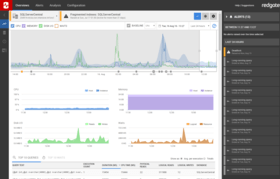
Screenshot Preview

SQL Toolbelt - Summary

by Red Gate Software - Product Type: Application

Summary

SQL Toolbelt by Red Gate Software

URLs: red-gate-sql-toolbelt, red gate sql toolbelt, redgatesqltoolbelt, red-gate, red gate, redgate

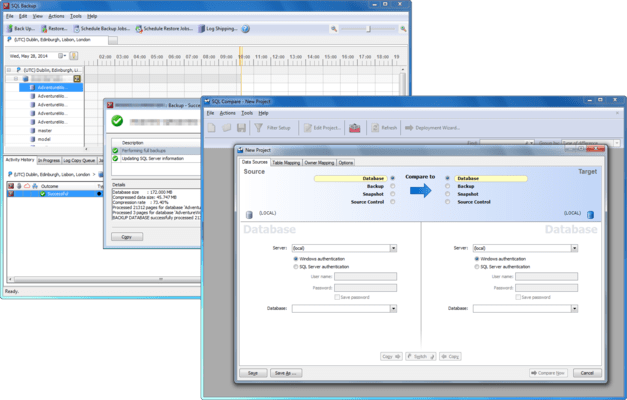
A collection of tools to compare, synchronize, backup, analyze and more for SQL Server. SQL Toolbelt allows developers and DBAs to gain access to all the SQL Server tools that Red Gate currently produces, including new releases. This means that when you are working with SQL Server databases, you can have a powerful set of tools right there to hand, when you need them. Includes SQL Compare, SQL Data Compare Pro, SQL Packager Pro, SQL Prompt Pro, SQL Data Generator, SQL Dependency Tracker, SQL Refactor, SQL Doc, SQL Backup Pro, SQL Multi Script SQL Comparison SDK and SQL Monitor (formerly SQL Response).

Whether you are a DBA (Database Administrator) or a developer, you benefit from using tools that help you work better. The SQL Toolbelt is one of the simplest and most effective ways for you to access all the SQL Server tools that you need, to get your job done, the way you want to do it, and fast.

SQL Toolbelt Features:

All 13 Red Gate SQL Server tools in a single installer

Relentlessly tested for accuracy, reliability and ease of use

Save over 70% compared with buying the tools separately

Products included in the SQL Toolbelt:

SQL Compare Pro: compare and synchronize schemas

SQL Data Compare Pro: compare and synchronize data

SQL Packager: package, upgrade, and install databases

SQL Prompt Pro: seamless IntelliSense-style code completion and layout

SQL Data Generator: automatically populate databases with realistic test data

SQL Dependency Tracker: graphical impact analysis

SQL Refactor: a host of smart refactorings on the fly

SQL Doc: multiple database documentation

SQL Backup Pro**: compress, securely encrypt and strengthen backups - fast

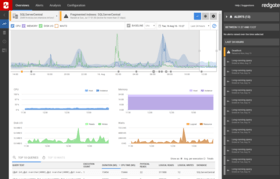
SQL Monitor**: monitors MS SQL Server health and activity, with alerts and diagnostic data

SQL Multi Script Unlimited: execute multiple scripts against multiple SQL Servers with a single click

SQL Comparison SDK: automate functionality with our APIs

SQL Object Level Recovery Native: recover database objects from SQL Server backups

**SQL Backup and SQL Monitor are licensed per server. All other tools are licensed per user.

SQL Toolbel Updated:

SQL Backup 7.0 is a major upgrade from SQL Backup 6.5 and includes the following new features:

Schedule a recurring restore from a full backup or set of backups that does not exist yet by specifying a folder and file name pattern to identify the latest backup each time the job runs.

Schedule a recurring restore from specific backup files which form a full backup or set of backups.

Run a database integrity check as part of a scheduled restore job.

Drop a database after a scheduled restore job has completed, or only if the restore and integrity check (if applicable) were successful.

Take a copy-only backup using the Back Up or Schedule Backup Jobs wizards.

Include CHECKSUM in the backup process using the Back Up or Schedule Backup Jobs wizards.

Create a reminder to set up backup verification using the Schedule Backup Jobs wizard.

Launch the Schedule Restore Jobs wizard from the Reminders tab, populated with details from the scheduled backup job, to set up backup verification.

View results of CHECKSUM and DBCC CHECKDB in the Activity History.

Various bug fixes.

What's New in SQL Data Compare 10.0

New Features

Select a version of your database from source control

Recently used server list and recently accessed repository list

Fast Deploy - two-click deploy from the project list for common deployments

Major Feature Requests Implemented / Bugs Fixed

SDC-113 - New option to compare null values as equal to empty strings

SDC-206 - New option to compare floats that only have unsynchronizable differences as equal

SDC-1137 - Viewer now correctly displays full length of float values

SDC-1293 - int datatypes can now successfully map to varchar and some other string types

What's New in SQL Monitor 3.0

SQL Monitor 3.0 is a major upgrade from SQL Monitor 2.3. If your current license includes a valid support and upgrades package for SQL Monitor 2.x, the same license serial number will automatically activate SQL Monitor 3.0.

If your v2.x license does not include support and upgrades, SQL Monitor will upgrade to a 14-day trial of v3.0. You cannot roll back to the previous 2.x version, so it is recommended that you install a trial version of v3.0 on a separate machine.

New Features:

Custom metrics: SQL Monitor collects a standard set of metrics from every monitored object. Custom metrics allow you to use your own T-SQL queries to collect metric values that aren't currently collected by default. They can also be used to collect application-specific information. Once collected, you can analyze and alert on this data.

Example custom metrics: To get you started with custom metrics, we have provided examples that include validated T-SQL queries so you don't have to write your own scripts.

User roles: Administrators can now control user access to certain features in SQL Monitor. There are three user roles available; Administrator, Standard and Read-only. Each role is activated by creating a single password and then sharing it with relevant users. The following restrictions apply:

Administrators have unrestricted access and can configure every feature in SQL Monitor.

Standard users can manage and configure alerts, but cannot configure custom metrics, custom alerts or alert email settings. They can view most pages except the Manage user roles, Licensing and Base Monitor connection pages.

Read-only users cannot make any configuration changes, but they can view most of the pages in SQL Monitor except the Manage user roles, Licensing and Base Monitor connection pages.

SQL 2012 / Denali support: You can monitor SQL Server 2012 servers within SQL Monitor.

Analysis graph improvements: Graphs will no longer interpolate the data where there are significant gaps, so you can see more clearly whetherdata collection issues exist.

Feature usage reporting: This feature (disabled by default) helps Red Gate understand how you are using SQL Monitor. It reports how often individual features are used, allowing future development work to be prioritized. You will be asked during the installation if you wish to enable feature usage reporting.

SQL Toolbelt Updated:

SQL Compare 9.0 and SQL Data Compare 9.0 now supports SQL Azure databases.

SQL Source Control 2.1 adds support for Sourcegear Vault, Vault Pro, and additional systems (Mercurial, Perforce, CVS, Git, Bazaar and more).

SQL Backup 6.5 is a minor release that includes various engine improvements and bug fixes:

New features

Ability to choose "existing database file location" as well as the SQL Backup suggested defaults.

Bug fixes and improvements

Improvements to purging backup files in the following cases:

when folders contain spaces in the name

when the restored database name differs from the original database name

Support for KEEP_CDC

LATEST_ALL keyword fixes for restoring the latest full backup and and all subsequent log and differential backups, in particular:

handling large backup sets

handling SQB files created with earlier versions of SQL Backup

Network resilience bug fixes

Product activation improvements

Improved debugging information and error handling:

Improved timeout for VDI functions and threaded SQL connections

Debug information for decompression

More exception handling code when writing process data for the GUI

When creating new folders

Partially created backup files when running of disk space

Detect if t-log backup file has previously been restored during log shipping

Miscellaneous

Quality improvement program - users now have the option to send usage information back to Red Gate to help us improve future versions

SQL Monitor 2.2

New Features:

Maintenance window - you can now set maintenance windows to temporarily suspend alerting during set periods.

Four new alerts - you will now receive alerts when connection issues occur.

Machine offline and SQL Server instance offline alerts have been renamed Machine unreachableand SQL Server instance unreachablerespectively.

Bug Fixes:

SRP-2134: The Fragmented index alert is broken.

SRP-2927: Alert descriptions for Backup overdue, Log backup overdue and Integrity check overdue alerts need changing.

SRP-3135/ SRP-3136: The time displayed in the Occurrences tab of the Alert details page is out by 12 hours or is in the wrong format.

SRP-3018: Purge behavior does not work as expected; a backlog of data due to be purged builds up, and attempts to purge the backlog affects performance. To fix this, SQL Monitor has increased its usage of tempdb, so you may see tempdb grow by up to half the size of your Data Repository database. Once the backlog of data has been purged successfully and your SQL Server service has been restarted, tempdb size will revert back to normal.

SRP-3140: The Disk used alert description is not entirely accurate.

SRP-3090: Offline alerts: include seconds on alert timings.

SRP-2924: Allow a threshold of more than 100% for the Job duration unusual alert configuration.

SRP-2202/ SRP-1769: The availability of button in the Alert Inbox should not be determined by the visible page.

SRP-1137: Enable sorting of the SQL Process by ID to make it easier to find a particular process.

SRP-3243: On the Alert details page, trace data is retrieved only when users click a specific SQL process.

Known Issues:

SRP-495: If the Base Monitor loses its connection to the SQL Monitor Data Repository then you may see the following error, “System.Data.SqlClient.SqlException was thrown by method Query on service DataPresenterService: Timeout expired. The timeout period elapsed prior to completion of the operation or the server is not responding”.

SRP-1443: An internal error occurs if the database name contains a non-latin character.

SRP-2167: A user will see a “script stack space quota is exhausted” JavaScript error on Firefox when there is a lot of performance data in an alert details page. Use an alternative browser to view SQL Monitor.

SRP-2310: “Back in time” can sometime crash with an error when using IE 7. Use an alternative browser to view SQL Monitor.

SRP-2702: Long running query process ID not appearing in the SQL Processes/Trace tab.

A collection of tools to compare, synchronize, backup, analyze and more for SQL Server.

Pricing: SQL Toolbelt 1 User License, SQL Toolbelt 5 User License, SQL Toolbelt 10 User License, SQL Toolbelt with 12 Months of Support and Upgrades 1 User License, SQL Toolbelt with 12 Months of Support and Upgrades 5 User License, SQL Toolbelt with 12 Months of Support and Upgrades 10 User License, SQL Toolbelt with 24 Months of Support and Upgrades 1 User License, SQL Toolbelt with 24 Months of Support and Upgrades 5 User License, SQL Toolbelt with 24 Months of Support and Upgrades 10 User License, SQL Toolbelt with 36 Months of Support and Upgrades 1 User License, SQL Toolbelt with 36 Months of Support and Upgrades 5 User License, SQL Toolbelt with 36 Months of Support and Upgrades 10 User License, SQL Toolbelt Renewal License - 12 Months of Support and Upgrades 1 User Renewal License, SQL Toolbelt Renewal License - 12 Months of Support and Upgrades 5 User Renewal License, SQL Toolbelt Renewal License - 12 Months of Support and Upgrades 10 User Renewal License, SQL Toolbelt Renewal License - 24 Months of Support and Upgrades 1 User Renewal License, SQL Toolbelt Renewal License - 24 Months of Support and Upgrades 5 User Renewal License, SQL Toolbelt Renewal License - 24 Months of Support and Upgrades 10 User Renewal License, SQL Toolbelt Renewal License - 36 Months of Support and Upgrades 1 User Renewal License, SQL Toolbelt Renewal License - 36 Months of Support and Upgrades 5 User Renewal License, SQL Toolbelt Renewal License - 36 Months of Support and Upgrades 10 User Renewal License

Evals & Downloads: Read the SQL Backup help file, Read the SQL Compare help file, Read the SQL Comparison SDK - Compare API help file, Read the SQL Comparison SDK - Data Compare API help file, Read the SQL Comparison SDK - Packager API help file, Read the SQL Data Compare help file, Read the SQL Data Generator help file, Read the SQL Dependency Tracker help file, Read the SQL Doc help file, Read the SQL Packager help file, Read the SQL Prompt help file, Read the SQL Refactor help file, Read the SQL Backup Data sheet, Read the SQL Compare Data sheet, Read the SQL Compare Database Development White Paper, Read the SQL Comparison SDK Data sheet, Read the SQL Data Compare Data sheet, Read the SQL Data Generator Data sheet, Read the SQL Dependency Tracker Data sheet, Read the SQL Doc Data sheet, Read the SQL Multi Script Data sheet, Read the SQL Packager Data sheet, Read the SQL Prompt Data sheet, Read the SQL Refactor Data sheet, Read the SQL Monitor Data sheet, Read the Red Gate End User License Agreement, Download the SQL Toolbelt evaluation on to your computer - Expires after 14 days

Operating System for Deployment: Windows 7, Windows Vista, Windows XP, Windows Server 2003, Windows 2000

Architecture of Product: 32Bit

Product Type: Application

Compatible Containers: MS SQL Azure, Microsoft SQL Server 2008, Microsoft SQL Server 2005, Microsoft SQL Server 2000, Microsoft Internet Explorer 8.0, Microsoft Internet Explorer 7.0, Mozilla Firefox 3.6, Mozilla Firefox 3.5, Mozilla Firefox 3.0

Keywords: red gate sql toolbelt, sql toolbelt, redgate sql toolbelt, red gate toolbelt, buy sql toolbelt, buy red gate toolbelt, buy redgate toolbelt, sql toolbelt reseller, red gate toolbelt reseller, redgate toolbelt reseller, sql toolbelt distributor, red gate toolbelt distributor, redgate toolbelt distributor, price sql toolbelt, price red gate toolbelt, price redgate toolbelt, order sql toolbelt, order red gate toolbelt, order redgate toolbelt, purchase sql toolbelt, purchase red gate toolbelt, purchase redgate toolbelt, upgrade sql toolbelt, upgrade red gate toolbelt, upgrade redgate toolbelt, renew sql toolbelt, renew red gate toolbelt, renew redgate toolbelt

Red Gate Software Red-Gate RedGate

SQL query language

Storage Store

Database DB Management

Product Suites Suite bundles bundle

Database DB Reporting Report reports

Part numbers: PC-518512-454472 518512-454472 PC-518512-454475 518512-454475 PC-518512-454478 518512-454478 PC-518512-454481 518512-454481 PC-518512-454484 518512-454484 PC-518512-454487 518512-454487 PC-518512-454490 518512-454490 PC-518512-454493 518512-454493 PC-518512-454496 518512-454496 PC-518512-454499 518512-454499 PC-518512-454502 518512-454502 PC-518512-454505 518512-454505 PC-518512-454508 518512-454508 PC-518512-454511 518512-454511 PC-518512-454514 518512-454514 PC-518512-454517 518512-454517 PC-518512-454520 518512-454520 PC-518512-454523 518512-454523 PC-518512-454526 518512-454526 PC-518512-454529 518512-454529 PC-518512-454532 518512-454532

Mfr. Part No: P64U10M0 P64U10M12 P64U10M24 P64U10M36 P64U1M0 P64U1M12 P64U1M24 P64U1M36 P64U5M0 P64U5M12 P64U5M24 P64U5M36

Product Search

Enter search words:

Quick Links

Publisher

Primary Category

Related Products

Related Categories

Award Award