by DevExpress (Developer Express) - Product Type: Add-In
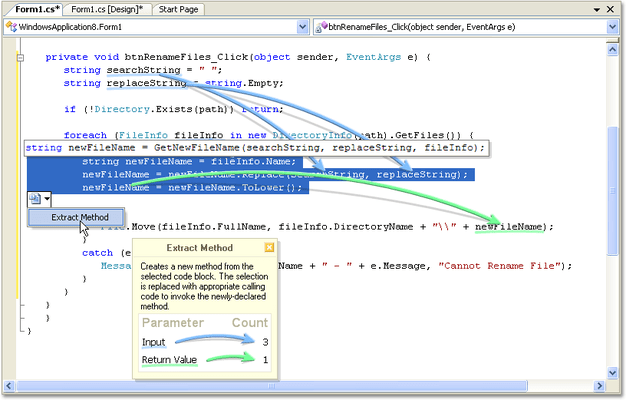
A refactoring toolset for Visual Studio. Refactor! Pro combines a language-independent code shaping engine with a highly-optimized user experience. Refactor! Pro is designed to help all developers craft and sculpt their code with the speed and efficiency needed to meet their line of business demands. While you work, Refactor! Pro analyzes the code, looking for opportunities to simplify. When a refactoring is available, you'll see a refactoring smart tag appear below the identifier at the caret or near the selected code block. Just click the smart tag to see which refactorings are available. DevExpress Refactor! Pro includes 1 year Subscription. DevExpress Refactor! Pro Renewals also available.

Our regular prices are shown below. Please logon to see your discounted prices.
| Add to Cart | $ 38.22 | Subscription Renewal for one year (for Subscriptions soon to expire or just expired) | Verify | Download (52.8 MB) |
| Add to Cart | $ 97.99 | Subscription Renewal for one year (for Subscriptions soon to expire or just expired) | Verify | Download (52.8 MB) |
Our prices include ComponentSource technical support and, for most downloadable products, an online backup and a FREE upgrade to the new version if it is released within 30 days of your purchase. All sales are made on our standard Terms and Conditions and subject to our Return Policy. Please contact us if you require any licensing option not listed, including volume licensing and previous versions.
Our regular prices are shown above. Please logon to see your discounted prices.
What's new in Refactor! Pro v2011 vol 1? - The following new refactorings are now available:
What's new in Refactor! Pro v2010 vol 2?
What's new in Refactor! Pro v2010 vol 1?
What’s new in Refactor! Pro v2009 vol 3?
What’s new in Refactor! Pro v2009 vol 2?
Faster Performance - A new symbol cache, built the first time you open a solution, improves the speed of subsequent solution parses dramatically. Now the speed to go from opening a solution to being able to refactor anywhere in that code base increases by 200%-500% for large solutions.
Additional performance enhancements
Reduced Memory Consumption - CodeRush 9.2 uses dramatically less memory. Project symbols are now cached, and only loaded when needed. Recently-accessed members are kept in memory, while stale members are aggressively released. As a result, customers with large solutions can expect reductions in overall memory consumption by 100MB-200MB.
Manual Load and Unload - Normally CodeRush loads on startup, and unloads when Visual Studio shuts down. CodeRush 9.2 adds the ability to defer loading to another time after startup, and also adds the ability to unload CodeRush while Visual Studio remains running. This may be useful for developers running into memory issues (e.g., very large solutions open in many instances of Visual Studio). You can defer the CodeRush startup time to a time of your choosing on the CodeRush Startup options page. Check the "Load manually" checkbox and restart. The next time Visual Studio starts, there will be a DevExpress menu item with a single entry, "Load". Selecting this entry will load CodeRush and any other third-party plug-ins that rely upon the DXCore.
Settings Merge on Upgrade – DexExpress introduce a new XML storage engine for CodeRush settings. This settings engine is backwards compatible - customer settings stored in the older INI files are merged with new settings stored in XML files (the INI files are not deleted). This engine will allow DevExpress to enhance default settings without losing customer changes.
Support for Preprocessor Directives - Conditional compiler directives are now supported.
Background Processing Progress Bar - CodeRush now shows progress for background parsing and symbol loading as you open a new solution. This progress bar is essentially your countdown to the moment when you can refactor instantly anywhere in the code. Note that you can work normally with Visual Studio before the background parse process ends. Closing this window does not break the background parsing process.
DXCore Version Switcher - The DXCore Version Switcher lets you switch among several versions of DevExpress IDE Tools installed side-by-side.
What’s new in Refactor! Pro v2009 vol 1?
User Experience Improvements - Added a document bar hinting feature. It allows for quick navigation to code issues and displays issue preview hints so that you can immediately highlight and fix issues. Version 2009 vol 1 also introduces several new actions used for keyboard interaction. The following new actions allow you to navigate though issues and manage them.
What’s new in Refactor! Pro V3.x?
Refactor! Pro 3.0 adds 27 new refactorings, including 15 dedicated to ASP.NET, 3 for XAML, and 9 for C#, VB, C++, and, as an early experience option, we've added refactoring support for JavaScript.
New source code refactorings in this 3.0 release:
New XAML refactorings in this 3.0 release:
New ASP.NET refactorings in this 3.0 release:
What's new in Refactor! V2.5x?
What’s new in Refactor V2.2.x?
Simplify your .NET Code
Refactor is one of the only code simplification and refactoring tools able to provide so much functionality with just one key.
Say Goodbye to Modal Speed Bumps
Developers need tools that help them concentrate on producing code. Complex modal user interfaces, code preview windows, and distracting popup dialogs slow you down. With Refactor, nothing gets between you and your code. All Refactor UI is grafted onto the surface of the editor. So if you need to reorder parameters to a method, you'll actually see the parameters move in the code.
Refactor is one of the only refactoring and code simplification tools to ship without any modal interface to slow you down.
Cut and Paste Refactoring
Much of refactoring is simply about moving code from one location to another. Refactor exploits the clipboard to allow you to initiate refactorings simply by cutting from one location and pasting at a target location. Let's say you need a new, small method derived from a chunk of a large, unwieldy method. These large complicated code blocks can be daunting to even highly-skilled coders but with Refactor you can simply cut out a chunk from the big method and paste it where you want the new method to appear.
Refactor is one of the only refactoring and code simplification tools to use cut and paste as an entry point to refactoring.
Refactoring Smart Tags
While you work, Refactor analyzes the code, looking for opportunities to simplify. When a refactoring is available, you'll see a refactoring smart tag appear below the identifier at the caret or near the selected code block. Just click the smart tag to see which refactorings are available.
Multiple Language Support
Refactor is designed to be completely language neutral, just like Visual Studio .NET. While refactor currently supports Visual Basic and C#, the remarkable thing is that the refactorings are all coming from a single code base. There is no language-specific C# or VB code in the product. That means when the CodeRush Core Engine gains support for a new programming language, Refactor will too.
Refactor! is one of the only refactoring and code simplification tools that supports both Visual Basic and C#
Extensibility
Refactor! was built upon the DXCore for Visual Studio .NET extensibility framework, and exposes additional interface that developers can easily exploit to create their own custom refactorings and code simplification tools. Note: CodeRush is not required to be able to use Refactor!
Refactor is one of the only refactoring and code simplification tools with built in extensibility