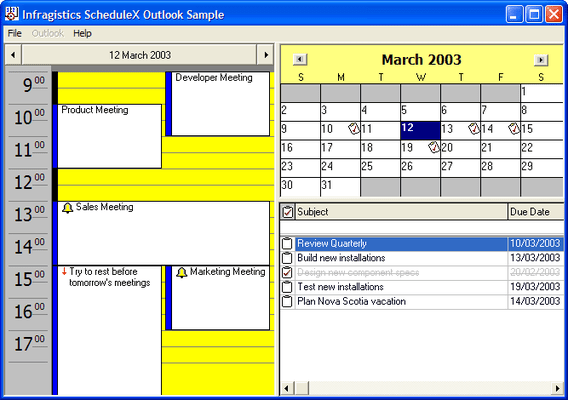
Screenshot Preview

ScheduleX - Summary

by Infragistics - Product Type: Component / ActiveX OCX

ScheduleX is now officially part of UltraSuite.

If you require information on upgrading ScheduleX, please visit the page above or Contact Us for pricing and availability.

Summary

ScheduleX by Infragistics

URLs: schedulex, infragistics

Build complete scheduling and task management applications. ScheduleX combines three powerful, lightweight (ATL) components for calendar, task management and scheduling applications. Using the advanced ScheduleX 's Calendar, DayView and TaskPad components, create Personal Information Management (PIM) software, project management and tracking, or any application that requires advanced scheduling. All ScheduleX components default to the familiar Outlook user interfaces. Infragistics ScheduleX was formerly known as Sheridan Protoview ScheduleX.


ScheduleX Key Features:

Advanced Calendar

DayView Synchronization With Calendar

TaskPad With Alarms

ScheduleX synchronized Microsoft Outlook-Style UI Components

All components default to the familiar Outlook user interfaces

Calendar & DayView communicate with each other for true application synchronization of information

NEW Read and write component information (appointments, tasks, dates) from all three components to and from a file based on the iCalendar format

NEW Property to get/set strings to allow International customization of the component

NEW Multi-Byte support

ScheduleX Calendar View

Display one, three, six or twelve month calendars

Control vertical or horizontal orientation

Set day orientation inside day cell

Assign data variants, custom colors, fonts and images to days

Multiple selection of days

Set first day of the week

Customize day and month names

Show/hide spin buttons for month and/or year

Change months and years using drop-down or spin buttons

Set header colors for area behind month/year

Place images in individual day cells

Supports reoccurring Week, Month and Year images

ScheduleX DayView

NEW Built-in default appointment dialog. An Outlook-style dialog box to allow end-users to create new appointments and alarms or modify existing ones

NEW Before and after events to override the default behavior of the component

NEW Execute programs on the start time of an appointment

Create appointments with alarms

Optional track bars for smooth scrolling through days and times

Set the start and end display times

Set display to hour/half-hour/15-minute increments

Set background color for times

Use images for appointments

In-place editing/read-only property for appointments

Assign data variants to appointments

Pop-up menu on right-click at run-time to add appointments to a day

ScheduleX TaskPad

NEW Additional properties, methods and events for greater control over the TaskPad

NEW Ability to change headings of the TaskPad

Display images for completion of tasks

Set dates for completion of tasks

Set fonts and colors for completed tasks (with strikeouts)

Pop-up menu on right-click at run time to add, delete or complete a task

Complete collection of Outlook task fields

Build complete scheduling and task management applications.

Operating System for Deployment: Windows XP, Windows 2000, Windows 98, Windows NT 4.0, Windows 95

Architecture of Product: 32Bit

Product Type: Component

Component Type: ActiveX OCX

Built Using: ActiveX Template Library (ATL)

General: Internet Enhanced, Includes Digital Signature, Marked as Safe for Scripting, Marked as Safe for Initialization, OCX96 Compatible, Supports Component Categories, Supports Apartment Model Threading, Supports Free Threading, Microsoft Transaction Server Compatible (MTS)

Compatible Containers: Microsoft Visual Studio 6.0, Microsoft Visual Studio 97, Microsoft Visual Basic 6.0, Microsoft Visual Basic 5.0, Microsoft Visual Basic 4.0, Microsoft Visual C++ 6.0, Microsoft Visual C++ 5.0, Microsoft Visual C++ 4.0, Microsoft Visual J++ 6.0, Microsoft Visual J++ 1.1, Microsoft Visual InterDev 6.0, Microsoft Visual InterDev 1.0, Microsoft Visual FoxPro 6.0, Microsoft Visual FoxPro 5.0, Microsoft ActiveX Control Pad, Microsoft Office 97, Microsoft Outlook, Microsoft Repository, Microsoft Exchange Server 5.5, Microsoft Exchange Server 5.0, Microsoft Site Server, Microsoft Internet Information Server 4.0, Microsoft Internet Information Server 3.0, Microsoft SNA Server, Microsoft FrontPage, Microsoft Internet Explorer 5.0, Microsoft Internet Explorer 4.0, Microsoft Internet Explorer 3.0, Netscape Navigator, CodeGear C++ 5.0 (formerly Borland), C++Builder 4, C++Builder 3, Delphi 5.0, Delphi 4.0, Delphi 3.0, Delphi 2.0, Visual dBase 7.0, Sybase PowerBuilder 7.0, Sybase PowerBuilder 6.0

Product Class: User Interface Components

Keywords: schedulex, infragistics schedulex, schedulex infragistics, schedulex ultrasuite, ultrasuite schedulex, infragistics scheduler activex, infragistics scheduling activex, schedulex dayview, schedulex calendar, schedulex calendar view, buy schedulex, buy infragistics schedulex, upgrade schedulex, sheridan protoview schedulex

infragistics, netadvantage, infragistic, ultra suite, calendar widgets, data widgets, netadvantage net, netadvantage 2009, infragistics 2009, infragistics controls, netadvantage for net, infragistics asp.net, activethreed, protoview, sheridan software

Calendar calendaring calendars Scheduling Schedule Schedules

Product Search

Enter search words:

Award