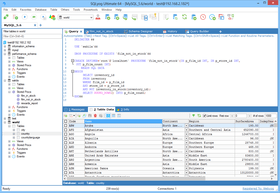
Screenshot Preview

SQLyog

by Webyog - Product Type: Application

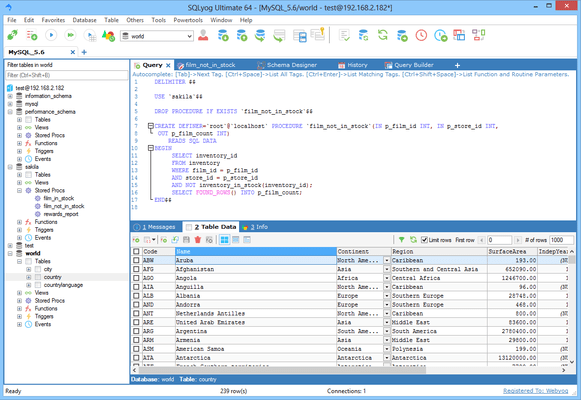
MySQL manager and admin tool. SQLyog MySQL GUI is a MySQL manager and admin tool, combining the features of MySQL Query Browser, Administrator, phpMyAdmin and other MySQL Front Ends and MySQL GUI tools in a single intuitive interface. SQLyog is an easy to use, compact and very fast graphical tool for managing your MySQL databases. SQLyog was developed for all who use MySQL as their preferred RDBMS. Whether you enjoy the control of handwritten SQL or prefer to work in a visual environment, SQLyog makes it easy for you get started and provides you with tools to enhance your MySQL experience.

From
$4,899.02

Our regular prices are shown below. Please logon to see your discounted prices.

Price in

MONyog and SQLyog - Combo Pack with Premium Support

Add to Cart $ 4,899.02 Enterprise Unlimited Combo Pack with Premium Support Download (27.3 MB)
Add to Cart $ 5,879.02 Ultimate Unlimited Combo Pack with Premium Support Download (27.3 MB)

SQLyog 9.6.0 Professional

Add to Cart $ 97.02 Single User License - includes 1 year of free upgrades (both minor and major) and 1 month installation support Download (17.0 MB)
Add to Cart $ 391.02 5 User License - includes 1 year of free upgrades (both minor and major) and 1 month installation support Download (17.0 MB)
Add to Cart $ 1,077.02 Unlimited User License - includes 1 year of free upgrades (both minor and major) and 1 month installation support Download (17.0 MB)

SQLyog 9.6.0 Enterprise

Add to Cart $ 136.22 Single User License - includes 1 year of free upgrades (both minor and major) and 1 month installation support Download (17.0 MB)
Add to Cart $ 489.02 5 User License - includes 1 year of free upgrades (both minor and major) and 1 month installation support Download (17.0 MB)
Add to Cart $ 1,469.02 Unlimited User License - includes 1 year of free upgrades (both minor and major) and 1 month installation support Download (17.0 MB)

SQLyog 9.6.0 Ultimate

Add to Cart $ 175.42 Single User License - includes 1 year of free upgrades (both minor and major) and 1 month installation support Download (17.0 MB)
Add to Cart $ 685.02 5 User License - includes 1 year of free upgrades (both minor and major) and 1 month installation support Download (17.0 MB)
Add to Cart $ 1,959.02 Unlimited User License - includes 1 year of free upgrades (both minor and major) and 1 month installation support Download (17.0 MB)

SQLyog Premium Support

Add to Cart $ 48.02 Single User 1 Year Premium Support License Download (212 KB)
Add to Cart $ 195.02 5 User 1 Year Premium Support License Download (212 KB)
Add to Cart $ 489.02 Unlimited User 1 Year Premium Support License Download (212 KB)

Our prices include ComponentSource technical support and, for most downloadable products, an online backup and a FREE upgrade to the new version if it is released within 30 days of your purchase.  All sales are made on our standard Terms and Conditions and subject to our Return Policy. Please contact us if you require any licensing option not listed, including volume licensing and previous versions.

Our regular prices are shown above. Please logon to see your discounted prices.

What's new in SQLyog 9.6

Features:

  • When performing CREATE/ALTER TABLE operations from inside the Schema Designer a dialog with a tabbed interface similar to the CREATE/ALTER TABLE tab will now open.
  • It is now optional if Query Builder creates statements with ‘fully qualified tablenames’ or not.
  • Implemented Alt+Ins, Alt+Del, Alt+Up and Alt+Down for inserting, deleting, moving up/down the rows in CREATE|ALTER TABLE interface when the focus is on respective grids. The tooltip for the toolbar buttons will now show these shortcuts.

Bug fixes:

  • In Data Sync a low setting of ’max_allowed_packet’ on source server could result in CONCAT_WS() used for checksums’ calculation returning NULL . This was not considered and as a consequence rows could fail to sync without warning. SQLyog will now abort the job with an error message (if user has selected to ‘abort on error’) or print an error to the sja.log file and the console (if user has selected not to ‘abort on error’ ) informing that some rows may have been skippped in such cases.
  • The fix for empty string defaults in 9.51 was not complete. It was (unlike 9.5) possible to create such defaults but it did not display as ” after creation in ALTER TABLE.
  • If multiple databases with the same name existed only differing in lettercase SQLyog would generate certain statements using the ‘mostly lowercased’ database name. This bug was introduced in 9.5 and is now fixed.
  • Autocomplete runs in a separate connection, but also when Autocomplete was disabled this connection was created for no reason.
  • SQLyog sometimes waited unnecessarily long (30 seconds – which is the client timeout setting used internally) to report that SSH connection could not be established. This happened for instance if a wrong RSA passphrase was entered. In such and other cases there is no reason to wait for client timeout.
  • Small fixes – mostly GUI fixes to the new CREATE/ALTER TABLE interface.

What's new in SQLyog 9.5
This release is geared towards enhancing the user experience; the major changes are:

  • The conversion of modal dialogue boxes to a tabbed interface for creating and altering tables, and defining table properties.
    • Creating a table involves, defining columns, and often, creating indexes and foreign keys. Before, these actions had to be done one after the other, which was annoyingly slow. Now, you can define columns, and create indexes and foreign keys, all in a single interface, which gives you a single CREATE/ALTER TABLE query to execute. Not only is creating tables easier, it is also much faster!
    • Modal dialogue boxes limit one from multitasking. Previously, when in the middle of creating a foreign key, if some information had to be looked up from a different table (or even the same table), it required one to close all the dialogue boxes, get the information, and then start again from scratch. Now, while working on creating a table, you can go to another tab, check for some details and return back to creating the table.
  • History and Info tabs now appear alongside the Query tab. As the content of these two tabs is not dependent on a specific Query tab, it is logical to not have these under the Query tab. Additionally, these tabs consume one third of the system resource that they did before.
  • Content of History and Info tabs is now searchable.

SQLyog provides you with powerful means to manage your MySQL databases.

  • Runs on all Windows versions from 98SE to Vista. Runs on Linux with WINE.
  • MySQL 5.x compatible
  • Create/Drop/Alter Tables, Stored Procedures, Functions, Views, Triggers and Events.
  • HTTP and SSH Tunneling - smartly manage your MySQL server even if the MySQL port is blocked or remote access to MySQL is disallowed!
  • Protect your data with SSL encryption
  • Smart AutoComplete
  • Formats SQL statements
  • Proactive Query Profiler
  • Favorite Manager to neatly organize your favorite SQL statements
  • Very fast retrieval of data
  • Advanced GUI Query Builder. Supports JOINs, aggregate as well as 'common' functions, sorting (ORDER BY) and filtering (WHERE and HAVING) and ALIAS.
  • SQLyog Migration Toolkit - use the GUI or specify a query
  • Schema and Data synchronization tools
  • Powerful Scheduled Backup with email notification
  • Schedule various jobs
  • Notification Services - execute unattended queries for database maintainence of data verification with flexible email option
  • Update result returned from query - also supports queries with JOINs. No dialogues - just edit
  • Manage foreign key relationships
  • Fully InnoDB compliant
  • Supports MySQL pluggable storage engines architecture
  • Multi-threaded query execution with option to allow multiple query execution simultaneously
  • View your results in GRID/TEXT mode
  • Filter data and resultsets directly form the context menu of a displayed value
  • Execute (very large) SQL-scripts as batch files
  • Execute multiple queries returning more than 1000s of rows per resultset. Its very efficient in memory.
  • Very compact binary
  • Written entirely in C/C++/Win32 APIs using native MySQL C APIs. No wrapper classes used.
  • Connection manager
  • Excel like grid interface to create/alter tables
  • View and edit advanced table-properties, such as Comment, Key_Length etc.
  • Do table-diagnostics (check, optimize, repair, analyze)
  • Duplicate tables to new table-names
  • Excel like grid interface to edit data with support for Enum/Set
  • Create/drop databases
  • Manage indexes
  • Comprehensive user/security manager. Control every available privilege on what level you like (server/database/table/column).
  • Reorder columns of table
  • Copy database between two MySQL hosts
  • Drop all tables of a database with a single click
  • Edit BLOBs in TEXT or GRAPICHS mode. All common (non-proprioritary) graphics format (including 'high-resolution' TIFFs and PNGs) supported.
  • Export table-structure and data into SQL-dumps
  • Direct export to Microsoft Excel
  • Export/import data in/from CSV files
  • Export database schema in HTML
  • Log all queries for a session
  • Syntax-highlighting
  • Save resultset in CSV, HTML and XML
  • Copy your result as CSV to clipboard
  • Is very keyboard friendly. You can work with 99% features of SQLyog with keyboard.
  • View and kill other user-processes
  • Flush Host/Logs/Privileges/Tables
  • Quick access to processlist, status, variables etc.
  • And a lot more...

SQLyog gives you a choice between four different connectivity options. No matter whatever your firewall/proxy/ISP settings are, you should be able to smartly manage your MySQL Server(s). The various connectivity options (in the order of responsiveness and network efficiency) are:

  • Direct connection using MySQL C API: This is by far the fastest way to connect and manage your MySQL server. This is the preferred method if you are not concerned about your MySQL traffic being spoofed. However, this requires direct access to your MySQL server. Most ISPs block the MySQL port or disallow remote access.
  • SSH Tunneling *: Use this option if you need to encrypt the contents of your MySQL traffic, but still want the efficiency of the MySQL C API. If your host supports SSH tunneling, SQLyog can use the tunnel to communicate with MySQL.
  • HTTP Tunneling *: This option saves your day if your ISP/MySQL provider disallows remote access, either my blocking the MySQL port or by giving access to “localhost” only. The response is slow compared to the previous options since the data is XML encoded and HTTP is stateless by nature. However, you can use all the cool features of SQLyog (and start getting more sleep!).
  • HTTPS Tunneling *: This option is similar to HTTP Tunneling but adds another layer of security by establishing a secure channel. *
  • SSL Encryption *: With this option all communication between SQLyog and the MySQL server is encrypted. The MySQL server must support this option. Not all servers do

Favorites
SQLyog allows easy access to frequently used SQL scripts. The script files can be stored as files from the SQLyog interface or you can link to an existing file anywhere where windows can access it - on a local drive or a shared network drive. The SQL scripts and the file links can be organized in folder and subfolders. The number of script files and file links and the number of nested folders you can manage is limited by an Operating System and the File System only.

Object Browser
The Object browser window gives you complete details of the server you are connected to in a tree format. Expanding database nodes will show the table(s), view(s), store procedure(s), function(s), trigger(s) and event(s) in the database and expanding the table name node will show the columns and indexes available for the table. When you right click on any object in the Object Browser, you will get a context sensitive popup menu. The options in the popup menu allow you to perform different operations on the selected object such as Open Table, Create Table, Alter Table, Manage Indexes, Relationships/Foreign Keys, Backup/Export, Import and more.

Database Synchronization
SQLyog Job Agent (SJA) is a high-performance, multithreaded application to automate and schedule synchronization of Data between two MySQL hosts.

SJA can also be used as a command line tool that accepts a Job Definition file encoded in XML as one of the parameters. You can either create the Job Definition file manually or use one of the wizards included with SQLyog. If you use SQLyog to create your job files, you don't need to have any knowledge about XML or the Job Definition schema.

SJA does not require any installation at hosts running the MySQL server. You can use any host to run the SJA. For example - you can use SJA to keep your production database (probably hosted with an ISP) in complete sync with your test database located in your PC or LAN.

SJA uses an efficient algorithm to generate checksums to find out the changes. Therefore only those rows that have been inserted, updated or deleted since the last sync are transferred between the hosts.


Compare between the editions of SQLyog MySQL Visual Editor
The following table shows the features included in the different editions of SQLyog.

Editions Ultimate Enterprise Professional
Features:
Core Features (See list below)
Optimizing Tools
Redundant Index Analyzer New! - -
Schema Optimizer - -
Query Profiling Tools
Query Profiler - -
Advanced Connectivity Options
HTTP/HTTPs Tunneling
SSH Tunneling
SSL Connections
Visual Tools
SQL Formatter -
Visual Query Builder -
Visual Schema Designer -
Enhanced Services
Priority access to BETAs, new versions and patches
Installation support for 1 month
Unlimited Priority Support (Optional)
Enhanced Productivity
Smart Autocomplete
Intelligent Code Completion
Migration Tools
Wizard Driven Migration Toolkit -
Import tasks can be scheduled -
Synchronization Tools
Schema Synchronization -
Data Synchronization -
Data Synchronization can be scheduled -
Other Power Tools
Compressed Scheduled Backups New! -
Notification Services -
Job Manager -


SQLyog Core Features:

Internationalization

  • Complete Unicode/UTF8 Support

DBA Productivity

  • Restoring/Importing large SQL dumps
  • MySQL 5.x objects support
  • User Management
  • Managing hosted MySQL
  • Connection Manager
  • Index Management
  • Relationship/Foreign Key Manager
  • Reorder Columns
  • Copy objects to another Host with single click
  • Table diagnostics
  • Flush Tools
  • Object Browser
  • Creating/dropping database
  • Optimized for managing Hosted MySQL
  • Multiple database connections
  • Table duplication with two clicks

Developer / User Productivity

  • Favorites Manager
  • HTML Schema Documentation
  • Shortcuts to generate SQL DML statements from schema definition
  • Creating/Dropping/Altering tables
  • Multi-tab Query Editor and Result-set Editor
  • Multiple Query Execution
  • Multi-threaded Query execution - Ability to stop long running queries
  • SQL Templates
  • Excel-style grid interface to view/update resultsets
  • Multi-format Blob editor
  • View data in Grid/Text Mode
  • ResultSet/Data Export to CSV/XML/HTML/Excel
  • Full Support from 3.23.38 to the latest 5.x
  • Support for all MySQL table handlers
  • Excel friendly resultsets/table-data export to clipboard/file
  • Dialog-less table and resultset editor

Technology

  • Turbo Speed MySQL Management. Uses native MySQL C API - the fastest way
  • to communicate with MySQL server
  • 100% keyboard friendly
  • Small compact binary
  • Minimal use of Registry
  • Easy migration of User Preferences by dragging and dropping config files.
  • Non-cluttered look and feel, ability to show/hide panes

Support

1 Year Premium Support (Optional)

  • All issues addressed directly by developers
  • Unlimited ticket based priority support
  • Response within 1 business day
  • Issue escalation to product development team
  • Hotfixes / emergency patches in the event of bugs
  • Remote troubleshooting

Product Search

Enter search words:

Quick Links

Publisher

Primary Category

Related Products