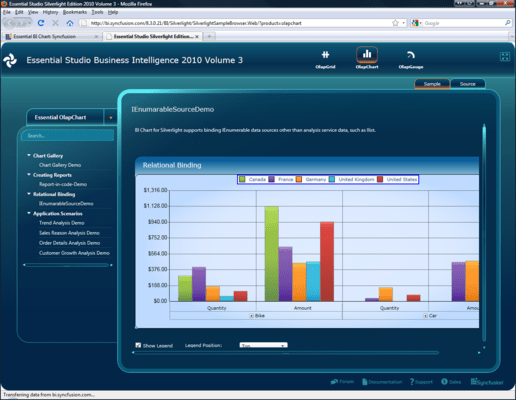
Screenshot Preview

Syncfusion Essential BI Chart - Summary

by Syncfusion - Product Type: Component / ASP.NET WebForms / .NET WPF / Silverlight / Source Code

Syncfusion Essential BI Chart is available as part of Syncfusion Essential Studio Enterprise Edition and Syncfusion Essential Studio Business Intelligence Edition.

If you require more information please Contact Us

Summary

Syncfusion Essential BI Chart by Syncfusion

URLs: syncfusion-essential-bi-chart, syncfusion essential bi chart, syncfusionessentialbichart, syncfusion

Business intelligence chart controls for the display of OLAP data. Syncfusion Essential BI Chart is a great way to visualize business-intelligence data buried in OLAP and relational databases. Syncfusion Essential BI Chart is an interactive control with drill down capabilities that allows you to surface big-picture data and makes it available at your finger tips. All common chart types are supported.


Syncfusion Essential BI Chart Data Sources

Use the intuitive APIs to refer to an OLAP data source and specify which dimensions, measures and KPIs you want to visualize in the chart. Or you can visually create a report definition schema (XML) using our Report Builder and refer to the schema in your applications. You can even bind to relational data sources and let our in-memory pivot engine transform the data dynamically and present it as multi-dimensional OLAP data.

Syncfusion Essential BI Chart Types

Visualize chart data using numerous chart types ranging from bar charts to pie charts.

Syncfusion Essential BI Chart Appearance

The background, fonts, borders, and other chart elements can be fully customized at the chart as well as series levels. Built-in customizable legends are displayed to identify dimensions that are visualized. Tooltip can be employed to provide additional information at point level.

Syncfusion Essential BI Chart Filter Elements based on top level records

Essential BI Chart filters individual measure elements based on top-level records, improving an application’s performance.

Syncfusion Essential BI Chart Filtering

The OLAP Chart allows you to filter the contents based on some filter conditions using the Reports.

Syncfusion Essential BI Chart Design-Time Support

Essential BI Chart supports customizing a control during design time using Visual Studio. You can easily connect using the Connection dialog. After connecting, you can customize a report to your liking by dragging and dropping dimensions and measures to create the form you need.

Syncfusion Essential BI Chart Drilldown

BI Chart has built-in support for drilling down to the different levels of a hierarchical dimension. For example, collapsible axes labels let you visualize data by year, quarter or month in a time dimension.

Syncfusion Essential BI Chart Exporting Charts

Easily export BI Chart to several file formats. Also embed chart images into PDF, Excel or Word documents using our Reporting Studio.

Syncfusion Essential BI Chart User Interaction

Interactive end-user zooming allows your end-users to zoom-into areas of interest within the chart.

Syncfusion Essential BI Chart Custom Expression Support

BI Chart now comes with support for binding data from any object whose class implements the IEnumerable interface with a user-defined expression. This helps render summary values in a grid in accordance with a given expression.

Syncfusion Essential BI Chart Named Set Records

BI Chart supports data binding with named-set records predefined in a cube. A named set is a collection of tuples and members that can be defined and saved as a part of the cube definition.

Syncfusion Essential BI Chart Calculated Members

The calculated members are classified into two types: Calculated Measure—which is a user-defined measure element created from an existing measure element; and Calculated Dimension—which is a user-defined dimension element created from an existing dimension. New calculated members can also be created from existing calculated members, and they can be added to a report through the API. That report, containing calculated members, can then be loaded into OlapChart.

Business intelligence chart controls for the display of OLAP data.

Evals & Downloads: Read the Syncfusion Site License Agreement, Read the Syncfusion License Agreement - Requires Acrobat Reader, Read the Syncfusion Company Brochure - Requires Acrobat Reader, Read the Syncfusion - Overview of products and Suite options document - Requires Acrobat Reader, Download the Syncfusion User Guide Installer onto your computer, Download the Syncfusion Class Reference Documentation Installer onto your computer, Download the Syncfusion Essential Studio 2012 Vol 2 (V10.2.0.56) evaluation on to your computer - Expires After 30 Days

Operating System for Deployment: Windows 7, Windows Vista, Windows XP, Windows Server 2003, Windows 2000

Architecture of Product: 32Bit

Product Type: Component

Component Type: ASP.NET WebForms, .NET WPF, Silverlight, Source Code

Built Using: Visual C# .NET

Compatible Containers: Microsoft Visual Studio 2010, Microsoft Visual Studio 2008, Microsoft Visual Studio 2005, Microsoft Visual Basic 2010, Microsoft Visual Basic 2008, Microsoft Visual Basic 2005, Microsoft Visual C++ 2010, Microsoft Visual C++ 2008, Microsoft Visual C++ 2005, Microsoft Visual C# 2010, Microsoft Visual C# 2008, Microsoft Visual C# 2005, .NET Framework 4.0, .NET Framework 3.5, .NET Framework 3.0, .NET Framework 2.0, Silverlight 4, Silverlight 3

Product Class: User Interface Components

Keywords: syncfusion essential chart, essential chart

Syncfusion Sync fusion

Chart Charting Charts Graph Graphing Graphs

Product Search

Enter search words:

Award