by Syncfusion - Product Type: Component / ASP.NET WebForms / .NET WPF / Silverlight / Source Code
Syncfusion Essential BI Grid is available as part of Syncfusion Essential Studio Enterprise Edition and Syncfusion Essential Studio Business Intelligence Edition.
If you require more information please Contact Us
Syncfusion Essential BI Grid by Syncfusion
URLs: syncfusion-essential-bi-grid, syncfusion essential bi grid, syncfusionessentialbigrid, syncfusion
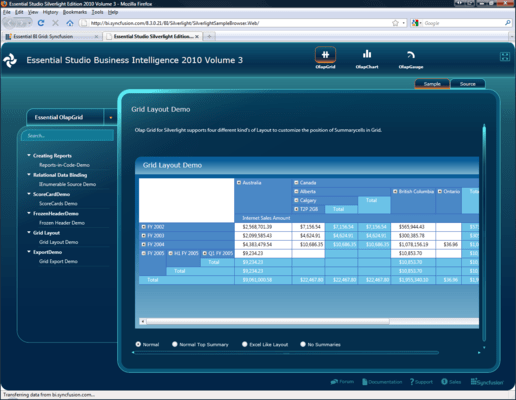
Grid control for the display of OLAP data. Syncfusion Essential BI Grid let you summarize, analyze, explore and present summaries of critical data in your enterprise and make informed decisions. Users can easily drill down into all available levels of data. Syncfusion Essential BI Grid can even be configured to drill down into relational data. Syncfusion Essential BI Grid has built-in support for exporting to Excel.

Syncfusion Essential BI Grid Data Sources
Use the intuitive APIs to refer to an OLAP data source and specify which dimensions, measures and KPIs you want to visualize in the grid. Or you can visually create a report definition schema (XML) using our Report Builder and refer to the schema in your applications. You can even bind to relational data sources and let the in-memory pivot engine transform the data dynamically and present it as multi-dimensional OLAP data.
Syncfusion Essential BI Grid User Interaction
The BI Grid comes with built-in support for drilling down to different levels of a hierarchical dimension. For example, collapsible headers let you visualize data by year, quarter or month in a time dimension. Optionally, it also lets you view drill-down data via tooltips.
Syncfusion Essential BI Grid Filtering
The OLAP Grid allows you to filter the contents based on some filter conditions using the Reports.
Syncfusion Essential BI Grid Custom Expression Support
BI Grid comes with support for binding data from any object whose class implements the IEnumerable interface with a user-defined expression. This helps render summary values in a grid in accordance with a given expression.
Syncfusion Essential BI Grid Calculated Members
The calculated members are classified into two types: Calculated Measure—which is a user-defined measure element created from an existing measure element; and Calculated Dimension—which is a user-defined dimension element created from an existing dimension. New calculated members can also be created from existing calculated members, and they can be added to a report through the API. That report, containing calculated members, can then be loaded into OlapGrid.
Syncfusion Essential BI Grid Member Properties
The BI Grid has an option for displaying member properties that provide basic information about each member in each tuple, including member name, parent level, and number of children. These member properties are available for all members at any given level.
Syncfusion Essential BI Grid KPI Support
Easily create executive summary scorecards to help visualize business critical KPIs with status and trend information. Scorecards could be hierarchical with built-in support for drill-down. The status indicators can be customized with several built-in or custom icons.
Syncfusion Essential BI Grid Appearance
The BI Grid allows you to customize the look and feel of the different portions of the grid using styles. Easily customize the grid to fit your organization's themes.
Syncfusion Essential BI Grid Export Options
Essential BI Grid can export OLAP data to Excel spreadsheets or Word documents. Using Syncfusion products like Essential XlsIO, DocIO, and PDF, you can also export a BI grid to an Excel or Word document.
Syncfusion Essential BI Grid Named Set Records
BI Grid for WPF supports binding OLAP data with named-set records predefined in a cube. A named set is a set of dimension members or a set expression that is created for reuse in multidimensional expressions (MDX) queries.
Syncfusion Essential BI Grid Design Time Support
OlapGrid for WPF supports customizing a control during design time by using Visual Studio 2008 or Visual Studio 2010. You can easily connect to a cube by using the Connection dialog. After connecting, customize a report to your liking by dragging and dropping dimensions and measures to create the kind of report you need.
Grid control for the display of OLAP data.
Evals & Downloads: Read the Syncfusion Site License Agreement, Read the Syncfusion License Agreement - Requires Acrobat Reader, Read the Syncfusion Company Brochure - Requires Acrobat Reader, Read the Syncfusion - Overview of products and Suite options document - Requires Acrobat Reader, Download the Syncfusion User Guide Installer onto your computer, Download the Syncfusion Class Reference Documentation Installer onto your computer, Download the Syncfusion Essential Studio 2012 Vol 2 (V10.2.0.56) evaluation on to your computer - Expires After 30 Days
Operating System for Deployment: Windows 7, Windows Vista, Windows XP, Windows Server 2003, Windows 2000
Architecture of Product: 32Bit
Product Type: Component
Component Type: ASP.NET WebForms, .NET WPF, Silverlight, Source Code
Built Using: Visual C# .NET
Compatible Containers: Microsoft Visual Studio 2010, Microsoft Visual Studio 2008, Microsoft Visual Studio 2005, Microsoft Visual Basic 2010, Microsoft Visual Basic 2008, Microsoft Visual Basic 2005, Microsoft Visual C++ 2010, Microsoft Visual C++ 2008, Microsoft Visual C++ 2005, Microsoft Visual C# 2010, Microsoft Visual C# 2008, Microsoft Visual C# 2005, .NET Framework 4.0, .NET Framework 3.5, .NET Framework 3.0, .NET Framework 2.0, Silverlight 4, Silverlight 3
Product Class: User Interface Components
Keywords: syncfusion essential chart, essential chart
Syncfusion Sync fusion
On-Line Analytical OLAP analysis analyze analyse
datagrid controls, datatable controls, datagrid components, datatable components, datagrid, data grid, data table, net gridview, net datagrid, data grid, grid control, net datatable, c# gridview, c# datagrid, asp.net datagrid, grid asp, vb.net datagrid
Publisher
Primary Category
Related Products
Related Categories