Screenshot Preview

Syncfusion Essential Chart for ASP.NET

by Syncfusion - Product Type: Component / ASP.NET WebForms / ASP.NET AJAX (ATLAS) / ASP.NET MVC / .NET WinForms / .NET WPF / Silverlight / Source Code / JavaScript / AJAX

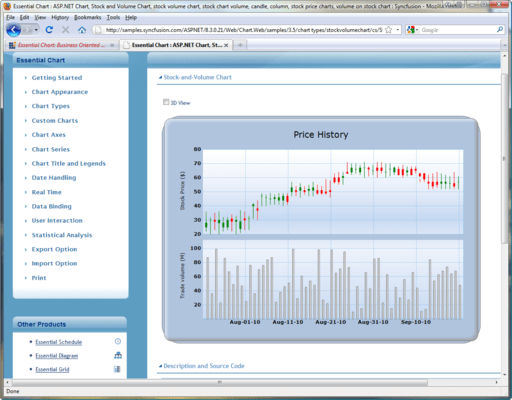
Add rich, interactive financial and business charts to your ASP.NET applications. Syncfusion Essential Chart for ASP.NET is a business-oriented charting component that offers an innovative data object model which makes it easy to populate a chart with any kind of data source. Syncfusion Essential Chart for ASP.NET features an advanced style architecture which simplifies complex multilevel formatting. Syncfusion Essential Chart for ASP.NET includes many chart types ranging from simple column charts to complex financial charts. All of these can be configured to suit users needs. All charts except Radar and Polar charts can be rendered in 3-D mode.


From
$805.50

Our regular prices are shown below. Please logon to see your discounted prices.

Price in

Syncfusion Essential Chart for ASP.NET 2012 Vol 2 (V10.2.0.56) - Binary

Add to Cart $ 805.50 1 Developer License - with 1 Year Subscription Download (595.0 MB)
Add to Cart $ 364.50 1 Developer Annual Subscription Renewal License (for subscriptions soon to expire or up to 30 days past expiration) Verify Download (29 KB)
Add to Cart $ 604.13 1 Developer Reinstatement of Lapsed Subscription License (for subscriptions lapsed longer than 30 days up to one year) Verify Download (29 KB)

Syncfusion Essential Chart for ASP.NET 2012 Vol 2 (V10.2.0.56) with Source Code

Add to Cart $ 1,165.50 1 Developer License with Source Code - with 1 Year Subscription Download (595.0 MB)
Add to Cart $ 526.50 1 Developer Annual Subscription Renewal License (for subscriptions soon to expire or up to 30 days past expiration) with Source Code Verify Download (29 KB)
Add to Cart $ 874.13 1 Developer Reinstatement of Lapsed Subscription License (for subscriptions lapsed longer than 30 days up to one year) with Source Code Verify Download (29 KB)

Syncfusion Essential Chart for ASP.NET 2012 Vol 2 (V10.2.0.56) - Binary Site License

Add to Cart $ 18,000.00 Site License - with 1 Year Subscription - Allows upto 500 Developers at a single address Verify Download (595.1 MB)
Add to Cart $ 7,200.00 Site Annual Subscription Renewal License (for subscriptions soon to expire or up to 30 days past expiration) - Allows upto 500 Developers at a single address Verify Download (29 KB)
Add to Cart $ 16,200.00 Site Reinstatement of Lapsed Subscription License (for subscriptions lapsed longer than 30 days up to one year) - Allows upto 500 Developers at a single address Verify Download (29 KB)

Syncfusion Essential Chart for ASP.NET 2012 Vol 2 (V10.2.0.56) with Source Code Site License

Add to Cart $ 27,000.00 Site License with Source Code - with 1 Year Subscription - Allows upto 500 Developers at a single address Verify Download (595.1 MB)
Add to Cart $ 10,800.00 Site Annual Subscription Renewal License (for subscriptions soon to expire or up to 30 days past expiration) with Source Code - Allows upto 500 Developers at a single address Verify Download (29 KB)
Add to Cart $ 24,300.00 Site Reinstatement of Lapsed Subscription (for subscriptions lapsed longer than 30 days up to one year) with Source Code - Allows upto 500 Developers at a single address Verify Download (29 KB)

Our prices include ComponentSource technical support and, for most downloadable products, an online backup and a FREE upgrade to the new version if it is released within 30 days of your purchase.  All sales are made on our standard Terms and Conditions and subject to our Return Policy. Please contact us if you require any licensing option not listed, including volume licensing and previous versions.

Our regular prices are shown above. Please logon to see your discounted prices.

Please note: Syncfusion Essential Chart includes Windows Forms, ASP.NET, ASP.NET MVC, Silverlight and WPF components.

What’s new in Syncfusion Essential Chart 2011 Vol 4?

Essential Chart for ASP.NET MVC Mobile

  • Chart Control - Essential Chart for Mobile MVC is a lightweight, HTML 5 canvas element-based chart control that is easily configurable. It provides high quality, visually rich business charts on mobile platforms. Essential Chart provides support for the following chart types: Line charts, Step line charts, Spline charts, Pie charts, Column charts, Area charts, Step area charts and Spline area charts.

Essential Chart for ASP.NET

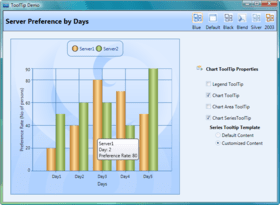
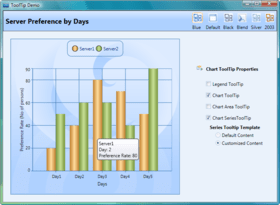
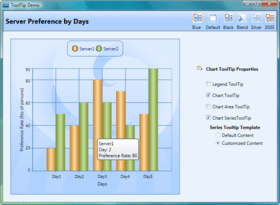
  • ToolTips for Chart Axis Labels - Users can add custom ToolTips to display further information about chart axis labels.
  • Localization Support - The user interface of a chart can be customized to be locale-specific.

Essential Chart for ASP.NET MVC

  • Essential Chart with HTML 5 - Essential Chart with HTML 5 is a lightweight, canvas-based chart control that utilizes HTML 5 to implement a very high performance and interactive chart control.

Essential Chart for WPF

  • TimeLine Control - The TimeLine control can be used to view specific time frames in a chart by allowing users to select a range of data. It can be integrated with other controls like Essential Chart, Essential Grid, and Essential Gantt for selecting and viewing data that falls inside a specific time frame. It has a rich UI for users to interact with.

Essential Chart for Windows Forms

  • Localization Support - The user interface of a chart can be customized to display chart data according to the language and culture specific to a particular country or region.
  • ToolTips for Chart Axis Labels - Users can add custom ToolTips to display further information about chart axis labels.

Syncfusion Essential Chart for ASP.NET General Features
Essential Chart is a data visualization tool that helps you generate professional graphs and charts. It supports a large variety of chart types and sports an object-oriented API that is easy to use.

  • Unlimited Data Series
  • Unlimited Data Points
  • Chart Wizard
  • Zooming and Scrolling
  • Panning for Zoomed Chart
  • Smart Labels
  • Template Support
  • AJAX Support

Syncfusion Essential Chart for ASP.NET Chart Types
Many chart types ranging from simple column charts to complex financial charts are offered in Essential Chart for ASP.NET. All of these can be configured to suit users needs. All charts except Radar and Polar charts can be rendered in 3-D mode.

  • Area Charts
  • Bar Charts
  • Column Charts
  • Line Charts
  • Financial Charts
  • Pie and Doughnut Charts
  • Bubble and Scatter Charts
  • Accumulation Charts
  • Circular Charts
  • Combination Charts
  • Heat Map Chart

Syncfusion Essential Chart for ASP.NET Axis Features
The default chart control settings include the primary x- and y-axes. The chart control framework also provides complete support for the inclusion of multiple x- and y-axes.

  • Gridlines
  • Axis Line Type
  • Axis Ticks
  • Axis Label Customization
  • Axis Label Orientation
  • Axis Custom Origin
  • Axis Strip Line
  • Automatic Range Scaling
  • Axis Custom Range
  • Custom Polar-Axis Range
  • Opposed Axis
  • Inverted Axis
  • Secondary Axis
  • Logarithmic Axis
  • Scale Break
  • Multiple Axes Layout
  • Chart Axis Labels
  • Custom Polar Axis

Syncfusion Essential Chart for ASP.NET Title Appearance
A chart title can be customized to suit the needs of the user. Its font style, size, and color can be modified. The alignment and position of the chart title can also be specified. Essential Chat also supports multiple chart titles.

  • Title Font Customization
  • Title Position
  • Title Alignment
  • Multiple Chart Titles

Syncfusion Essential Chart for ASP.NET Alter Series Data and Style
The Chart control comes with a rich style architecture that separates the display styles from the data model and provides flexibility in the appearance and definition of each display element. Style forms the core of the Chart control and provides extensive customization. It can be inherited from a parent chart, which makes complex formatting relatively easy.

  • Series Chart Control
  • Empty Point
  • Custom Point
  • Statistics Support
  • Data Point Style
  • Data Point Label
  • Grouping Support
  • Chart and Grid Interaction

Syncfusion Essential Chart for ASP.NET Chart Data
Essential Chart can handle data in different ways. You can add data points to a series and let the chart manage it. Alternatively, achieve easier data binding to a data set using the built-in ChartDataBindModel control and specify the column names containing the x and y coordinate values. For additional flexibility, you can implement the IChartSeriesModel interface and plug-in your custom model.

  • Default Data Population
  • Data Binding to DataSet
  • Axes Label Binding
  • Custom Data Model
  • Excel Import-Export
  • LINQ Support

Syncfusion Essential Chart for ASP.NET Chart Appearance
A chart's appearance can be customized by setting individual chart element properties. The rich styles architecture available for the Chart control provides formatting options at both point level and series levels.

  • 3-D Mode
  • Clustered Mode
  • Spacing Effect
  • Anti-aliasing
  • Alpha Blending
  • Built-in-Skins
  • Chart Background
  • Chart Interior
  • Chart Border
  • Series Border
  • Chart Font
  • Color Palette
  • Shadow Effect
  • Data Point Symbol
  • Localization
  • Multiple Pies

Syncfusion Essential Chart for ASP.NET Chart Legend Appearance
A chart legend, which is a symbol-based caption, is rendered for each series in a chart by default. There is also support for adding custom chart legends. There are also customization options for its appearance. Essential Chart supports multiple chart legends as well.

  • Docking and Alignment
  • Border Style
  • Title Font and Color
  • Representation Type
  • Visible Check Box
  • Background Image
  • Item Alignment
  • Multiple Chart Legends

Syncfusion Essential Chart for ASP.NET Interactive Elements
User interaction adds to the appeal of any control. Keeping this in mind, the Chart control has been designed to be completely user-friendly and supports several user-interaction elements.

  • AutoHighlight
  • Drag-and-Drop Data Point
  • Interactive Cursor
  • Toolbar
  • Context Menu
  • Get Point or Value
  • Navigation links