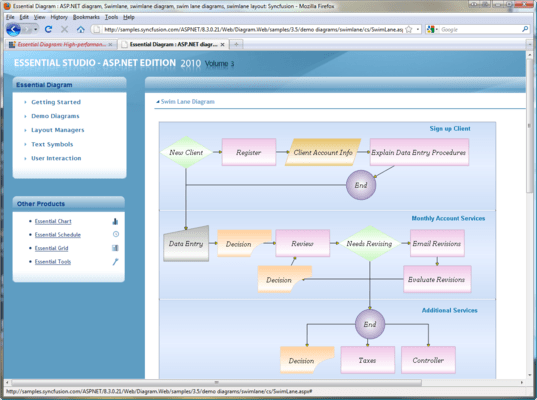
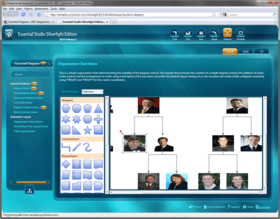
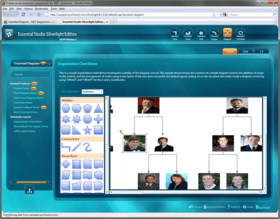
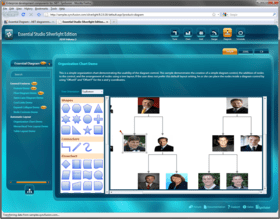
Screenshot Preview

Syncfusion Essential Diagram for ASP.NET

by Syncfusion - Product Type: Component / ASP.NET WebForms / ASP.NET AJAX (ATLAS) / .NET WinForms / .NET WPF / Silverlight / 100% Managed Code / Source Code / JavaScript / AJAX

Create AJAX enabled Visio-like diagrams. Syncfusion Essential Diagram for ASP.NET is an extensible, high-performance .NET diagramming framework for ASP.NET applications. It can be used for developing Microsoft Visio-like interactive graphics and diagramming applications. It stores graphical objects in a node graph and renders those objects on the screen. Syncfusion Essential Diagram for ASP.NET supports both vector and raster graphics on the drawing surface.



Average Review:   based on 1 review.
From
$805.50

Our regular prices are shown below. Please logon to see your discounted prices.

Price in

Syncfusion Essential Diagram for ASP.NET 2012 Vol 2 (V10.2.0.56) - Binary

Add to Cart $ 805.50 1 Developer License - with 1 Year Subscription Download (595.0 MB)
Add to Cart $ 364.50 1 Developer Annual Subscription Renewal License (for subscriptions soon to expire or up to 30 days past expiration) Verify Download (29 KB)
Add to Cart $ 604.13 1 Developer Reinstatement of Lapsed Subscription License (for subscriptions lapsed longer than 30 days up to one year) Verify Download (29 KB)

Syncfusion Essential Diagram for ASP.NET 2012 Vol 2 (V10.2.0.56) with Source Code

Add to Cart $ 1,165.50 1 Developer License with Source Code - with 1 Year Subscription Download (595.0 MB)
Add to Cart $ 526.50 1 Developer Annual Subscription Renewal License (for subscriptions soon to expire or up to 30 days past expiration) with Source Code Verify Download (29 KB)
Add to Cart $ 874.13 1 Developer Reinstatement of Lapsed Subscription License (for subscriptions lapsed longer than 30 days up to one year) with Source Code Verify Download (29 KB)

Syncfusion Essential Diagram for ASP.NET 2012 Vol 2 (V10.2.0.56) - Binary Site License

Add to Cart $ 18,000.00 Site License - with 1 Year Subscription - Allows upto 500 Developers at a single address Verify Download (595.1 MB)
Add to Cart $ 7,200.00 Site Annual Subscription Renewal License (for subscriptions soon to expire or up to 30 days past expiration) - Allows upto 500 Developers at a single address Verify Download (29 KB)
Add to Cart $ 16,200.00 Site Reinstatement of Lapsed Subscription License (for subscriptions lapsed longer than 30 days up to one year) - Allows upto 500 Developers at a single address Verify Download (29 KB)

Syncfusion Essential Diagram for ASP.NET 2012 Vol 2 (V10.2.0.56) with Source Code Site License

Add to Cart $ 27,000.00 Site License with Source Code - with 1 Year Subscription - Allows upto 500 Developers at a single address Verify Download (595.1 MB)
Add to Cart $ 10,800.00 Site Annual Subscription Renewal License (for subscriptions soon to expire or up to 30 days past expiration) with Source Code - Allows upto 500 Developers at a single address Verify Download (29 KB)
Add to Cart $ 24,300.00 Site Reinstatement of Lapsed Subscription License (for subscriptions lapsed longer than 30 days up to one year) with Source Code - Allows upto 500 Developers at a single address Verify Download (29 KB)

Our prices include ComponentSource technical support and, for most downloadable products, an online backup and a FREE upgrade to the new version if it is released within 30 days of your purchase.  All sales are made on our standard Terms and Conditions and subject to our Return Policy. Please contact us if you require any licensing option not listed, including volume licensing and previous versions.

Our regular prices are shown above. Please logon to see your discounted prices.

Please note: Syncfusion Essential Diagram insludes Windows Forms, Silverlight, WPF and ASP.NET components.

What’s new in Essential Diagram 2012 Volume 1?

  • HTML 5 Diagram Modes - Essential Diagram has two HTML 5-enhanced modes: SVG (Scalable Vector Graphics) mode and Canvas mode—which utilizes the CANVAS element. You can choose the mode that is best suited to your particular needs and required performance.
  • Export to Image - The Diagram control can export the current layout in the diagram area to multiple image formats, specifically .jpeg, .bmp, and .png.
  • Polyline Support - When in SVG mode, Essential Diagram can support polylines—multiple lines connected by intermediate points—for straight and orthogonal line connectors. The intermediate points in a polyline are visually represented as vertices.
  • Printing Support - Essential Diagram gives you the ability to print a diagram layout when in SVG mode; this includes nodes, line connectors, custom shapes and custom content.
  • Saving and Loading Diagram Edits - In SVG mode, the Diagram control can save and reload information regarding changes to nodes and line connectors to and from a database.
  • Data Binding - Diagram data binding has been enhanced to support the ADO.NET Entity Model.

Syncfusion Essential Diagram for ASP.NET Architecture
Essential Diagram is designed to be a high-performance, modular, easy-to-use and easy-to-customize engine. Many of the classes and components in the library can be sub-classed, providing users the ability to extend and customize the library to meet their needs.

  • Export Options
  • Hierarchy
  • Model-view-controller
  • Property Inheritance and Styling

Syncfusion Essential Diagram for ASP.NET Node Linking
Essential Diagram comes with built-in shapes that let you link diagram nodes illustrating work flow.

  • Connector
  • End-Point Decorator
  • Line Routing and Bridging
  • Port

Syncfusion Essential Diagram for ASP.NET Layout Management
Essential Diagram provides a default layout implementation for all the common layout patterns. It also lets you easily customize the existing layout technique and implement brand new ones as well.

  • Custom Layout Manager
  • Directed-Tree Layout Manager
  • Hierarchical Layout Manager
  • Org. Chart Layout
  • Radial-Tree Layout Manager
  • Symmetric Layout Manager
  • Table-Tree Layout Manager

Syncfusion Essential Diagram for ASP.NET Custom Symbols
Custom Symbols can be easily created using the Symbol Designer Utility. Such symbols can then be added to the symbol palette in a Diagram Builder application or simply be reused in diagrams you might create programmatically.

  • Symbol Designer Utility
  • Visio-Stencil Import

Syncfusion Essential Diagram for ASP.NET Scripting
Essential Diagram is integrated with the Essential Scripting Library to support diagram creation with scriptable interactivity. The scripting feature lets end-users define behaviors for diagram entities at run-time using one of the supported scripting languages. The scripting languages currently supported are C#, Visual Basic.NET and JScript.NET.

Syncfusion Essential Diagram for ASP.NET Graphical Objects
Essential Diagram provides you all the basic shapes to let you come up with symbols which reflect your business needs.

  • Label
  • Model
  • Node
  • Shapes
  • Symbol

Syncfusion Essential Diagram for ASP.NET Appearance
There are plenty of options to customize the appearance of different portions of a diagram. These options let you create professional-looking diagrams that can reflect the style patterns commonly used in your business domain.

  • Background Style
  • Enable Shading
  • Fill Style
  • Font Color and Style
  • Layer
  • Line Style
  • Shadow Style
  • Margin Support

Syncfusion Essential Diagram for ASP.NET Diagram Builder Mode
Essential Diagram can be used to create a rich Visio-like Diagram Builder application. This framework provides many utility controls to help you put such an application together very easily.

  • Drawing Tools
  • Editing Tools
  • Grouping
  • Layout Grid
  • Rulers
  • Serialization
  • Undo Redo

Syncfusion Essential Diagram for ASP.NET Wizard
Essential Diagram comes with advanced user-interface features to provide end-users with a rich visualization experience. The wizard features highlighted in this section include Wizard.

Syncfusion Essential Diagram for ASP.NET Client Side Functionalities
Essential Diagram provides support for client-side events and methods that allows access to different nodes drawn in diagram control.

  • Client-Side Event
  • In-Place Editing
  • Node Information

Product Search

Enter search words:

Award