by Syncfusion - Product Type: Component / ASP.NET WebForms / ASP.NET AJAX (ATLAS) / .NET WinForms / .NET WPF / Silverlight / 100% Managed Code / Source Code / JavaScript / AJAX
Syncfusion Essential Diagram for ASP.NET by Syncfusion
URLs: syncfusion-essential-diagram-for-asp-net, syncfusion essential diagram for asp net, syncfusionessentialdiagramforaspnet, syncfusion
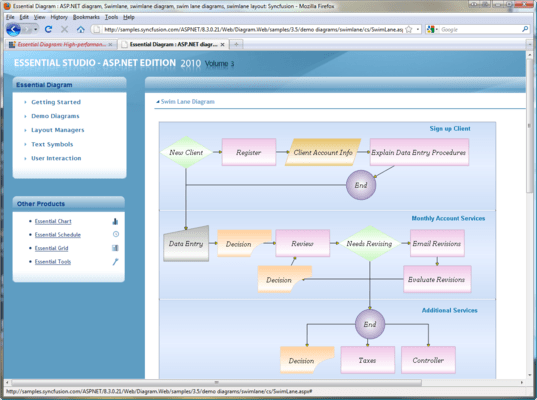
Create AJAX enabled Visio-like diagrams. Syncfusion Essential Diagram for ASP.NET is an extensible, high-performance .NET diagramming framework for ASP.NET applications. It can be used for developing Microsoft Visio-like interactive graphics and diagramming applications. It stores graphical objects in a node graph and renders those objects on the screen. Syncfusion Essential Diagram for ASP.NET supports both vector and raster graphics on the drawing surface.

Syncfusion Essential Diagram for ASP.NET Architecture
Essential Diagram is designed to be a high-performance, modular, easy-to-use and easy-to-customize engine. Many of the classes and components in the library can be sub-classed, providing users the ability to extend and customize the library to meet their needs.
Export Options
Hierarchy
Model-view-controller
Property Inheritance and Styling
Syncfusion Essential Diagram for ASP.NET Node Linking
Essential Diagram comes with built-in shapes that let you link diagram nodes illustrating work flow.
Connector
End-Point Decorator
Line Routing and Bridging
Port
Syncfusion Essential Diagram for ASP.NET Layout Management
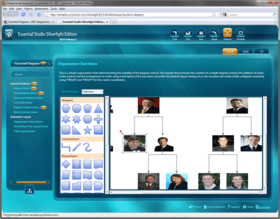
Essential Diagram provides a default layout implementation for all the common layout patterns. It also lets you easily customize the existing layout technique and implement brand new ones as well.
Custom Layout Manager
Directed-Tree Layout Manager
Hierarchical Layout Manager
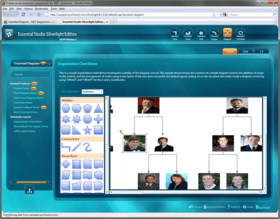
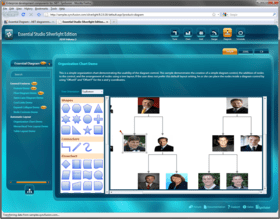
Org. Chart Layout
Radial-Tree Layout Manager
Symmetric Layout Manager
Table-Tree Layout Manager
Syncfusion Essential Diagram for ASP.NET Custom Symbols
Custom Symbols can be easily created using the Symbol Designer Utility. Such symbols can then be added to the symbol palette in a Diagram Builder application or simply be reused in diagrams you might create programmatically.
Symbol Designer Utility
Visio-Stencil Import
Syncfusion Essential Diagram for ASP.NET Scripting
Essential Diagram is integrated with the Essential Scripting Library to support diagram creation with scriptable interactivity. The scripting feature lets end-users define behaviors for diagram entities at run-time using one of the supported scripting languages. The scripting languages currently supported are C#, Visual Basic.NET and JScript.NET.
Syncfusion Essential Diagram for ASP.NET Graphical Objects
Essential Diagram provides you all the basic shapes to let you come up with symbols which reflect your business needs.
Label
Model
Node
Shapes
Symbol
Syncfusion Essential Diagram for ASP.NET Appearance
There are plenty of options to customize the appearance of different portions of a diagram. These options let you create professional-looking diagrams that can reflect the style patterns commonly used in your business domain.
Background Style
Enable Shading
Fill Style
Font Color and Style
Layer
Line Style
Shadow Style
Margin Support
Syncfusion Essential Diagram for ASP.NET Diagram Builder Mode
Essential Diagram can be used to create a rich Visio-like Diagram Builder application. This framework provides many utility controls to help you put such an application together very easily.
Drawing Tools
Editing Tools
Grouping
Layout Grid
Rulers
Serialization
Undo Redo
Syncfusion Essential Diagram for ASP.NET Wizard
Essential Diagram comes with advanced user-interface features to provide end-users with a rich visualization experience. The wizard features highlighted in this section include Wizard.
Syncfusion Essential Diagram for ASP.NET Client Side Functionalities
Essential Diagram provides support for client-side events and methods that allows access to different nodes drawn in diagram control.
Client-Side Event
In-Place Editing
Node Information
Please note: Syncfusion Essential Diagram insludes Windows Forms, Silverlight, WPF and ASP.NET components.
What’s new in Essential Diagram 2012 Volume 1?
HTML 5 Diagram Modes - Essential Diagram has two HTML 5-enhanced modes: SVG (Scalable Vector Graphics) mode and Canvas mode—which utilizes the CANVAS element. You can choose the mode that is best suited to your particular needs and required performance.
Export to Image - The Diagram control can export the current layout in the diagram area to multiple image formats, specifically .jpeg, .bmp, and .png.
Polyline Support - When in SVG mode, Essential Diagram can support polylines—multiple lines connected by intermediate points—for straight and orthogonal line connectors. The intermediate points in a polyline are visually represented as vertices.
Printing Support - Essential Diagram gives you the ability to print a diagram layout when in SVG mode; this includes nodes, line connectors, custom shapes and custom content.
Saving and Loading Diagram Edits - In SVG mode, the Diagram control can save and reload information regarding changes to nodes and line connectors to and from a database.
Data Binding - Diagram data binding has been enhanced to support the ADO.NET Entity Model.
Create AJAX enabled Visio-like diagrams.
Pricing: Syncfusion Essential Diagram for ASP.NET 2012 Vol 2 (V10.2.0.56) - Binary 1 Developer License - with 1 Year Subscription, Syncfusion Essential Diagram for ASP.NET 2012 Vol 2 (V10.2.0.56) - Binary 1 Developer Annual Subscription Renewal License (for subscriptions soon to expire or up to 30 days past expiration), Syncfusion Essential Diagram for ASP.NET 2012 Vol 2 (V10.2.0.56) - Binary 1 Developer Reinstatement of Lapsed Subscription License (for subscriptions lapsed longer than 30 days up to one year), Syncfusion Essential Diagram for ASP.NET 2012 Vol 2 (V10.2.0.56) with Source Code 1 Developer License with Source Code - with 1 Year Subscription, Syncfusion Essential Diagram for ASP.NET 2012 Vol 2 (V10.2.0.56) with Source Code 1 Developer Annual Subscription Renewal License (for subscriptions soon to expire or up to 30 days past expiration) with Source Code, Syncfusion Essential Diagram for ASP.NET 2012 Vol 2 (V10.2.0.56) with Source Code 1 Developer Reinstatement of Lapsed Subscription License (for subscriptions lapsed longer than 30 days up to one year) with Source Code, Syncfusion Essential Diagram for ASP.NET 2012 Vol 2 (V10.2.0.56) - Binary Site License Site License - with 1 Year Subscription - Allows upto 500 Developers at a single address, Syncfusion Essential Diagram for ASP.NET 2012 Vol 2 (V10.2.0.56) - Binary Site License Site Annual Subscription Renewal License (for subscriptions soon to expire or up to 30 days past expiration) - Allows upto 500 Developers at a single address, Syncfusion Essential Diagram for ASP.NET 2012 Vol 2 (V10.2.0.56) - Binary Site License Site Reinstatement of Lapsed Subscription License (for subscriptions lapsed longer than 30 days up to one year) - Allows upto 500 Developers at a single address, Syncfusion Essential Diagram for ASP.NET 2012 Vol 2 (V10.2.0.56) with Source Code Site License Site License with Source Code - with 1 Year Subscription - Allows upto 500 Developers at a single address, Syncfusion Essential Diagram for ASP.NET 2012 Vol 2 (V10.2.0.56) with Source Code Site License Site Annual Subscription Renewal License (for subscriptions soon to expire or up to 30 days past expiration) with Source Code - Allows upto 500 Developers at a single address, Syncfusion Essential Diagram for ASP.NET 2012 Vol 2 (V10.2.0.56) with Source Code Site License Site Reinstatement of Lapsed Subscription License (for subscriptions lapsed longer than 30 days up to one year) with Source Code - Allows upto 500 Developers at a single address
Evals & Downloads: Read the Syncfusion Site License Agreement, Read the Syncfusion License Agreement - Requires Acrobat Reader, Read the Syncfusion HTML5 datasheet - Requires Acrobat Reader, Read the Syncfusion Company Brochure - Requires Acrobat Reader, Read the Syncfusion - Overview of products and Suite options document - Requires Acrobat Reader, Download the Syncfusion User Guide Installer onto your computer, Download the Syncfusion Class Reference Documentation Installer onto your computer, Download the Syncfusion Essential Studio 2012 Vol 2 (V10.2.0.56) evaluation on to your computer - Expires After 30 Days
Operating System for Deployment: Windows 7, Windows Vista, Windows XP, Windows Server 2003, Windows 2000
Architecture of Product: 32Bit
Product Type: Component
Component Type: ASP.NET WebForms, ASP.NET AJAX (ATLAS), .NET WinForms, .NET WPF, Silverlight, 100% Managed Code, Source Code, JavaScript, AJAX
Built Using: Visual C# .NET
Compatible Containers: Microsoft Visual Studio 2010, Microsoft Visual Studio 2008, Microsoft Visual Studio 2005, Microsoft Visual Basic 2010, Microsoft Visual Basic 2008, Microsoft Visual Basic 2005, Microsoft Visual C++ 2010, Microsoft Visual C++ 2008, Microsoft Visual C++ 2005, Microsoft Visual C# 2010, Microsoft Visual C# 2008, Microsoft Visual C# 2005, Delphi 8.0, C#Builder, .NET Framework 4.0, .NET Framework 3.5, .NET Framework 3.0, .NET Framework 2.0, Silverlight 4
Product Class: User Interface Components
Keywords: syncfusion essential diagram for windows forms, essential diagram for windows forms
Syncfusion Sync fusion
Flow Diagramming diagram diagrams flowchart
Part numbers: PC-515342-455508 515342-455508 PC-515342-455514 515342-455514 PC-515342-455526 515342-455526 PC-515342-455511 515342-455511 PC-515342-455517 515342-455517 PC-515342-455527 515342-455527 PC-515342-455528 515342-455528 PC-515342-455529 515342-455529 PC-515342-455530 515342-455530 PC-515342-455531 515342-455531 PC-515342-455532 515342-455532 PC-515342-455533 515342-455533
Publisher
Primary Category
Related Products