

 (12)
(12)


 (5)
(5)공식 공급 업체
200 이상의 소프트웨어 개발처와 판매 계약을 맺은 공인 디스트리뷰터로서 합법적인 라이선스를 제공합니다.
모든 브랜드 보기.

릴리스 노트: Sample: Backstage background creation improved and menu separators added. SkinFramework Child window ... 더 읽기 본 제품에 관한 더 많은 결과 보기
릴리스 노트: Application Stability and Initialization- This release has significantly improved the application initialization process with enhanced verification. This ensures a more reliable and robust startup, reducing potential issues and improving overall application stability. Modernized Windows 11 Support- ... 더 읽기
설명: Docking Pane, Property Grid, Report Control, Shortcut Bar, Syntax Edit, Skin Framework and Task Panel. ... lines of code to create any charting style. Command Bars- Command Bars includes customizable menus, ... provides an easy to create hierarchical list of editable properties and represent any data type ... 더 읽기
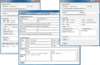
설명: Windows XP, Windows Server 2003 and Windows 2000. Why Choose AddEmail? It takes only 3 lines of code ... lines of code to accomplish the same task. AddEmail can send emails asynchronously without blocking your ... line of code. AddEmail automatically creates HTML email and attaches all images referenced in the HTML. ... 더 읽기 본 제품에 관한 더 많은 결과 보기
설명: Windows 2000. Why Choose AddEmail? It takes only 3 lines of code to send HTML email with attachments using ... AddEmail. With other controls or.NET classes you will need 20+ lines of code to accomplish the same task. ... AddEmail you can import HTML files with embedded images in just one line of code. AddEmail automatically ... 더 읽기
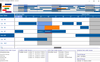
설명: Edit Cursors. Custom bar start / end Icons. Date/Time at X,Y coordinate. Dates in Bars. Dates at End ... Edit Modes. Multi Level Undo / Redo. Pre-defined start /end Icons. Programmatic Date/Time Scrolling. ... Weekend Color. Multi Column Resource List Data Grid Alternating Line Color. Checkbox Edit Mode. Column ... 더 읽기 본 제품에 관한 더 많은 결과 보기
설명: intervals. Gantt Scheduling Area Bar Fill Styles. Bar Sub Text. Built in Undo Feature. Custom Edit Cursors. ... Edit Modes. Multi Level Undo / Redo. Pre-defined start /end Icons. Programmatic Date/Time Scrolling. ... Weekend Color. Multi Column Resource List Data Grid Alternating Line Color. Checkbox Edit Mode. Column ... 더 읽기
사양: Solutions Schedule for COM Solutions Schedule COM 64 Solutions Schedule for.NET Standard Edition ... Solutions Schedule for.NET Corporate Edition Solutions Schedule for.NET Enterprise Edition Solutions ... Custom Edit Cursors Custom bar start / end Icons Date/Time at X,Y ... 더 읽기
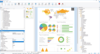
릴리스 노트: xlsx, txt and xml. DOM bar chart, Z-axes can now be edited / added. Components Alaska Xbase++ ... in debug output. The PDF export now also sets the creation date metadata field. Further improved line ... code 421 (meaning “The service is unavailable due to a connection problem” – should be 452 (“Too many ... 더 읽기 본 제품에 관한 더 많은 결과 보기
릴리스 노트: selection (in table creation wizard) now has the 'fields' node expanded by default. Web Report ... field selection (in table creation wizard) now has the "fields" node expanded by default. Web ... 더 읽기
릴리스 노트: with an asterisk. Changing of 3D chart view angles in the chart dialog always triggered creation of completely new ... 더 읽기
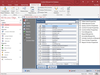
설명: databases by understanding how they work. Comprehensive Module Analysis with the Code Parser- Total Access ... Analyzer includes a proprietary Microsoft Visual Basic for Applications (VBA) code parser that understands ... your module code to generate detailed analysis of your code in modules, classes, and behind forms and ... 더 읽기 본 제품에 관한 더 많은 결과 보기
설명: of your databases by understanding how they work. Comprehensive Module Analysis with the Code Parser- ... Total Access Analyzer includes a proprietary Microsoft Visual Basic for Applications (VBA) code parser ... that understands your module code to generate detailed analysis of your code in modules, classes, and behind forms ... 더 읽기
릴리스 노트: XML (Portrait) Data Macro Analysis- Total Access Analyzer now parses data macro code to document what ... 더 읽기
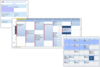
설명: Calendar View. Multi-Column Day View. Multi-Column Resource View. Week View. Direct Inline Editing. Drag ... 더 읽기 본 제품에 관한 더 많은 결과 보기
설명: Direct Inline Editing. Drag and Drop Scheduling. More appointments indicator (stock or custom). Control ... 더 읽기
릴리스 노트: Enhanced gesture handling. Appointment resize enhancements. Appointment edit window fill. Appointment ... border enhancements. Appointment image management. Enhanced how the control hides the edit window when ... 더 읽기
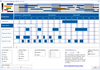
설명: Edit Cursors. Custom bar start / end Icons. Date/Time at X,Y coordinate. Dates in Bars. Dates at End ... Edit Modes. Multi Level Undo / Redo. Pre-defined start /end Icons. Programmatic Date/Time Scrolling. ... Weekend Color. Multi Column Resource List Data Grid Alternating Line Color. Checkbox Edit Mode. Column ... 더 읽기 본 제품에 관한 더 많은 결과 보기
설명: Scheduling Area Bar Fill Styles. Bar Sub Text. Built in Undo Feature. Custom Edit Cursors. Custom bar start / ... Bars Before Schedule, Method. Time Bars After Schedule, Method. Milestone Markers. Multiple Edit Modes. ... Column Resource List Data Grid Alternating Line Color. Checkbox Edit Mode. Column Designer Property Page. ... 더 읽기
사양: Solutions Schedule for COM Solutions Schedule COM 64 Solutions Schedule for.NET Standard Edition ... Solutions Schedule for.NET Corporate Edition Solutions Schedule for.NET Enterprise Edition Solutions ... Custom Edit Cursors Custom bar start / end Icons Date/Time at X,Y ... 더 읽기
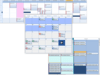
설명: of code-level technical support. Component updates. Product upgrades. Online license management. Online 24 hour ... visual flexibility and built-in functionality ct DropDate- date-edit object with a built-in drop-down ... and Grid: ct Combo- drop down list control offering multiple columns, built-in sorting, images lists, edit ... 더 읽기 본 제품에 관한 더 많은 결과 보기
설명: All DBI component software products include: One full year of code-level technical support. Component ... functionality ct DropDate- date-edit object with a built-in drop-down calendar, smart data-entry features ct ... down list control offering multiple columns, built-in sorting, images lists, edit, import/ export XML ... 더 읽기
릴리스 노트: Appointment edit window fill. Appointment border enhancements. Appointment image management. Enhanced how ... the control hides the edit window when focus is lost so that the appointment remains selected. Adjusted when ... 더 읽기

설명: package. Studio Controls R4 contains Appointment Scheduling, Data input and edits, Dialogues, Calendars, ... single, value-packed product. Studio Controls R4 also includes sample applications, sample source code ... Scheduling, Data input and edits, Dialogues, Calendars, Data and Menu Navigation, General Presentation ... 더 읽기 본 제품에 관한 더 많은 결과 보기
설명: source code in C#, VB.NET, VB, Access, VFP and detailed component documentation. Royalty-free ... Date, Month,and Year controls. Data Edit/Input/Grid: Add effective user interfaces with: Check, DEdit, ... 83.NET WinForms and ActiveX controls sample applications, and sample source code in C#, ... 더 읽기
호환성: 32Bit 툴 타입 Component 콤포넌트 타입.NET WinForms 100% Managed Code ActiveX OCX COM Add-in for Office 2000 DLL ... 더 읽기
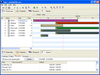
설명: Include sophisticated time management capability in your applications. The Gantt time package is a collection of user interface components which handles time blocks. The time blocks are displayed in a Gantt chart or a schema view. The times are connected to an owner, for example a person or an ... 더 읽기 본 제품에 관한 더 많은 결과 보기
가격: Unlimited Developers at a Single Physical Address) Our Part No: 510322-1206972 1 Source Code License ... (includes 1 Developer Subscription License) Our Part No: 510322-1206980 1 Source Code Subscription Renewal ... 더 읽기
호환성: Tested- Yes Documentation Reviewed- Yes Sample Code Reviewed- Yes Disk Space Required: 1MB, 3MB with full ... 더 읽기
전화 : 00798 14 800 6332
팩스 : +1 770 250 6199


