

 (12)
(12)

공식 공급 업체
200 이상의 소프트웨어 개발처와 판매 계약을 맺은 공인 디스트리뷰터로서 합법적인 라이선스를 제공합니다.
모든 브랜드 보기.
기능: 셀, 열, 행 레벨의 포맷 – 버전 1.6 에는 많은 고도의 포맷 기능이 있습니다. 버전 2.0에는 이러한 기능이 유지되며, 포맷 서비스의 새로운 세트가 추가되었습니다. 프로그래머는 데이터 표시 방법을 완전하게 제어할 수 있습니다. 통지와 기준을 사용하여 각각의 셀, 열, 행을 포맷할 수 있게 되었습니다. 포맷 작업을 용이하게 하기 위하여 새로운 툴, FormatStyles이 추가되었습니다. FormatStyles은 폰트, 색, 이미지 등의 포맷 정보를 유지하는 별개의 객체입니다. 워드 램프 셀과 직전 행의 서포트 데이터는 단일의 ... 더 읽기

릴리스 노트: DPI support added to both Calendar and DatePicker. Calendar DPI support added to both Calendar and DatePicker. Controls TVIS_CUT state support added. Report DPI support added. CommandBars Mouse message filtering removed from mouse hook, Gallery's popup closing logic fixed on mouse up event. ... 더 읽기 본 제품에 관한 더 많은 결과 보기
릴리스 노트: Adds new FrameShadow component. Added FrameShadow component. Added VB6, C# and VB.NET samples for Frame Shadow. Calendar System defined format of year/month string added to DatePicker. Month and day names added to DatePicker. CommandBars DialogBar.CaptionPopup property added. Controls Control re ... 더 읽기
릴리스 노트: Adds new Visual Studio themes plus new PasswordPeek and WebBrowser controls. SuitePro Added Microsoft Visual Studio 2017, 2019 and 2022 themes to all related controls. Registration-free COM manifests have been added for all OCX modules. Chart Added support for legend item sorting. CommandBars ... 더 읽기
릴리스 노트: signatures Essential PDF supports timestamps with digital signatures, noting the date and time when ... 더 읽기
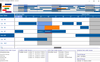
설명: presenting dates, start and end times, specific resource related data including allocation details. Features: ... Edit Cursors. Custom bar start / end Icons. Date/Time at X,Y coordinate. Dates in Bars. Dates at End ... Edit Modes. Multi Level Undo / Redo. Pre-defined start /end Icons. Programmatic Date/Time Scrolling. ... 더 읽기 본 제품에 관한 더 많은 결과 보기
설명: Custom bar start / end Icons. Date/Time at X,Y coordinate. Dates in Bars. Dates at End of TimeBars. ... Edit Modes. Multi Level Undo / Redo. Pre-defined start /end Icons. Programmatic Date/Time Scrolling. ... Print Title. Print Footers. Print to Any Page Format. Print Multiple Pages. Variable Timline Ruler (Date ... 더 읽기
사양: Custom Edit Cursors Custom bar start / end Icons Date/Time at X,Y ... coordinate Dates in Bars Dates at End of TimeBars Display ... Pre-defined start /end Icons Programmatic Date/Time Scrolling ... 더 읽기
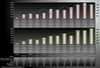
스크린샷: Improved multi-axis capabilities, intelligent date-time handling ideal for continuous and ... 더 읽기 본 제품에 관한 더 많은 결과 보기
스크린샷: Improved multi-axis capabilities, intelligent date-time handling ideal for continuous ... 더 읽기
릴리스 노트: Graph and Scientific Graph can now zoom a background image with the data. Speed Improvements 3D rendering supports Direct3D in plotting, annotations, hot-spots, and items uniquely offered via the DirectX domain. Support for double precision data and Direct3D double precision shaders. This allows ... 더 읽기
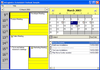
설명: tasks, dates) from all three components to and from a file based on the iCalendar format NEW Property ... of the TaskPad Display images for completion of tasks Set dates for completion of tasks Set fonts and colors ... 더 읽기
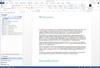
릴리스 노트: Date/Time and Version Variables- When adding a new text variable, you can now select Text, Version ... or Date/Time. Dozens of Usability Enhancements and Other Improvements- A number of critical bug fixes ... 더 읽기
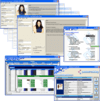
릴리스 노트: Dynamic date and time axis on any plot Dual Y axis and logarithmic axes supported Axis annotation options ... 더 읽기 본 제품에 관한 더 많은 결과 보기
릴리스 노트: Updates in 2009 v3 ComponentOne Studio for WinForms New XmlEditor control and Report Scheduler empower end-users to edit Xhtml documents and assign tasks for scheduling reports. Existing controls such as FlexGrid and PDF have several enhancements. Componentone Studio for WPF ComponentOne Studio for ... 더 읽기
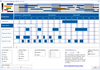
설명: presenting dates, start and end times, specific resource related data including allocation details. Features: ... Edit Cursors. Custom bar start / end Icons. Date/Time at X,Y coordinate. Dates in Bars. Dates at End ... Edit Modes. Multi Level Undo / Redo. Pre-defined start /end Icons. Programmatic Date/Time Scrolling. ... 더 읽기 본 제품에 관한 더 많은 결과 보기
설명: end Icons. Date/Time at X,Y coordinate. Dates in Bars. Dates at End of TimeBars. Display Overlapping ... Multi Level Undo / Redo. Pre-defined start /end Icons. Programmatic Date/Time Scrolling. Schedule Notes. ... Print Footers. Print to Any Page Format. Print Multiple Pages. Variable Timline Ruler (Date / Time ... 더 읽기
사양: Custom Edit Cursors Custom bar start / end Icons Date/Time at X,Y ... coordinate Dates in Bars Dates at End of TimeBars Display ... Pre-defined start /end Icons Programmatic Date/Time Scrolling ... 더 읽기
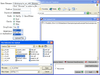
고객 리뷰: no issues to date with their components. Good show. ba [USA] 5 ... 더 읽기
전화 : 00798 14 800 6332
팩스 : +1 770 250 6199


