

 (4)
(4)


 (5)
(5) (1)
(1)공식 공급 업체
200 이상의 소프트웨어 개발처와 판매 계약을 맺은 공인 디스트리뷰터로서 합법적인 라이선스를 제공합니다.
모든 브랜드 보기.
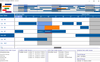
설명: presenting dates, start and end times, specific resource related data including allocation details. Features: ... Edit Cursors. Custom bar start / end Icons. Date/Time at X,Y coordinate. Dates in Bars. Dates at End ... Edit Modes. Multi Level Undo / Redo. Pre-defined start /end Icons. Programmatic Date/Time Scrolling. ... 더 읽기 본 제품에 관한 더 많은 결과 보기
설명: Custom bar start / end Icons. Date/Time at X,Y coordinate. Dates in Bars. Dates at End of TimeBars. ... Edit Modes. Multi Level Undo / Redo. Pre-defined start /end Icons. Programmatic Date/Time Scrolling. ... Print Title. Print Footers. Print to Any Page Format. Print Multiple Pages. Variable Timline Ruler (Date ... 더 읽기
사양: Custom Edit Cursors Custom bar start / end Icons Date/Time at X,Y ... coordinate Dates in Bars Dates at End of TimeBars Display ... Pre-defined start /end Icons Programmatic Date/Time Scrolling ... 더 읽기
릴리스 노트: Engine). Answer Area and OMR Date fields for high-level OMR Forms Recognition. Document Viewer ... 더 읽기
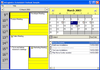
설명: tasks, dates) from all three components to and from a file based on the iCalendar format NEW Property ... of the TaskPad Display images for completion of tasks Set dates for completion of tasks Set fonts and colors ... 더 읽기
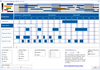
설명: presenting dates, start and end times, specific resource related data including allocation details. Features: ... Edit Cursors. Custom bar start / end Icons. Date/Time at X,Y coordinate. Dates in Bars. Dates at End ... Edit Modes. Multi Level Undo / Redo. Pre-defined start /end Icons. Programmatic Date/Time Scrolling. ... 더 읽기 본 제품에 관한 더 많은 결과 보기
설명: end Icons. Date/Time at X,Y coordinate. Dates in Bars. Dates at End of TimeBars. Display Overlapping ... Multi Level Undo / Redo. Pre-defined start /end Icons. Programmatic Date/Time Scrolling. Schedule Notes. ... Print Footers. Print to Any Page Format. Print Multiple Pages. Variable Timline Ruler (Date / Time ... 더 읽기
사양: Custom Edit Cursors Custom bar start / end Icons Date/Time at X,Y ... coordinate Dates in Bars Dates at End of TimeBars Display ... Pre-defined start /end Icons Programmatic Date/Time Scrolling ... 더 읽기
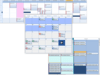
릴리스 노트: with buit-in combo boxes and date pickers. ctxPush- (v1.0.0.1) New, enhanced Unicode, 32 bit and 64 bit ActiveX ... 더 읽기 본 제품에 관한 더 많은 결과 보기
스크린샷: 0 ... 더 읽기
설명: visual flexibility and built-in functionality ct DropDate- date-edit object with a built-in drop-down ... calendar, smart data-entry features ct Date- a monthly calendar presenting one or two months at a time ct ... Controls: ct Check- five-state check box ct DEdit- date / time masked edit ct MEdit- flexible data masked ... 더 읽기
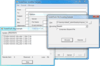
릴리스 노트: synchronization across a wider range of systems and future-proof applications that work with dates and times ... 더 읽기 본 제품에 관한 더 많은 결과 보기
릴리스 노트: a hard close on their connection. Corrected an issue which could result in incorrect publication dates ... 더 읽기
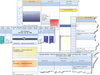
스크린샷: Create your own style and calendar presentations with Studio Controls R4's ctDate, ctYear,ctMonth, dbiMonth ... 더 읽기 본 제품에 관한 더 많은 결과 보기
설명: systems with as many individual personalities as end- users demand: Date, DropDate, MDay, Days, Alarm, ... Date, Month,and Year controls. Data Edit/Input/Grid: Add effective user interfaces with: Check, DEdit, ... 더 읽기
설명: individual personalities as end- users demand: Date, DropDate, MDay, Days, Alarm, Week, Contact, DayView, PIM ... Calendars: Create your own style and calendar presentations with: Calendar, Date, Month,and Year controls. ... 더 읽기
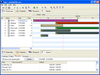
설명: 애플리케이션에 정교한 시간 관리 기능을 포함 시킵니다. The Gantt time package is a collection of user interface components which handles time blocks. The time blocks are displayed in a Gantt chart or a schema view. The times are connected to an owner, for example a person or an activity in a project. You can also use it ... 더 읽기 본 제품에 관한 더 많은 결과 보기
설명: Include sophisticated time management capability in your applications. The Gantt time package is a collection of user interface components which handles time blocks. The time blocks are displayed in a Gantt chart or a schema view. The times are connected to an owner, for example a person or an ... 더 읽기
가격: Gantt Time Package V3.2 1 Developer Subscription License 부품 번호: 510322-1206944 1 Developer Subscription Renewal License 부품 번호: 510322-1206948 4 Developer Subscription License 부품 번호: 510322-1206952 4 Developer Subscription Renewal License 부품 번호: 510322-1206956 8 Developer Subscription License 부품 번호: ... 더 읽기
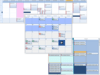
릴리스 노트: with buit-in combo boxes and date pickers. ctxPush- (v1.0.0.1) New, enhanced Unicode, 32 bit and 64 bit ActiveX ... 더 읽기 본 제품에 관한 더 많은 결과 보기
스크린샷: 0 ... 더 읽기
설명: visual flexibility and built-in functionality ct DropDate- date-edit object with a built-in drop-down ... calendar, smart data-entry features ct Date- a monthly calendar presenting one or two months at a time ct ... Controls: ct Check- five-state check box ct DEdit- date / time masked edit ct MEdit- flexible data masked ... 더 읽기
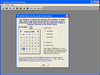
스크린샷: ctDropDate is a date edit control with a drop calendar. ... 더 읽기 본 제품에 관한 더 많은 결과 보기
스크린샷: ctDEdit is a date/time edit control. ... 더 읽기
설명: scrolling calendar, Contacts, and a date edit with a drop down calendar. To find out what's new for ... 더 읽기
전화 : 00798 14 800 6332
팩스 : +1 770 250 6199


