

 (12)
(12)


 (5)
(5)공식 공급 업체
200 이상의 소프트웨어 개발처와 판매 계약을 맺은 공인 디스트리뷰터로서 합법적인 라이선스를 제공합니다.
모든 브랜드 보기.

설명: applications that incorporate a full set of highly customizable user interface components including Visual ... toolbars and ribbons to give your application a professional and modern interface. Controls- Controls ... Syntax Edit provides users with a highly sophisticated text editor control that supports syntax ... 더 읽기 본 제품에 관한 더 많은 결과 보기
설명: 도구 모음, 메뉴, 도킹, 속성 그리드, 레포팅 및 달력 기능으로 귀하의 애플리케이션에 전문적이고 현대적인 외관을 제공합니다. Xtreme Command Bars는 Microsoft Office XP스타일의 툴바와 메뉴 작성에 유효한 컴포넌트 장치이며, 확장 도킹 알고리즘으로 구성되어 있습니다. Xtreme Docking Pane에는 Visual Studio.NET 스타일의 고도의 도킹 윈도우 작성에 필요한 컴포넌트가 준비되어 있습니다. Xtreme Property Grid를 사용함으로써 세련된 Visual Studio. ... 더 읽기
릴리스 노트: added to the WebBrowser control for ShellExplorer settings customization. User-Agent HTTP header ... customization has been added to the WebBrowser control. Client interface reference holding has been added ... 더 읽기
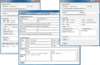
설명: user-friendly interface with mail progress indicator, Cancel button etc. Supports international characters- ... version.) No dependencies on other components- AddEmail doesn't depend on any other component or API ... asynchronously. The call returns immediately and your application is free to process user input while AddEmail ... 더 읽기 본 제품에 관한 더 많은 결과 보기
설명: version.) No dependencies on other components- AddEmail doesn't depend on any other component or API ... user-friendly interface with mail progress indicator, Cancel button etc. Supports international characters- ... it asynchronously. The call returns immediately and your application is free to process user input while AddEmail ... 더 읽기
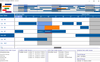
호환성: PowerBuilder 5.0.NET Framework 1.1.NET Framework 1.0 Product Class User Interface Components Test and Review ... 더 읽기 본 제품에 관한 더 많은 결과 보기
호환성: OS Windows 7 Windows Vista Windows XP Windows 2000 Windows 98 Windows NT 4.0 Windows 95 Windows NT 3.51 제품 아키텍쳐 32Bit 64Bit 툴 타입 Component 콤포넌트 타입 ActiveX OCX 개발에 사용된 툴 MFC V4.2 / V6.0.NET Ready/Tested with.NET RCW Yes General OCX96 호환 호환성있는 플랫드폼 Microsoft Visual Studio.NET 2003 Microsoft Visual ... 더 읽기
스크린샷: 0 ... 더 읽기
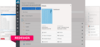
릴리스 노트: to be created once and can be maintained at just a single location. Improved Drag & Drop User Interface ... for the Table The new user interface is easier to use, and more intuitive. List & Label automatically ... to the latest Microsoft.NET Core platform and the interface has been implemented as a single page application ... 더 읽기 본 제품에 관한 더 많은 결과 보기
설명: the fully browser-based web controls on Windows, iOS, Linux and Android. The user interface has been ... all major development platforms, providing a powerful reporting engine, a flexible API and a ... master-detail reports/subreports, crosstabs, charts, RTF text, graphics, PDF objects, user defined objects and ... 더 읽기
설명: API and a feature-rich report designer. Just a few lines of code are needed to embed List & Label ... and Android. The user interface has been optimized for all common browsers on PC, laptops and tablets. Report ... in your desktop, web or cloud application, saving you up to 50% development time. It allows the users ... 더 읽기
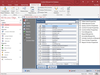
릴리스 노트: user interface to show progress of the documentation. Revised user manual and help file. ... 더 읽기 본 제품에 관한 더 많은 결과 보기
릴리스 노트: on the output reports' title, header, footer and groupings New Access 2010 user interface with theme ... 더 읽기
릴리스 노트: are now thicker to appear more clearly in preview and print. Improved User Interface Shows More Progress ... 더 읽기
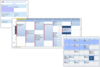
릴리스 노트: Adds new UserDrawn Header and Cell Text features, plus enhanced Print functions. New UserDrawn Header and Cell Text features. New Index values from Key ID or Code for Contact, Location and Task. New Hit Test methods allowing for more discrete information in each view. New Enhanced Print functions. ... 더 읽기
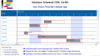
스크린샷: 0 ... 더 읽기 본 제품에 관한 더 많은 결과 보기
설명: which developers define the type of Gantt style end-user interaction, varying degrees of accuracy and ... & Custom Bar Styles. Text into View. Text Wrap. Time Bar Shadows. Time Bar Tool Tips. Undo / Redo. User ... Drawn Time Bars. User Drawn Time Bar After Event. Theme / Style Gradient Fills. Weekend Color. Multi ... 더 읽기
설명: end-user interaction, varying degrees of accuracy and supporting information that can be surfaced. ... Undo / Redo. User Drawn Time Bars. User Drawn Time Bar After Event. Theme / Style Gradient Fills. ... 더 읽기
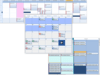
설명: Split- create application interfaces quickly with discrete navigational zones ct Tray- places icons ... users to open linked documents ct Listbar- a multi-column navigation component- display sets of sliding ... interfaces ct Digit- displays alpha-numeric characters ct Fold- container Tab object ct Image- invisible ... 더 읽기 본 제품에 관한 더 많은 결과 보기
설명: simulates a spiral tabbed notebook interface ct Text- enhanced text label, display text at any angle, 3D ... interface for validating / formatting text ct NEdit- enhanced numeric edit- integers, reals, floating point ... masked interface for validating / formatting text ctx NEdit- enhanced numeric edit- integers, reals, ... 더 읽기
릴리스 노트: ctxCalendar- (v4.0.0.2) Fix for issue with the BreakChar property. Fix for issue with the TimeDblClick and UserDrawnColorCell events not firing for AllDay time cells. Fix for issue with UserDrawnCellText event not receiving the correct Time value when triggered by an AllDay time cell. ctxCombo- (v2 ... 더 읽기
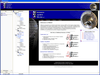
스크린샷: Extend the Windows interface standards quickly and effortlessly using Studio Controls R4 controls ... for great presentations and user navigation ... 더 읽기 본 제품에 관한 더 많은 결과 보기
설명: Data Edit/Input/Grid: Add effective user interfaces with: Check, DEdit, MEdit, NEdit, Grid Dialogues: ... purpose components will add to your own branding, User Interface design and implementation, and saving ... individual personalities as end- users demand: Date, DropDate, MDay, Days, Alarm, Week, Contact, DayView, PIM ... 더 읽기
설명: eleven general purpose components will add to your own branding, User Interface design and ... Windows interface standards quickly and effortlessly using these controls for great presentations and user ... Date, Month,and Year controls. Data Edit/Input/Grid: Add effective user interfaces with: Check, DEdit, ... 더 읽기
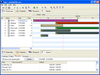
설명: 애플리케이션에 정교한 시간 관리 기능을 포함 시킵니다. The Gantt time package is a collection of user interface components ... display dependencies and collisions between times, which gives the end user a graphical way to view and ... 더 읽기 본 제품에 관한 더 많은 결과 보기
설명: is a collection of user interface components which handles time blocks. The time blocks are displayed in a Gantt ... in a project. You can also use it to display dependencies and collisions between times, which gives the end user ... 더 읽기
호환성: 4.0 Sybase PowerBuilder 7.0 Sybase PowerBuilder 6.0.NET Framework 1.0 Product Class User Interface ... 더 읽기
전화 : 00798 14 800 6332
팩스 : +1 770 250 6199


