Optimiza el proceso de depuración con vigilancias
Los IDEs que ofrecen vigilancias durante la depuración reducen la necesidad de ejecutar el código repetidamente y realizar comprobaciones manuales, lo que facilita resolver los problemas rápidamente.
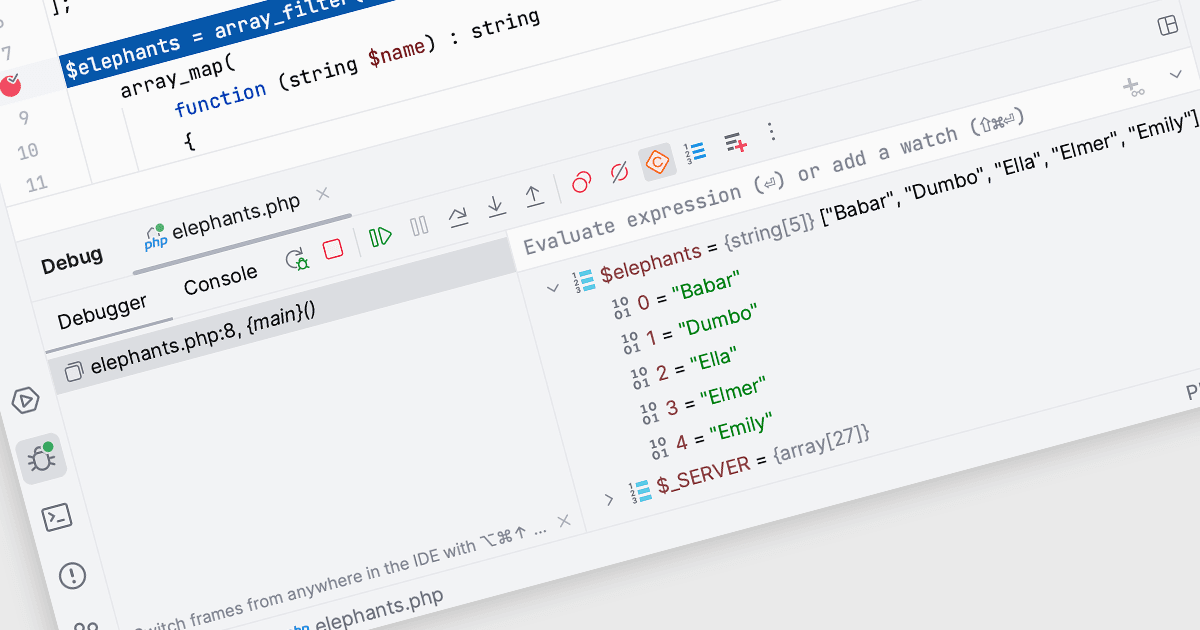
En los Entornos de Desarrollo Integrados (IDEs), las vigilancias dentro de la herramienta de depuración permiten a los desarrolladores supervisar y evaluar variables o expresiones específicas mientras un programa se ejecuta o se detiene en un punto de interrupción. Al agregar una vigilancia, los desarrolladores pueden observar cómo cambia el valor de una variable con el tiempo o seguir el resultado de una expresión, lo que ayuda a comprender el comportamiento del programa y a identificar posibles problemas. Esto facilita una mayor comprensión durante el proceso de depuración, permitiendo diagnosticar problemas de manera eficiente y validar la lógica dentro del código sin necesidad de añadir declaraciones de impresión adicionales o modificar el código fuente.
Varios Entornos de Desarrollo Integrados (IDEs) ofrecen la funcionalidad de vigilancias, incluyendo:
- PhpStorm de JetBrains te permite supervisar dinámicamente los valores de las variables durante las sesiones de depuración, lo que facilita detectar y corregir problemas de código.
- EiffelStudio de Eiffel Software proporciona capacidades de vigilancias completas para la inspección en tiempo real de variables, ayudando a los desarrolladores a seguir el flujo de datos y los cambios de estado.
- B4i (iOS) de Anywhere Software facilita la adición de vigilancias para observar transformaciones de variables, mejorando la eficiencia de depuración en proyectos de desarrollo iOS.
- RemObjects Elements te permite configurar vigilancias y realizar seguimiento de expresiones en múltiples plataformas, agilizando el proceso de depuración en aplicaciones complejas y multilenguaje.
Para un análisis en profundidad de las funciones y el precio, visita nuestra comparación de Entornos de Desarrollo Integrados (IDEs).