Regola i report più velocemente con la modifica in anteprima
Direttamente modifica gli elementi del report all’interno dell’anteprima, abilitando la visualizzazione in tempo reale delle modifiche a formattazione e layout e iterazioni più rapide.
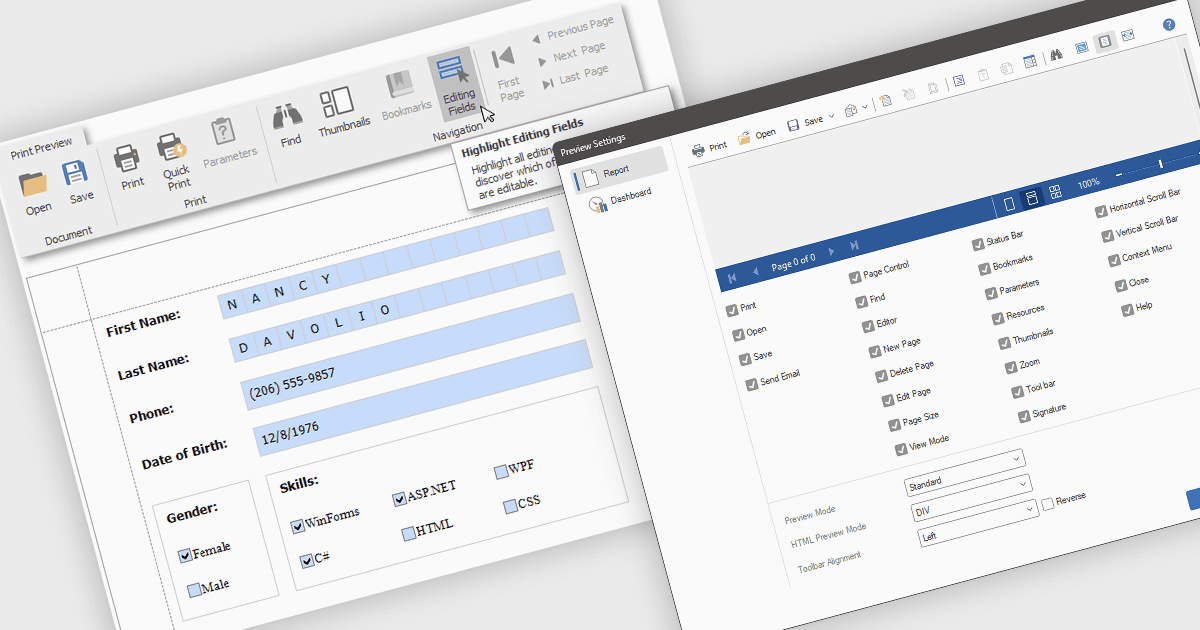
La modifica dei report in modalità di anteprima consente di apportare modifiche dirette agli elementi del report, come testo, grafici e layout, all’interno della finestra di revisione. Questo approccio offre vantaggi come iterazioni più rapide, maggiore accuratezza ed efficienza migliorata eliminando la necessità di passare tra le modalità di modifica e di anteprima. I team possono regolare le etichette dei grafici per maggiore chiarezza oppure modificare il layout di un report per una presentazione migliore, vedendo immediatamente l’impatto delle proprie modifiche e migliorando il processo di finalizzazione del report.
Diversi Controlli di reportistica .NET WPF offrono supporto per la modifica in anteprima, tra cui:
- DevExpress Reports consente la manipolazione diretta degli elementi del report nell’anteprima, offrendo un feedback visivo immediato per regolazioni più rapide e accurate.
- FastReport .NET by Fast Reports permette la modifica in anteprima degli oggetti del report, semplificando il processo di progettazione con visualizzazione in tempo reale delle modifiche al layout.
- Stimulsoft Reports.Wpf facilita la modifica interattiva del contenuto del report direttamente nella finestra di anteprima, offrendo un’esperienza WYSIWYG intuitiva per rifinire il report.
Per un’analisi approfondita di funzionalità e prezzo, visita il nostro confronto dei Controlli di reportistica .NET WPF.