Esporta i report con PDF AcroForms compilabili
Esporta i campi dei report come PDF AcroForms interattivi, consentendo un inserimento dati semplice, una formattazione coerente e la compatibilità con un’ampia gamma di visualizzatori PDF.
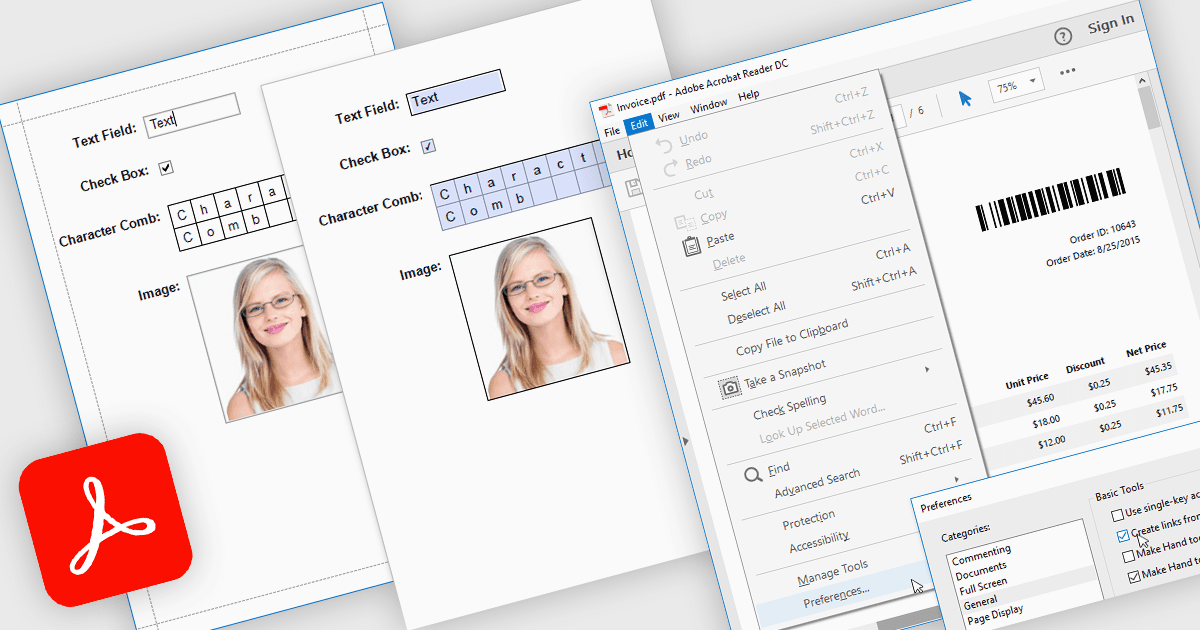
Esportare report in PDF con AcroForms consente di salvare i report come file PDF contenenti campi modulo completamente interattivi, invece di semplice testo statico. Elementi modificabili come caselle di testo, caselle di controllo, pulsanti di opzione e liste a discesa restano compilabili dopo l’esportazione, permettendo agli utenti di completare i moduli direttamente nei comuni visualizzatori PDF come Adobe Acrobat Reader - senza la necessità di software specializzato. I vantaggi sono considerevoli: le organizzazioni possono ridurre l’inserimento manuale dei dati, mantenere un formato coerente tra documenti distribuiti e migliorare l’accessibilità per gli utenti finali. Ad esempio, un’azienda potrebbe esportare un report di fattura con dettagli di fatturazione modificabili, creare un sondaggio che i destinatari possono compilare digitalmente oppure generare moduli di conformità che i clienti possono compilare e restituire elettronicamente. Integrando direttamente campi interattivi nei report esportati, AcroForms aiuta a rendere i flussi di lavoro documentali più efficienti, accurati e user-friendly.
Diversi controlli di reportistica .NET WPF offrono Esporta in PDF con AcroForms, tra cui:
- DevExpress Reports (Multi-Platform) ti consente di esportare PDF interattivi con AcroForms, abilitando campi modificabili su dispositivi e visualizzatori diversi.
- ActiveReports.NET di MESCIUS ti permette di creare report esportati come PDF AcroForm, supportando l’inserimento digitale dei dati, la conformità e una migliore distribuzione dei moduli.
- List & Label Enterprise Reporting Edition di combit facilita l’esportazione di PDF compilabili con AcroForms, preservando i campi interattivi per una raccolta dati professionale e user-friendly.
- FastReport .NET WPF consente di generare report come PDF AcroForm interattivi, combinando layout dinamici con campi modificabili per flussi di lavoro digitali efficienti.
Per un’analisi approfondita di funzionalità e prezzo, visita il nostro confronto dei controlli di reportistica .NET WPF.