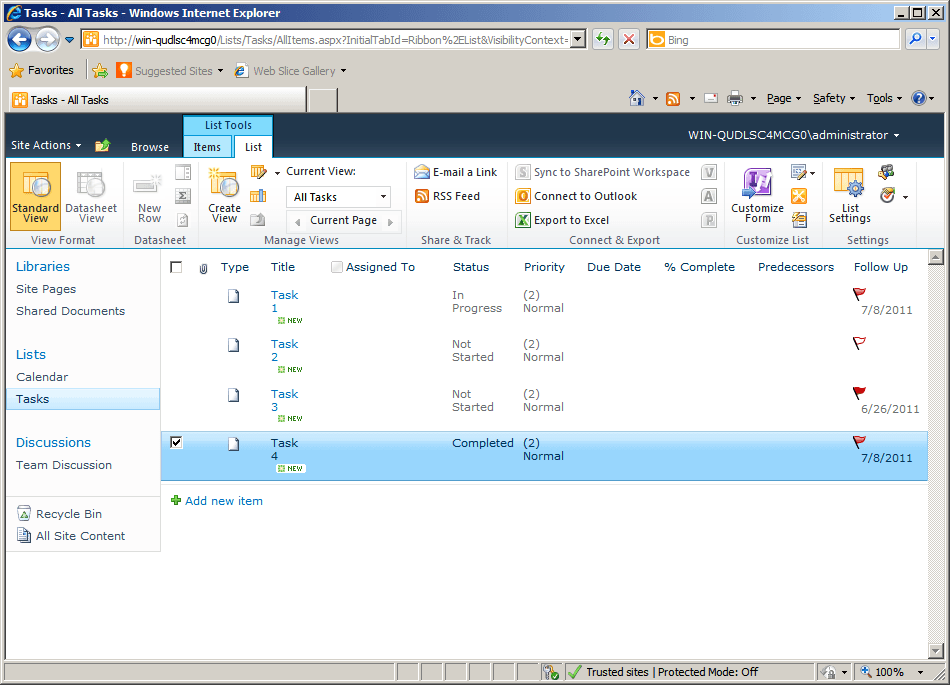
Follow-Up Column
Monitora e gestisci i follow-up email direttamente nella vista della posta in arrivo.
- Aggiunge una colonna dedicata per tenere traccia dello stato e delle azioni di follow-up.
- Organizza le attività email con chiara visibilità su conversazioni e scadenze.
- Supporta flussi di lavoro coerenti per gestire risposte, promemoria e responsabilità.

Prezzi da:
Caricamento...
| Disponibile singolarmente | Il nostro prezzo |
|---|---|
| Follow-Up Column | Caricamento |
| Disponibile anche in | |
|---|---|
| Indicator Columns Bundle | Caricamento |
| ArtfulBits Columns Suite | Caricamento |
| ArtfulBits SharePoint Suite | Caricamento |
Versione di prova disponibile Contattaci per una prova gratuita
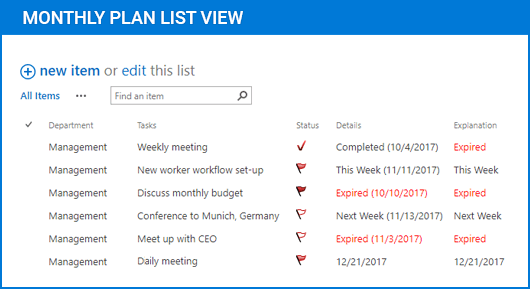
Follow-Up Column estende l'interfaccia email con un modo strutturato per monitorare e gestire le azioni di follow-up. Introduce una colonna dedicata che visualizza stato, promemoria e assegnazione, aiutando gli utenti a tenere traccia delle risposte in sospeso e a mantenere flussi di comunicazione organizzati su grandi volumi di messaggi.
Dedicated Follow-Up Column
Aggiunge una colonna visibile all'interno dell'elenco email che mostra lo stato del follow-up per ogni messaggio. Ciò consente agli utenti di scansionare rapidamente e identificare quali email richiedono attenzione senza aprire i singoli elementi o affidarsi a sistemi di tracciamento separati.
Custom Status Indicators
Fornisce indicatori di stato configurabili che riflettono la fase attuale di un processo di follow-up. Gli utenti possono assegnare e aggiornare gli stati per rappresentare azioni come risposta in attesa, in corso o completato, migliorando la chiarezza nei flussi di lavoro di comunicazione.
Integrated Reminder Management
Supporta l'assegnazione di promemoria direttamente nel contesto della colonna. Gli utenti possono associare scadenze o date di follow-up ai messaggi, garantendo risposte tempestive e riducendo il rischio di attività di comunicazione trascurate.
Centralized Email Task Tracking
Consolida le informazioni di follow-up nella vista della posta in arrivo, eliminando la necessità di strumenti di tracciamento esterni. Questo approccio aiuta a mantenere un'unica fonte di verità per gestire le responsabilità legate alla comunicazione e le azioni in sospeso.
Improved Workflow Visibility
Migliora la visibilità su grandi volumi di email presentando i dati di follow-up insieme ai metadati dei messaggi. Team e singoli utenti possono valutare rapidamente il carico di lavoro, dare priorità alle attività e monitorare i progressi senza cambiare contesto.
Flexible Configuration Options
Consente agli utenti di adattare il comportamento della colonna e le informazioni visualizzate in base ai requisiti specifici del flusso di lavoro. Ciò include la regolazione dei tipi di stato, delle regole di visibilità e del modo in cui i dati di follow-up vengono presentati nell'interfaccia.
Seamless Inbox Integration
Si integra direttamente nell'interfaccia esistente del client email, preservando i flussi di lavoro familiari e aggiungendo nuove funzionalità. Gli utenti possono gestire i follow-up senza interrompere i processi consolidati o richiedere una formazione approfondita.
Efficient Task Prioritization
Consente una rapida identificazione dei messaggi ad alta priorità combinando lo stato del follow-up con funzionalità di ordinamento e filtro. Questo aiuta gli utenti a concentrarsi sulle comunicazioni urgenti e a gestire il tempo in modo più efficace.
Consistent Communication Tracking
Garantisce che le azioni di follow-up vengano applicate in modo coerente a tutti i messaggi. Standardizzando il modo in cui i follow-up vengono registrati e visualizzati, riduce l'ambiguità e migliora la responsabilità nei flussi di lavoro individuali o di team.
Compatibilità del prodotto
Esamina i dettagli riportati di seguito per assicurarti che questo prodotto sia supportato nell'ambiente in uso.
Applicazione host
- SharePoint
- Visual Studio
Informazioni su ArtfulBits
ArtfulBits, fondata nel 2005 e con sede a Kharkiv, in Ucraina, è specializzata nella progettazione di componenti e controlli di alta qualità per Microsoft SharePoint, .NET e piattaforme mobili. Il suo portfolio include controlli per la visualizzazione dei dati, soluzioni per la gestione dei progetti e strumenti pensati per supportare l'ottimizzazione dei flussi di lavoro per professionisti IT e sviluppatori. Il brand è riconosciuto per affrontare requisiti complessi di gestione dei dati con un approccio orientato all'utente e per mantenere uno sviluppo attivo al fine di garantire la compatibilità continua con le tecnologie attuali. ArtfulBits aiuta i team software ad avanzare nei loro progetti con componenti affidabili e creati appositamente.