Instantly Apply Consistent Styles to Data Grids
Apply pre-designed themes to grids to achieve consistent, accessible interfaces with less styling effort and a more polished user experience.
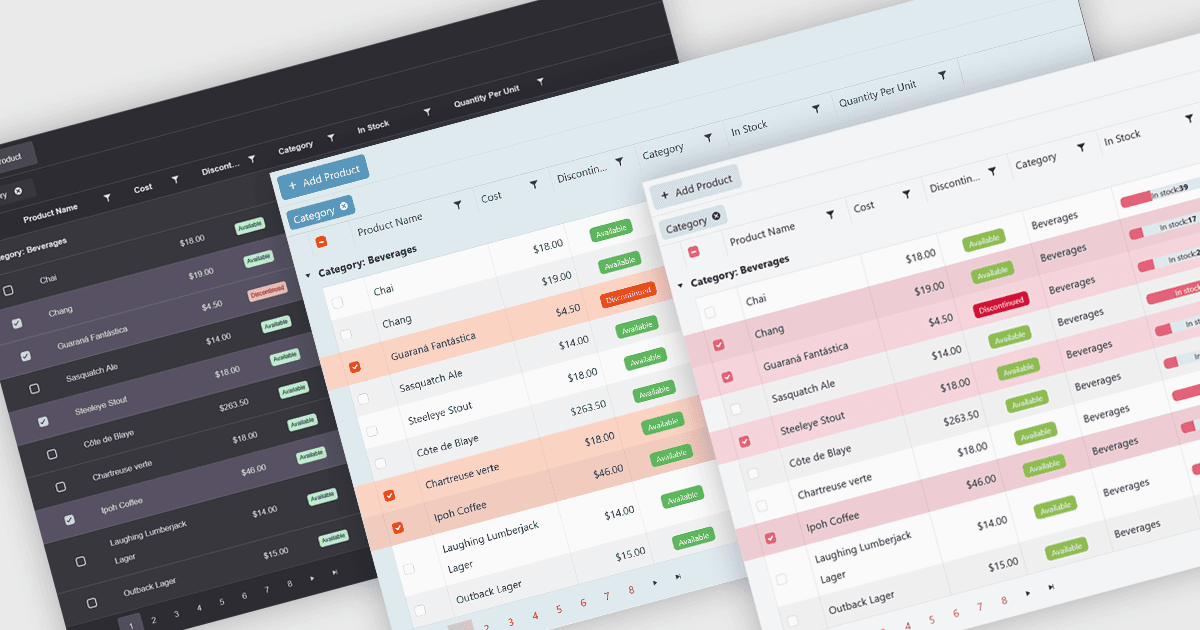
Built-in themes for grids are pre-designed visual styles that can be applied directly to data grid components within applications. These themes define elements such as color schemes, typography, spacing, and borders to create a consistent and polished appearance without requiring manual CSS. The primary benefit is efficiency, as teams can quickly implement a cohesive look that aligns with modern user interface standards. Built-in themes also enhance usability by improving readability, supporting accessibility, and offering a familiar interface that reduces user effort. For example, enterprise dashboards, admin panels, and financial reporting tools can all benefit from built-in themes to present complex data in a clear, user-friendly format while maintaining visual consistency across different parts of the application.
Several .NET Blazor grid components offer built-in theme support including:
- Telerik UI for Blazor Grid (part of Telerik UI for Blazor) allows rapid styling with built‑in themes like Material, Bootstrap and Fluent that ensure a modern visual layout.
- DevExpress Blazor Grid (part of DevExpress ASP.NET and Blazor) offers built‑in Classic and Fluent themes, plus Bootstrap integration, enabling interface consistency.
- Blazorise DataGrid (part of Blazorise) allows theming and appearance control through its theme API and templates for consistent styling.
- Syncfusion Blazor DataGrid (part of Syncfusion Essential Studio Enterprise) lets you apply default CSS or generate cohesive custom themes via Theme Studio.
For an in-depth analysis of features and price, visit our .NET Blazor grid controls comparison.