Add Conditional Formatting to Spreadsheets
Add intelligent visual cues to React spreadsheet applications so users can identify trends, thresholds, and key changes more efficiently.
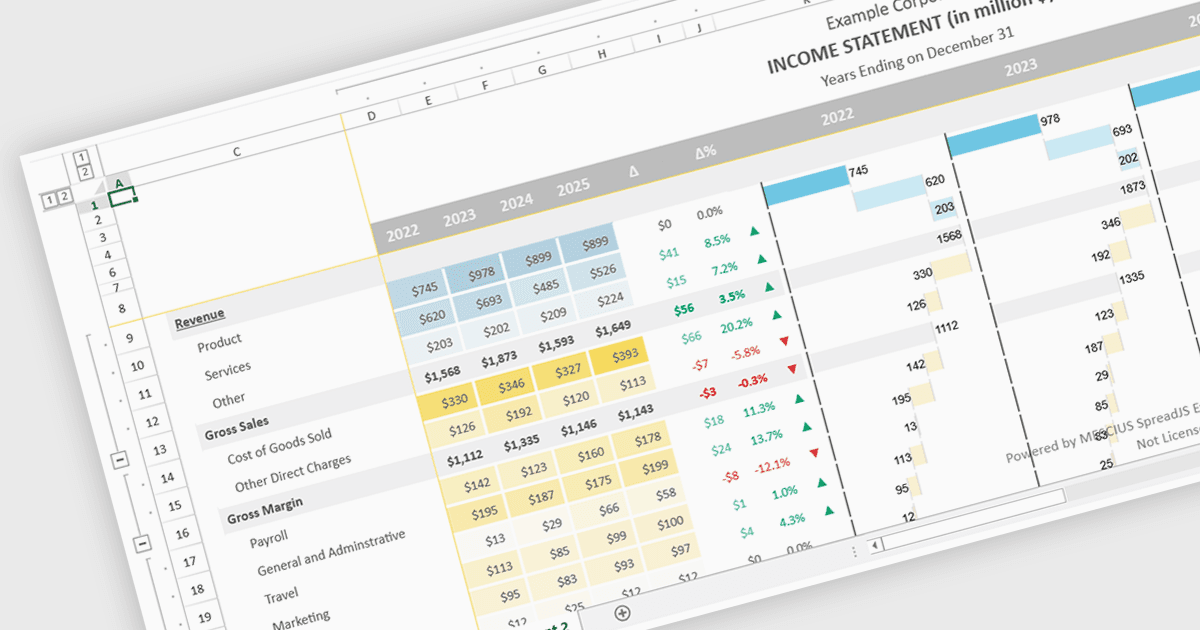
Conditional formatting support in a React spreadsheet component allows developers to apply dynamic visual styling to cells based on defined rules, values, formulas where supported, or predefined conditions, such as highlighting trends, thresholds, errors, or status changes as data changes. This capability improves data readability and usability by helping users identify important information quickly without manual analysis, while also enabling more interactive and responsive data-driven applications. For software developers, it provides a familiar spreadsheet experience within React applications, reduces the need for custom rendering logic, and supports the creation of dashboards, financial tools, reporting systems, and enterprise data management interfaces with clearer visual context.
Several React spreadsheet controls support conditional formatting including:
- SpreadJS by MESCIUS lets you apply rule-based conditional formatting in React spreadsheets, highlighting trends and thresholds with dynamic visual cell styling.
- Infragistics Ignite UI for React Spreadsheet (part of Infragistics Ignite UI) allows you to create React spreadsheets using conditional formatting rules that emphasize critical data.
- Syncfusion React Spreadsheet (part of Syncfusion Essential Studio Enterprise) facilitates conditional formatting enabling developers to visualize patterns and exceptions.
For an in-depth analysis of features and price, visit our React spreadsheet controls comparison.