Add Flexible Tabbed Navigation to Windows Apps
RAD Studio 13.2 Florence adds TabView and NavigationView controls to help developers create contemporary Windows navigation interfaces.
RAD Studio by Embarcadero is an integrated development environment (IDE) used to build applications for various platforms. It allows programmers to create native apps for Windows, macOS, mobile devices (Android and iOS), and more using C++ or Delphi. RAD Studio is known for its rapid application development features and is targeted towards professional developers building data-rich and visually appealing applications.
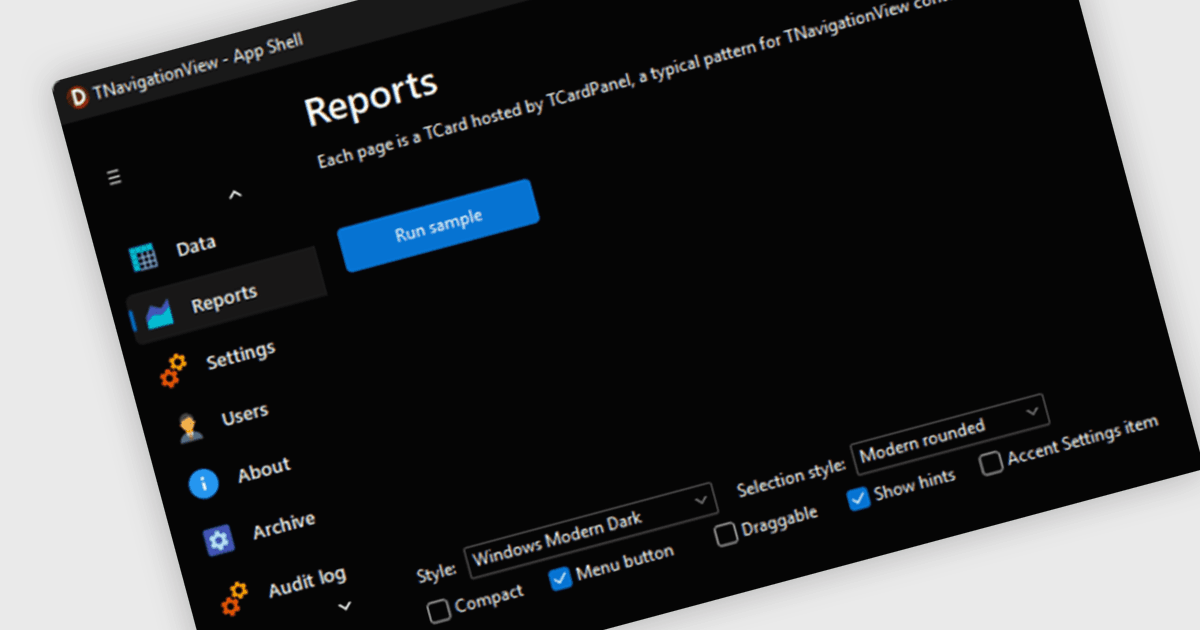
The RAD Studio 13.2 Florence release introduces two new VCL navigation controls, TabView and NavigationView. TabView provides horizontal tabbed navigation with images, multiline captions, close and add buttons, scrolling and an open-tabs menu, while NavigationView provides vertical navigation with normal and compact modes, images, multiline text, scrolling and optional drag-and-drop reordering. Both controls work with existing forms and other controls, helping developers build contemporary multi-view Windows interfaces without moving away from the VCL programming model.
To see a full list of what's new in version 13.2 Florence, see our release notes.
RAD Studio is licensed per Named, Network Named or Concurrent user and is available as a Perpetual License with an Update Subscription that includes support and free upgrades for 1 Year. See our RAD Studio licensing page for full details.
For more information, visit our RAD Studio product page.