分析报表中的数据并与之交互

11月 22, 2024
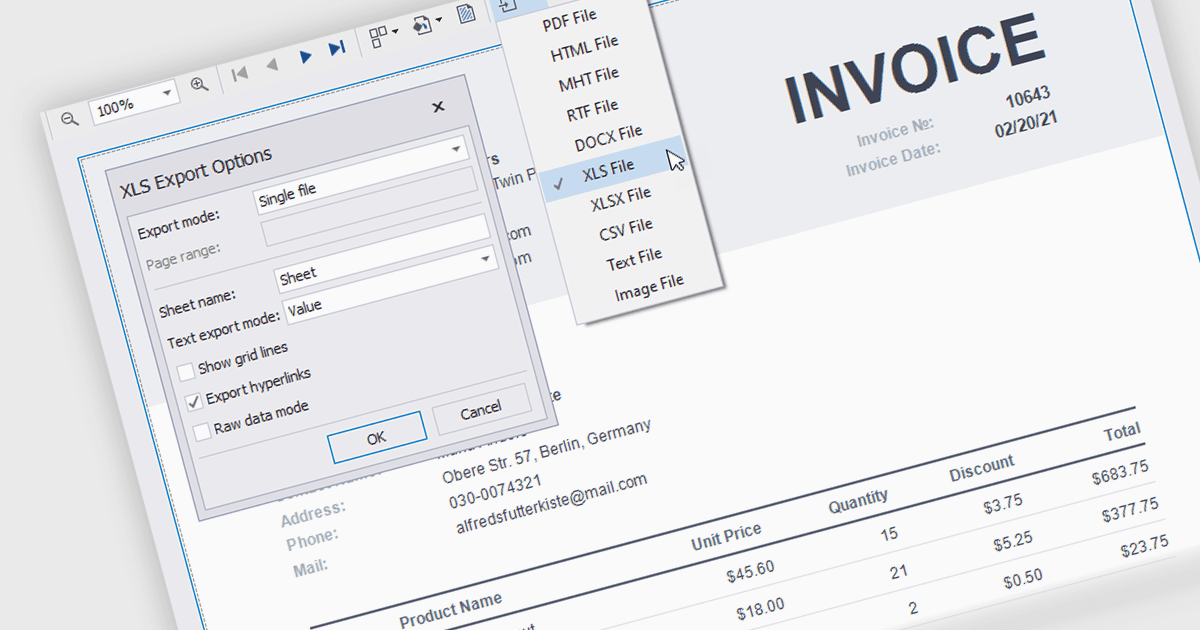
支持 XLS/XLSX 导出的 .NET 报表控件使用户能够直接在 Microsoft Excel 中编辑、筛选和操作报表数据。

继续用英语阅读:

The ability to export reports to XLS/XLSX enables developers to transform report data into Microsoft Excel files in the widely-used XLS or XLSX formats. This allows easy integration of structured data with Excel's powerful data analysis and presentation tools and ensures compatibility with industry standards. It simplifies the dissemination of information by providing end-users with editable spreadsheets that preserve the layout, formatting, and accuracy of the original reports. The capability enhances user experience, streamlines workflows, and supports automated reporting solutions in enterprise and business applications.

Several .NET Reporting Controls offer exporting of reports to XLS/XLSX including:

  • DevExpress Reports (Multi-Platform) allows you to export detailed, well-formatted reports to XLS and XLSX formats for seamless Excel integration.
  • ActiveReports.NET by MESCIUS, lets you deliver professional reports in XLS/XLSX formats, enabling precise data representation and user-driven customization in Excel.
  • Telerik Reporting facilitates exporting robust, interactive reports into Excel-compatible XLS/XLSX files, enhancing data analysis and sharing capabilities.
  • List & Label Professional Reporting Edition enables easy conversion of reports into XLS/XLSX formats, ensuring flexibility for spreadsheet-based processing and analysis.
  • Stimulsoft Reports.Net provides efficient exporting of reports to XLS/XLSX, supporting Excel's advanced functionality while preserving report structure.

For an in-depth analysis of features and price, visit our comparison of .NET Reporting Controls.

Compare .NET Reporting Controls