使用箭头注释为 PDF 增添清晰度
方向标记增强了文档审阅和技术插图效果,带来更清晰的沟通,并提升 PDF 的可读性。
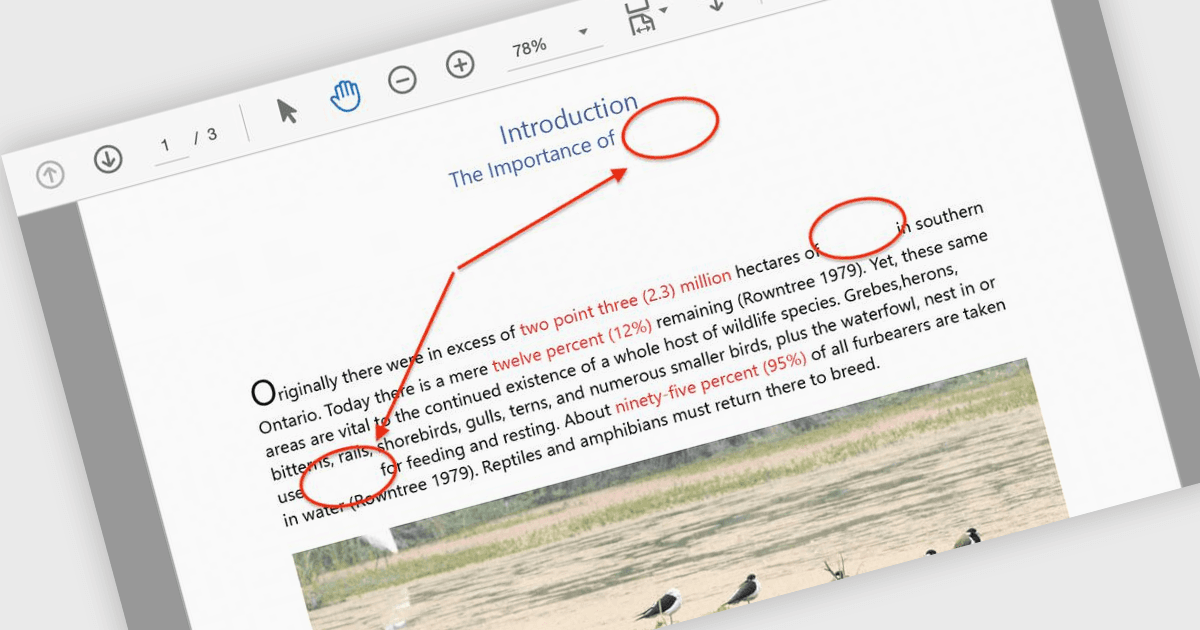
箭头注释是可视化工具,允许用户通过箭头作为方向指示器来突出显示 PDF 中的特定元素。此类注释在引导读者浏览复杂图表、工作流程或技术性插图时尤其有用——当清晰度至关重要时,箭头能帮助指向关键区域,从而消除混淆,确保重要细节不会被忽略,并在文档审阅或协作讨论期间简化沟通。常见使用场景包括在工程示意图中添加标注、在设计草稿中标记需要修改的区域,以及在报告中突出显示特定数据点。最终,这将产生更直观、更具吸引力的文档,并有效传达其预期信息。许多 PDF 处理库都支持以编程方式创建、定制和操作箭头注释,并提供诸如颜色、粗细、透明度和定位等选项,以适配各种使用场景。
一些 ASP.NET Core PDF 组件提供箭头注释,包括:
- Document Solutions for PDF(MESCIUS 提供)使用户能够创建并自定义箭头注释,支持可调节宽度、颜色和线条样式,以增强文档标注效果。
- ImageGear for .NET(Accusoft 提供)允许开发人员以编程方式添加、修改和移除箭头注释,并对定位与外观进行精确控制。
- Syncfusion ASP.NET Core PDF(Syncfusion Essential Studio Enterprise 的一部分)提供丰富的箭头注释,可在交互式 UX 中动态创建并编辑。
如需深入了解功能和价格,请访问我们的 ASP.NET Core PDF 组件对比。