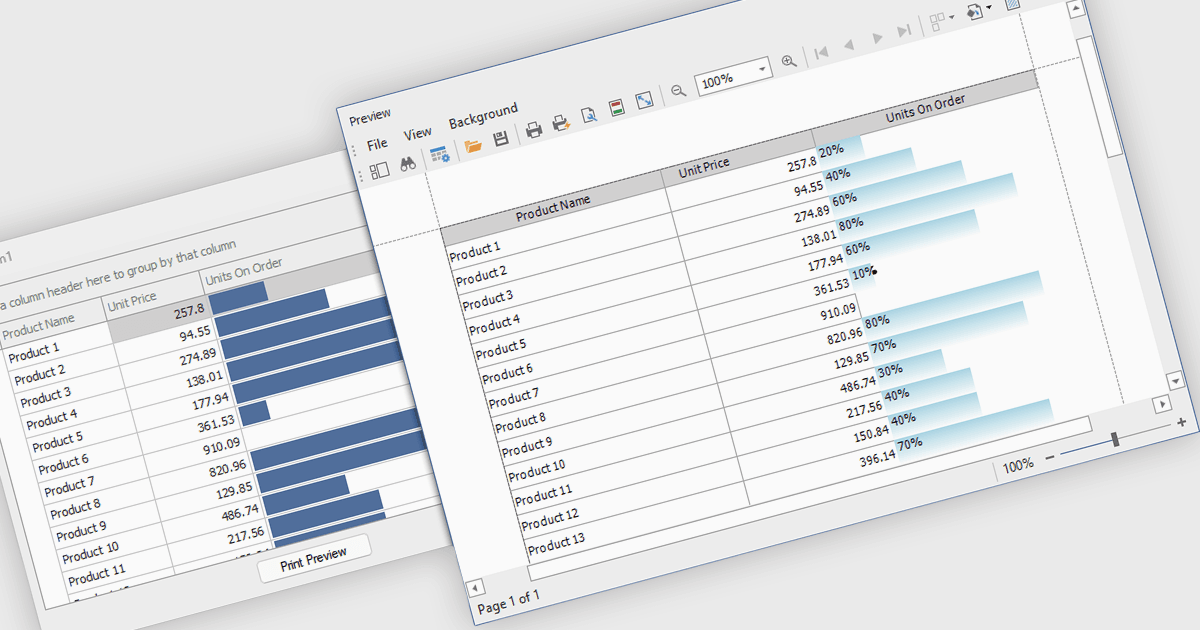
在网格界面中清晰显示进度

8月 1, 2025
.NET WinForms 网格中的 ProgressBar 单元格提供了一种直接的可视化方式来显示结构化表格布局中任务或数据的完成情况。

继续用英语阅读:

ProgressBar cell types in a .NET WinForms grid control are specialized cells that visually represent progress or completion levels within a grid layout, using horizontal progress bars. These cells are particularly useful for tracking status indicators, such as task completion or data processing percentages, directly within tabular views. They provide a clear, immediate representation of numeric progress values, enhancing readability without requiring users to interpret raw numbers. For developers, integrating ProgressBar cells simplifies the task of conveying progress-related information in data-driven interfaces, offering a familiar and consistent user experience aligned with standard Windows Forms controls.

Several .NET WinForms grid controls offer ProgressBar cell type controls, including:

  • DevExpress WinForms Data Grid (part of DevExpress WinForms) lets you incorporate visually rich ProgressBar cells that clearly communicate task completion within complex data-driven interfaces.
  • True DBGrid for WinForms (part of ComponentOne Studio WinForms by MESCIUS) enables dynamic ProgressBar rendering in grid cells, ideal for tracking real-time metrics like processing or loading status.
  • Infragistics WinDataGrid (part of Infragistics Ultimate UI for Windows Forms) supports ProgressBar cells that visually convey progress values, helping developers present real-time status within structured data views.
  • Bunifu UI WinForms DataGrid View (part of Bunifu UI WinForms) allows you to present completion states directly in grid rows using sleek ProgressBar cells for modern, responsive interfaces.

For an in-depth analysis of features and price, visit our .NET WinForms grid controls comparison.

Compare .NET WinForms Grid Controls