Progress Column
用于 SharePoint 列表数据和状态跟踪的可视化进度条。
- 在 SharePoint 列表中将数值显示为基于百分比的进度条。
- 支持计算值、视觉自定义和灵活的显示设置。
- 可轻松在 Progress Column 与标准数值列之间转换。

起价:
加载中...
| 可单独购买 | 我们的价格 |
|---|---|
| Progress Column | 加载中 |
试用版可用 联系我们,获取免费试用
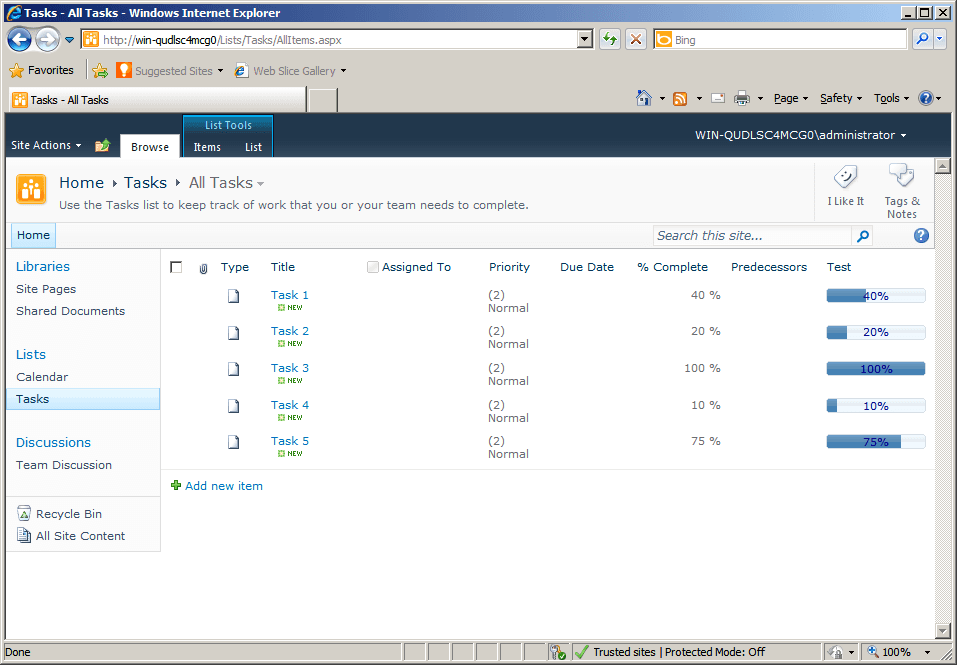
Progress Column 为 SharePoint 列表添加了图形化进度条,使团队能够将数值以清晰的可视化状态指示器进行呈现。它有助于在项目进度和销售活动等场景中让列表数据更易于阅读,同时支持自定义、计算值以及简单的列转换。
基于百分比的数据可视化
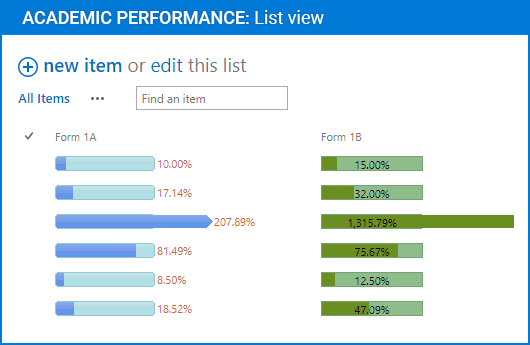
Progress Column 将数值显示为 SharePoint 列表中的百分比进度条。这能为用户提供关于状态和完成情况的即时视觉提示,帮助列表数据比单纯的数字更清晰地传达进度。
清晰的状态表示
该组件以一种突出当前进度一目了然的格式呈现列表值。它适用于项目进度或销售活动等场景,在这些场景中,用户需要一种快速、直观的方式来解读不断变化的数值信息。
可自定义的进度条外观
显示设置可以调整,以适配列表所需的外观和行为。可用配置包括背景颜色、进度颜色、文本颜色、进度条宽度和文本对齐方式,因此视觉输出可以匹配不同的展示需求。
支持计算值
Progress Column 可以与基于其他列表列的计算值配合使用。这使进度条不仅能反映手动输入的百分比,还能反映派生结果;当进度依赖于同一列表项中存储的相关值时,这一点尤其有帮助。
处理超过 100% 的值
该组件支持对超过 100% 的值进行百分比显示,为用户提供一种清晰可读的方式来表示超额完成或超过原始目标的进度。这有助于在总量可能超出预期基线的列表中保留其含义。
双向列转换
用户只需单击一次,即可将 Progress Column 转换为标准的 SharePoint 数值百分比列,并可再转换回来。这使得在图形化表示和标准数值表示之间切换更加容易,而无需从头重建列结构。
提升列表可读性
通过用图形化指示器替代单纯的数字输出,该组件让 SharePoint 列表更具视觉性,也更容易快速浏览。它帮助用户迅速识别条目状态,尤其适用于需要在短时间内查看大量记录的列表。
SharePoint 列表集成
Progress Column 可直接在 Microsoft SharePoint 列表中使用,为列表数据添加进度条功能,而无需单独的界面。这让进度信息保持在团队已用于管理和审阅内容的同一位置。
语言包支持
该组件包含语言包支持,有助于其适配需要本地化用户体验的 SharePoint 环境。这对于希望在保持不同语言部署一致性的同时增强列表视觉效果的组织尤为有用。
为用户提供实时视觉反馈
Progress Column 为用户提供关于列表值状态更丰富、更即时的反馈。用户不再只是读取原始百分比,而是可以通过视觉进度条来解读进度,从而在日常列表使用中更容易理解当前状态。
产品兼容性
请查看以下详细信息,以确保此产品在您的环境中受支持。
宿主应用程序
- SharePoint
- Visual Studio
关于ArtfulBits
ArtfulBits 成立于 2005 年,总部位于乌克兰哈尔科夫,专注于为 Microsoft SharePoint、.NET 和移动平台设计高质量组件和控件。其产品组合包括数据可视化控件、项目管理解决方案,以及专为支持 IT 专业人员和开发者优化工作流程而设计的工具。该品牌以用户为中心的方式处理复杂的数据处理需求,并通过持续开发确保与当前技术保持兼容而闻名。ArtfulBits 通过可靠、专为特定用途打造的组件,帮助软件团队推进他们的项目。