以箭頭註解為 PDF 增添清晰度
方向標記可強化文件審閱與技術示意圖,提供更清晰的溝通並提升 PDF 的可讀性。
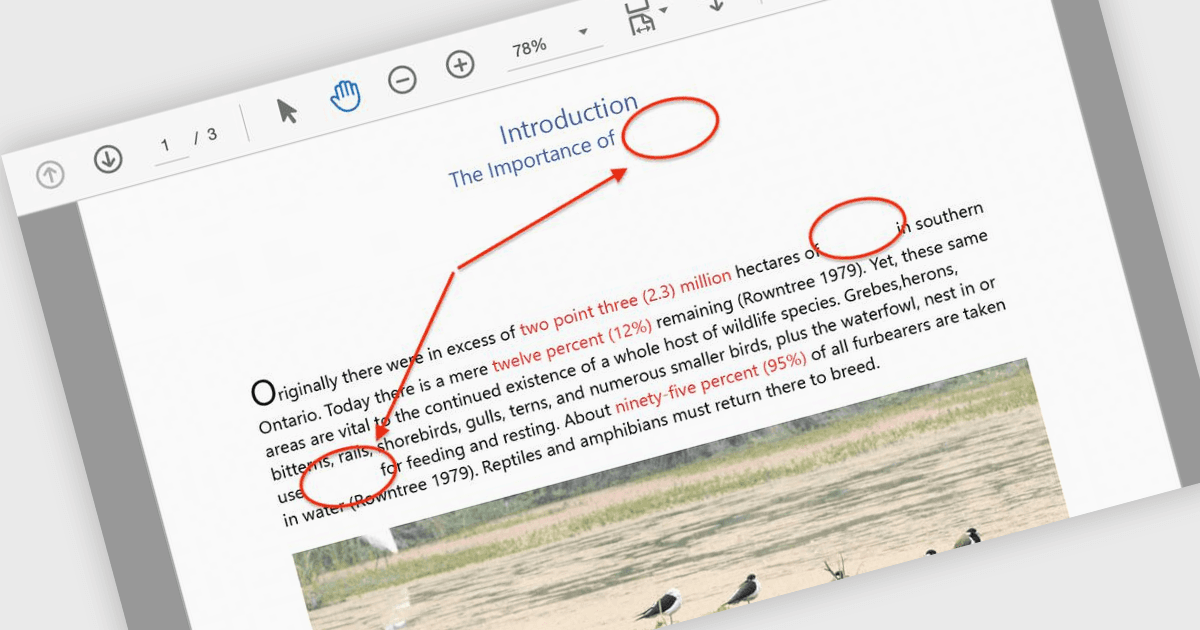
箭頭註解是視覺工具,讓使用者能透過箭頭作為方向指示,來強調 PDF 中的特定元素。這類註解特別適用於引導讀者瀏覽複雜的圖表、工作流程或技術示意圖;在清晰度至關重要的情境中,它能協助讀者更快掌握重點。透過指向關鍵區域,箭頭可降低理解上的混淆、確保重要細節不會被忽略,並在文件審閱或協作討論期間精簡溝通流程。常見的使用情境包括為工程圖表加註、在設計草稿中標示需要修訂的區域,以及在報告中強調特定數據點。最終會產生更直覺且更具吸引力的文件,能有效傳達其預期訊息。許多 PDF 處理程式庫都支援以程式方式建立、自訂與操作箭頭註解,提供如顏色、粗細、透明度與定位等選項,以符合各種使用情境。
部分 ASP.NET Core PDF 元件提供箭頭註解,包括:
- Document Solutions for PDF(MESCIUS)讓使用者能建立並自訂箭頭註解,支援調整寬度、顏色與線條樣式,以強化文件標註。
- ImageGear for .NET(Accusoft)讓開發人員可透過程式以精準方式新增、修改與移除箭頭註解,並能精細控制定位與外觀。
- Syncfusion ASP.NET Core PDF(Syncfusion Essential Studio Enterprise 的一部分)提供豐富的箭頭註解,可動態建立並編輯,打造互動式的 UX。
如需更深入了解功能與價格,請造訪我們的 ASP.NET Core PDF 元件比較。