在檢視器中直接刪除 PDF 頁面
內建的頁面刪除功能可讓使用者直接在 PDF Viewer 中移除重複項或敏感內容,讓文件編輯更快、更乾淨利落。
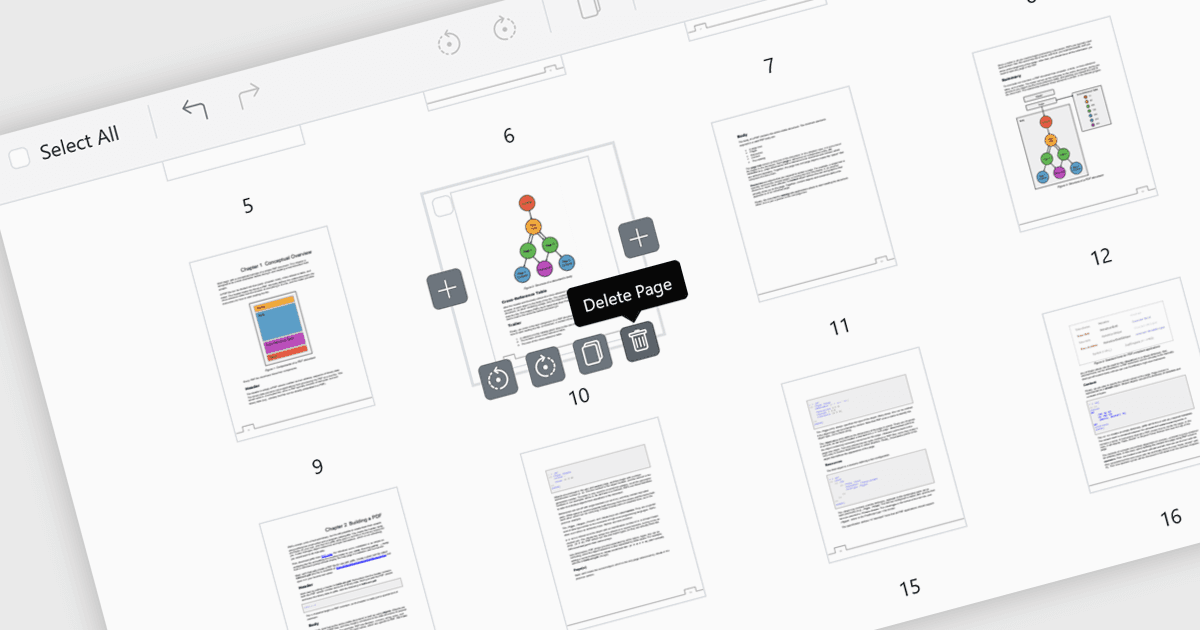
PDF Viewer 中的頁面刪除功能,讓使用者能在應用程式內直接移除不需要的、重複的或敏感的頁面,而無需另外使用編輯器。此功能透過減少檔案大小,並確保最終的 PDF 清晰、精簡且專業,來簡化文件管理。特別適用於修正錯誤,例如移除誤加入或空白的頁面;同時也可透過在外部分享前刪除機密內容來提升安全性。透過提供快速且內建的編輯功能,頁面刪除可提升工作效率,並讓針對特定受眾調整文件變得更有效率。
多種 ASP.NET Core PDF viewer 控制項都提供將頁面新增至 PDF 檔案的能力,包括:
- Telerik UI PDF for ASP.NET Core(隸屬於 Telerik UI for ASP.NET Core)可讓您透過頁面刪除精修文件,讓專業且符合受眾需求的 PDF 即刻完成。
- Document Solutions for PDF(由 MESCIUS 提供)讓您能透過移除頁面來管理內容,保護機密性並輕鬆建立精簡且安全的檔案。
- Syncfusion ASP.NET Core PDF(隸屬於 Telerik UI for ASP.NET Core)可透過內建頁面刪除功能,協助您進行文件自訂。
如需深入了解功能與價格,請前往瀏覽我們的 ASP.NET Core PDF viewer 控制項比較。