Link to Document Column
直接從清單欄位參照 SharePoint 文件與資料夾。
- 將清單項目連結到 SharePoint 文件庫中的文件與資料夾。
- 支援從欄位中瀏覽、選取與直接下載。
- 可依資料夾範圍與物件類型控制可選取內容。

起價:
載入中...
| 可單獨購買 | 我們的價格 |
|---|---|
| Link to Document Column | 載入中 |
試用版可用 聯絡我們,享受免費試用
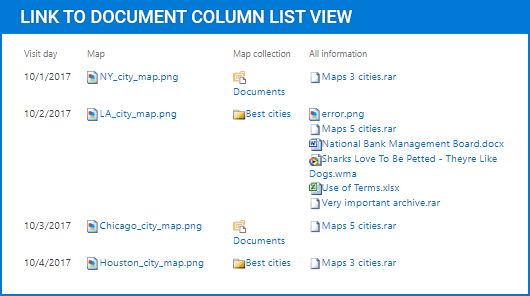
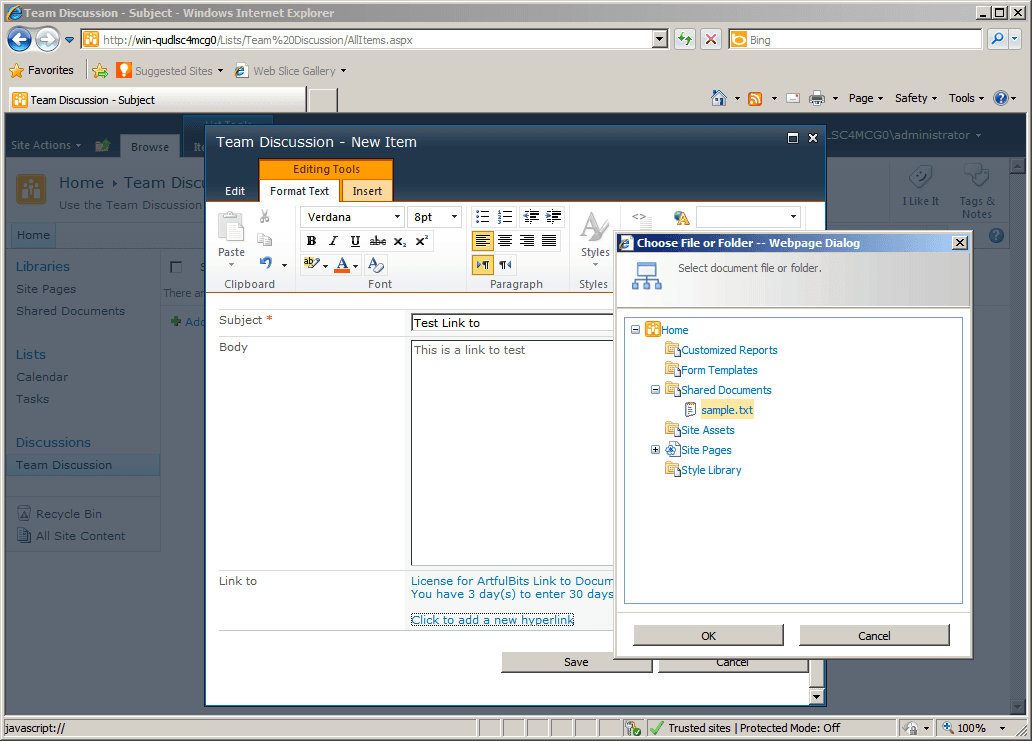
Link to Document Column 在 SharePoint 中新增一個欄位,用於參照文件庫中儲存的文件與資料夾。它讓使用者可以瀏覽內容,而不是手動輸入 URL,支援單一或多重選取,並可透過資料夾範圍、物件類型、顯示文字、圖示與工具提示來控制可選取的內容。
文件與資料夾參照
此元件會新增一個 SharePoint 欄位,用來儲存對文件庫中文件與資料夾的參照。它將清單項目連結至既有的文件庫內容,讓相關檔案可從欄位中存取,而不需要使用者手動輸入檔案路徑或 URL。
文件庫瀏覽介面
使用者可以透過選取介面瀏覽到所需的文件或資料夾,而不是手動輸入連結。這讓選擇參照內容更直接,也減少在 SharePoint 表單中新增或編輯清單項目時的手動輸入。
直接檔案存取
此欄位以支援可直接從清單欄位本身下載的方式呈現已連結內容。這有助於使用者從相關清單項目開啟或擷取參照檔案,而無需另外瀏覽文件庫結構。
單一與多重選取
依欄位設定方式,此元件支援在同一欄位中使用單一或多重參照。這讓清單項目可以指向一份文件或資料夾,或是一組更廣泛的相關文件庫物件。
可選取物件篩選
可依物件類型限制選取行為,使欄位可同時處理檔案與資料夾、僅資料夾,或僅檔案。這有助於依清單需要參照的 SharePoint 內容類型來調整欄位。
資料夾範圍控制
此元件可將選取限制在指定的根資料夾。透過設定文件選取範圍,可在編輯時縮小可用內容,讓使用者只從文件庫中相關的區域進行選擇。
可編輯連結顯示文字
此欄位支援編輯參照的顯示文字。這可讓團隊在清單檢視或項目表單中顯示更有用的標籤,而不只依賴原始文件或資料夾名稱。
視覺化參照指示
它可在每個參照旁顯示檔案類型圖示,讓使用者快速以視覺方式辨識連結內容。當清單包含多個參照項目與不同類型的檔案時,這能增加清晰度。
工具提示支援
進階工具提示可為欄位中顯示的參照提供更多脈絡。這有助於使用者在檢視清單項目時更容易辨識連結內容,特別是在名稱本身無法提供足夠細節的情況下。
跨網站集合查找
此元件可在同一網站集合內,從不同網站中的文件庫查找文件與資料夾。這讓 SharePoint 清單能參照單一網站以外的文件庫內容,同時仍將存取集中於同一欄位。
產品相容性
請查看以下詳細資訊,以確保此產品在您的環境中受支援。
宿主應用程式
- SharePoint
- Visual Studio
關於ArtfulBits
ArtfulBits 成立於 2005 年,總部位於烏克蘭的 Kharkiv,專注於為 Microsoft SharePoint、.NET 和行動平台設計高品質的元件與控制項。其產品組合包括資料視覺化控制項、專案管理解決方案,以及專為支援 IT 專業人員與開發人員優化工作流程而量身打造的工具。該品牌以能夠因應複雜的資料處理需求、採取以使用者為中心的方法,並持續積極開發以確保與當前技術維持相容而聞名。ArtfulBits 透過可靠、專為特定用途打造的元件,協助軟體團隊推進其專案。