Screenshot Preview

Budget In Brief

by Budget In Brief - Product Type: Application / End User Application / Server Application

Create and manipulate budget data. Budget In Brief is a tool for Budget Analysts and Enterprise Solution Integrators. The Budget In Brief application was built with the goal of allowing budget analysts and enterprise solution integrators to create and manipulate budget data. Budget In Brief automates the production of budget documents, providing a solution combining financial information, exhibits, reports, and narrative and media documents, all created with common word processing packages, into final documents that are ready for publication.

Our regular prices are shown below. Please logon to see your discounted prices.

Price in

Budget In Brief V1.3.647.252 Professional Edition

Add to Cart $ 979.02 Single User License Download (10.6 MB)
Add to Cart $ 881.12 Single User License, price per license for 5 or more licenses Download (10.6 MB)

Budget In Brief V1.3.647.252 Enterprise Edition

Add to Cart $ 1,958.04 Single User License Download (10.6 MB)
Add to Cart $ 1,664.33 Single User License, price per license for 5 or more licenses Download (10.6 MB)

Our prices include ComponentSource technical support and, for most downloadable products, an online backup and a FREE upgrade to the new version if it is released within 30 days of your purchase.  All sales are made on our standard Terms and Conditions and subject to our Return Policy. Please contact us if you require any licensing option not listed, including volume licensing and previous versions.

Our regular prices are shown above. Please logon to see your discounted prices.

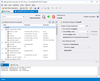
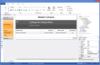
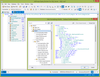
Screenshot of Budget In Brief - Application - V1.3.647.252

For Budget Analysts
Budget In Brief enhances the current budget formulation and publication process. With an automated, standardized, and repeatable process, suitable for any kind of budget submissions. It drives a consistent look and feel across all organization budget submissions, and flexibly adapts to the latest organizational standards.

No matter whether you are a member of a Federal, State, Municipal or Commercial organization, the Budget In Brief application will support the budget formulation for Presidential, Congressional, or any other internal submission.

The user interface is simple, friendly and robust; it provides all the required information in one window, and was created with the Microsoft.NET Framework 3.5 with the focus on 508 compliance requirements.

A simplified installation process does not require administrative privileges. It can be installed or simply copied in to the folder making it easy for all to use.

Supported Client Side Platforms:

  • Windows XP
  • Windows Vista
  • Windows 7

For Enterprise Solution Integrators
Budget In Brief does not need Microsoft Office to produce documents. It is a totally independent solution, which provides everything that is needed to produce Office files. None of the risks associated with the Microsoft Office package are inherent to the Budget In Brief application.

Budget In Brief is very secure, due to its components running in the user context. Therefore, Budget In Brief’s components do not pose a potential risk to vital system resources. Furthermore, when a document is created by the Budget In Brief application, macros do not automatically run. 

Budget In Brief tools do not need any additional parts or pieces in order for the application to function.

The command line tools do not require any human response, and are designed for server automation. 

The Budget In Brief application is scalable and fast. Most Office applications are not designed to be simultaneously used by hundreds and thousands of users; but contrary to this, the Budget In Brief application is designed for just that. 

The Budget In Brief application performs flawlessly whether on a user laptop, single server or on a load balanced web farm powering an Enterprise wide application.

Supported Server Side Platforms

  • Windows Server 2003
  • Windows Server 2008
  • Windows Server 2008 R2

Budget In Brief is available in Professional and Enterprise Editions
The Enterprise Edition adds:

  • Input from Databases, Accounting Systems, Financial Systems, Enterpise Applications and Third Party Applications
  • Crosswalks, Financial and Accounting Data and Performance Data
  • Data Transformation Scripts
  • Exhibits

Budget In Brief Enterprise Features:

  • User Interface and command line tools
  • Very small space imprint. Application can run from USB memory stick.
  • No need for the installation. Copy and paste or carry application with you on USB.
  • Friendlier UI with integrated help
  • Improved book and exhibit generation event messaging
  • Ability to browse through the all generated artifacts
  • Consolidate data from multiple files
  • Control the document's look and feel with the style template
  • Use your existing Microsoft Excel crosswalks. Just add name ranges and you're good to go.
  • Automated exhibit generation.
  • References in data files
  • References from the crosswalks
  • Open to solution integrators
    • Open book format
    • Open exhibit format
    • Open reference format
    • Open data format
    • Open XSLT transformation
  • Use existing XSLT transformation scripts that produce HTML
  • Control what you want to generate: the data, the exhibits only, or the whole book.
  • Support for hard linking to the exhibit documents or pre-generating the exhibit documents.
  • Working with data
    • Use your existing Microsoft Excel crosswalks. Just add a named ranges and you're good to go.
    • Provide data extracts in XML format from any data storage
    • Effortlessly introduce data dimensions
    • Spread cost by different dimensions
    • Fund spreading on desires level of details
    • Use pre calculated values or perform XSLT roll up
    • Link to data directly from your narratives or other context documents
    • Link values from excel spreadsheets, or data files, to Narratives
    • Association of the same data elements with different dimensions
    • Inject attributes in to any dimension
    • Support for control numbers
    • Support for any type of data: strings, text, money, numbers, etc.
  • Optimized for servers
  • No need for Excel or Word - Budget In Brief does it all.
  • Extensive list of the supported excel formulas to aggregate the values and perform calculations.
    • Database functions:
      • DAVERAGE, DCOUNT, DCOUNTA, DGET, DMAX, DMIN, DPRODUCT,
        DSTDEV, DSTDEVP, DSUM, DVAR, DVARP
    • Date and time functions
      • DATE, DATEVALUE, DAY, DAYS360, HOUR, MINUTE, MONTH, NOW,
        SECOND, TIME, TODAY, WEEKDAY, YEAR
    • Financial functions
      • FV, NPV, PMT, PV
    • Information functions
      • ISBLANK, ISNA, ISNUMBER
    • Logical functions
      • AND, FALSE, IF, NOT, OR, TRUE
    • Lookup and reference functions
      • COLUMN, COLUMNS, HLOOKUP, HYPERLINK, INDEX, INDIRECT,
        LOOKUP, MATCH, OFFSET, ROW, ROWS, VLOOKUP
    • Math and trigonometry functions
      • ABS, ACOS, ACOSH, ASIN, ASINH, ATAN, ATAN2, ATANH, CEILING, COMBIN, COS, COSH, DEGREES, EVEN, EXP, FACT, FLOOR, INT, LN, LOG, LOG10, MOD, ODD, PI, POWER, PRODUCT, RADIANS, RAND, ROUND, ROUNDDOWN, ROUNDUP, SIGN, SIN, SINH, SQRT, SUBTOTAL, SUM, SUMIF, SUMPRODUCT, SUMSQ, SUMX2MY2, SUMX2PY2, SUMXMY2, TAN, TANH, TRUNC,
    • Statistical functions
      • AVEDEV, AVERAGE, CORREL, COUNT, COUNTA, COUNTBLANK, COUNTIF, LINEST, MAX, MEDIAN, MIN, PEARSON, RANK,RSQ, STDEV, STDEVP
    • Text functions
      • ASC, CHAR, CODE, CONCATENATE, DOLLAR, EXACT, FIND, FIXED, LEFT, LEN, LOWER, MID, REPLACE, REPT, RIGHT, SEARCH, SUBSTITUTE, T, TEXT, TRIM, UPPER, VALUE

Budget In Brief Enterprise v Professional

Budget In BriefProfessionalEnterprise
Very small space imprint. Application can run from USB memory stick.YesYes
A Windows ApplicationYesYes
Command Line ToolYesYes
Friendly UI with integrated helpYesYes
No need for the installation. Copy and paste or carry application with you on USB.YesYes
Does not require Microsoft Office or Open Office suites.  Budget In Brief does it all.YesYes
Extended event messagingYesYes
Error and process reporting YesYes
Ability to browse through the all generated artifactsYesYes
Ability to merge documents from different formats into the single budget documentYesYes
Enforces consistent document formatting for documents received from numerous sourcesYesYes
Supports tables, charts, and different media contentYesYes
Automatically calculates a table of contents YesYes
Allows multiple ways to create the table of contentsYesYes
Automatically calculates page numbers YesYes
Default document marginsYesYes
Customizable margins per document sectionYesYes
Enforces the default document header or footerYesYes
Provides ability to manage headers and footer for each individual section YesYes
Predefined budget book nameYesYes
Ability to add watermarksYesYes
Ability to start section on an odd page  YesYes
Support for multiple cover pagesYesYes
Control what you want to generate: the data, the exhibits only, or the whole book.NoYes
Document Templates
Supports custom document templates  YesYes
Support for cover page templates YesYes
Support for header or footer templates YesYes
Control the document's look and feel with the style templateYesYes
Numbers In Narratives 
Supports Numbers in NarrativesYesYes
Supports multiple reference files YesYes
Control order in which references are appliedYesYes
Allows to use an extra reference filesYesYes
Extract references from the crosswalksNoYes
Extract references from data files.NoYes
File Formats
Support for different document file formats: ODT, DOC, DOCX, Open Office XML, RFT, HTML, XML, Word XML, Word 2003 XML.YesYes
Output formats: DOCX, Microsoft Word 2007-2010; Adobe PDF.YesYes
Exhibits and Reports 
Support for hard linking to the exhibit documentsYesYes
Automated exhibit generation.NoYes
Use existing XSLT transformation scripts that produce HTMLNoYes
Working with data 
Imports data extracts in XML format from any data storageNoYes
Support for any type of data: strings, text, money, numbers, etc.NoYes
Use your existing Microsoft Excel crosswalks. Just add a named ranges and you're good to go.NoYes
Link to data directly from your narratives or other context documentsNoYes
Consolidate data from multiple data filesNoYes
Link values from excel spreadsheets, or data files, to NarrativesNoYes
Support for control numbersNoYes
Fund spreading on desires level of detailsNoYes
Effortlessly introduce data dimensionsNoYes
Inject attributes in to any dimensionNoYes
Spread cost by different dimensionsNoYes
Association of the same data elements with different dimensionsNoYes
Extensive list of the supported excel formulas to aggregate the values and perform calculations.NoYes
Use pre calculated values or perform XSLT roll upNoYes
Enterprise Solution Integration 
Optimized for serversYesYes
Open to solution integrators: Open book format; Open reference format; Open exhibit format; Open data format; Open XSLT transformation;YesYes
Full budget book processing cycleYesYes
Document processing automationYesYes
Assembly of highly complex budget documentsYesYes
Increased data qualityYesYes
Ready for incorporation with the Distributed Build Management and Continuous Integration tools YesYes
Supports content management integration and version control system transparency YesYes
Simplifies the rollover process YesYes

Product Search

Enter search words:

Quick Links

Publisher

Primary Category

Related Categories