Screenshot Preview

ComponentOne Studio for iPhone - Summary

by ComponentOne - Product Type: Component / ASP.NET AJAX (ATLAS)

Summary

ComponentOne Studio for iPhone by ComponentOne

URLs: componentone-studio-for-iphone, componentone studio for iphone, componentonestudioforiphone, componentone

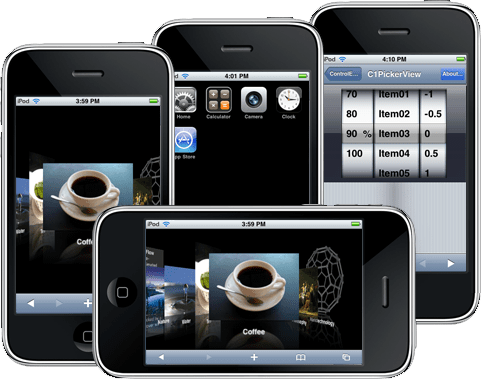
Mimic the look and feel of the iPhone and iTouch user interfaces. ComponentOne Studio for iPhone is a suite of ASP.NET components developed to mimic the look and feel of the native UI of the iPhone and iTouch. ComponentOne Studio for iPhone is sure to satisfy developers looking for a new way to reach the growing number of mobile Web end-users without the need to learn a new technology. ComponentOne Studio for iPhone contains ten components like Button, LaunchPad, Calendar, NavigationList, Slider, SwitchButton, ViewPort and more that mimic the look and feel of the iPhone and iTouch user interfaces when rendered in Mobile Safari. ComponentOne Studio for iPhone also includes support for the top smart phones in the market including Android OS, Droid, Nexus One, Palm Pre or Opera Mini. ComponentOne Studio for iPhone includes one year subscription and can also be bought as part of ComponentOne Studio Enterprise.


ComponentOne Studio for iPhone Subscription Benefits

This subscription entitles you to minor and major updates of any of the products included in the ComponentOne Studio for iPhone as well as any new products added to the ComponentOne Studio for iPhone during one year.

ComponentOne Studio for iPhone has 3 releases per year and these are scheduled for the middle of the month in March, July and November each year.

Create web applications that mimic the iPhone interface using ComponentOne Studio for iPhone. ComponentOne Studio for iPhone will enable you to generate ASP.NET Web applications that mimic the iPhone interface and navigation. ComponentOne Studio for iPhone combines the power of Microsoft ASP.NET to create a cutting-edge version of corporate Web sites that targets the iPhone and iTouch devices.

ComponentOne Studio for iPhone includes

Buttons for iPhone (C1Button)

Calendar for iPhone (C1 Calendar)

CoverFlow for iPhone (C1CoverFlow)

LaunchPad for iPhone (C1LaunchPad)

MultiView for iPhone (C1MultiView)

NavigationList for iPhone (C1NavigationList)

PickView for iPhone (C1PickView)

Slider for iPhone (C1Slider)

TabBarController for iPhone (C1TabBarController)

ViewPort (C1ViewPort)

You can use the C1.Web.iPhone assembly to create rich web experiences that mimic the look and feel of native iPhone applications.

When designing applications for use on the iPhone, you should keep in mind the display metrics that are provided for by the device. The entire iPhone display is 320 x 480 pixels in portrait mode and 480 x 320 pixels in landscape mode. However, web application developers don’t have access to the entire display. The typical layout for web pages on the iPhone has to account for various elements provided by mobile Safari.

ComponentOne LaunchPad for iPhone (C1LaunchPad)

C1LaunchPad control provides a familiar UI for launching different aspects of your web application. C1LaunchPad provides for multiple pages of navigation with a page indicator, a toolbar that contains commonly used features, and status text that provides additional information associated with a launch icon.

ComponentOne ViewPort for iPhone (C1ViewPort)

The C1ViewPort control, when used with the C1NavigationList control, provides custom navigation for your iPhone web application. The C1ViewPort control provides three distinct areas used to design a web application:

Navigation bar

Content area

Toolbar

ComponentOne NavigationList for iPhone (C1NavigationList)

This control provides your web application with the edge-to-edge navigation style that you see in most native iPhone applications. When this control is placed inside the content area of the C1ViewPort control, the C1ViewPort.Navigationbar will automatically be updated as you traverse from page to page.

C1NavigationList provides for a rich set of elements that allows you to:

Specify how the list is rendered. SimpleList or RoundedCornerList.

Group items with an optional group title.

Customize both list types and templated items.

Load on demand. As the control is being navigated, only the current page is retrieved from the server. This greatly reduces the initial load size of your web application.

ComponentOne Calendar for iPhone (C1 Calendar)

ComponentOne Calendar for iPhone provides a familiar UI for iPhone calendar users. Selecting dates and changing months is as easy as a few taps on the display. ComponentOne Calendar for iPhone supports a wide range of cultures, the calendar title appears in the English (United States) cultural format by default, but the culture can be changed by setting just one property to the desired cultural setting.

ComponentOne Butttons for iPhone (C1Button)

iPhone-like Buttons for Your Web Apps. Get the button you need when creating your Web application with ComponentOne Buttons for iPhone. This includes the C1Button control for basic commands, the C1SwitchButton control for displaying an ON/OFF button that can be toggled by the end-user, and a horizontal C1SegmentedButtons made of multiple segments, where each segment functions as a discrete button. You can also cChange the type of button by setting one property; select from the following styles: back, forward, destructive, immediate, primary, standard, and text only.

ComponentOne Studio for iPhone (C1CoverFlow)

Visually navigate through album items in a three-dimensional, animated graphical UI with ComponentOne CoverFlow for iPhone. Browse the Cover Flow using the on-screen scrollbar or by sliding your finger across the touch screen.

ComponentOne MultiView for iPhone (C1MultiView)

Display Multiple Pages of Content and Navigate Simultaneously in Your Web Apps.Display liberal amounts of information on your page without using up valuable screen real estate. ComponentOne MultiView for iPhone displays a collection of pages, showing one at a time.

ComponentOne PickerView for iPhone (C1PickView)

ComponentOne PickerView for iPhone shows one or more sets of values using a spinning-wheel or slot-machine motif. To select values, simply rotate the wheels until a row of values is aligned with a selection indicator.

ComponentOne Slider for iPhone (C1Slider)

ComponentOne Slider for iPhone allows you to display a specific continuous range of values for the end-user to select from. This type of control is commonly used to set the volume on audio controls.You can easily customize the slider's appearance by adding images at either end of the slider control to indicate which value that end of the slider represents.

ComponentOne TabBarController for iPhone (C1TabBarController)

ComponentOne TabBarController for iPhone manages a set of view controllers that are displayed when selected. The appearance of the tab bar can be modified by changing properties in the view controllers. C1TabBarController resizes and positions your views between the tab bar and, if present, navigation bar. Otherwise, it resizes and positions your views between the tab bar and status bar. TabBarController for iPhone can be bound to a C1MultiView control to provide tabbed navigation of the C1MultiView's page views. Binding these two controls is as simple as setting one property.

ComponentOne Studio for iPhone Subscription

New Product Releases -You will automatically receive any ComponentOne for iPhone products added to Studio for WinForms during your annual subscription term

Updates, Upgrades, and Betas - When you purchase ComponentOne Studio for iPhone you will also automatically get all ComponentOne Studio for iPhone updates and upgrades during your subscription term

Free e-mail and online technical support - Your ComponentOne Studio for iPhone purchase includes complimentary e-mail support by a dedicated team of friendly responsive Technical Support personnel. In addition, you receive online support on the ComponentOne Web site in the form of FAQs, sample code, our knowledge base, and peer-to-peer newsgroups

Documentation - Components in ComponentOne Studio for iPhone include thorough online Help, .CHM Help, demos, tutorials, and sample projects with source code

Renewals - After your subscription expires, you can continue using the components that were released while your subscription was active. You can continue to develop and distribute your applications built using ComponentOne Studio for iPhone products. You will need to renew your subscription to download new updates, upgrades, and products

What's New in Studio for iPhone 2011 v1?

Support for iPhone 4, iPad, and more Android phones have recently been added to this suite of controls.

Added the ability to scroll the back cover content when it exceeds the cover height in CoverFlow for iPhone.

CoverFlow for iPhone now supports devices with a custom screen size (iPad / PC version of the Safari browser).

What's New in Studio for iPhone 2010 v3?

Now Supports iPhone4 and iPad. More support for Android phones

What's New in Studio for iPhone 2010 v2?

The ComponentOne suite of iPhone controls now includes iPhone4 and iPad support along with more samples for easy learning.

iPhone4 and iPad support

ComponentOne Studio for iPhone has been expanded to support the top devices on the market (Android phones, Palm Pre). Now, ComponentOne Studio for iPhone controls also support iPhone4 and iPad.

New Samples:

AdventureWorks Mobile - Just like the ASP.NET AJAX sample application, ComponentOne have built a full mobile Web application against the AdventureWorks SQL Server sample database. The application features a product catalog and integrates with the Membership from the full site.

Netflix - Using RSS feeds from Netflix, ComponentOne built a mobile browser for the top 10 lists on Netflix. It shows how easy Studio for iPhone makes building Web applications with external data sources.

What's New in Studio for iPhone 2010 v1?

Support for Visual Studio 2010 and ASP.NET 4.0

Palomino and jQuery integration

Support for the top smart phones in the market including Android OS, Droid, Nexus One, Palm Pre, Opera Mini

What's New in Studio for iPhone 2009 v3?

New control: C1ViewScroller is a navigation menu for jumping to specific points in a page. It adds usability to long lists and lengthy content

Client-side enhancements to give more powerful JavaScript development capabilities

Added Touch, Gesture, and Swipe event helpers for enabling these rich interactions in any iPhone web applications

Hardware acceleration added for animations and styles

What's New in Studio for iPhone 2009 v3?

New control: C1ViewScroller is a navigation menu for jumping to specific points in a page. It adds usability to long lists and lengthy content

Client-side enhancements to give more powerful JavaScript development capabilities

Added Touch, Gesture, and Swipe event helpers for enabling these rich interactions in any iPhone web applications

Hardware acceleration added for animations and styles

Mimic the look and feel of the iPhone and iTouch user interfaces.

Pricing: ComponentOne Studio for iPhone 2011 v3 1 Developer Subscription License, ComponentOne Studio for iPhone 2011 v3 10-29 Developer Subscription License - Price per license, ComponentOne Studio for iPhone 2011 v3 30-49 Developer Subscription License - Price per license, ComponentOne Studio for iPhone 2011 v3 50-99 Developer Subscription License - Price per license, ComponentOne Studio for iPhone 2011 v3 with Platinum Support 1 Developer Subscription License, ComponentOne Studio for iPhone 2011 v3 with Platinum Support 10-29 Developer Subscription License - Price per license, ComponentOne Studio for iPhone 2011 v3 with Platinum Support 30-49 Developer Subscription License - Price per license, ComponentOne Studio for iPhone 2011 v3 with Platinum Support 50-99 Developer Subscription License - Price per license, ComponentOne Studio for iPhone 2011 v3 Upgrade 1 Developer Subscription Upgrade License from any ComponentOne product, ComponentOne Studio for iPhone 2011 v3 Upgrade 10-29 Developer Subscription Upgrade License from any ComponentOne Component - Price per license, ComponentOne Studio for iPhone 2011 v3 Upgrade 30-49 Developer Subscription Upgrade License from any ComponentOne Component - Price per license, ComponentOne Studio for iPhone 2011 v3 Upgrade 50-99 Developer Subscription Upgrade License from any ComponentOne Component - Price per license, ComponentOne Studio for iPhone 2011 v3 Upgrade with Platinum Support 1 Developer Subscription Upgrade License from any ComponentOne product, ComponentOne Studio for iPhone 2011 v3 Upgrade with Platinum Support 10-29 Developer Subscription Upgrade License from any ComponentOne Component - Price per license, ComponentOne Studio for iPhone 2011 v3 Upgrade with Platinum Support 30-49 Developer Subscription Upgrade License from any ComponentOne Component - Price per license, ComponentOne Studio for iPhone 2011 v3 Upgrade with Platinum Support 50-99 Developer Subscription Upgrade License from any ComponentOne Component - Price per license, ComponentOne Studio for iPhone 2011 v3 Renewal 1 Developer Subscription Renewal License, ComponentOne Studio for iPhone 2011 v3 Renewal 10-29 Developer Subscription Renewal License - Price per license, ComponentOne Studio for iPhone 2011 v3 Renewal 30-49 Developer Subscription Renewal License - Price per license, ComponentOne Studio for iPhone 2011 v3 Renewal 50-99 Developer Subscription Renewal License - Price per license, ComponentOne Studio for iPhone 2011 v3 Renewal with Platinum Support 1 Developer Subscription Renewal License, ComponentOne Studio for iPhone 2011 v3 Renewal with Platinum Support 10-29 Developer Subscription Renewal License - Price per license, ComponentOne Studio for iPhone 2011 v3 Renewal with Platinum Support 30-49 Developer Subscription Renewal License - Price per license, ComponentOne Studio for iPhone 2011 v3 Renewal with Platinum Support 50-99 Developer Subscription Renewal License - Price per license

Evals & Downloads: ComponentOne Studio Enterprise and ComponentOne Report Designer Edition Case Study, Read End-User License Agreement for ComponentOne Software, Download the ComponentOne Studio for iPhone 2011 v3 evaluation on to your computer - Expires after 30 days

Operating System for Deployment: Windows 7, Windows Vista, Windows XP

Product Type: Component

Component Type: ASP.NET AJAX (ATLAS)

Compatible Containers: Microsoft Visual Studio 2010, Microsoft Visual Studio 2008, Microsoft Visual Basic 2010, Microsoft Visual Basic 2008, Microsoft Visual C++ 2010, Microsoft Visual C++ 2008, Microsoft Visual C# 2010, Microsoft Visual C# 2008, .NET Framework 4.0

Keywords: componentone studio for iphone, c1 studio iphone, studio for iphone, studio iphone, componentone iphone, iphone asp.net

c1 controls, c1 components, componentone controls, componentone components, componentone, componentone, c1, componentone studio, component one, componentone studio enterprise, componentone review, componentone activex, truegrid, true dbgrid, flexgrid

Product Suites Suite bundles bundle

Button Cursor Buttons Cursors

User Interface UI

Calendar calendaring calendars Scheduling Schedule Schedules

Part numbers: PC-528025-428161 528025-428161 PC-528025-428164 528025-428164 PC-528025-428170 528025-428170 PC-528025-428167 528025-428167 PC-528025-428173 528025-428173 PC-528025-428176 528025-428176 PC-528025-428182 528025-428182 PC-528025-428179 528025-428179 PC-528025-428209 528025-428209 PC-528025-428212 528025-428212 PC-528025-428218 528025-428218 PC-528025-428215 528025-428215 PC-528025-428221 528025-428221 PC-528025-428224 528025-428224 PC-528025-428230 528025-428230 PC-528025-428227 528025-428227 PC-528025-428185 528025-428185 PC-528025-428188 528025-428188 PC-528025-428194 528025-428194 PC-528025-428191 528025-428191 PC-528025-428197 528025-428197 PC-528025-428200 528025-428200 PC-528025-428206 528025-428206 PC-528025-428203 528025-428203

Mfr. Part No: ESD-I-STUDIO ESD-I-STUDIO-PLAT ESD-I-STUDIO-PLAT-R ESD-I-STUDIO-PLAT-U ESD-I-STUDIO-R ESD-I-STUDIO-U I-STUDIO-PLAT-R I-STUDIO-PLAT-U I-STUDIO-R I-STUDIO-U

Product Search

Enter search words:

Award Award