by ComponentOne - Product Type: Component / .NET WinForms / 100% Managed Code
ComponentOne FlexGrid for WinForms can also be bought as part of ComponentOne Studio Enterprise and ComponentOne Studio for WinForms.
If you require more information please Contact Us
Create user-friendly interfaces that display, edit, format, organize, summarize, and print tabular data. ComponentOne FlexGrid for WinForms incorporates the latest in data-binding technology, ADO.NET, to integrate seamlessly with the Microsoft .NET Framework. New features include: hierarchical styles, calculated columns, a simpler and more powerful object model, enhanced cell editing (masks, buttons, etc.), better painting (such as scalable images and transparency), object-oriented design and design-time support. ComponentOne FlexGrid for WinForms also includes FlexGridClassic, a wrapper class that provides an object model with the ActiveX version of the control. ComponentOne FlexGrid for WinForms is Visual Studio 2010 compatible.

Our regular prices are shown below. Please logon to see your discounted prices.
| Add to Cart | $ 490.00 | 1 Developer Subscription License Mfr. Part No: ESD-N-FLEX |
Download (116.2 MB) | |
| Add to Cart | $ 441.00 | 10-29 Developer Subscription License - Price per license Mfr. Part No: ESD-N-FLEX |
Download (116.2 MB) | |
| Add to Cart | $ 416.50 | 30-49 Developer Subscription License - Price per license Mfr. Part No: ESD-N-FLEX |
Download (116.2 MB) | |
| Add to Cart | $ 392.00 | 50-99 Developer Subscription License - Price per license Mfr. Part No: ESD-N-FLEX |
Download (116.2 MB) |
| Add to Cart | $ 392.00 | 1 Developer Subscription Renewal Mfr. Part No: ESD-N-FLEX-R |
Verify | Download (116.2 MB) |
| Add to Cart | $ 392.00 | 1 Developer Subscription Upgrade from previous version Mfr. Part No: ESD-N-FLEX-U |
Verify | Download (116.2 MB) |
| Add to Cart | $ 294.00 | 1 Platinum Support License (Includes a year of Telephone and Online Technical Support) Mfr. Part No: SUPPORT-TS |
Verify | Download (20 KB) |
Our prices include ComponentSource technical support and, for most downloadable products, an online backup and a FREE upgrade to the new version if it is released within 30 days of your purchase. All sales are made on our standard Terms and Conditions and subject to our Return Policy. Please contact us if you require any licensing option not listed above including volume licensing and previous versions.
Our regular prices are shown above. Please logon to see your discounted prices.

New Enhancements in ComponentOne FlexGrid for WinForms 2011 v1
ComponentOne FlexGrid for WinForms is the .NET version of the ActiveX control, VSFlexGrid Pro. ComponentOne have completely rewritten VSFlexGrid Pro to take advantage of the infrastructure provided by .NET so you can maximize your development productivity. ComponentOne FlexGrid for WinForms is now VS2010, .NET framework 4.0 compatible.
ComponentOne FlexGrid for WinForms incorporates the latest in data-binding technology, ADO.NET, to integrate seamlessly with the Microsoft .NET Framework. As a result, you get an easy-to-use, robust grid control to create user-friendly interfaces that display, edit, format, organize, summarize, and print tabular data.
ComponentOne FlexGrid for WinForms has several enhancements new to this version. In addition, they have included the most popular features from the ActiveX® version of the control, VSFlexGrid Pro.
ComponentOne FlexGrid for WinForms Features:
ComponentOne FlexGrid for WinForms Great design time support
We make it easy to implement decisions at design time. For example, you can set up styles at design time with an easy-to-use style editor dialog box instead of writing code to do it at run time.
Favorite Features from VSFlexGrid Pro:
Bound or unbound mode and custom data sources
Use the grid in bound mode, where it displays data from an ADO.NET data source, or in unbound mode, where the grid itself manages the data. You’re in charge: bind the grid to existing data structures, use calculated “virtual” fields, perform data validation, or load data on demand.
Integrated printing
Print the grid with a single statement! You have control over paper orientation, margins, and footer text, or you can show a dialog box to let your users select and set up the printer. Printing events allow you to control page breaks, add repeating header rows, or add custom elements to each page.
Translated ImageLists
Bind grid columns to image lists, an easy and efficient way to display database information graphically.
Column references
Refer to columns by name instead of position, if desired. Column keys are automatically assigned to field names when the grid is data-bound, or you may assign them with code. You can later refer to a column using a ColIndex(ColKey) syntax, which will retrieve the column you want even if your user has moved it to a different position on the grid.
Range aggregates
Calculate totals, averages, and other statistics for ranges of cells with a single statement.
Merged cells
Merge contiguous like-valued cells, making them span multiple rows or columns to enhance appearance or clarity.
Hierarchical styles
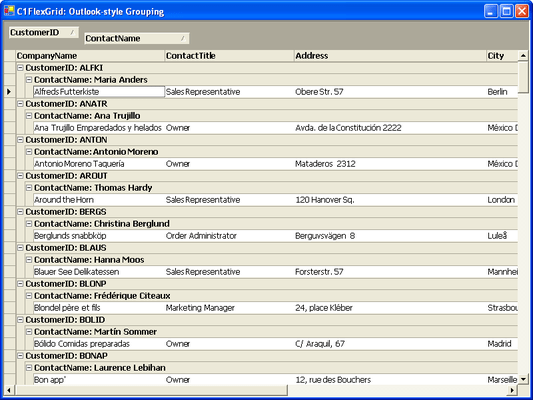
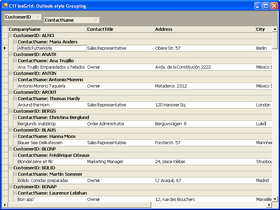
View data the way that’s best for you and your users with helpful new properties and methods! For example, you can summarize data and add aggregate values with the Subtotal method or use the Tree property to display hierarchical views of the data.
Enhanced cell editing
Use simple text editing, drop-down lists and combo lists, cell buttons, masks, and advanced data validation to control the editing process. For example, you can use an input mask to provide a template that automatically validates data as your users type, or choose to prevent users from editing specific columns altogether.
Even better painting
Make the grid look the way you want it to by painting special effects such as lines, bitmaps, and icons in appropriate grid cells. New to this version are scalable images and transparency.
Simpler, more powerful object model
Now you can customize the grid display by changing stock styles (or defining your own) and assigning them to rows, columns, or arbitrary cell ranges without having to use the multiple properties of the ActiveX control. The new object model replaces them, making the process even more efficient.
ComponentOne Platinum Support Subscriptions provide a full year of Telephone and Online Technical Support. ComponentOne Technical Support Engineers are available by phone Monday through Friday, except U.S. holidays, from 9:00 a.m. to 5:00 p.m. Eastern,USA. Customers outside the USA, please remember to check your time difference for phone support.