
 (4)
(4)
 (2)
(2)Official Supplier
As official and authorized distributors, we supply you with legitimate licenses directly from 200+ software publishers.
See all our Brands.
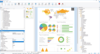
Release Notes: further formula evaluation. Prevented unnecessary interpolation loop in between values of a line diagram ... Read more
Description: Dive into your project without interrupting the application flow by adding live log-in with CodeSite ... Read more Show more results from this product
Release Notes: the Show In Explorer option. Replaced the editor structural flow icons (icons in line with the code ... indicating when a method returns, control flow breaks or moves, etc.) with high DPI versions. The opacity ... and structure flow in the editor have been replaced with high-DPI icons. Compilers and Toolchains Improvements ... Read more
Release Notes: Parenthesis Matching- Provides a visual queue to keep code clear. Flow Control Highlighting- A visual ... representation of flow jumps in code. Code Navigation Toolbar- Places classes and methods into a drop-down box ... Read more

Description: Dive into your project without interrupting the application flow by adding live log-in with CodeSite ... Read more Show more results from this product
Release Notes: the Show In Explorer option. Replaced the editor structural flow icons (icons in line with the code ... indicating when a method returns, control flow breaks or moves, etc.) with high DPI versions. The opacity ... and structure flow in the editor have been replaced with high-DPI icons. Compilers and Toolchains Improvements ... Read more
Release Notes: Parenthesis Matching- Provides a visual queue to keep code clear. Flow Control Highlighting- A visual ... representation of flow jumps in code. Code Navigation Toolbar- Places classes and methods into a drop-down box ... Read more

Description: Dive into your project without interrupting the application flow by adding live log-in with CodeSite ... Read more Show more results from this product
Release Notes: the Show In Explorer option. Replaced the editor structural flow icons (icons in line with the code ... indicating when a method returns, control flow breaks or moves, etc.) with high DPI versions. The opacity ... and structure flow in the editor have been replaced with high-DPI icons. Compilers and Toolchains Improvements ... Read more
Release Notes: Parenthesis Matching- Provides a visual queue to keep code clear. Flow Control Highlighting- A visual ... representation of flow jumps in code. Code Navigation Toolbar- Places classes and methods into a drop-down box ... Read more


Description: the integrated DUnit frameworks. Dive into your project without interrupting the application flow by adding live ... Read more Show more results from this product
Release Notes: Replaced the editor structural flow icons (icons in line with the code indicating when a method returns, ... control flow breaks or moves, etc.) with high DPI versions. The opacity of disabled editor text (ifdef-ed ... designer's hint window has been improved. The icons for SyncEdit and structure flow in the editor have been ... Read more
Release Notes: Improves code navigation. Parenthesis Matching- Provides a visual queue to keep code clear. Flow Control ... Highlighting- Provides a visual representation of flow jumps in code. ... Read more

Description: the integrated DUnit frameworks. Dive into your project without interrupting the application flow by adding live ... Read more Show more results from this product
Release Notes: Replaced the editor structural flow icons (icons in line with the code indicating when a method returns, ... control flow breaks or moves, etc.) with high DPI versions. The opacity of disabled editor text (ifdef-ed ... designer's hint window has been improved. The icons for SyncEdit and structure flow in the editor have been ... Read more
Release Notes: Improves code navigation. Parenthesis Matching- Provides a visual queue to keep code clear. Flow Control ... Highlighting- Provides a visual representation of flow jumps in code. ... Read more

Description: the integrated DUnit frameworks. Dive into your project without interrupting the application flow by adding live ... Read more Show more results from this product
Release Notes: Replaced the editor structural flow icons (icons in line with the code indicating when a method returns, ... control flow breaks or moves, etc.) with high DPI versions. The opacity of disabled editor text (ifdef-ed ... designer's hint window has been improved. The icons for SyncEdit and structure flow in the editor have been ... Read more
Release Notes: Improves code navigation. Parenthesis Matching- Provides a visual queue to keep code clear. Flow Control ... Highlighting- Provides a visual representation of flow jumps in code. ... Read more

Description: frameworks. Dive into your project without interrupting the application flow by adding live log-in ... Read more Show more results from this product
Release Notes: the Show In Explorer option. Replaced the editor structural flow icons (icons in line with the code ... indicating when a method returns, control flow breaks or moves, etc.) with high DPI versions. The opacity ... and structure flow in the editor have been replaced with high-DPI icons. Compilers and Toolchains Improvements ... Read more
Description: frameworks. Dive into your project without interrupting the application flow by adding live log-in ... Read more Show more results from this product
Release Notes: the Show In Explorer option. Replaced the editor structural flow icons (icons in line with the code ... indicating when a method returns, control flow breaks or moves, etc.) with high DPI versions. The opacity ... and structure flow in the editor have been replaced with high-DPI icons. Compilers and Toolchains Improvements ... Read more
Description: frameworks. Dive into your project without interrupting the application flow by adding live log-in ... Read more Show more results from this product
Release Notes: Replaced the editor structural flow icons (icons in line with the code indicating when a method returns, ... control flow breaks or moves, etc.) with high DPI versions. The opacity of disabled editor text (ifdef-ed ... designer's hint window has been improved. The icons for SyncEdit and structure flow in the editor have been ... Read more
Tel: (888) 850 9911
Fax: +1 770 250 6199


