<rss version="2.0" xmlns:media="http://search.yahoo.com/mrss/" xmlns:atom="http://www.w3.org/2005/Atom"><channel><title>ComponentSource News | ComponentArt</title><link>http://www.componentsource.com/news/componentart/index.html</link><description></description><language>en-us</language><lastBuildDate>Thu, 20 Jun 2013 06:14:52 GMT</lastBuildDate><copyright>(C) Copyright 1996-2013 ComponentSource.</copyright><atom:link href="http://www.componentsource.com/news/componentart/rss.xml" rel="self" type="application/rss+xml"/><item><title>ComponentArt for WinRT released</title><link>http://www.componentsource.com/news/2012/10/24/componentart-data-visualization-for-winrt.html?rc=ni_11988</link><description>&lt;div class="image"&gt;&lt;img src="http://cloudcdn.componentsource.com/res/pub/media/1/11988/default_w350.png?rc=ni_11988" alt="Dashboard created with ComponentArt Data Visualization for WinRT."/&gt;&lt;p&gt;&lt;small&gt;Dashboard created with ComponentArt Data Visualization for WinRT.&lt;/small&gt;&lt;/p&gt;&lt;/div&gt;&lt;p&gt;&lt;strong&gt;A complete developer tools package for building Business Intelligence dashboards for Windows 8.&lt;/strong&gt;&lt;/p&gt;&lt;p&gt;&lt;a href="http://www.componentsource.com/products/componentart-data-visualization-for-winrt/index.html?rc=ni_11988"&gt;ComponentArt Data Visualization for WinRT&lt;/a&gt; includes charts, gauges, datagrids, navigators and maps. It can be used to help people gain insight from their data and access information through any device. ComponentArt Data Visualization for WinRT is built for Visual Studio 2012, WinRT, XAML and C#.&lt;/p&gt;&lt;h3&gt;Features&lt;/h3&gt;&lt;ul&gt;&lt;li&gt;&lt;strong&gt;Charting -&lt;/strong&gt; Comprehensive set of charting controls, featuring all major chart types, brilliant rendering, touch interactivity and support for large datasets.&lt;/li&gt;&lt;li&gt;&lt;strong&gt;Gauges&lt;/strong&gt; - Wide selection of gauge controls, designed for easy KPI binding and featuring customizable pointers, scales and ranges.&lt;/li&gt;&lt;li&gt;&lt;strong&gt;DataGrids -&lt;/strong&gt; Visual presentation of tabular data, featuring conditional row/cell formatting, embedding visualization controls and handling large datasets.&lt;/li&gt;&lt;li&gt;&lt;strong&gt;Navigators&lt;/strong&gt; - Sophisticated touch-based navigation controls including NavigationTiles, TimeNavigator, TreeList, Dropdown and DropdownTree.&lt;/li&gt;&lt;li&gt;&lt;strong&gt;Maps -&lt;/strong&gt; Effective visualization of geographic data, with over 150 ready-to-use maps of continents, regions, countries and US states.&lt;/li&gt;&lt;li&gt;&lt;strong&gt;Calc for Windows 8&lt;/strong&gt; - Advanced client-side data processing including lightning-fast DateTime KPI aggregations, dataset operations, financial and statistics libraries.&lt;/li&gt;&lt;/ul&gt;&lt;h3&gt;About ComponentArt&lt;/h3&gt;&lt;p&gt;&lt;a href="http://www.componentsource.com/features/componentart/index.html?rc=ni_11988"&gt;ComponentArt&lt;/a&gt; is a leading vendor of developer tools and business intelligence solutions. Their mission is to help people gain insight from their data and access information through any device. Their products empower customers and boosts user productivity.&lt;/p&gt;</description><category>.NET Class</category><category>.NET Components</category><category>32 Bit</category><category>64 Bit</category><category>ComponentArt</category><category>Components</category><category>Microsoft</category><category>Press Releases</category><category>Product Suites</category><category>Visual C# 2008</category><category>Visual Studio 2012</category><category>.NET Class</category><category>.NET Components</category><category>32 Bit</category><category>64 Bit</category><category>ComponentArt</category><category>Components</category><category>Microsoft</category><category>Press Releases</category><category>Product Suites</category><category>Visual C# 2008</category><category>Visual Studio 2012</category><guid isPermaLink="false">http://www.componentsource.com/news/2012/10/24/componentart-data-visualization-for-winrt.html?rc=ni_11988</guid><pubDate>Wed, 24 Oct 2012 10:43:00 GMT</pubDate></item>
		<item><title>ComponentArt adds Data Visualization for WinRT</title><link>http://www.componentsource.com/news/2012/10/17/componentart-data-visualization-for-net-ultimate.html?rc=ni_11980</link><description>&lt;div class="image"&gt;&lt;img src="http://cloudcdn.componentsource.com/res/pub/media/1/11980/default_w350.png?rc=ni_11980" alt="Designed for easy KPI binding and featuring customizable pointers, scales &amp; ranges."/&gt;&lt;p&gt;&lt;small&gt;Designed for easy KPI binding and featuring customizable pointers, scales &amp; ranges.&lt;/small&gt;&lt;/p&gt;&lt;/div&gt;&lt;p&gt;&lt;strong&gt;A native set of controls for Windows 8, optimized for touch input and mobile CPUs.&lt;/strong&gt;&lt;/p&gt;&lt;p&gt;ComponentArt Data Visualization delivers the complete feature set for building next-generation digital dashboards and data analysis applications. ComponentArt Data Visualization includes charts, gauges, maps, gridview, time navigator and a calc engine. ComponentArt's 3D pixel shading technology integrated with XAML produces brilliant image quality, while being able to render many thousands of elements per second. The result is a highly responsive user interface, smooth animation, delivering applications that boost productivity and are a pleasure to use.&lt;/p&gt;&lt;p&gt;The following editions are available:&lt;/p&gt;&lt;ul&gt;&lt;li&gt;&lt;a href="http://www.componentsource.com/products/componentart-data-visualization-for-net-ultimate/index.html?rc=ni_11980"&gt;ComponentArt Data Visualization for .NET Ultimate&lt;/a&gt; (includes Silverlight, WPF and WinRT editions)&lt;/li&gt;&lt;li&gt;&lt;a href="http://www.componentsource.com/products/componentart-data-visualization-for-silverlight/index.html?rc=ni_11980"&gt;ComponentArt Data Visualization for Silverlight&lt;/a&gt;&lt;/li&gt;&lt;li&gt;&lt;a href="http://www.componentsource.com/products/componentart-data-visualization-for-wpf/index.html?rc=ni_11980"&gt;ComponentArt Data Visualization for WPF&lt;/a&gt;&lt;/li&gt;&lt;/ul&gt;&lt;h3&gt;Updates in 2012&lt;/h3&gt;&lt;ul&gt;&lt;li&gt;&lt;strong&gt;Data Visualization for WinRT&lt;/strong&gt; - A native set of controls for Windows 8, optimized for touch input and mobile CPUs.&lt;/li&gt;&lt;li&gt;&lt;strong&gt;Micro Charts, NavigationTiles, TreeList, Dropdown, DropdownTree -&lt;/strong&gt; The Data Visualization suite has been expanded with a number of new controls, chosen strategically to enable implementation of modern user interfaces, improve performance on mobile CPUs and minimize the amount of required application code.&lt;/li&gt;&lt;li&gt;&lt;strong&gt;KPI Data Objects&lt;/strong&gt; - Developers are able to preload any amount of data, of any date-time granularity and then efficiently query this data for hourly, daily, weekly, monthly, quarterly or yearly values.&lt;/li&gt;&lt;li&gt;&lt;strong&gt;New Demo Applications&lt;/strong&gt; - Data Visualization product demo applications for WinRT, WPF and Silverlight have been updated as interactive product tutorials. They contain everything that developers need to quickly get up to speed and become productive including live dashboard examples, control galleries, integrated tutorials, source code and data viewers.&lt;/li&gt;&lt;/ul&gt;&lt;h3&gt;About ComponentArt&lt;/h3&gt;&lt;p&gt;&lt;a href="http://www.componentsource.com/features/componentart/index.html?rc=ni_11980"&gt;ComponentArt&lt;/a&gt; is a leading vendor of developer tools and business intelligence solutions. Their mission is to help people gain insight from their data and access information through any device. Their products empower customers and boosts user productivity.&lt;/p&gt;</description><category>.NET Class</category><category>.NET Components</category><category>32 Bit</category><category>64 Bit</category><category>ComponentArt</category><category>Components</category><category>Feature Releases</category><category>Microsoft</category><category>Product Suites</category><category>Silverlight Controls</category><category>Visual Basic 2005</category><category>Visual Basic 2008</category><category>Visual Basic 2010</category><category>Visual Basic 2012</category><category>Visual C# 2008</category><category>Visual C# 2010</category><category>Visual C# 2012</category><category>Visual C++ 2008</category><category>Visual C++ 2010</category><category>Visual C++ 2012</category><category>Visual Studio 2008</category><category>Visual Studio 2010</category><category>Visual Studio 2012</category><category>WPF Controls</category><guid isPermaLink="false">http://www.componentsource.com/news/2012/10/17/componentart-data-visualization-for-net-ultimate.html?rc=ni_11980</guid><pubDate>Wed, 17 Oct 2012 11:04:00 GMT</pubDate></item>
		<item><title>Silverlight/WPF charts handle millions of records</title><link>http://www.componentsource.com/news/2011/06/10/componentart-charting-for-silverlight.html?rc=ni_8000</link><description>&lt;div class="image"&gt;&lt;img src="http://cloudcdn.componentsource.com/res/pub/media/9/8000/default_w350.png?rc=ni_8000" alt="Various chart types created with ComponentArt Charting for Silverlight."/&gt;&lt;p&gt;&lt;small&gt;Various chart types created with ComponentArt Charting for Silverlight.&lt;/small&gt;&lt;/p&gt;&lt;/div&gt;&lt;p&gt;&lt;strong&gt;ComponentArt Charting for Silverlight/WPF 2011 adds new sampling system to avoid dashboard rendering bottlenecks.&lt;/strong&gt;&lt;/p&gt;&lt;p&gt;ComponentArt Charting is a comprehensive set of charting components designed to deliver highly interactive visualization of business data. Featuring brilliant rendering, interactive drill-downs, built-in zooming &amp;amp; scrolling, extremely large dataset handling and integration with the CalcEngine data processing control. ComponentArt Charting for Silverlight and WPF include: XyChart, PieChart, FunnelChart, RadarChart, TreeMap, Legend, DrillDownManager, WcfDataProvider, DashboardLayout, DashboardPanel and DashboardPopup components.&lt;/p&gt;&lt;p&gt;The following editions are available:&lt;/p&gt;&lt;ul&gt;&lt;li&gt;&lt;a href="http://www.componentsource.com/products/componentart-charting-for-silverlight/index.html?rc=ni_8000"&gt;ComponentArt Charting for Silverlight&lt;/a&gt;&lt;/li&gt;&lt;li&gt;&lt;a href="http://www.componentsource.com/products/componentart-charting-for-wpf/index.html?rc=ni_8000"&gt;ComponentArt Charting for WPF&lt;/a&gt;&lt;/li&gt;&lt;/ul&gt;&lt;p&gt;ComponentArt Charting is also available as part of &lt;a href="http://www.componentsource.com/products/componentart-data-visualization-for-silverlight/index.html?rc=ni_8000"&gt;ComponentArt Data Visualization for Silverlight&lt;/a&gt;, &lt;a href="http://www.componentsource.com/products/componentart-data-visualization-for-wpf/index.html?rc=ni_8000"&gt;ComponentArt Data Visualization for WPF&lt;/a&gt; and &lt;a href="http://www.componentsource.com/products/componentart-data-visualization-for-net-ultimate/index.html?rc=ni_8000"&gt;ComponentArt Data Visualization for .NET Ultimate&lt;/a&gt;.&lt;/p&gt;&lt;h3&gt;Updates in 2011&lt;/h3&gt;&lt;p&gt;&lt;strong&gt;Charting Millions of Records&lt;/strong&gt;&lt;/p&gt;&lt;p&gt;The Data Visualization suite now handles millions of records out-of-the-box. Dashboard rendering is never a bottleneck with the new sampling system which is enabled automatically when large record sets are used. With the 2011 release, ComponentArt ships an integrated dashboard example showcasing interactive navigation through 1 million records on the client.&lt;/p&gt;&lt;p&gt;&lt;strong&gt;Other new features&lt;/strong&gt;&lt;/p&gt;&lt;ul&gt;&lt;li&gt;Range highlighting along X or Y axis&lt;/li&gt;&lt;li&gt;Delta indicator stripes&lt;/li&gt;&lt;li&gt;Target line&lt;/li&gt;&lt;li&gt;Logarithmic axis&lt;/li&gt;&lt;li&gt;Multiple independent Y axis&lt;/li&gt;&lt;li&gt;Automatically adjusted ranges&lt;/li&gt;&lt;li&gt;Projected values&lt;/li&gt;&lt;li&gt;Unlimited levels of axis annotations&lt;/li&gt;&lt;li&gt;Free-form X/Y zooming and scrolling&lt;/li&gt;&lt;li&gt;Datapoint and range selection&lt;/li&gt;&lt;li&gt;Expanded popup types&lt;/li&gt;&lt;li&gt;Context menu&lt;/li&gt;&lt;li&gt;Drag &amp;amp; drop integration with the GridView control&lt;/li&gt;&lt;li&gt;Dynamic range adjustment when hiding or showing series&lt;/li&gt;&lt;/ul&gt;&lt;h3&gt;About ComponentArt&lt;/h3&gt;&lt;p&gt;&lt;a href="http://www.componentsource.com/features/componentart/index.html?rc=ni_8000"&gt;ComponentArt&lt;/a&gt; is a leading component vendor specializing in the creation of user interface and data visualization software for Microsoft's .NET platform. The company's primary goal is to help developers worldwide advance their software development effort by providing powerful building blocks that allow them to focus on the business logic, core value, and primary function of their application or website. ComponentArt has consistently been at the leading edge of technological innovation - from its first ASP.NET user interface component launch in 2002, parallel with the launch of the Microsoft ASP.NET platform - to the breakthrough release of Web.UI for ASP.NET AJAX, parallel with the Microsoft ASP.NET AJAX framework launch (now a part of ASP.NET 3.5 and Visual Studio 2008).&lt;/p&gt;</description><category>.NET Components</category><category>32 Bit</category><category>64 Bit</category><category>Charting and Graphing</category><category>ComponentArt</category><category>Components</category><category>Feature Releases</category><category>Microsoft</category><category>Silverlight Controls</category><category>Visual Basic 2008</category><category>Visual Basic 2010</category><category>Visual C# 2008</category><category>Visual C# 2010</category><category>Visual C++ 2008</category><category>Visual C++ 2010</category><category>Visual Studio 2008</category><category>Visual Studio 2010</category><category>.NET Components</category><category>32 Bit</category><category>64 Bit</category><category>Charting and Graphing</category><category>ComponentArt</category><category>Components</category><category>Feature Releases</category><category>Microsoft</category><category>Silverlight Controls</category><category>Visual Basic 2008</category><category>Visual Basic 2010</category><category>Visual C# 2008</category><category>Visual C# 2010</category><category>Visual C++ 2008</category><category>Visual C++ 2010</category><category>Visual Studio 2008</category><category>Visual Studio 2010</category><guid isPermaLink="false">http://www.componentsource.com/news/2011/06/10/componentart-charting-for-silverlight.html?rc=ni_8000</guid><pubDate>Fri, 10 Jun 2011 15:34:00 GMT</pubDate></item>
		<item><title>ComponentArt Data Visualization adds OLAP support</title><link>http://www.componentsource.com/news/2011/06/10/componentart-data-visualization-for-net-ultimate.html?rc=ni_7998</link><description>&lt;div class="image"&gt;&lt;img src="http://cloudcdn.componentsource.com/res/pub/media/8/7998/default_w350.png?rc=ni_7998" alt="Dashboard examples in ComponentArt Data Visualization for .NET."/&gt;&lt;p&gt;&lt;small&gt;Dashboard examples in ComponentArt Data Visualization for .NET.&lt;/small&gt;&lt;/p&gt;&lt;/div&gt;&lt;p&gt;&lt;strong&gt;2011 release also supports Windows Phone 7 and adds new charting features plus SharePoint 2010 theme pack.&lt;/strong&gt;&lt;/p&gt;&lt;p&gt;ComponentArt Data Visualization delivers the complete feature set for building next-generation digital dashboards and data analysis applications. ComponentArt Data Visualization includes charts, gauges, maps, gridview, time navigator and a calc engine. ComponentArt's 3D pixel shading technology integrated with XAML produces brilliant image quality, while being able to render many thousands of elements per second. The result is a highly responsive user interface, smooth animation, delivering applications that boost productivity and are a pleasure to use.&lt;/p&gt;&lt;p&gt;The following editions are available:&lt;/p&gt;&lt;ul&gt;&lt;li&gt;&lt;a href="http://www.componentsource.com/products/componentart-data-visualization-for-net-ultimate/index.html?rc=ni_7998"&gt;ComponentArt Data Visualization for .NET Ultimate&lt;/a&gt; (includes both Silverlight and WPF editions)&lt;/li&gt;&lt;li&gt;&lt;a href="http://www.componentsource.com/products/componentart-data-visualization-for-silverlight/index.html?rc=ni_7998"&gt;ComponentArt Data Visualization for Silverlight&lt;/a&gt;&lt;/li&gt;&lt;li&gt;&lt;a href="http://www.componentsource.com/products/componentart-data-visualization-for-wpf/index.html?rc=ni_7998"&gt;ComponentArt Data Visualization for WPF&lt;/a&gt;&lt;/li&gt;&lt;/ul&gt;&lt;h3&gt;Updates in 2011&lt;/h3&gt;&lt;ul&gt;&lt;li&gt;&lt;strong&gt;PivotGrid Control &amp;amp; OLAP Support&lt;/strong&gt;&lt;br/&gt;A rich set of data libraries has been added to ComponentArt Data Visualization for .NET to provide native support for handling of multi-dimensional data. A new multi-dimensional data source provider control automatically connects to cubes hosted in Microsoft SQL Server Analysis Services. Brand-new PivotGrid and PivotTree controls provide easy navigation of the cubes.&lt;/li&gt;&lt;li&gt;&lt;strong&gt;Support for Windows Phone 7&lt;/strong&gt;&lt;br/&gt;Support for Windows Phone 7 is now fully integrated into the main ComponentArt Data Visualization for Silverlight package. A specialized version of all control assemblies targeting the mobile platform is now distributed and supported as part of the Data Visualization for Silverlight. A separate demo gallery application optimized for the phone as well as a Windows Phone 7 quick start project are also included.&lt;/li&gt;&lt;li&gt;&lt;strong&gt;Charting Millions of Records&lt;/strong&gt;&lt;br/&gt;The Data Visualization suite now handles millions of records out-of-the-box. Dashboard rendering is never a bottleneck with the new sampling system which is enabled automatically when large record sets are used. With the 2011 release, ComponentArt ships an integrated dashboard example showcasing interactive navigation through 1 million records on the client.&lt;/li&gt;&lt;li&gt;&lt;strong&gt;Vastly Expanded Charting Features&lt;/strong&gt;&lt;br/&gt;With the 2011 release ComponentArt introduces a comprehensive set of new features: range highlighting along X or Y axis, delta indicator stripes, target line, logarithmic axis, multiple independent Y axis, automatically adjusted ranges, projected values, unlimited levels of axis annotations, free-form X/Y zooming and scrolling, datapoint and range selection, expanded popup types, context menu, drag &amp;amp; drop integration with the GridView control, dynamic range adjustment when hiding or showing series and many more.&lt;/li&gt;&lt;li&gt;&lt;strong&gt;New Map-based Visualizations and Shape Files&lt;/strong&gt;&lt;br/&gt;The new Map control now supports interactive selection of areas and points, unlimited map layers, built-in bubble visualizations, expandable custom visualizations, map drill-down with load-on-demand shapes and GridView integration.&lt;/li&gt;&lt;li&gt;&lt;strong&gt;Expanded TimeNavigator Features&lt;/strong&gt;&lt;br/&gt;ComponentArt's original, TimeNavigator control has been further enhanced to provide intuitive animated transitions through selection states. The customization rule-set has been expanded to include: culture settings, fiscal offset, first day of week, first week of year and week numbering.&lt;/li&gt;&lt;li&gt;&lt;strong&gt;Brand-New PDF and Image Export Library&lt;/strong&gt;&lt;br/&gt;The Data Visualization suite now includes a library for exporting any XAML-based content to images and PDFs. Complete dashboards, or dashboard elements like charts and other visualizations can now be saved and shared through these broadly supported formats.&lt;/li&gt;&lt;li&gt;&lt;strong&gt;SharePoint 2010 Theme Pack&lt;/strong&gt;&lt;br/&gt;All Data Visualization controls now feature a built-in theme and a color palette created specifically to match the look and feel of SharePoint 2010. Dashboards built using this theme blend seamlessly into the SharePoint 2010 interface.&lt;/li&gt;&lt;li&gt;&lt;strong&gt;Enhanced Integrated Dashboard Demos&lt;/strong&gt;&lt;br/&gt;ComponentArt integrated live dashboard demos are now built using the MVVM architecture. All dashboard demos support printing, exporting to PDF and high-quality full screen scaling.&lt;/li&gt;&lt;li&gt;&lt;strong&gt;All-new State-of-the-art Product Documentation&lt;/strong&gt;&lt;br/&gt;The 2011 release of ComponentArt Data Visualization includes vastly expanded product documentation, featuring extensive API references, dozens of new control tutorials as well as MVVM dashboard building whitepapers and tutorials.&lt;/li&gt;&lt;/ul&gt;&lt;h3&gt;About ComponentArt&lt;/h3&gt;&lt;p&gt;&lt;a href="http://www.componentsource.com/features/componentart/index.html?rc=ni_7998"&gt;ComponentArt&lt;/a&gt; is a leading component vendor specializing in the creation of user interface and data visualization software for Microsoft's .NET platform. The company's primary goal is to help developers worldwide advance their software development effort by providing powerful building blocks that allow them to focus on the business logic, core value, and primary function of their application or website. ComponentArt has consistently been at the leading edge of technological innovation - from its first ASP.NET user interface component launch in 2002, parallel with the launch of the Microsoft ASP.NET platform - to the breakthrough release of Web.UI for ASP.NET AJAX, parallel with the Microsoft ASP.NET AJAX framework launch (now a part of ASP.NET 3.5 and Visual Studio 2008).&lt;/p&gt;</description><category>.NET Components</category><category>32 Bit</category><category>64 Bit</category><category>ComponentArt</category><category>Components</category><category>Feature Releases</category><category>Microsoft</category><category>Product Suites</category><category>Silverlight Controls</category><category>Visual Basic 2005</category><category>Visual Basic 2008</category><category>Visual Basic 2010</category><category>Visual C# 2008</category><category>Visual C# 2010</category><category>Visual C++ 2008</category><category>Visual C++ 2010</category><category>Visual Studio 2008</category><category>Visual Studio 2010</category><category>WPF Controls</category><guid isPermaLink="false">http://www.componentsource.com/news/2011/06/10/componentart-data-visualization-for-net-ultimate.html?rc=ni_7998</guid><pubDate>Fri, 10 Jun 2011 15:34:00 GMT</pubDate></item>
		<item><title>ComponentArt Gauges adds PDF and image export</title><link>http://www.componentsource.com/news/2011/06/10/componentart-gauges-for-silverlight.html?rc=ni_7995</link><description>&lt;div class="image"&gt;&lt;img src="http://cloudcdn.componentsource.com/res/pub/media/8/7995/default_w350.png?rc=ni_7995" alt="Gauges displayed with themes in ComponentArt Gauges for Silverlight."/&gt;&lt;p&gt;&lt;small&gt;Gauges displayed with themes in ComponentArt Gauges for Silverlight.&lt;/small&gt;&lt;/p&gt;&lt;/div&gt;&lt;p&gt;&lt;strong&gt;2011 release also features SharePoint 2010 theme pack and enhanced integrated dashboard demos.&lt;/strong&gt;&lt;/p&gt;&lt;p&gt;ComponentArt Gauges feature easy KPI binding, customizable pointers, scales &amp;amp; ranges, flexible inner layout and smooth animation. All controls include professionally designed skins &amp;amp; themes and extensive Visual Studio 2010 design-time support. ComponentArt Gauges includes the following components: RadialGauge, LinearGauge, NumericGauge, BulletGraph, Cylinder, HalfDonut, Thermometer, Legend, Indicator, WcfDataProvider, DashboardLayout, DashboardPanel  and DashboardPopup.&lt;/p&gt;&lt;p&gt;The following editions are available:&lt;/p&gt;&lt;ul&gt;&lt;li&gt;&lt;a href="http://www.componentsource.com/products/componentart-gauges-for-silverlight/index.html?rc=ni_7995"&gt;ComponentArt Gauges for Silverlight&lt;/a&gt;&lt;/li&gt;&lt;li&gt;&lt;a href="http://www.componentsource.com/products/componentart-gauges-for-wpf/index.html?rc=ni_7995"&gt;ComponentArt Gauges for WPF&lt;/a&gt;&lt;/li&gt;&lt;/ul&gt;&lt;p&gt;ComponentArt Gauges is also available as part of &lt;a href="http://www.componentsource.com/products/componentart-data-visualization-for-silverlight/index.html?rc=ni_7995"&gt;ComponentArt Data Visualization for Silverlight&lt;/a&gt;, &lt;a href="http://www.componentsource.com/products/componentart-data-visualization-for-wpf/index.html?rc=ni_7995"&gt;ComponentArt Data Visualization for WPF&lt;/a&gt; and &lt;a href="http://www.componentsource.com/products/componentart-data-visualization-for-net-ultimate/index.html?rc=ni_7995"&gt;ComponentArt Data Visualization for .NET Ultimate&lt;/a&gt;.&lt;/p&gt;&lt;h3&gt;Updates in 2011&lt;/h3&gt;&lt;ul&gt;&lt;li&gt;&lt;strong&gt;Brand-New PDF and Image Export Library&lt;/strong&gt;&lt;br/&gt;The Data Visualization suite now includes a library for exporting any XAML-based content to images and PDFs. Complete dashboards, or dashboard elements like charts and other visualizations can now be saved and shared through these broadly supported formats.&lt;/li&gt;&lt;li&gt;&lt;strong&gt;SharePoint 2010 Theme Pack&lt;/strong&gt;&lt;br/&gt;All Data Visualization controls now feature a built-in theme and a color palette created specifically to match the look and feel of SharePoint 2010. Dashboards built using this theme blend seamlessly into the SharePoint 2010 interface.&lt;/li&gt;&lt;li&gt;&lt;strong&gt;Enhanced Integrated Dashboard Demos&lt;/strong&gt;&lt;br/&gt;ComponentArt integrated live dashboard demos are now built using the MVVM architecture. All dashboard demos support printing, exporting to PDF and high-quality full screen scaling.&lt;/li&gt;&lt;li&gt;&lt;strong&gt;All-new State-of-the-art Product Documentation&lt;/strong&gt;&lt;br/&gt;The 2011 release of ComponentArt Data Visualization includes vastly expanded product documentation, featuring extensive API references, dozens of new control tutorials as well as MVVM dashboard building whitepapers and tutorials.&lt;/li&gt;&lt;/ul&gt;&lt;h3&gt;About ComponentArt&lt;/h3&gt;&lt;p&gt;&lt;a href="http://www.componentsource.com/features/componentart/index.html?rc=ni_7995"&gt;ComponentArt&lt;/a&gt; is a leading component vendor specializing in the creation of user interface and data visualization software for Microsoft's .NET platform. The company's primary goal is to help developers worldwide advance their software development effort by providing powerful building blocks that allow them to focus on the business logic, core value, and primary function of their application or website. ComponentArt has consistently been at the leading edge of technological innovation - from its first ASP.NET user interface component launch in 2002, parallel with the launch of the Microsoft ASP.NET platform - to the breakthrough release of Web.UI for ASP.NET AJAX, parallel with the Microsoft ASP.NET AJAX framework launch (now a part of ASP.NET 3.5 and Visual Studio 2008).&lt;/p&gt;</description><category>.NET Components</category><category>32 Bit</category><category>64 Bit</category><category>ComponentArt</category><category>Components</category><category>Feature Releases</category><category>Instrumentation</category><category>Microsoft</category><category>Silverlight Controls</category><category>Visual Basic 2008</category><category>Visual Basic 2010</category><category>Visual C# 2008</category><category>Visual C# 2010</category><category>Visual C++ 2008</category><category>Visual C++ 2010</category><category>Visual Studio 2008</category><category>Visual Studio 2010</category><guid isPermaLink="false">http://www.componentsource.com/news/2011/06/10/componentart-gauges-for-silverlight.html?rc=ni_7995</guid><pubDate>Fri, 10 Jun 2011 15:33:37 GMT</pubDate></item>
		<item><title>ComponentArt GridView adds PivotGrid control</title><link>http://www.componentsource.com/news/2011/06/10/componentart-gridview-for-silverlight.html?rc=ni_7993</link><description>&lt;div class="image"&gt;&lt;img src="http://cloudcdn.componentsource.com/res/pub/media/8/7993/default_w350.png?rc=ni_7993" alt="A selection of grids created with ComponentArt GridView for Silverlight."/&gt;&lt;p&gt;&lt;small&gt;A selection of grids created with ComponentArt GridView for Silverlight.&lt;/small&gt;&lt;/p&gt;&lt;/div&gt;&lt;p&gt;&lt;strong&gt;2011 release includes a rich set of data libraries to provide native support for handling multi-dimensional data.&lt;/strong&gt;&lt;/p&gt;&lt;p&gt;ComponentArt GridView's streamlined API allows for quick implementation in your application or dashboard. ComponentArt GridView features include: interactive column resizing &amp;amp; reordering, row &amp;amp; column freezing, support for embedded visualizations, ability to handle very large datasets and more.&lt;/p&gt;&lt;p&gt;The following editions are available:&lt;/p&gt;&lt;ul&gt;&lt;li&gt;&lt;a href="http://www.componentsource.com/products/componentart-gridview-for-silverlight/index.html?rc=ni_7993"&gt;ComponentArt GridView for Silverlight&lt;/a&gt;&lt;/li&gt;&lt;li&gt;&lt;a href="http://www.componentsource.com/products/componentart-gridview-for-wpf/index.html?rc=ni_7993"&gt;ComponentArt GridView for WPF&lt;/a&gt;&lt;/li&gt;&lt;/ul&gt;&lt;p&gt;ComponentArt GridView is also available as part of &lt;a href="http://www.componentsource.com/products/componentart-data-visualization-for-silverlight/index.html?rc=ni_7993"&gt;ComponentArt Data Visualization for Silverlight&lt;/a&gt;, &lt;a href="http://www.componentsource.com/products/componentart-data-visualization-for-wpf/index.html?rc=ni_7993"&gt;ComponentArt Data Visualization for WPF&lt;/a&gt; and &lt;a href="http://www.componentsource.com/products/componentart-data-visualization-for-net-ultimate/index.html?rc=ni_7993"&gt;ComponentArt Data Visualization for .NET Ultimate&lt;/a&gt;.&lt;/p&gt;&lt;h3&gt;Updates in 2011&lt;/h3&gt;&lt;ul&gt;&lt;li&gt;&lt;strong&gt;PivotGrid Control &amp;amp; OLAP Support&lt;/strong&gt;&lt;br/&gt;A rich set of data libraries has been added to ComponentArt Data Visualization for .NET to provide native support for handling of multi-dimensional data. A new multi-dimensional data source provider control automatically connects to cubes hosted in Microsoft SQL Server Analysis Services. Brand-new PivotGrid and PivotTree controls provide easy navigation of the cubes.&lt;/li&gt;&lt;/ul&gt;&lt;h3&gt;About ComponentArt&lt;/h3&gt;&lt;p&gt;&lt;a href="http://www.componentsource.com/features/componentart/index.html?rc=ni_7993"&gt;ComponentArt&lt;/a&gt; is a leading component vendor specializing in the creation of user interface and data visualization software for Microsoft's .NET platform. The company's primary goal is to help developers worldwide advance their software development effort by providing powerful building blocks that allow them to focus on the business logic, core value, and primary function of their application or website. ComponentArt has consistently been at the leading edge of technological innovation - from its first ASP.NET user interface component launch in 2002, parallel with the launch of the Microsoft ASP.NET platform - to the breakthrough release of Web.UI for ASP.NET AJAX, parallel with the Microsoft ASP.NET AJAX framework launch (now a part of ASP.NET 3.5 and Visual Studio 2008).&lt;/p&gt;</description><category>.NET Components</category><category>32 Bit</category><category>64 Bit</category><category>ComponentArt</category><category>Components</category><category>Datagrids</category><category>Feature Releases</category><category>Microsoft</category><category>Silverlight Controls</category><category>Visual Basic 2008</category><category>Visual Basic 2010</category><category>Visual C# 2008</category><category>Visual C# 2010</category><category>Visual C++ 2008</category><category>Visual C++ 2010</category><category>Visual Studio 2008</category><category>Visual Studio 2010</category><guid isPermaLink="false">http://www.componentsource.com/news/2011/06/10/componentart-gridview-for-silverlight.html?rc=ni_7993</guid><pubDate>Fri, 10 Jun 2011 15:33:03 GMT</pubDate></item>
		<item><title>ComponentArt Maps adds map-based visualizations</title><link>http://www.componentsource.com/news/2011/06/10/componentart-maps-for-silverlight.html?rc=ni_7991</link><description>&lt;div class="image"&gt;&lt;img src="http://cloudcdn.componentsource.com/res/pub/media/8/7991/default_w350.png?rc=ni_7991" alt="Population maps created with ComponentArt Maps."/&gt;&lt;p&gt;&lt;small&gt;Population maps created with ComponentArt Maps.&lt;/small&gt;&lt;/p&gt;&lt;/div&gt;&lt;p&gt;&lt;strong&gt;2011 release supports interactive selection of areas and points, unlimited map layers and custom visualizations.&lt;/strong&gt;&lt;/p&gt;&lt;p&gt;ComponentArt Maps is a comprehensive mapping package including state-of-the-art rendering and rich interactive features built on the latest technology. It includes a large collection of over 150 ready-to-use maps of continents, regions and countries and US states. ComponentArt Maps features interactive zooming and panning via the mouse. The functionality can also be used by interacting with the zooming and panning widget which can optionally be displayed within the control.&lt;/p&gt;&lt;p&gt;The following editions are available:&lt;/p&gt;&lt;ul&gt;&lt;li&gt;&lt;a href="http://www.componentsource.com/products/componentart-maps-for-silverlight/index.html?rc=ni_7991"&gt;ComponentArt Maps for Silverlight&lt;/a&gt;&lt;/li&gt;&lt;li&gt;&lt;a href="http://www.componentsource.com/products/componentart-maps-for-wpf/index.html?rc=ni_7991"&gt;ComponentArt Maps for WPF&lt;/a&gt;&lt;/li&gt;&lt;/ul&gt;&lt;p&gt;ComponentArt Maps is also available as part of &lt;a href="http://www.componentsource.com/products/componentart-data-visualization-for-silverlight/index.html?rc=ni_7991"&gt;ComponentArt Data Visualization for Silverlight&lt;/a&gt;, &lt;a href="http://www.componentsource.com/products/componentart-data-visualization-for-wpf/index.html?rc=ni_7991"&gt;ComponentArt Data Visualization for WPF&lt;/a&gt; and &lt;a href="http://www.componentsource.com/products/componentart-data-visualization-for-net-ultimate/index.html?rc=ni_7991"&gt;ComponentArt Data Visualization for .NET Ultimate&lt;/a&gt;.&lt;/p&gt;&lt;h3&gt;Updates in 2011&lt;/h3&gt;&lt;p&gt;New Map control now supports:&lt;/p&gt;&lt;ul&gt;&lt;li&gt;Interactive selection of areas and points&lt;/li&gt;&lt;li&gt;Unlimited map layers&lt;/li&gt;&lt;li&gt;Built-in bubble visualizations&lt;/li&gt;&lt;li&gt;Expandable custom visualizations&lt;/li&gt;&lt;li&gt;Map drill-down with load-on-demand shapes&lt;/li&gt;&lt;li&gt;GridView integration&lt;/li&gt;&lt;/ul&gt;&lt;h3&gt;About ComponentArt&lt;/h3&gt;&lt;p&gt;&lt;a href="http://www.componentsource.com/features/componentart/index.html?rc=ni_7991"&gt;ComponentArt&lt;/a&gt; is a leading component vendor specializing in the creation of user interface and data visualization software for Microsoft's .NET platform. The company's primary goal is to help developers worldwide advance their software development effort by providing powerful building blocks that allow them to focus on the business logic, core value, and primary function of their application or website. ComponentArt has consistently been at the leading edge of technological innovation - from its first ASP.NET user interface component launch in 2002, parallel with the launch of the Microsoft ASP.NET platform - to the breakthrough release of Web.UI for ASP.NET AJAX, parallel with the Microsoft ASP.NET AJAX framework launch (now a part of ASP.NET 3.5 and Visual Studio 2008).&lt;/p&gt;</description><category>.NET Components</category><category>32 Bit</category><category>64 Bit</category><category>ComponentArt</category><category>Components</category><category>Feature Releases</category><category>Mapping and GIS</category><category>Microsoft</category><category>Silverlight Controls</category><category>Visual Basic 2008</category><category>Visual Basic 2010</category><category>Visual C# 2008</category><category>Visual C# 2010</category><category>Visual C++ 2008</category><category>Visual C++ 2010</category><category>Visual Studio 2008</category><category>Visual Studio 2010</category><guid isPermaLink="false">http://www.componentsource.com/news/2011/06/10/componentart-maps-for-silverlight.html?rc=ni_7991</guid><pubDate>Fri, 10 Jun 2011 15:32:33 GMT</pubDate></item>
		<item><title>ComponentArt TimeNavigator expands rule-set</title><link>http://www.componentsource.com/news/2011/06/10/componentart-timenavigator-for-silverlight.html?rc=ni_7989</link><description>&lt;div class="image"&gt;&lt;img src="http://cloudcdn.componentsource.com/res/pub/media/8/7989/default_w350.png?rc=ni_7989" alt="Selecting dates with ComponentArt TimeNavigator."/&gt;&lt;p&gt;&lt;small&gt;Selecting dates with ComponentArt TimeNavigator.&lt;/small&gt;&lt;/p&gt;&lt;/div&gt;&lt;p&gt;&lt;strong&gt;Customization rule-set expanded to include culture settings, fiscal offset and additional numbering schemes.&lt;/strong&gt;&lt;/p&gt;&lt;p&gt;ComponentArt TimeNavigator was designed to enable quick and intuitive date range selections. Developers can specify the allowed date range as well as any number of date/time drill levels: decades, years, quarters, months, weeks, days, hours, minute, seconds or milliseconds. The user navigates through time and makes date selections by clicking, dragging, zooming, scrolling, using the mouse wheel or using SHIFT and CTRL keys. All operations are quick, easy and intuitive. ComponentArt TimeNavigator has been optimized to quickly handle many thousands of time nodes: scrolling, zooming and drilling is extremely responsive, even with very large time spans.&lt;/p&gt;&lt;p&gt;The following editions are available:&lt;/p&gt;&lt;ul&gt;&lt;li&gt;&lt;a href="http://www.componentsource.com/products/componentart-timenavigator-for-silverlight/index.html?rc=ni_7989"&gt;ComponentArt TimeNavigator for Silverlight&lt;/a&gt;&lt;/li&gt;&lt;li&gt;&lt;a href="http://www.componentsource.com/products/componentart-timenavigator-for-wpf/index.html?rc=ni_7989"&gt;ComponentArt TimeNavigator for WPF&lt;/a&gt;&lt;/li&gt;&lt;/ul&gt;&lt;p&gt;ComponentArt TimeNavigator is also available as part of &lt;a href="http://www.componentsource.com/products/componentart-data-visualization-for-silverlight/index.html?rc=ni_7989"&gt;ComponentArt Data Visualization for Silverlight&lt;/a&gt;, &lt;a href="http://www.componentsource.com/products/componentart-data-visualization-for-wpf/index.html?rc=ni_7989"&gt;ComponentArt Data Visualization for WPF&lt;/a&gt; and &lt;a href="http://www.componentsource.com/products/componentart-data-visualization-for-net-ultimate/index.html?rc=ni_7989"&gt;ComponentArt Data Visualization for .NET Ultimate&lt;/a&gt;.&lt;/p&gt;&lt;h3&gt;Updates in 2011&lt;/h3&gt;&lt;ul&gt;&lt;li&gt;Provides intuitive animated transitions through selection states&lt;/li&gt;&lt;li&gt;The customization rule-set has been expanded to include: culture settings, fiscal offset, first day of week, first week of year and week numbering.&lt;/li&gt;&lt;/ul&gt;&lt;h3&gt;About ComponentArt&lt;/h3&gt;&lt;p&gt;&lt;a href="http://www.componentsource.com/features/componentart/index.html?rc=ni_7989"&gt;ComponentArt&lt;/a&gt; is a leading component vendor specializing in the creation of user interface and data visualization software for Microsoft's .NET platform. The company's primary goal is to help developers worldwide advance their software development effort by providing powerful building blocks that allow them to focus on the business logic, core value, and primary function of their application or website. ComponentArt has consistently been at the leading edge of technological innovation - from its first ASP.NET user interface component launch in 2002, parallel with the launch of the Microsoft ASP.NET platform - to the breakthrough release of Web.UI for ASP.NET AJAX, parallel with the Microsoft ASP.NET AJAX framework launch (now a part of ASP.NET 3.5 and Visual Studio 2008).&lt;/p&gt;</description><category>.NET Components</category><category>32 Bit</category><category>64 Bit</category><category>ComponentArt</category><category>Components</category><category>Feature Releases</category><category>Microsoft</category><category>Silverlight Controls</category><category>User Interface</category><category>Visual Basic 2008</category><category>Visual Basic 2010</category><category>Visual C# 2008</category><category>Visual C# 2010</category><category>Visual C++ 2008</category><category>Visual C++ 2010</category><category>Visual Studio 2008</category><category>Visual Studio 2010</category><guid isPermaLink="false">http://www.componentsource.com/news/2011/06/10/componentart-timenavigator-for-silverlight.html?rc=ni_7989</guid><pubDate>Fri, 10 Jun 2011 15:32:00 GMT</pubDate></item>
		<item><title>Web.UI for Silverlight updated</title><link>http://www.componentsource.com/news/2010/11/24/componentart-silverlight.html?rc=ni_6500</link><description>&lt;div class="image"&gt;&lt;img src="http://cloudcdn.componentsource.com/res/pub/media/7/6500/default_w350.png?rc=ni_6500" alt="ComponentArt Silverlight demos including ItemFlow, DataGrid and Toolbar."/&gt;&lt;p&gt;&lt;small&gt;ComponentArt Silverlight demos including ItemFlow, DataGrid and Toolbar.&lt;/small&gt;&lt;/p&gt;&lt;/div&gt;&lt;p&gt;&lt;a href="http://www.componentsource.com/products/componentart-silverlight/index.html?rc=ni_6500"&gt;ComponentArt Web.UI for Silverlight&lt;/a&gt; includes user interface controls for the development of sophisticated Silverlight based enterprise applications. ComponentArt Web.UI for Silverlight currently includes Silverlight components like DataGrid, Toolbar, Upload, Menu, ItemFlow, DragDrop, TreeView. All Web.UI for Silverlight controls include five professionally-designed built-in themes.&lt;/p&gt;&lt;p&gt;ComponentArt Web.UI for Silverlight is also part of the &lt;a href="http://www.componentsource.com/products/componentart-ui-framework/index.html?rc=ni_6500"&gt;ComponentArt UI Framework for .NET&lt;/a&gt;.&lt;/p&gt;&lt;h3&gt;Updates in 2011&lt;/h3&gt;&lt;p&gt;&lt;strong&gt;What's New in ComponentArt Web.UI for Silverlight 2011?&lt;/strong&gt;&lt;/p&gt;&lt;ul&gt;&lt;li&gt;&lt;span id="ctl01_ArticleRepeater_ctl01_ArticleText"&gt;Fix: Resolved DataGrid rendering problems with browser zoom&lt;/span&gt;&lt;/li&gt;&lt;li&gt;&lt;span id="ctl01_ArticleRepeater_ctl01_ArticleText"&gt;Fix: Resolved TreeView problem with dragging items that have XAML content in the header&lt;/span&gt;&lt;/li&gt;&lt;li&gt;&lt;span id="ctl01_ArticleRepeater_ctl01_ArticleText"&gt;Fix: Resolved ComboBox problem with SelectItem&lt;/span&gt;&lt;/li&gt;&lt;li&gt;&lt;span id="ctl01_ArticleRepeater_ctl01_ArticleText"&gt;Fix: Resolved ComboBox problem with mouse scrolling&lt;/span&gt;&lt;/li&gt;&lt;li&gt;&lt;span id="ctl01_ArticleRepeater_ctl01_ArticleText"&gt;Fix: Resolved ComboBox problem with expanding dropdown on receiving focus&lt;/span&gt;&lt;/li&gt;&lt;li&gt;&lt;span id="ctl01_ArticleRepeater_ctl01_ArticleText"&gt;Fix: Resolved Upload problem with erroneous &amp;quot;file count reached&amp;quot; error&lt;/span&gt;&lt;/li&gt;&lt;li&gt;&lt;span id="ctl01_ArticleRepeater_ctl01_ArticleText"&gt;Fix: Resolved Upload problem with enforcing MaximumFileCount&lt;/span&gt;&lt;/li&gt;&lt;li&gt;&lt;span id="ctl01_ArticleRepeater_ctl01_ArticleText"&gt;Fix: Resolved Input problem with failing to abide by Horizontal/VerticalContentAlignment&lt;/span&gt;&lt;/li&gt;&lt;li&gt;&lt;span id="ctl01_ArticleRepeater_ctl01_ArticleText"&gt;Fix: Resolved MaskedInput problem with failing to assign Text property at runtime&lt;/span&gt;&lt;/li&gt;&lt;li&gt;&lt;span id="ctl01_ArticleRepeater_ctl01_ArticleText"&gt;Fix: Resolved HtmlPanel issue with CSS clip property causing erroneous sizing of child content in IE8.&lt;/span&gt;&lt;/li&gt;&lt;li&gt;&lt;span id="ctl01_ArticleRepeater_ctl01_ArticleText"&gt;Feature: Added simpler licensing mechanism to Silverlight suite, matching the one in WPF.&lt;/span&gt;&lt;/li&gt;&lt;li&gt;&lt;span id="ctl01_ArticleRepeater_ctl01_ArticleText"&gt;Feature: Added Expand and Collapse methods to DataGridRow.&lt;/span&gt;&lt;/li&gt;&lt;li&gt;&lt;span id="ctl01_ArticleRepeater_ctl01_ArticleText"&gt;Retirement: Removed Chart and Gauge controls from suite. These are replaced by controls in the Data Visualization suite.&lt;/span&gt;&lt;/li&gt;&lt;/ul&gt;&lt;p&gt;For more information visit: &lt;a href="http://www.componentart.com/company/archive.aspx" target="_blank"&gt;www.componentart.com&lt;/a&gt;&lt;/p&gt;&lt;h3&gt;About ComponentArt&lt;/h3&gt;&lt;p&gt;&lt;a href="http://www.componentsource.com/features/componentart/index.html?rc=ni_6500"&gt;ComponentArt&lt;/a&gt; is a leading component vendor specializing in the creation of user interface and data visualization software for Microsoft's .NET platform. The company'sprimary goal is to help developers worldwide advance their software development effort by providing powerful building blocks that allow them to focus on the business logic, core value, and primary function of their application or website. ComponentArt has consistently been at the leading edge of technological innovation - from its first ASP.NET user interface component launch in 2002, parallel with the launch of the Microsoft ASP.NET platform - to the breakthrough release of Web.UI for ASP.NET AJAX, parallel with the Microsoft ASP.NET AJAX framework launch (now a part of ASP.NET 3.5 and Visual Studio 2008).&lt;/p&gt;</description><category>.NET Components</category><category>32 Bit</category><category>64 Bit</category><category>ComponentArt</category><category>Components</category><category>Microsoft</category><category>Patch Releases</category><category>Silverlight Controls</category><category>User Interface Collections</category><category>Visual Basic 2005</category><category>Visual Basic 2008</category><category>Visual Basic 2010</category><category>Visual C# 2008</category><category>Visual C# 2010</category><category>Visual C++ 2008</category><category>Visual C++ 2010</category><category>Visual Studio 2008</category><category>Visual Studio 2010</category><guid isPermaLink="false">http://www.componentsource.com/news/2010/11/24/componentart-silverlight.html?rc=ni_6500</guid><pubDate>Wed, 24 Nov 2010 18:42:00 GMT</pubDate></item>
		<item><title>ComponentArt Web.UI supports .NET 4.0</title><link>http://www.componentsource.com/news/2010/11/24/componentart-webui.html?rc=ni_6499</link><description>&lt;div class="image"&gt;&lt;img src="http://cloudcdn.componentsource.com/res/pub/media/7/6499/default_w350.png?rc=ni_6499" alt="A selection of Web.UI demos including integration, charts and gauges."/&gt;&lt;p&gt;&lt;small&gt;A selection of Web.UI demos including integration, charts and gauges.&lt;/small&gt;&lt;/p&gt;&lt;/div&gt;&lt;p&gt;&lt;strong&gt;ComponentArt Web.UI for ASP.NET AJAX 2011 adds support for .NET Framework 4.0 and Microsoft SharePoint 2010.&lt;/strong&gt;&lt;/p&gt;&lt;p&gt;&lt;a href="http://www.componentsource.com/products/componentart-webui/index.html?rc=ni_6499"&gt;ComponentArt Web.UI for ASP.NET AJAX&lt;/a&gt; and MVC includes over 20 user interface controls for the development of sophisticated Web applications. ComponentArt Web.UI for ASP.NET AJAX client-side richness is built on top of ComponentArt's innovative web user interface technology. Offering second generation web service binding through ComponentArt SOA.UI, ComponentArt Web.UI for ASP.NET AJAX delivers full server-side code reuse with Silverlight applications. ComponentArt Web.UI for ASP.NET AJAX includes Calendar, ComboBox, Editor, Grid, Menu, NavBar, SpellCheck, Splitter, TabStrip, ToolBar, TreeView and advanced data visualization components like ComponentArt Chart and ComponenArt Gauges. ComponentArt Web.UI for ASP.NET also includes a set of native ASP.NET MVC HTML helpers, designed to provide a comprehensive user interface platform to ASP.NET MVC developers. ComponentArt Web.UI for ASP.NET AJAX components are designed for and have been tested with all modern browsers like Internet Explorer (IE), Firefox, Mozilla, Opera or Safari.&lt;/p&gt;&lt;p&gt;ComponentArt Web.UI for ASP.NET AJAX can also be bought as part of &lt;a href="http://www.componentsource.com/products/componentart-ui-framework/index.html?rc=ni_6499"&gt;ComponentArt UI Framework for .NET&lt;/a&gt;.&lt;/p&gt;&lt;h3&gt;Updates in 2011&lt;/h3&gt;&lt;ul&gt;&lt;li&gt;Now natively supports both .NET 4.0 framework and Microsoft SharePoint 2010.&lt;/li&gt;&lt;li&gt;Fix: Resolved Upload failure to function in Safari and Chrome .&lt;/li&gt;&lt;li&gt;Fix: Resolved TreeView persistence problem in FireFox when inside UpdatePanel&lt;/li&gt;&lt;li&gt;Fix: Resolved DataGrid cross-site scripting security issue with client events&lt;/li&gt;&lt;li&gt;Fix: Resolved DataGrid issue with losing special characters in the search box across postbacks&lt;/li&gt;&lt;li&gt;Fix: Resolved DataGrid issue with losing state across postbacks when in UpdatePanel&lt;/li&gt;&lt;li&gt;Fix: Resolved DataGrid issue with client-side multi-column grouping and matching datetime values&lt;/li&gt;&lt;li&gt;Fix: Resolved NavBar persistence problem across postbacks when in UpdatePanel .&lt;/li&gt;&lt;li&gt;Fix: Resolved ComboBox issue with rendering inside a DataGrid in FireFox&lt;/li&gt;&lt;li&gt;Fix: Resolved ComboBox brief flicker when reloading in UpdatePanel&lt;/li&gt;&lt;li&gt;Fix: Resolved ComboBox issue with callback mode in UpdatePanel&lt;/li&gt;&lt;li&gt;Fix: Resolved ComboBox issue with jumping page scroll on focus&lt;/li&gt;&lt;li&gt;Fix: Resolved ComboBox issue Delete key and AutoComplete&lt;/li&gt;&lt;li&gt;Fix: Resolved ComboBox issues with down arrow and filtering&lt;/li&gt;&lt;li&gt;Fix: Resolved NumberInput issues with culture-dependant number formats&lt;/li&gt;&lt;li&gt;Fix: Resolved SpellCheck issue with reporting newly added words .&lt;/li&gt;&lt;li&gt;Fix: Resolved Snap error in UpdatePanel in IE&lt;/li&gt;&lt;li&gt;Fix: Resolved Dialog issue with unnecessary requests for content&lt;/li&gt;&lt;li&gt;Fix: Resolved Dialog header issue in .NET 4&lt;/li&gt;&lt;li&gt;Feature: Added beforeCallback client event to ComboBox.&lt;/li&gt;&lt;li&gt;Feature: Added CallbackFilterDelay and CallbackFilterMinimumLength properties to ComboBox.&lt;/li&gt;&lt;/ul&gt;&lt;h3&gt;About ComponentArt&lt;/h3&gt;&lt;p&gt;&lt;a href="http://www.componentsource.com/features/componentart/index.html?rc=ni_6499"&gt;ComponentArt&lt;/a&gt; is a leading component vendor specializing in the creation of user interface and data visualization software for Microsoft's .NET platform. The company'sprimary goal is to help developers worldwide advance their software development effort by providing powerful building blocks that allow them to focus on the business logic, core value, and primary function of their application or website. ComponentArt has consistently been at the leading edge of technological innovation - from its first ASP.NET user interface component launch in 2002, parallel with the launch of the Microsoft ASP.NET platform - to the breakthrough release of Web.UI for ASP.NET AJAX, parallel with the Microsoft ASP.NET AJAX framework launch (now a part of ASP.NET 3.5 and Visual Studio 2008).&lt;/p&gt;</description><category>.NET Components</category><category>32 Bit</category><category>64 Bit</category><category>ASP.NET AJAX Controls</category><category>ASP.NET Controls</category><category>ASP.NET MVC</category><category>ComponentArt</category><category>Components</category><category>Feature Releases</category><category>Internet Explorer</category><category>JavaScript / AJAX</category><category>Microsoft</category><category>SharePoint Tools</category><category>SQL Server Tools</category><category>User Interface Collections</category><category>Visual Basic .NET</category><category>Visual Basic 2005</category><category>Visual Basic 2008</category><category>Visual Basic 2010</category><category>Visual C# .NET</category><category>Visual C# 2005</category><category>Visual C# 2008</category><category>Visual C# 2010</category><category>Visual C++ .NET</category><category>Visual C++ 2005</category><category>Visual C++ 2008</category><category>Visual C++ 2010</category><category>Visual Studio .NET</category><category>Visual Studio 2005</category><category>Visual Studio 2008</category><category>Visual Studio 2010</category><guid isPermaLink="false">http://www.componentsource.com/news/2010/11/24/componentart-webui.html?rc=ni_6499</guid><pubDate>Wed, 24 Nov 2010 18:42:00 GMT</pubDate></item>
		<item><title>Silverlight and WPF charts now available</title><link>http://www.componentsource.com/news/2010/10/15/componentart-charting-for-silverlight.html?rc=ni_6018</link><description>&lt;div class="image"&gt;&lt;img src="http://cloudcdn.componentsource.com/res/pub/media/4/3031/default_w350.png?rc=ni_6018" alt="3D donut chart with templated labels created with ComponentArt Charting for Silverlight."/&gt;&lt;p&gt;&lt;small&gt;3D donut chart with templated labels created with ComponentArt Charting for Silverlight.&lt;/small&gt;&lt;/p&gt;&lt;/div&gt;&lt;p&gt;&lt;strong&gt;ComponentArt Charting provides flexible, interactive, customizable charts and accessories for Silverlight or WPF.&lt;/strong&gt;&lt;/p&gt;&lt;p&gt;ComponentArt Charting is a comprehensive set of charting components designed to deliver highly interactive visualization of business data. Featuring brilliant rendering, interactive drill-downs, built-in zooming &amp;amp; scrolling, extremely large dataset handling and integration with the CalcEngine data processing control. ComponentArt Charting for Silverlight and WPF include: XyChart, PieChart, FunnelChart, RadarChart, TreeMap, Legend, DrillDownManager, WcfDataProvider, DashboardLayout, DashboardPanel and DashboardPopup components.&lt;/p&gt;&lt;p&gt;The following editions are available:&lt;/p&gt;&lt;ul&gt;&lt;li&gt;&lt;a href="http://www.componentsource.com/products/componentart-charting-for-silverlight/index.html?rc=ni_6018"&gt;ComponentArt Charting for Silverlight&lt;/a&gt;&lt;/li&gt;&lt;li&gt;&lt;a href="http://www.componentsource.com/products/componentart-charting-for-wpf/index.html?rc=ni_6018"&gt;ComponentArt Charting for WPF&lt;/a&gt;&lt;/li&gt;&lt;/ul&gt;&lt;p&gt;ComponentArt Charting is also available as part of &lt;a href="http://www.componentsource.com/products/componentart-data-visualization-for-silverlight/index.html?rc=ni_6018"&gt;ComponentArt Data Visualization for Silverlight&lt;/a&gt;, &lt;a href="http://www.componentsource.com/products/componentart-data-visualization-for-wpf/index.html?rc=ni_6018"&gt;ComponentArt Data Visualization for WPF&lt;/a&gt; and &lt;a href="http://www.componentsource.com/products/componentart-data-visualization-for-net-ultimate/index.html?rc=ni_6018"&gt;ComponentArt Data Visualization for .NET Ultimate&lt;/a&gt;.&lt;/p&gt;&lt;h3&gt;Features&lt;/h3&gt;&lt;ul&gt;&lt;li&gt;&lt;strong&gt;Bar &amp;amp; Column Charts&lt;/strong&gt;&lt;br/&gt;The ComponentArt XyChart control includes a variety of attractive 2D and 3D bar and column chart shapes: 3D Cylinder, 3D Block, 3D Rounded Block, Simple Rectangle, Rounded Rectangle, Double Edged Rectangle, Gradient Rectangle and Double Edged Gradient Rectangle. The control supports an unlimited number of points and series. Series compositions can be: side-by-side, stacked or stacked 100%. Each series and each data point can be customized individually.&lt;/li&gt;&lt;li&gt;&lt;strong&gt;Pie &amp;amp; Donut Charts&lt;/strong&gt;&lt;br/&gt;ComponentArt PieChart control includes a variety of 2D and 3D shapes, the ability to customize data point annotations and popups, as well as to shift individual slices.&lt;/li&gt;&lt;li&gt;&lt;strong&gt;Line Charts&lt;/strong&gt;&lt;br/&gt;ComponentArt XyChart control includes a variety of attractive line styles, ranging from solid, dotted and dashed, in a number of thickness, border and shadow presets. All line charts have been designed with performance in mind first, so they can handle any number of data points and series. Scrolling and zooming are built into the control, so interactively analyzing large amounts of data is easy.&lt;/li&gt;&lt;li&gt;&lt;strong&gt;Area Charts&lt;/strong&gt;&lt;br/&gt;ComponentArt XyChart control features a number effective 3D and 2D area chart styles, including translucent gradient, opaque gradient, solid and with a bordered line. Similarly to line charts, ComponentArt's area charts are capable handling very large datasets. The built-in scrolling and zooming provide easy interactive analysis of data.&lt;/li&gt;&lt;li&gt;&lt;strong&gt;Bubble &amp;amp; Marker Charts&lt;/strong&gt;&lt;br/&gt;ComponentArt XyChart includes flexible and visually appealing 2D and 3D bubble charts, with customizable data point annotations and interactive popups.&lt;/li&gt;&lt;li&gt;&lt;strong&gt;Financial &amp;amp; Stock Charts&lt;/strong&gt;&lt;br/&gt;ComponentArt XyChart features interactive candlestick and open-high-low-close chart types, with templated data point annotations and popups. Combined with the extensive financial function library included in the CalcEngine.&lt;/li&gt;&lt;li&gt;&lt;strong&gt;Funnel Charts&lt;/strong&gt;&lt;br/&gt;ComponentArt FunnelChart provides attractive 2D and 3D funnel visualizations, with templated strips and data point annotations.&lt;/li&gt;&lt;li&gt;&lt;strong&gt;Radar Charts&lt;/strong&gt;&lt;br/&gt;ComponentArt RadarChart delivers effective 2D and 3D radar visualizations through a combination of line, area and marker styles.&lt;/li&gt;&lt;li&gt;&lt;strong&gt;TreeMaps&lt;/strong&gt;&lt;br/&gt;ComponentArt TreeMap control provides interactive treemap visualizations, with templated item and group annotations and item popups.&lt;/li&gt;&lt;li&gt;&lt;strong&gt;Ability to Handle Very Large Datasets&lt;/strong&gt;&lt;br/&gt;ComponentArt's Charting controls have been designed for handling extremely large amounts of data - measured in millions of records - through a highly effective WCF web service communication layer. In addition, all controls are capable of handling tens of thousands of records on the client.&lt;/li&gt;&lt;li&gt;&lt;strong&gt;Integration with the Powerful CalcEngine&lt;/strong&gt;&lt;br/&gt;All Charting controls can directly leverage the powerful data processing capabilities of the CalcEngine control. This enables any number of &amp;quot;computed&amp;quot; series, where statistical, financial or dataset operations can be performed on a dataset through a simple &amp;quot;Calc&amp;quot; expression. Additionally, CalcEngine enables insertion of custom computed XAML fragments into the control's visual tree, delivering another level of client-side flexibility.&lt;/li&gt;&lt;li&gt;&lt;strong&gt;Interactivity&lt;/strong&gt;&lt;br/&gt;Providing context through animated drill-downs, enabling data point selection and templated popups, interactive zooming &amp;amp; scrolling have all been developed to take productivity and user experience to a whole new level.&lt;/li&gt;&lt;li&gt;&lt;strong&gt;Comprehensive Visual Studio 2010 Design Time Support&lt;/strong&gt;&lt;br/&gt;ComponentArt Charting for .NET offers extensive design-time capabilities within Microsoft's Visual Studio 2010 IDE. All controls include custom design UI panels - enabling quick customization and design-time preview. In addition, ComponentArt is pleased to include single-click license enabling of the application, greatly simplifying the deployment of your solution.&lt;/li&gt;&lt;/ul&gt;&lt;p&gt;For more information visit:&lt;br/&gt;&lt;a href="http://www.componentart.com/company/press/PressRelease_20101009.doc"&gt;http://www.componentart.com/company/press/PressRelease_20101009.doc&lt;/a&gt; (Microsoft Word Document)&lt;/p&gt;&lt;h3&gt;About ComponentArt&lt;/h3&gt;&lt;p&gt;&lt;a href="http://www.componentsource.com/features/componentart/index.html?rc=ni_6018"&gt;ComponentArt&lt;/a&gt; is a leading component vendor specializing in the creation of user interface and data visualization software for Microsoft's .NET platform. The company's primary goal is to help developers worldwide advance their software development effort by providing powerful building blocks that allow them to focus on the business logic, core value, and primary function of their application or website. ComponentArt has consistently been at the leading edge of technological innovation - from its first ASP.NET user interface component launch in 2002, parallel with the launch of the Microsoft ASP.NET platform - to the breakthrough release of Web.UI for ASP.NET AJAX, parallel with the Microsoft ASP.NET AJAX framework launch (now a part of ASP.NET 3.5 and Visual Studio 2008).&lt;/p&gt;</description><category>.NET Components</category><category>32 Bit</category><category>64 Bit</category><category>Charting and Graphing</category><category>ComponentArt</category><category>Components</category><category>Microsoft</category><category>Press Releases</category><category>Silverlight Controls</category><category>Visual Basic 2008</category><category>Visual Basic 2010</category><category>Visual C# 2008</category><category>Visual C# 2010</category><category>Visual C++ 2008</category><category>Visual C++ 2010</category><category>Visual Studio 2008</category><category>Visual Studio 2010</category><guid isPermaLink="false">http://www.componentsource.com/news/2010/10/15/componentart-charting-for-silverlight.html?rc=ni_6018</guid><pubDate>Fri, 15 Oct 2010 17:05:00 GMT</pubDate></item>
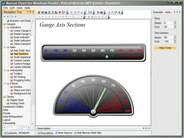
		<item><title>Gauges for Silverlight and WPF released</title><link>http://www.componentsource.com/news/2010/10/15/componentart-gauges-for-silverlight.html?rc=ni_6017</link><description>&lt;div class="image"&gt;&lt;img src="http://cloudcdn.componentsource.com/res/pub/media/4/3024/default_w350.png?rc=ni_6017" alt="Bullet Graph displayed in a browser with ComponentArt Gauges for Silverlight."/&gt;&lt;p&gt;&lt;small&gt;Bullet Graph displayed in a browser with ComponentArt Gauges for Silverlight.&lt;/small&gt;&lt;/p&gt;&lt;/div&gt;&lt;p&gt;&lt;strong&gt;ComponentArt Gauges provides a wide selection of digital gauge controls for Silverlight and WPF applications.&lt;/strong&gt;&lt;/p&gt;&lt;p&gt;ComponentArt Gauges feature easy KPI binding, customizable pointers, scales &amp;amp; ranges, flexible inner layout and smooth animation. All controls include professionally designed skins &amp;amp; themes and extensive Visual Studio 2010 design-time support. ComponentArt Gauges includes the following components: RadialGauge, LinearGauge, NumericGauge, BulletGraph, Cylinder, HalfDonut, Thermometer, Legend, Indicator, WcfDataProvider, DashboardLayout, DashboardPanel  and DashboardPopup.&lt;/p&gt;&lt;p&gt;The following editions are available:&lt;/p&gt;&lt;ul&gt;&lt;li&gt;&lt;a href="http://www.componentsource.com/products/componentart-gauges-for-silverlight/index.html?rc=ni_6017"&gt;ComponentArt Gauges for Silverlight&lt;/a&gt;&lt;/li&gt;&lt;li&gt;&lt;a href="http://www.componentsource.com/products/componentart-gauges-for-wpf/index.html?rc=ni_6017"&gt;ComponentArt Gauges for WPF&lt;/a&gt;&lt;/li&gt;&lt;/ul&gt;&lt;p&gt;ComponentArt Gauges is also available as part of &lt;a href="http://www.componentsource.com/products/componentart-data-visualization-for-silverlight/index.html?rc=ni_6017"&gt;ComponentArt Data Visualization for Silverlight&lt;/a&gt;, &lt;a href="http://www.componentsource.com/products/componentart-data-visualization-for-wpf/index.html?rc=ni_6017"&gt;ComponentArt Data Visualization for WPF&lt;/a&gt; and &lt;a href="http://www.componentsource.com/products/componentart-data-visualization-for-net-ultimate/index.html?rc=ni_6017"&gt;ComponentArt Data Visualization for .NET Ultimate&lt;/a&gt;.&lt;/p&gt;&lt;h3&gt;Features&lt;/h3&gt;&lt;ul&gt;&lt;li&gt;&lt;strong&gt;Radial Gauges&lt;/strong&gt;&lt;br/&gt;ComponentArt RadialGauge control supports 13 different gauge shapes: full circle, 4 orientations of half-circle and 8 orientations of quarter-circle. Extensive customizations are possible through scale, range, tickmark and annotation settings.&lt;/li&gt;&lt;li&gt;&lt;strong&gt;BulletGraphs&lt;/strong&gt;&lt;br/&gt;ComponentArt BulletGraph control delivers powerful horizontal and vertical bullet graphs, with flexible color stops, smooth animation and templated value and target bar popups.&lt;/li&gt;&lt;li&gt;&lt;strong&gt;Linear Gauges&lt;/strong&gt;&lt;br/&gt;Used to display a value in the context of a range, ComponentArt LinearGauge features multiple scales, ranges and pointers, flexible annotations and templateable popups.&lt;/li&gt;&lt;li&gt;&lt;strong&gt;Cylinders&lt;/strong&gt;&lt;br/&gt;Cylinders are used to display a percentage of the target reached in a linear form.&lt;/li&gt;&lt;li&gt;&lt;strong&gt;Half Donuts&lt;/strong&gt;&lt;br/&gt;Half donuts are used to display a percentage of the target reached in a radial form.&lt;/li&gt;&lt;li&gt;&lt;strong&gt;Thermometers&lt;/strong&gt;&lt;br/&gt;Thermometers are used to display a percentage reached towards a maximum value in a linear form, with optional tickmarks and annotations.&lt;/li&gt;&lt;li&gt;&lt;strong&gt;Numeric Gauges&lt;/strong&gt;&lt;br/&gt;Numeric gauges display numeric values in a graphically pleasing form, with optional animation effects.&lt;/li&gt;&lt;li&gt;&lt;strong&gt;Indicators&lt;/strong&gt;&lt;br/&gt;Indicators are used to show the state of a certain measure, based on a set of predefined rules.&lt;/li&gt;&lt;li&gt;&lt;strong&gt;Composite Gauges&lt;/strong&gt;&lt;br/&gt;Composite gauges are comprised out of several gauge controls in order to graphically show one or more related values.&lt;/li&gt;&lt;li&gt;&lt;strong&gt;Suite-wide Themes &amp;amp; Palettes&lt;/strong&gt;&lt;br/&gt;Themes are used throughout the suite to define visual characteristics of the user interface, such as chrome shapes of DashboardPanels and Dashboard popups, as well as the matching visual properties of the individual gauge controls. Setting a theme on a DashboardPanel will automatically apply that theme to all controls that it contains. Theme settings can be overridden on each individual control. Color palettes are also commonly shared throughout the suite. Any palette can be applied against any theme. All gauge controls support the same set of palettes and themes - providing a highly consistent look and feel throughout the application. The suite ships with a set of professionally designed themes and palettes, all of which can be further customized to match any branding requirements.&lt;/li&gt;&lt;li&gt;&lt;strong&gt;Comprehensive Visual Studio 2010 Design Time Support&lt;/strong&gt;&lt;br/&gt;ComponentArt Gauges for .NET offers extensive design-time capabilities within Microsoft's Visual Studio 2010 IDE. All controls include custom design UI panels - enabling quick customization and design-time preview. In addition, ComponentArt is pleased to include single-click license enabling of the application, greatly simplifying the deployment of your solution&lt;/li&gt;&lt;/ul&gt;&lt;p&gt;For more information visit:&lt;br/&gt;&lt;a href="http://www.componentart.com/company/press/PressRelease_20101009.doc"&gt;http://www.componentart.com/company/press/PressRelease_20101009.doc&lt;/a&gt; (Microsoft Word Document)&lt;/p&gt;&lt;h3&gt;About ComponentArt&lt;/h3&gt;&lt;p&gt;&lt;a href="http://www.componentsource.com/features/componentart/index.html?rc=ni_6017"&gt;ComponentArt&lt;/a&gt; is a leading component vendor specializing in the creation of user interface and data visualization software for Microsoft's .NET platform. The company's primary goal is to help developers worldwide advance their software development effort by providing powerful building blocks that allow them to focus on the business logic, core value, and primary function of their application or website. ComponentArt has consistently been at the leading edge of technological innovation - from its first ASP.NET user interface component launch in 2002, parallel with the launch of the Microsoft ASP.NET platform - to the breakthrough release of Web.UI for ASP.NET AJAX, parallel with the Microsoft ASP.NET AJAX framework launch (now a part of ASP.NET 3.5 and Visual Studio 2008).&lt;/p&gt;</description><category>.NET Components</category><category>32 Bit</category><category>64 Bit</category><category>ComponentArt</category><category>Components</category><category>Instrumentation</category><category>Microsoft</category><category>Press Releases</category><category>Silverlight Controls</category><category>Visual Basic 2008</category><category>Visual Basic 2010</category><category>Visual C# 2008</category><category>Visual C# 2010</category><category>Visual C++ 2008</category><category>Visual C++ 2010</category><category>Visual Studio 2008</category><category>Visual Studio 2010</category><guid isPermaLink="false">http://www.componentsource.com/news/2010/10/15/componentart-gauges-for-silverlight.html?rc=ni_6017</guid><pubDate>Fri, 15 Oct 2010 17:05:00 GMT</pubDate></item>
		<item><title>Silverlight/WPF GridView now available</title><link>http://www.componentsource.com/news/2010/10/15/componentart-gridview-for-silverlight.html?rc=ni_6015</link><description>&lt;div class="image"&gt;&lt;img src="http://cloudcdn.componentsource.com/res/pub/media/4/3002/default_w350.png?rc=ni_6015" alt="Spreadsheet mode in ComponentArt GridView for Silverlight."/&gt;&lt;p&gt;&lt;small&gt;Spreadsheet mode in ComponentArt GridView for Silverlight.&lt;/small&gt;&lt;/p&gt;&lt;/div&gt;&lt;p&gt;&lt;strong&gt;ComponentArt GridView lets you add Excel-like spreadsheet presentation and traditional paged data to your applications.&lt;/strong&gt;&lt;/p&gt;&lt;p&gt;ComponentArt GridView's streamlined API allows for quick implementation in your application or dashboard. ComponentArt GridView features include: interactive column resizing &amp;amp; reordering, row &amp;amp; column freezing, support for embedded visualizations, ability to handle very large datasets and more.&lt;/p&gt;&lt;p&gt;The following editions are available:&lt;/p&gt;&lt;ul&gt;&lt;li&gt;&lt;a href="http://www.componentsource.com/products/componentart-gridview-for-silverlight/index.html?rc=ni_6015"&gt;ComponentArt GridView for Silverlight&lt;/a&gt;&lt;/li&gt;&lt;li&gt;&lt;a href="http://www.componentsource.com/products/componentart-gridview-for-wpf/index.html?rc=ni_6015"&gt;ComponentArt GridView for WPF&lt;/a&gt;&lt;/li&gt;&lt;/ul&gt;&lt;p&gt;ComponentArt GridView is also available as part of &lt;a href="http://www.componentsource.com/products/componentart-data-visualization-for-silverlight/index.html?rc=ni_6015"&gt;ComponentArt Data Visualization for Silverlight&lt;/a&gt;, &lt;a href="http://www.componentsource.com/products/componentart-data-visualization-for-wpf/index.html?rc=ni_6015"&gt;ComponentArt Data Visualization for WPF&lt;/a&gt; and &lt;a href="http://www.componentsource.com/products/componentart-data-visualization-for-net-ultimate/index.html?rc=ni_6015"&gt;ComponentArt Data Visualization for .NET Ultimate&lt;/a&gt;.&lt;/p&gt;&lt;h3&gt;Features&lt;/h3&gt;&lt;ul&gt;&lt;li&gt;&lt;strong&gt;Effective Spreadsheet and Paged Display of Data&lt;/strong&gt;&lt;br/&gt;Choose between two intuitive interfaces into your tabular data: Excel-like spreadsheet presentation and traditional paged data grid. Or choose something in between, by picking and choosing your favorite features. GridView's highly usable user interface utilizes the best of Silverlight technology for rich presentation of your tabular data. Its streamlined API allows for quick implementation in your application or dashboard.&lt;/li&gt;&lt;li&gt;&lt;strong&gt;Built-in Sorting, Grouping and Paging&lt;/strong&gt;&lt;br/&gt;The GridView control knows how to efficiently sort, group and page through any data set available to the application. All functionality is immediately usable through the intuitive interface.&lt;/li&gt;&lt;li&gt;&lt;strong&gt;Interactive Column Resizing &amp;amp; Reordering&lt;/strong&gt;&lt;br/&gt;Customize and adjust the view by quickly ordering and sizing columns. The API allows for easy saving and loading of customized column configurations.&lt;/li&gt;&lt;li&gt;&lt;strong&gt;Row &amp;amp; Column Freezing&lt;/strong&gt;&lt;br/&gt;Easily manage large spreadsheet views by freezing columns and rows of special interest while you scroll horizontally and vertically through your data.&lt;/li&gt;&lt;li&gt;&lt;strong&gt;Support for Embedded Visualizations&lt;/strong&gt;&lt;br/&gt;Other Data Visualization controls are first-class citizens in GridView's data panel. Drop charts and gauges into grid cells for rich, dynamic visualizations of your tabular data.&lt;/li&gt;&lt;li&gt;&lt;strong&gt;Ability to Handle Very Large Datasets&lt;/strong&gt;&lt;br/&gt;By utilizing virtualized rendering, GridView maintains optimal performance as its data set grows. Scroll through tens of thousands of rows on the client, and sort or group them, without compromising the usability of your application.&lt;/li&gt;&lt;li&gt;&lt;strong&gt;ComponentArt GridView for Silverlight Integration with the Powerful CalcEngine&lt;/strong&gt;&lt;br/&gt;GridView makes use of the CalcEngine to natively provide powerful built-in data-shaping functionality like computed cells: as in a standard spreadsheet, grid values can be the results of quick on-the-fly calculations based on original data.&lt;/li&gt;&lt;li&gt;&lt;strong&gt;Suite-wide Themes &amp;amp; Palettes&lt;/strong&gt;&lt;br/&gt;Themes are used throughout the suite to define visual characteristics of the user interface, such as chrome shapes of DashboardPanels and Dashboard popups, as well as the matching visual properties of the GridView control. Setting a theme on a DashboardPanel will automatically apply that theme to all controls that it contains. Theme settings can be overridden on each individual control. Color palettes are also commonly shared throughout the suite. Any palette can be applied against any theme. The GridView control supports the same set of palettes and themes - providing a highly consistent look and feel throughout the application. The suite ships with a set of professionally designed themes and palettes, all of which can be further customized to match any branding requirements.&lt;/li&gt;&lt;li&gt;&lt;strong&gt;Comprehensive Visual Studio 2010 Design Time Support&lt;/strong&gt;&lt;br/&gt;ComponentArt GridView for Silverlight offers extensive design-time capabilities within Microsoft's Visual Studio 2010 IDE. The control includes custom design UI panels - enabling quick customization and design-time preview. In addition, ComponentArt is pleased to include single-click license enabling of the application, greatly simplifying the deployment of your solution.&lt;/li&gt;&lt;/ul&gt;&lt;p&gt;For more information visit:&lt;br/&gt;&lt;a href="http://www.componentart.com/company/press/PressRelease_20101009.doc"&gt;http://www.componentart.com/company/press/PressRelease_20101009.doc&lt;/a&gt; (Microsoft Word Document)&lt;/p&gt;&lt;h3&gt;About ComponentArt&lt;/h3&gt;&lt;p&gt;&lt;a href="http://www.componentsource.com/features/componentart/index.html?rc=ni_6015"&gt;ComponentArt&lt;/a&gt; is a leading component vendor specializing in the creation of user interface and data visualization software for Microsoft's .NET platform. The company's primary goal is to help developers worldwide advance their software development effort by providing powerful building blocks that allow them to focus on the business logic, core value, and primary function of their application or website. ComponentArt has consistently been at the leading edge of technological innovation - from its first ASP.NET user interface component launch in 2002, parallel with the launch of the Microsoft ASP.NET platform - to the breakthrough release of Web.UI for ASP.NET AJAX, parallel with the Microsoft ASP.NET AJAX framework launch (now a part of ASP.NET 3.5 and Visual Studio 2008).&lt;/p&gt;</description><category>.NET Components</category><category>32 Bit</category><category>64 Bit</category><category>ComponentArt</category><category>Components</category><category>Datagrids</category><category>Microsoft</category><category>Press Releases</category><category>Silverlight Controls</category><category>Visual Basic 2008</category><category>Visual Basic 2010</category><category>Visual C# 2008</category><category>Visual C# 2010</category><category>Visual C++ 2008</category><category>Visual C++ 2010</category><category>Visual Studio 2008</category><category>Visual Studio 2010</category><guid isPermaLink="false">http://www.componentsource.com/news/2010/10/15/componentart-gridview-for-silverlight.html?rc=ni_6015</guid><pubDate>Fri, 15 Oct 2010 17:05:00 GMT</pubDate></item>
		<item><title>Silverlight and WPF maps now available</title><link>http://www.componentsource.com/news/2010/10/15/componentart-maps-for-silverlight.html?rc=ni_6016</link><description>&lt;div class="image"&gt;&lt;img src="http://cloudcdn.componentsource.com/res/pub/media/4/3021/default_w350.png?rc=ni_6016" alt="World map displayed in a browser with ComponentArt Maps for Silverlight."/&gt;&lt;p&gt;&lt;small&gt;World map displayed in a browser with ComponentArt Maps for Silverlight.&lt;/small&gt;&lt;/p&gt;&lt;/div&gt;&lt;p&gt;&lt;strong&gt;ComponentArt Maps provides effective visualization of geographic data for Silverlight and WPF applications.&lt;/strong&gt;&lt;/p&gt;&lt;p&gt;ComponentArt Maps is a comprehensive mapping package including state-of-the-art rendering and rich interactive features built on the latest technology. It includes a large collection of over 150 ready-to-use maps of continents, regions and countries and US states. ComponentArt Maps features interactive zooming and panning via the mouse. The functionality can also be used by interacting with the zooming and panning widget which can optionally be displayed within the control.&lt;/p&gt;&lt;p&gt;The following editions are available:&lt;/p&gt;&lt;ul&gt;&lt;li&gt;&lt;a href="http://www.componentsource.com/products/componentart-maps-for-silverlight/index.html?rc=ni_6016"&gt;ComponentArt Maps for Silverlight&lt;/a&gt;&lt;/li&gt;&lt;li&gt;&lt;a href="http://www.componentsource.com/products/componentart-maps-for-wpf/index.html?rc=ni_6016"&gt;ComponentArt Maps for WPF&lt;/a&gt;&lt;/li&gt;&lt;/ul&gt;&lt;p&gt;ComponentArt Maps is also available as part of &lt;a href="http://www.componentsource.com/products/componentart-data-visualization-for-silverlight/index.html?rc=ni_6016"&gt;ComponentArt Data Visualization for Silverlight&lt;/a&gt;, &lt;a href="http://www.componentsource.com/products/componentart-data-visualization-for-wpf/index.html?rc=ni_6016"&gt;ComponentArt Data Visualization for WPF&lt;/a&gt; and &lt;a href="http://www.componentsource.com/products/componentart-data-visualization-for-net-ultimate/index.html?rc=ni_6016"&gt;ComponentArt Data Visualization for .NET Ultimate&lt;/a&gt;.&lt;/p&gt;&lt;h3&gt;Features&lt;/h3&gt;&lt;ul&gt;&lt;li&gt;&lt;strong&gt;Templated Item Popups&lt;/strong&gt;&lt;br/&gt;The Map control takes advantage of the standard DashboardPopup control to provide rich, themable popups over items on the map. The popup content is fully templated, allowing for rich, on-demand presentation of context-sensitive data.&lt;/li&gt;&lt;li&gt;&lt;strong&gt;Interactive Drill-downs&lt;/strong&gt;&lt;br/&gt;When a large amount of map data is organized hierarchically, the Map control can load it on-demand using an interactive drill-down approach. In such a scenario, an area, when selected, is automatically zoomed while additional data is loaded to visualize its constituents.&lt;/li&gt;&lt;li&gt;&lt;strong&gt;High-performance Zooming &amp;amp; Panning&lt;/strong&gt;&lt;br/&gt;Interactive zooming and panning via the mouse and standard features of the Map control. The functionality can also be used by interacting with the zooming and panning widget which can optionally be displayed within the control.&lt;/li&gt;&lt;li&gt;&lt;strong&gt;Multiple Shape Layers, Templated Points &amp;amp; Lines&lt;/strong&gt;&lt;br/&gt;Multiple layers of data are needed for some visualizations: points and/or lines may be plotted on top of areas, and both are fully customizable using XAML templates. Embed other Data Visualization controls, like Charts and Gauges, within your map.&lt;/li&gt;&lt;li&gt;&lt;strong&gt;Flexible Projections&lt;/strong&gt;&lt;br/&gt;The Map control includes a dynamic and extensible projection library. A complete set of standard cartographic projections is included, and can easily be added to by extending simple base classes.&lt;/li&gt;&lt;li&gt;&lt;strong&gt;Including a Large Map Library&lt;/strong&gt;&lt;br/&gt;The Data Visualization package includes an extensive library of ready-to-use ESRI shapefiles, covering multiple configurations of the World, its Continents and Regions, and over one hundred countries, including the United States and all its individual states.&lt;/li&gt;&lt;/ul&gt;&lt;p&gt;For more information visit:&lt;br/&gt;&lt;a href="http://www.componentart.com/company/press/PressRelease_20101009.doc"&gt;http://www.componentart.com/company/press/PressRelease_20101009.doc&lt;/a&gt; (Microsoft Word Document)&lt;/p&gt;&lt;h3&gt;About ComponentArt&lt;/h3&gt;&lt;p&gt;&lt;a href="http://www.componentsource.com/features/componentart/index.html?rc=ni_6016"&gt;ComponentArt&lt;/a&gt; is a leading component vendor specializing in the creation of user interface and data visualization software for Microsoft's .NET platform. The company's primary goal is to help developers worldwide advance their software development effort by providing powerful building blocks that allow them to focus on the business logic, core value, and primary function of their application or website. ComponentArt has consistently been at the leading edge of technological innovation - from its first ASP.NET user interface component launch in 2002, parallel with the launch of the Microsoft ASP.NET platform - to the breakthrough release of Web.UI for ASP.NET AJAX, parallel with the Microsoft ASP.NET AJAX framework launch (now a part of ASP.NET 3.5 and Visual Studio 2008).&lt;/p&gt;</description><category>.NET Components</category><category>32 Bit</category><category>64 Bit</category><category>ComponentArt</category><category>Components</category><category>Mapping and GIS</category><category>Microsoft</category><category>Press Releases</category><category>Silverlight Controls</category><category>Visual Basic 2008</category><category>Visual Basic 2010</category><category>Visual C# 2008</category><category>Visual C# 2010</category><category>Visual C++ 2008</category><category>Visual C++ 2010</category><category>Visual Studio 2008</category><category>Visual Studio 2010</category><guid isPermaLink="false">http://www.componentsource.com/news/2010/10/15/componentart-maps-for-silverlight.html?rc=ni_6016</guid><pubDate>Fri, 15 Oct 2010 17:05:00 GMT</pubDate></item>
		<item><title>Silverlight/WPF TimeNavigator released</title><link>http://www.componentsource.com/news/2010/10/15/componentart-timenavigator-for-silverlight.html?rc=ni_6014</link><description>&lt;div class="image"&gt;&lt;img src="http://cloudcdn.componentsource.com/res/pub/media/3/2993/default_w350.png?rc=ni_6014" alt="Gradient Chart created with ComponentArt TimeNavigator for Silverlight."/&gt;&lt;p&gt;&lt;small&gt;Gradient Chart created with ComponentArt TimeNavigator for Silverlight.&lt;/small&gt;&lt;/p&gt;&lt;/div&gt;&lt;p&gt;&lt;strong&gt;ComponentArt TimeNavigator provides WPF and Silverlight with a highly interactive control for date range selections.&lt;/strong&gt;&lt;/p&gt;&lt;p&gt;ComponentArt TimeNavigator was designed to enable quick and intuitive date range selections. Developers can specify the allowed date range as well as any number of date/time drill levels: decades, years, quarters, months, weeks, days, hours, minute, seconds or milliseconds. The user navigates through time and makes date selections by clicking, dragging, zooming, scrolling, using the mouse wheel or using SHIFT and CTRL keys. All operations are quick, easy and intuitive. ComponentArt TimeNavigator has been optimized to quickly handle many thousands of time nodes: scrolling, zooming and drilling is extremely responsive, even with very large time spans.&lt;/p&gt;&lt;p&gt;The following editions are available:&lt;/p&gt;&lt;ul&gt;&lt;li&gt;&lt;a href="http://www.componentsource.com/products/componentart-timenavigator-for-silverlight/index.html?rc=ni_6014"&gt;ComponentArt TimeNavigator for Silverlight&lt;/a&gt;&lt;/li&gt;&lt;li&gt;&lt;a href="http://www.componentsource.com/products/componentart-timenavigator-for-wpf/index.html?rc=ni_6014"&gt;ComponentArt TimeNavigator for WPF&lt;/a&gt;&lt;/li&gt;&lt;/ul&gt;&lt;p&gt;ComponentArt TimeNavigator is also available as part of &lt;a href="http://www.componentsource.com/products/componentart-data-visualization-for-silverlight/index.html?rc=ni_6014"&gt;ComponentArt Data Visualization for Silverlight&lt;/a&gt;, &lt;a href="http://www.componentsource.com/products/componentart-data-visualization-for-wpf/index.html?rc=ni_6014"&gt;ComponentArt Data Visualization for WPF&lt;/a&gt; and &lt;a href="http://www.componentsource.com/products/componentart-data-visualization-for-net-ultimate/index.html?rc=ni_6014"&gt;ComponentArt Data Visualization for .NET Ultimate&lt;/a&gt;.&lt;/p&gt;&lt;h3&gt;Features&lt;/h3&gt;&lt;p&gt;&lt;strong&gt;A Comprehensive Collection of Visualizations&lt;/strong&gt;&lt;br/&gt;TimeNavigator supports embedding any custom control that is able to render content over the date/time axis. ComponentArt XyChart has been extensively optimized to integrate seamlessly with TimeNavigator and provide highly responsive rendering that TimeNavigator requires.&lt;/p&gt;&lt;ul&gt;&lt;li&gt;Line Visualizations&lt;/li&gt;&lt;li&gt;Area Visualizations&lt;/li&gt;&lt;li&gt;Column Visualizations&lt;/li&gt;&lt;li&gt;Marker Visualizations&lt;/li&gt;&lt;li&gt;Composite Visualizations&lt;/li&gt;&lt;/ul&gt;&lt;p&gt;&lt;strong&gt;Suite-wide Themes &amp;amp; Palettes&lt;/strong&gt;&lt;br/&gt;Themes are used throughout the suite to define visual characteristics of the user interface, such as chrome shapes of DashboardPanels and Dashboard popups, as well as the matching visual properties of the TimeNavigator control. Setting a theme on a DashboardPanel will automatically apply that theme to all controls that it contains. Theme settings can be overridden on each individual control. Color palettes are also commonly shared throughout the suite. Any palette can be applied against any theme. The TimeNavigator control supports the same set of palettes and themes providing a highly consistent look and feel throughout the application. The suite ships with a set of professionally designed themes and palettes, all of which can be further customized to match any branding requirements.&lt;/p&gt;&lt;p&gt;&lt;strong&gt;Comprehensive Visual Studio 2010 Design Time Support&lt;/strong&gt;&lt;br/&gt;ComponentArt TimeNavigator for Silverlight offers extensive design-time capabilities within Microsoft's Visual Studio 2010 IDE. The control includes custom design UI panels'enabling quick customization and design-time preview. In addition, ComponentArt is pleased to include single-click license enabling of the application, greatly simplifying the deployment of your solution.&lt;/p&gt;&lt;p&gt;For more information visit:&lt;br/&gt;&lt;a href="http://www.componentart.com/company/press/PressRelease_20101009.doc"&gt;http://www.componentart.com/company/press/PressRelease_20101009.doc&lt;/a&gt; (Microsoft Word Document)&lt;/p&gt;&lt;h3&gt;About ComponentArt&lt;/h3&gt;&lt;p&gt;&lt;a href="http://www.componentsource.com/features/componentart/index.html?rc=ni_6014"&gt;ComponentArt&lt;/a&gt; is a leading component vendor specializing in the creation of user interface and data visualization software for Microsoft's .NET platform. The company's primary goal is to help developers worldwide advance their software development effort by providing powerful building blocks that allow them to focus on the business logic, core value, and primary function of their application or website. ComponentArt has consistently been at the leading edge of technological innovation - from its first ASP.NET user interface component launch in 2002, parallel with the launch of the Microsoft ASP.NET platform - to the breakthrough release of Web.UI for ASP.NET AJAX, parallel with the Microsoft ASP.NET AJAX framework launch (now a part of ASP.NET 3.5 and Visual Studio 2008).&lt;/p&gt;</description><category>.NET Components</category><category>32 Bit</category><category>64 Bit</category><category>ComponentArt</category><category>Components</category><category>Microsoft</category><category>Press Releases</category><category>Silverlight Controls</category><category>User Interface</category><category>Visual Basic 2008</category><category>Visual Basic 2010</category><category>Visual C# 2008</category><category>Visual C# 2010</category><category>Visual C++ 2008</category><category>Visual C++ 2010</category><category>Visual Studio 2008</category><category>Visual Studio 2010</category><guid isPermaLink="false">http://www.componentsource.com/news/2010/10/15/componentart-timenavigator-for-silverlight.html?rc=ni_6014</guid><pubDate>Fri, 15 Oct 2010 17:05:00 GMT</pubDate></item>
		<item><title>ComponentArt Data Visualization released</title><link>http://www.componentsource.com/news/2010/10/11/componentart-data-visualization-for-net-ultimate.html?rc=ni_5900</link><description>&lt;div class="image"&gt;&lt;img src="http://cloudcdn.componentsource.com/res/pub/media/3/2956/default_w350.png?rc=ni_5900" alt="Gauges, charts and maps in ComponentArt Data Visualization."/&gt;&lt;p&gt;&lt;small&gt;Gauges, charts and maps in ComponentArt Data Visualization.&lt;/small&gt;&lt;/p&gt;&lt;/div&gt;&lt;p&gt;&lt;strong&gt;A complete package of controls for building next-generation digital dashboards, now available from ComponentSource.&lt;/strong&gt;&lt;/p&gt;&lt;p&gt;ComponentArt Data Visualization delivers the complete feature set for building next-generation digital dashboards and data analysis applications. ComponentArt Data Visualization includes charts, gauges, maps, gridview, time navigator and a calc engine. ComponentArt's 3D pixel shading technology integrated with XAML produces brilliant image quality, while being able to render many thousands of elements per second. The result is highly responsive user interface, smooth animation, delivering applications that boost productivity and are a pleasure to use.&lt;/p&gt;&lt;p&gt;The following editions are available:&lt;/p&gt;&lt;ul&gt;&lt;li&gt;&lt;a href="http://www.componentsource.com/products/componentart-data-visualization-for-net-ultimate/index.html?rc=ni_5900"&gt;ComponentArt Data Visualization for .NET Ultimate&lt;/a&gt; (includes both Silverlight and WPF editions)&lt;/li&gt;&lt;li&gt;&lt;a href="http://www/products/componentart-data-visualization-for-silverlight/index.html" title="View the full details for ComponentArt Data Visualization for Silverlight"&gt;ComponentArt Data Visualization for Silverlight&lt;/a&gt;&lt;/li&gt;&lt;li&gt;&lt;a href="http://www/products/componentart-data-visualization-for-wpf/index.html" title="View the full details for ComponentArt Data Visualization for WPF"&gt;ComponentArt Data Visualization for WPF&lt;/a&gt;&lt;/li&gt;&lt;/ul&gt;&lt;h3&gt;Features&lt;/h3&gt;&lt;ul&gt;&lt;li&gt;&lt;strong&gt;ComponentArt Data Visualization for .NET Ultimate Features&lt;/strong&gt;&lt;br/&gt;ComponentArt Data Visualization for .NET Ultimate includes includes charts, gauges, maps, gridview, time navigator and a calc engine for both WPF and Silverlight Technologies. All of ComponentArt's charts, gauges, maps, grids and time navigators are built on top of this core rendering technology, producing a unified look and feel across the entire suite.&lt;/li&gt;&lt;li&gt;&lt;strong&gt;ComponentArt Data Visualization for .NET Ultimate Performance&lt;/strong&gt;&lt;br/&gt;ComponentArt's Data Visualization suite has been designed for handling extremely large amounts of data - measured in millions of records - through a highly effective WCF web service communication layer. In addition, all controls are capable of handling tens of thousands of records on the client.&lt;/li&gt;&lt;li&gt;&lt;strong&gt;ComponentArt Data Visualization for .NET Ultimate Common Framework&lt;/strong&gt;&lt;br/&gt;Common data access and CalcEngine data processing technology are at the core of ComponentArt Data Visualization for .NET. In addition, the suite includes generic elements for building dashboard user interfaces: DashboardLayout, DashboardPanel and DashboardPopup. All of these elements are reused by all data visualization controls - providing a consistent programming framework throughout the application.&lt;/li&gt;&lt;li&gt;&lt;strong&gt;ComponentArt Data Visualization for .NET Ultimate Interactivity&lt;/strong&gt;&lt;br/&gt;Providing context through animated drill-downs, enabling data point selection and templated popups, interactive zooming &amp;amp; scrolling have all been developed improve end user experience.&lt;/li&gt;&lt;li&gt;&lt;strong&gt;ComponentArt Data Visualization for .NET Ultimate Suite-wide Themes &amp;amp; Palettes&lt;/strong&gt;&lt;br/&gt;Themes are used throughout the suite to define visual characteristics of the user interface, such as chrome shapes of DashboardPanels and Dashboard popups, as well as the matching visual properties of the individual controls. Setting a theme on a DashboardPanel will automatically apply that theme to all controls that it contains. Theme settings can be overridden on each individual control. Color palettes are also commonly shared throughout the suite. Any palette can be applied against any theme. All controls support the same set of palettes and themes - providing a highly consistent look and feel throughout the application. The suite ships with a set of professionally designed themes and palettes, all of which can be further customized to match any branding requirements.&lt;/li&gt;&lt;li&gt;&lt;strong&gt;ComponentArt Data Visualization for .NET Ultimate Comprehensive Visual Studio 2010 Design Time Support&lt;/strong&gt;&lt;br/&gt;ComponentArt Data Visualization for .NET offers extensive design-time capabilities within Microsoft's Visual Studio IDE. All controls include custom design UI panels - enabling quick customization and design-time preview. In addition, ComponentArt is pleased to include single-click license enabling of the application, greatly simplifying the deployment of your solution.&lt;/li&gt;&lt;/ul&gt;&lt;p&gt;&lt;strong&gt;ComponentArt Data Visualization Ultimate Charting&lt;/strong&gt;&lt;/p&gt;&lt;ul&gt;&lt;li&gt;Bar &amp;amp; Column Charts&lt;/li&gt;&lt;li&gt;Pie &amp;amp; Donut Charts&lt;/li&gt;&lt;li&gt;Line Charts&lt;/li&gt;&lt;li&gt;Area Charts&lt;/li&gt;&lt;li&gt;Bubble &amp;amp; Marker Charts&lt;/li&gt;&lt;li&gt;Financial &amp;amp; Stock Charts&lt;/li&gt;&lt;li&gt;Funnel Charts&lt;/li&gt;&lt;li&gt;Radar Charts&lt;/li&gt;&lt;li&gt;TreeMaps&lt;/li&gt;&lt;li&gt;Combination Charts&lt;/li&gt;&lt;li&gt;Ability to Handle Very Large Datasets&lt;/li&gt;&lt;li&gt;Integration with the CalcEngine&lt;/li&gt;&lt;/ul&gt;&lt;p&gt;&lt;strong&gt;ComponentArt Data Visualization Ultimate Gauges&lt;/strong&gt;&lt;/p&gt;&lt;ul&gt;&lt;li&gt;Radial Gauges&lt;/li&gt;&lt;li&gt;BulletGraphs&lt;/li&gt;&lt;li&gt;Linear Gauges&lt;/li&gt;&lt;li&gt;Cylinders&lt;/li&gt;&lt;li&gt;Half Donuts&lt;/li&gt;&lt;li&gt;Thermometers&lt;/li&gt;&lt;li&gt;Numeric Gauges&lt;/li&gt;&lt;li&gt;Indicators&lt;/li&gt;&lt;/ul&gt;&lt;p&gt;&lt;strong&gt;ComponentArt Data Visualization Ultimate Maps&lt;/strong&gt;&lt;/p&gt;&lt;ul&gt;&lt;li&gt;Effective Visualization of Geographic Data&lt;/li&gt;&lt;li&gt;Templated Item Popups&lt;/li&gt;&lt;li&gt;Interactive Drill-downs&lt;/li&gt;&lt;li&gt;High-performance Zooming &amp;amp; Panning&lt;/li&gt;&lt;li&gt;Multiple Shape Layers, Templated Points &amp;amp; Lines&lt;/li&gt;&lt;li&gt;Flexible Projections&lt;/li&gt;&lt;li&gt;Including a Large Map Library&lt;/li&gt;&lt;/ul&gt;&lt;p&gt;&lt;strong&gt;ComponentArt Data Visualization Ultimate GridView&lt;/strong&gt;&lt;/p&gt;&lt;ul&gt;&lt;li&gt;Effective Spreadsheet and Paged Display of Data&lt;/li&gt;&lt;li&gt;Built-in Sorting, Grouping and Paging&lt;/li&gt;&lt;li&gt;Interactive Column Resizing &amp;amp; Reordering&lt;/li&gt;&lt;li&gt;Row &amp;amp; Column Freezing&lt;/li&gt;&lt;li&gt;Support for Embedded Visualizations&lt;/li&gt;&lt;li&gt;Ability to Handle Very Large Datasets&lt;/li&gt;&lt;li&gt;Integration with the CalcEngine&lt;/li&gt;&lt;/ul&gt;&lt;p&gt;&lt;strong&gt;ComponentArt Data Visualization Ultimate TimeNavigator&lt;/strong&gt;&lt;/p&gt;&lt;ul&gt;&lt;li&gt;A Highly Interactive Control for Date Range Selections&lt;/li&gt;&lt;li&gt;A Comprehensive Collection of Visualizations&lt;/li&gt;&lt;/ul&gt;&lt;p&gt;&lt;strong&gt;ComponentArt Data Visualization Ultimate CalcEngine&lt;/strong&gt;&lt;/p&gt;&lt;ul&gt;&lt;li&gt;A Client-side Data Processing Engine&lt;/li&gt;&lt;li&gt;Dataset Operations&lt;/li&gt;&lt;li&gt;Statistical Operations&lt;/li&gt;&lt;li&gt;Financial Operations&lt;/li&gt;&lt;li&gt;Embedding Client-side Logic Into XAML Templates&lt;/li&gt;&lt;li&gt;Integration With Data Visualization Controls&lt;/li&gt;&lt;li&gt;Comprehensive Visual Studio Design Time Support&lt;/li&gt;&lt;/ul&gt;&lt;h3&gt;About ComponentArt&lt;/h3&gt;&lt;p&gt;&lt;a href="http://www.componentsource.com/features/componentart/index.html?rc=ni_5900"&gt;ComponentArt&lt;/a&gt; is a leading component vendor specializing in the creation of user interface and data visualization software for Microsoft's .NET platform. The company's primary goal is to help developers worldwide advance their software development effort by providing powerful building blocks that allow them to focus on the business logic, core value, and primary function of their application or website. ComponentArt has consistently been at the leading edge of technological innovation - from its first ASP.NET user interface component launch in 2002, parallel with the launch of the Microsoft ASP.NET platform - to the breakthrough release of Web.UI for ASP.NET AJAX, parallel with the Microsoft ASP.NET AJAX framework launch (now a part of ASP.NET 3.5 and Visual Studio 2008).&lt;/p&gt;</description><category>.NET Components</category><category>32 Bit</category><category>64 Bit</category><category>ComponentArt</category><category>Components</category><category>Microsoft</category><category>Press Releases</category><category>Product Suites</category><category>Silverlight Controls</category><category>Top Stories</category><category>Visual Basic 2005</category><category>Visual Basic 2008</category><category>Visual Basic 2010</category><category>Visual C# 2008</category><category>Visual C# 2010</category><category>Visual C++ 2008</category><category>Visual C++ 2010</category><category>Visual Studio 2008</category><category>Visual Studio 2010</category><category>WPF Controls</category><guid isPermaLink="false">http://www.componentsource.com/news/2010/10/11/componentart-data-visualization-for-net-ultimate.html?rc=ni_5900</guid><pubDate>Mon, 11 Oct 2010 17:26:00 GMT</pubDate></item>
		<item><title>ComponentArt launches Win.UI for WPF</title><link>http://www.componentsource.com/news/2010/03/20/componentart-winui-wpf.html?rc=ni_3235</link><description>&lt;div class="image"&gt;&lt;img src="http://cloudcdn.componentsource.com/res/pub/media/2/1671/default_w350.png?rc=ni_3235" alt="Viewing RSS feeds in DataGrid for WPF."/&gt;&lt;p&gt;&lt;small&gt;Viewing RSS feeds in DataGrid for WPF.&lt;/small&gt;&lt;/p&gt;&lt;/div&gt;&lt;p&gt;&lt;strong&gt;New suite includes WPF grid charting, navigation and input components.&lt;/strong&gt;&lt;/p&gt;&lt;p&gt;&lt;a href="http://www.componentsource.com/products/componentart-winui-wpf/index.html?rc=ni_3235"&gt;ComponentArt Win.UI for WPF&lt;/a&gt; currently includes grid, charting, navigation and input components. ComponentArt DataGrid for WPF can handle millions of records and includes an innovative slide pager, drag &amp;amp; drop capabilities and more. ComponentArt Charting for WPF includes features like animated drill-downs and data point selection.&lt;/p&gt;&lt;p&gt;ComponentArt Win.UI for WPF can also be bought as part of &lt;a href="http://www.componentsource.com/products/componentart-ui-framework/index.html?rc=ni_3235"&gt;ComponentArt UI Framework for .NET&lt;/a&gt;.&lt;/p&gt;&lt;h3&gt;Features&lt;/h3&gt;&lt;ul&gt;&lt;li&gt;&lt;strong&gt;ComponentArt DataGrid for WPF&lt;/strong&gt;&lt;br/&gt;ComponentArt DataGrid for WPF can handle millions of records, elegant architecture, a wealth of features and built-in styles. ComponentArt Win.UI for WPF includes an innovative slide pager, drag &amp;amp; drop capabilities, interactive column resizing &amp;amp; reordering and the ability show or hide columns on the fly, hierarchical display of data, complex master-detail functionality, full templating capabilities of each DataGrid element are all built-in features of the control. Comprehensive data manipulation functionality can be implemented without any client-side code through tight integration with ComponentArt SOA.UI for .NET. ComponentArt DataGrid includes features like paging, scrolling, sorting, grouping, filtering, editing, and a complete API for full programmatic control.&lt;/li&gt;&lt;li&gt;&lt;strong&gt;ComponentArt Charting for WPF&lt;/strong&gt;&lt;br/&gt;ComponentArt Charting for WPF includes features like animated drill-downs, data point selection, templated popups, interactive zooming &amp;amp; scrolling and more. Supporting any number of series and a virtually unlimited number of data points, ComponentArt Charting for WPF is able to easily handle complex and large datasets. A large number of ready-to-use skins and themes are also included.&lt;/li&gt;&lt;li&gt;&lt;strong&gt;ComponentArt Navigationg for WPF&lt;/strong&gt;&lt;br/&gt;ComponentArt Navigationg for WPF currently includes menus, toolbars, navigation bars, context menus, treeviews, tabstrips, breadcrumbs and dynamic cover flow controls. All ComponentArt navigation controls have been architected to easily support very large navigation structures with minimal CPU load and memory footprint. Direct web service binding, in-place editing, comprehensive drag &amp;amp; drop capabilities and powerful APIs are built into each ComponentArt navigation control. Complex server-side data communication can be implemented without any client-side code through tight integration with ComponentArt SOA.UI for .NET.&lt;/li&gt;&lt;li&gt;&lt;strong&gt;ComponentArt Input Controls for WPF&lt;/strong&gt;&lt;br/&gt;ComponentArt Input Controls for WPF will allow you to build interactive data entry forms for WPF. ComponentArt Input Controls for WPF currently includes auto-complete combobox, numeric input, masked input, and range slider. All input controls have been built on ComponentArt's user interface rendering technology, delivering a rich &amp;amp; fluid end user experience. Complex server-side data communication can be implemented without any client-side code through tight integration with ComponentArt SOA.UI for .NET. A large number of ready-to-use skins and themes are also included.&lt;/li&gt;&lt;/ul&gt;&lt;p&gt;For more information visit:&lt;br/&gt;&lt;a href="http://www.componentart.com/company/press/PressRelease_20100225.doc"&gt;http://www.componentart.com/company/press/PressRelease_20100225.doc&lt;/a&gt; (Microsoft Word DOC) &lt;/p&gt;&lt;h3&gt;About ComponentArt&lt;/h3&gt;&lt;p&gt;&lt;a href="http://www.componentsource.com/features/componentart/index.html?rc=ni_3235"&gt;ComponentArt&lt;/a&gt; is a leading component vendor specializing in the creation of user interface and data visualization software for Microsoft's .NET platform. The company'sprimary goal is to help developers worldwide advance their software development effort by providing powerful building blocks that allow them to focus on the business logic, core value, and primary function of their application or website. ComponentArt has consistently been at the leading edge of technological innovation - from its first ASP.NET user interface component launch in 2002, parallel with the launch of the Microsoft ASP.NET platform - to the breakthrough release of Web.UI for ASP.NET AJAX, parallel with the Microsoft ASP.NET AJAX framework launch (now a part of ASP.NET 3.5 and Visual Studio 2008).&lt;/p&gt;</description><category>.NET Components</category><category>32 Bit</category><category>64 Bit</category><category>ComponentArt</category><category>Components</category><category>Internet Explorer</category><category>JavaScript / AJAX</category><category>Microsoft</category><category>Press Releases</category><category>SQL Server Tools</category><category>User Interface Collections</category><category>Visual Basic .NET</category><category>Visual Basic 2005</category><category>Visual Basic 2008</category><category>Visual C# .NET</category><category>Visual C# 2005</category><category>Visual C# 2008</category><category>Visual C++ .NET</category><category>Visual C++ 2005</category><category>Visual C++ 2008</category><category>Visual Studio .NET</category><category>Visual Studio 2005</category><category>Visual Studio 2008</category><category>WPF Controls</category><guid isPermaLink="false">http://www.componentsource.com/news/2010/03/20/componentart-winui-wpf.html?rc=ni_3235</guid><pubDate>Sat, 20 Mar 2010 13:46:00 GMT</pubDate></item>
		<item><title>ComponentArt adds data DrillDownManager</title><link>http://www.componentsource.com/news/2010/03/16/componentart-silverlight.html?rc=ni_3233</link><description>&lt;div class="image"&gt;&lt;img src="http://cloudcdn.componentsource.com/res/pub/media/2/1644/default_w350.png?rc=ni_3233" alt="ComponentArt Silverlight demos including ItemFlow, DataGrid and Toolbar."/&gt;&lt;p&gt;&lt;small&gt;ComponentArt Silverlight demos including ItemFlow, DataGrid and Toolbar.&lt;/small&gt;&lt;/p&gt;&lt;/div&gt;&lt;p&gt;&lt;strong&gt;ComponentArt Web.UI for Silverlight 2010.1 gains new control for facilitating data drill-down operation.&lt;/strong&gt;&lt;/p&gt;&lt;p&gt;&lt;a href="http://www.componentsource.com/products/componentart-silverlight/index.html?rc=ni_3233"&gt;ComponentArt Web.UI for Silverlight&lt;/a&gt; includes user interface controls for the development of sophisticated Silverlight based enterprise applications. ComponentArt Web.UI for Silverlight currently includes Silverlight components like DataGrid, Toolbar, Upload, Menu, ItemFlow, DragDrop, TreeView. All Web.UI for Silverlight controls include five professionally-design built-in themes.&lt;/p&gt;&lt;p&gt;ComponentArt Web.UI for Silverlight is also part of &lt;a href="http://www.componentsource.com/products/componentart-ui-framework/index.html?rc=ni_3233"&gt;ComponentArt UI Framework for .NET&lt;/a&gt;.&lt;/p&gt;&lt;h3&gt;Updates in 2010.1&lt;/h3&gt;&lt;p&gt;New Controls Added to the Suite:&lt;/p&gt;&lt;ul&gt;&lt;li&gt;DrillDownManager, for facilitating data drill-down operation&lt;/li&gt;&lt;li&gt;WcfServiceDataProvider, for facilitating data access from WCF services and declarative binding&lt;/li&gt;&lt;/ul&gt;&lt;p&gt;For more information visit:&lt;br/&gt;&lt;a href="http://www.componentart.com/company/press/PressRelease_20100225.doc"&gt;http://www.componentart.com/company/press/PressRelease_20100225.doc&lt;/a&gt; (Microsoft Word DOC)&lt;/p&gt;&lt;h3&gt;About ComponentArt&lt;/h3&gt;&lt;p&gt;&lt;a href="http://www.componentsource.com/features/componentart/index.html?rc=ni_3233"&gt;ComponentArt&lt;/a&gt; is a leading component vendor specializing in the creation of user interface and data visualization software for Microsoft's .NET platform. The company'sprimary goal is to help developers worldwide advance their software development effort by providing powerful building blocks that allow them to focus on the business logic, core value, and primary function of their application or website. ComponentArt has consistently been at the leading edge of technological innovation - from its first ASP.NET user interface component launch in 2002, parallel with the launch of the Microsoft ASP.NET platform - to the breakthrough release of Web.UI for ASP.NET AJAX, parallel with the Microsoft ASP.NET AJAX framework launch (now a part of ASP.NET 3.5 and Visual Studio 2008).&lt;/p&gt;</description><category>.NET Components</category><category>32 Bit</category><category>64 Bit</category><category>ComponentArt</category><category>Components</category><category>Feature Releases</category><category>Microsoft</category><category>Silverlight Controls</category><category>User Interface Collections</category><category>Visual Basic 2005</category><category>Visual Basic 2008</category><category>Visual C# 2008</category><category>Visual C++ 2008</category><category>Visual Studio 2008</category><guid isPermaLink="false">http://www.componentsource.com/news/2010/03/16/componentart-silverlight.html?rc=ni_3233</guid><pubDate>Tue, 16 Mar 2010 15:31:00 GMT</pubDate></item>
		<item><title>ComponentArt adds AutoTheming</title><link>http://www.componentsource.com/news/2010/03/16/componentart-webui.html?rc=ni_3234</link><description>&lt;div class="image"&gt;&lt;img src="http://cloudcdn.componentsource.com/res/pub/media/2/1645/default_w350.png?rc=ni_3234" alt="A selection of Web.UI demos including integration, charts and gauges."/&gt;&lt;p&gt;&lt;small&gt;A selection of Web.UI demos including integration, charts and gauges.&lt;/small&gt;&lt;/p&gt;&lt;/div&gt;&lt;p&gt;&lt;strong&gt;ComponentArt Web.UI for ASP.NET AJAX 2010.1 lets you quickly apply a pre-built stylized design to your UI controls.&lt;/strong&gt;&lt;/p&gt;&lt;p&gt;&lt;a href="http://www.componentsource.com/products/componentart-webui/index.html?rc=ni_3234"&gt;ComponentArt Web.UI for ASP.NET AJAX&lt;/a&gt; includes over 20 user interface controls for the development of sophisticated web applications. ComponentArt Web.UI for ASP.NET AJAX client-side richness is built on top of ComponentArt's innovative web user interface technology. Offering second generation web service binding through ComponentArt SOA.UI, ComponentArt Web.UI for ASP.NET AJAX delivers full server-side code reuse with Silverlight applications. ComponentArt Web.UI for ASP.NET AJAX includes Calendar, ComboBox, Editor, Grid, Menu, NavBar, SpellCheck, Splitter, TabStrip, ToolBar, TreeView and advanced data visualization components like ComponentArt Chart and ComponenArt Gauges. ComponentArt Web.UI for ASP.NET AJAX components are designed for and have been tested with all modern browsers like Internet Explorer (IE), Firefox, Mozilla, Opera or Safari.&lt;/p&gt;&lt;p&gt;ComponentArt Web.UI for ASP.NET AJAX can also be bought as part of &lt;a href="http://www.componentsource.com/products/componentart-ui-framework/index.html?rc=ni_3234"&gt;ComponentArt UI Framework for .NET&lt;/a&gt;.&lt;/p&gt;&lt;h3&gt;Updates in 2010.1&lt;/h3&gt;&lt;ul&gt;&lt;li&gt;All Components: Ampersands in script reference links are now escaped&lt;/li&gt;&lt;li&gt;Chart: Area map rendering can be selective on a per-series basis&lt;/li&gt;&lt;li&gt;TreeView: Added AutoTheming functionality&lt;/li&gt;&lt;li&gt;Menu: Added AutoTheming functionality&lt;/li&gt;&lt;li&gt;NavBar: AutoTheming functionality&lt;/li&gt;&lt;li&gt;Dialog: OnResizeComplete Event&lt;/li&gt;&lt;/ul&gt;&lt;p&gt;For more information visit:&lt;br/&gt;&lt;a href="http://www.componentart.com/company/press/PressRelease_20100225.doc"&gt;http://www.componentart.com/company/press/PressRelease_20100225.doc&lt;/a&gt; (Microsoft Word DOC)&lt;/p&gt;&lt;h3&gt;About ComponentArt&lt;/h3&gt;&lt;p&gt;&lt;a href="http://www.componentsource.com/features/componentart/index.html?rc=ni_3234"&gt;ComponentArt&lt;/a&gt; is a leading component vendor specializing in the creation of user interface and data visualization software for Microsoft's .NET platform. The company'sprimary goal is to help developers worldwide advance their software development effort by providing powerful building blocks that allow them to focus on the business logic, core value, and primary function of their application or website. ComponentArt has consistently been at the leading edge of technological innovation - from its first ASP.NET user interface component launch in 2002, parallel with the launch of the Microsoft ASP.NET platform - to the breakthrough release of Web.UI for ASP.NET AJAX, parallel with the Microsoft ASP.NET AJAX framework launch (now a part of ASP.NET 3.5 and Visual Studio 2008).&lt;/p&gt;</description><category>.NET Components</category><category>32 Bit</category><category>64 Bit</category><category>ASP.NET AJAX Controls</category><category>ASP.NET Controls</category><category>ASP.NET MVC</category><category>ComponentArt</category><category>Components</category><category>Feature Releases</category><category>Internet Explorer</category><category>JavaScript / AJAX</category><category>Microsoft</category><category>SQL Server Tools</category><category>User Interface Collections</category><category>Visual Basic .NET</category><category>Visual Basic 2005</category><category>Visual Basic 2008</category><category>Visual C# .NET</category><category>Visual C# 2005</category><category>Visual C# 2008</category><category>Visual C++ .NET</category><category>Visual C++ 2005</category><category>Visual C++ 2008</category><category>Visual Studio .NET</category><category>Visual Studio 2005</category><category>Visual Studio 2008</category><guid isPermaLink="false">http://www.componentsource.com/news/2010/03/16/componentart-webui.html?rc=ni_3234</guid><pubDate>Tue, 16 Mar 2010 15:31:00 GMT</pubDate></item>
		<item><title>ComponentArt updates UI Framework</title><link>http://www.componentsource.com/news/2009/11/09/componentart-ui-framework.html?rc=ni_2055</link><description>&lt;div class="image"&gt;&lt;img src="http://cloudcdn.componentsource.com/res/pub/media/2/1144/default_w350.png?rc=ni_2055" alt="Executive Summary AJAX dashboard and Silverlight Feed Browser."/&gt;&lt;p&gt;&lt;small&gt;Executive Summary AJAX dashboard and Silverlight Feed Browser.&lt;/small&gt;&lt;/p&gt;&lt;/div&gt;&lt;p&gt;&lt;strong&gt;Latest release adds new Silverlight charting and visualization controls, plus Windows 7 compatibility.&lt;/strong&gt;&lt;/p&gt;&lt;p&gt;&lt;a href="http://www.componentsource.com/products/componentart-ui-framework/index.html?rc=ni_2055"&gt;ComponentArt UI Framework for .NET&lt;/a&gt; includes ComponentArt SOA.UI for .NET, ComponentArt Web.UI for Silverlight and ComponentArt Web.UI for ASP.NET AJAX. ComponentArt SOA.UI for .NET is a framework for building web services specialized to serve the user interface tier. It enables full server-side code reuse between ASP.NET AJAX and Silverlight front ends. ComponentArt Web.UI for Silverlight offers user interfaces to Silverlight-based Rich Internet Applications. All Web.UI for Silverlight controls ship with five professionally-design built-in themes. ComponentArt Web.UI for ASP.NET AJAX offers client-side richness and user interface performance. Now offering second generation web service binding through SOA.UI, ComponentArt Web.UI delivers full server-side code reuse with Silverlight applications. ComponentArt components are designed for and have been tested with all modern browsers. C# Source Code and 1 Year Subscription included.&lt;/p&gt;&lt;p&gt;The following products are also available for individual purchase:&lt;/p&gt;&lt;ul&gt;&lt;li&gt;&lt;a href="http://www.componentsource.com/products/componentart-soa/index.html?rc=ni_2055"&gt;ComponentArt SOA.UI for .NET&lt;/a&gt;&lt;/li&gt;&lt;li&gt;&lt;a href="http://www.componentsource.com/products/componentart-silverlight/index.html?rc=ni_2055"&gt;ComponentArt Web.UI for Silverlight&lt;/a&gt;&lt;/li&gt;&lt;li&gt;&lt;a href="http://www.componentsource.com/products/componentart-webui/index.html?rc=ni_2055"&gt;ComponentArt Web.UI for ASP.NET AJAX&lt;/a&gt;&lt;/li&gt;&lt;/ul&gt;&lt;h3&gt;Updates in 2009.3&lt;/h3&gt;&lt;ul&gt;&lt;li&gt;New Charting and Visualization controls are now included in ComponentArt Web.UI for Silverlight: BreadCrumb, Chart, Gauge, HtmlEditor, RangeSlider and Spinner&lt;/li&gt;&lt;li&gt;Windows 7 Compatibility&lt;/li&gt;&lt;li&gt;New Component added to ComponentArt SOA.UI for .NET: ComponentArt SoaScheduler&lt;/li&gt;&lt;li&gt;Several Fixes and Improvements added to ComponentArt Web.UI for ASP.NET AJAX&lt;/li&gt;&lt;/ul&gt;&lt;h3&gt;About ComponentArt&lt;/h3&gt;&lt;p&gt;&lt;a href="http://www.componentsource.com/features/componentart/index.html?rc=ni_2055"&gt;ComponentArt&lt;/a&gt; is a leading component vendor specializing in the creation of user interface and data visualization software for Microsoft's .NET platform. The company'sprimary goal is to help developers worldwide advance their software development effort by providing powerful building blocks that allow them to focus on the business logic, core value, and primary function of their application or website. ComponentArt has consistently been at the leading edge of technological innovation - from its first ASP.NET user interface component launch in 2002, parallel with the launch of the Microsoft ASP.NET platform - to the breakthrough release of Web.UI for ASP.NET AJAX, parallel with the Microsoft ASP.NET AJAX framework launch (now a part of ASP.NET 3.5 and Visual Studio 2008).&lt;/p&gt;</description><category>.NET Components</category><category>32 Bit</category><category>64 Bit</category><category>ASP.NET AJAX Controls</category><category>ASP.NET Controls</category><category>ComponentArt</category><category>Components</category><category>Feature Releases</category><category>Internet Explorer</category><category>JavaScript / AJAX</category><category>Microsoft</category><category>Silverlight Controls</category><category>SQL Server Tools</category><category>User Interface Collections</category><category>Visual Basic .NET</category><category>Visual Basic 2005</category><category>Visual Basic 2008</category><category>Visual C# .NET</category><category>Visual C# 2005</category><category>Visual C# 2008</category><category>Visual C++ .NET</category><category>Visual C++ 2005</category><category>Visual C++ 2008</category><category>Visual Studio .NET</category><category>Visual Studio 2005</category><category>Visual Studio 2008</category><guid isPermaLink="false">http://www.componentsource.com/news/2009/11/09/componentart-ui-framework.html?rc=ni_2055</guid><pubDate>Mon, 09 Nov 2009 18:08:00 GMT</pubDate></item>
	</channel></rss>