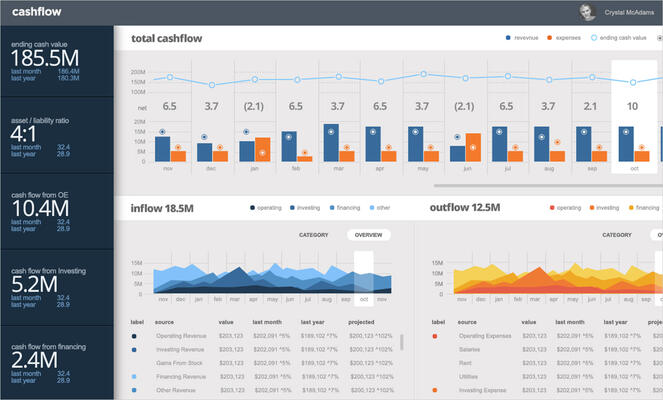
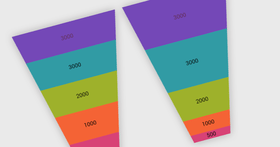
Screenshot Preview

Infragistics NetAdvantage for Windows Forms

by Infragistics - 상품타입: Component / .NET WinForms / 100% Managed Code / Managed/Unmanaged Code - without COM

 *

NetAdvantage for Windows Forms is also available as part of NetAdvantage for .NET and NetAdvantage Ultimate.

NetAdvantage for .NET includes ASP.NET, Windows Forms, Silverlight Line of Business and WPF Line of Business components.
NetAdvantage Ultimate includes ASP.NET, Windows Forms, Silverlight Line of Business, WPF Line of Business, Silverlight Data Visualization, WPF Data Visualization and jQuery components.

주의 : 별도의 안내가 없는 경우에는 영어제품 입니다.

*

Create modern user interfaces for your Windows Forms applications. Infragistics NetAdvantage for Windows Forms provides developers with UI controls to rapidly build and style high-fidelity line of business application user interfaces with the look and feel of Microsoft Office. With Infragistics NetAdvantage for Windows Forms developers receive every control (data grids, trees, toolbars, calendars, editors, charts, gauges, scenic ribbons and more) needed to create superior user experiences with stability, performance and robustness. NetAdvantage for Windows Forms includes an annual subscription to developer support, source code, all updates and upgrades, documentation and samples.

$845.75

인기상품

  |   

톱 다운로드

통화 선택

일반 적인 소비자 가격은 하기에 표시되어 있습니다. 고객님의 할인가격은 표시 하시려면 로그인 해주시기 바랍니다.

Infragistics NetAdvantage for Windows Forms 2011 Volume 2 (includes annual subscription & full .NET source code)   *

주문 $ 845.75 1 Developer Subscription License - Includes updates, upgrades and new components for 1 year  *
메이커 제품 번호: 48Y2C
다운로드 (775.3 MB)
주문 $ 760.75 1 Developer Subscription License - Upgrade from any Infragistics NetAdvantage product with a subscription that has expired in the past year (past year is defined as from the current date)  *
메이커 제품 번호: 48Y2CU
확인 다운로드 (775.3 MB)
주문 $ 357.64 1 Developer Subscription License - 90-Day Early Bird Subscription Renewal - (can be purchased up to the end of the 10th month of your existing subscription*)  *
메이커 제품 번호: 489990
확인 다운로드 (29 KB)
주문 $ 378.68 1 Developer Subscription License - 60-Day Early Bird Subscription Renewal - (can be purchased between the first and last day of the 11th month of your existing subscription*)  *
메이커 제품 번호: 489960
확인 다운로드 (29 KB)
주문 $ 420.75 1 Developer Subscription License - Subscription Renewal - (can be purchased until the last day of the 12th month of your existing subscription)  *
메이커 제품 번호: 489900
확인 다운로드 (29 KB)

Infragistics NetAdvantage for Windows Forms 2011 Volume 2 with Priority Support (includes annual subscription & full .NET source code)   *

주문 $ 1,270.75 1 Developer Subscription License with Priority Support - Includes updates, upgrades and new components for 1 year  *
메이커 제품 번호: 48Y2CP
다운로드 (775.3 MB)
주문 $ 1,185.75 1 Developer Subscription License with Priority Support - Upgrade from any Infragistics NetAdvantage product with a subscription that has expired in the past year (past year is defined as from the current date)  *
메이커 제품 번호: 48Y2PU
확인 다운로드 (775.3 MB)
주문 $ 574.39 1 Developer Subscription License with Priority Support - 90-Day Early Bird Renewal - (can be purchased up to the end of the 10th month of your existing subscription*)  *
메이커 제품 번호: 48999P
확인 다운로드 (29 KB)
주문 $ 608.17 1 Developer Subscription License with Priority Support - 60-Day Early Bird Renewal - (can be purchased between the first and last day of the 11th month of your existing subscription*)  *
메이커 제품 번호: 48996P
확인 다운로드 (29 KB)
주문 $ 675.75 1 Developer Subscription License with Priority Support - Subscription Renewal - (can be purchased until the last day of the 12th month of your existing subscription)  *
메이커 제품 번호: 48990P
확인 다운로드 (29 KB)

Infragistics NetAdvantage for Windows Forms Corporate 2011 Volume 2 (A Corporate license gives you the convenience of one key for multiple (minimum 10) licenses)   *

주문 $ 845.75 1 Developer Subscription License - Includes updates, upgrades and new components for 1 year (minimum quantity 10)  *
메이커 제품 번호: 48Y2V
다운로드 (775.3 MB)
주문 $ 420.75 1 Developer Subscription License - Subscription Renewal - (can be purchased until the last day of the 12th month of your existing subscription)  *
메이커 제품 번호: 4899V
확인 다운로드 (29 KB)
주문 $ 1,270.75 1 Developer Subscription License with Priority Support - Includes updates, upgrades and new components for 1 year (minimum quantity 10)  *
메이커 제품 번호: 48Y2VP
다운로드 (775.3 MB)
주문 $ 675.75 1 Developer Subscription License with Priority Support - Subscription Renewal - (can be purchased until the last day of the 12th month of your existing subscription)  *
메이커 제품 번호: 4899VP
확인 다운로드 (29 KB)

가격에는 ComponentSource의 기술지원 요금이 포함되어 있습니다. 또한 다운로드 판매를 하고 있는 상품의 대부분은 온라인 백업요금이 포함되어 있어서 구입날로부터 30일 이내에 새로운 버전이 발매된 경우 무료로 업그레이드해 드리고 있습니다.  모든 주문에 대해서 당사표준 계약조건 반품조건 의 내용이 적용됩니다. 다음의 경우,고객 서비스로연락하시기 바랍니다. (상기의 리스트에 게재되지 않은 대량의 라이센스나 구 버전 등의 라이센스 옵션이 필요한 경우)

일반 적인 소비자 가격은 상기에 표시되어 있습니다. 고객님의 할인가격은 표시 하시려면 로그인 해주시기 바랍니다.

 *

What's New in Infragistics NetAdvantage for Windows Forms 2011 Volume 2?
The new version adds Microsoft Excel features to different areas within the product, like implementing additional Excel behaviors in the grid with asynchronous exporting and added APIs to the Infragistics Excel Library to build more capable Microsoft Excel documents. A Math Library is also included to handle your applications’ complex computational needs when dealing with vectors and matrices, as well as the Microsoft Office 2010 Black & Silver themes.

Syntax Parsing Framework
The new Syntax Parsing Framework is a fully functional parser engine that can take a programming language and parse it into its language specific tokens, keywords and constructs. This library, in conjunction with a rich text editor, can provide full-blown language editing capabilities with text highlighting. The following key features are included:

  • EBNF Support - Feed in a language’s EBNF, and the syntax library will be able to parse it through and recognize the keywords, tokens and language construct.
  • Attach a RichTextEditor - Easily attach the syntax library to RichTextEditor, enabling the user to edit the language currently loaded in the Syntax Library. Highlight language keywords, mark for errors and compile the language using the text editor.

WinGrid
Improved performance of the exporters and re-designed conditional formatting dialog. The following key features are included:

  • Repeat Paste - Putting the Grid more in-tune with Excel behaviors, Repeat Paste feature has been added which allows the user to paste cells in a selection greater than the selection from which it was copied.
  • Filter Like Excel - To get the functionality to match one to one with Excel, this release is enhanced with Excel-like filtering to present distinct value choices within the filter drop down from the already filtered collection within the grid.
  • Asynchronous Exports - Export large volumes of data to Excel, PDF, Word or XPS using the async exporting capabilities featured in the grid exporters. It helps the exporting function without blocking the UI thread and the user is free to interact with the application during export.
  • New Conditional Formatting Dialog - The entire conditional formatting experience has been re-designed to be much easier to use, while it also lightens up the applications look and feel if you are using ISL (Infragistics Style Library) to define your themes.

Infragistics Excel
Import and export Microsoft Excel workbooks in high-fidelity XLS/XLSX/ExcelML file formats. With absolutely no Excel dependency, your Windows Forms application can run completely independently of Excel, and Excel does not even have to be installed alongside your application. The following features are included:

  • Shapes Support - Flip simple shape types - such as rectangles, right triangles and line shapes - horizontally or vertically, or change their outline or fill colors.
  • Data Validations - Constraints can now be placed on the values entered by users in Microsoft Excel. All data validations, including drop down lists and custom formula validations, are supported.
  • Print Titles - Groups of rows and columns can now be set to be repeated on each printed page, when a user prints the worksheet in Microsoft Excel.
  • Print Area - Rectangular ranges of cells can now be set to be printed on their own pages, when a user prints the worksheet in Microsoft Excel.
  • Page Breaks - Horizontal and vertical page breaks can now be added to the worksheets.

Gantt View
With popular demand, the GanttView is now able to support Custom Columns with the grid section of the control. This lets you create columns that can display additional information of the tasks which are not part of the built-in column set.

Math Library
If System.Math is not enough for your application computation needs, and you require complex vector or matrix calculations, the Math Library is developed to address those gaps. It also has all the standard .NET math functions built-in and extends the function set with other commonly used mathematical computation methods.

Office 2010 Black & Silver Themes
Theme your applications to look and feel like Office 2010 black or silver theme, using the latest ISL (Infragistics Style Library) files.


 *

Infragistics Windows Forms UI controls feature a hierarchical data grid with Microsoft Excel spreadsheet-like functionality, and interoperability with XLS, XLSX and ExcelML files. Microsoft Outlook style resource scheduling and Microsoft Project style Gantt charts make creating line of business applications quick and easy.  Office 2010/07 styles including both scenic and fluent ribbon UIs with Application Menu 2010 style (that is, “Backstage” view) deliver a task-centric user interface that has great performance and a comprehensive feature set to match on top of our robust Presentation Layer Framework. Infragistics Application Styling Framework enables you to globally style applications with little to no code. NetAdvantage AppStylist for Windows Forms lets you design style sets, or use one of the many professionally-designed style sets included.

Infragistics NetAdvantage for Windows Forms includes the following components:

  • WinGrid
  • WinCalcManager
  • WinChart
  • WinCombo
  • WinDataSource
  • WinDesktopAlert
  • WinDockManager
  • WinExtras
  • WinActivityIndicator
  • WinAnimation
  • WinButton
  • WinCalculator
  • WinDropdownButton
  • WinFormattedLinkLabel
  • WinLabel
  • WinPopupContainer
  • WinProgressBar
  • WinScrollBar
  • WinStatusBar
  • WinTooltipManager
  • WinValidator WinEditors
  • WinCalculatorDropdown
  • WinCheckEditor
  • WinColorPicker
  • WinComboEditor
  • WinControlContainerEditor
  • WinCurrencyEditor
  • WinDateTimeEditor
  • WinFontNameEditor
  • WinFormattedTextEditor
  • WinMaskedEdit
  • WinNumericEditor
  • WinOptionSet
  • WinTextEditor
  • WinTimeSpanEditor
  • WinTimeZoneEditor
  • WinTrackBar
  • WinExplorerBar
  • WinFormManager
  • WinGauge
  • WinGroupBox
  • WinGridBagLayoutPanel WinGanttView
  • WinGridDocumentExporter
  • WinGridExcelExporter
  • WinInkProvider
  • WinLayoutManagers
  • WinListbar
  • WinListView
  • WinMessageBoxManager
  • WinNavigationBar
  • WinPanel
  • WinPrinting
  • WinPrintDocument
  • WinPrintPreviewControl
  • WinPrintPreviewThumbnail
  • WinGridPrintDocument
  • WinSchedulePrintDocument
  • Infragistics.Documents
  • PDF Export
  • XPS Export Infragistics.Excel
  • XLS Export
  • XLS Import
  • WinSchedule
  • WinTimelineView
  • WinDayView
  • WinWeekView
  • WinMonthViewSingle
  • WinMonthViewMulti
  • WinCalendarCombo
  • WinCalendarInfo
  • WinCalendarLook
  • WinSpellChecker
  • WinSplitter
  • WinTabbedMdi
  • WinTab
  • WinTilePanel
  • WinToolbars
  • WinRibbon
  • WinScenicRibbon
  • WinTree

주의

제품 리뷰의 한국어 번역이 완료되지 않는 제품은 Google통역 서비스와 연동되어 표시되어 있습니다.통역 기계에 의한 자동 번역인 관계로 한국어 표기가 조금 부자연 스러운 점 양해 바랍니다.
에서 제공
FireFox와 Opera에서는 Flash가 필요합니다.

상품검색

검색어를 입력해주세요:

ComponentSource에서 구입하는 이유?

ComponentSource는 세계 1,000,000명 이상의 개발자에게 각종 글로벌 서비스를 제공합니다.

상세 | About Us

화면 바로가기 갤러리

클릭해서 이미지를 확대

 Infragistics NetAdvantage for Windows Forms - Windows Forms - 2011 Volume 2의 스크린샷  Infragistics NetAdvantage for Windows Forms - Windows Forms - 2011 Volume 2의 스크린샷  Infragistics NetAdvantage for Windows Forms - Windows Forms - 2011 Volume 2의 스크린샷  Infragistics NetAdvantage for Windows Forms - Windows Forms - 2011 Volume 2의 스크린샷  Infragistics NetAdvantage for Windows Forms - Windows Forms - 2011 Volume 2의 스크린샷
Award Award