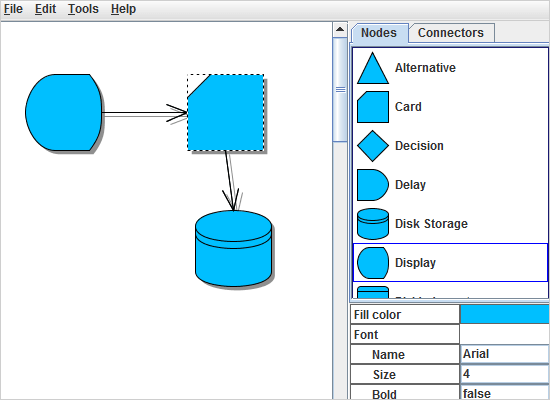
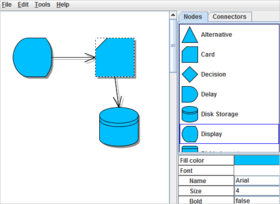
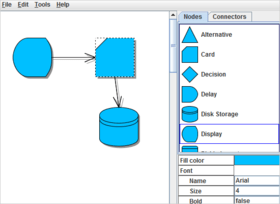
Screenshot Preview

MindFusion JDiagram - Summary

by MindFusion Group - Product Type: Component / Source Code / Java Class

Summary

MindFusion JDiagram by MindFusion Group

URLs: mindfusion-jdiagram, mindfusion jdiagram, mindfusionjdiagram, mindfusion

Enhance your Java applications with diagramming and graphing capabilities. JDiagram is a professional flowchart Java control that enables you to create complicated diagrams and charts in minutes, with minimum programming efforts. JDiagram is a Java Swing Component (JAR File Available). MindFusion JDiagram can create Workflow processes, Object hierarchies and relationships, Graphs and networks, Entity-relationship / database diagrams; IVR systems, Industrial automation processes, Genealogy trees, Algorithms and flowcharts, Organizational charts, XML documents, Classification hierarchies and more. JDiagram can be purchased with Source Code. Buy MindFusion JDiagram and obtain 12 months of free upgrades. MindFusion JDiagram upgrades and renewals also available.

JDiagram provides many different options for customization and personalization of your diagrams and charts. You can choose among a variety of shapes, arrows and color styles.

Below you can read some of the most important features available in JDiagram

JDiagram Component

Redistribution is royalty free

JAR file available

Is a Swing component

Can be purchased with source code

Implements the Document/View architecture

JDiagram User Interaction

Several user interaction modes

Node modification constraints

Scrolling and zooming

Panning

Automatic scrolling while dragging objects with the mouse

Alignment to grid

Multiple selection

Tool-tips

Docking points can be defined for nodes

Undo/Redo support

Copy and paste to/from the system clipboard

JDiagram Programming

Programmatic access to the diagram objects and selections

Numerous properties for customizing appearance and behavior

Numerous utility methods

Path finding and cycle detection

Rich event set

JDiagram can Store and Retrieve Diagrams into/from

Files on disk

Java streams

ASCII strings

XML documents

JDiagram Output

To display through Java Swing

Printing and print preview

To browser as an applet

Export images in jpeg, gif, tiff and png formats

To a browser using HTML image maps

Export to PDF

Export to SVG

JDiagram Diagram Elements

87 predefined node shapes

Tables with unlimited number of rows and columns

Table cells can span several columns and rows

Container nodes

Ability to define custom shapes and shape libraries

Rotation of shapes at arbitrary angles

Sections of table rows can be expanded or collapsed

Control hosts allow using Java controls as diagram nodes

Links can comprise multiple segments

Link segments can be straight lines or curves

Support for custom node and link types

TreeView nodes

JDiagram Behavior

Tables can be scrolled

In-place text editing

Ability to set selection handles behaviour

Lock diagram elements

Expand / collapse object hierarchies

Read-only mode supported

Dynamic positioning of arrows relative to linked nodes

JDiagram Automatic Layout

Layered graph layout

Simulated Annealing graph layout

Spring-Embedder graph layout

Radial tree layout

Directional tree layout

Grid layout

Automatic link routing

Layered graph layout

Circular graph layout

Orthogonal graph layout

Flowchart graph layout

JDiagram Appearance

Various text alignment styles

Text can be laid-out in polygonal areas

Styled HTML-like text formatting

Different styles for visual indication of a selected object

Z-order

Nodes can display images and text

Customizable fonts and colors

Rich choice of pen and brush styles

Ability to define custom node shapes

User-assigned mouse cursors

Custom painting of nodes

Shadows

Arcs over link intersection points

Transparent nodes

Invisible nodes

JDiagram Link Diagram Items

Nodes to nodes

Table rows to table rows

Table rows to nodes

Unconnected links

JDiagram Hierarchical Grouping

Attaching nodes to other nodes

Attaching nodes to link control points

Attaching nodes to link segments

JDiagram Auxiliary Controls

Overview control

ShapeListBox control

Ruler control

What's New in MindFusion JDiagram 3?

TreeView nodes: The TreeViewNode class represents nodes that can display hierarchical data. The root items displayed in the node can be accessed through the RootItems property. New items can be added to and removed from the returned collection. The root items can have child items on their own and so on. For more information, refer to the TreeViewItem class.

Ruler control: The Ruler control provides horizontal and vertical scales that helps users measure and align diagram items. In order to set the Ruler as a parent of a DiagramView, call its setDiagramView meethod. The control also implements support for scrolling and can be used instead of JScrollPane.

Export to SVG: The SvgExporter class creates a Scalable Vector Graphics (SVG) drawing from the content of a Diagram. Custom-drawn elements are exported too through an SVG implementation of the Graphics2D interface provided by JDiagram.

Adjustment handles styling: The ActiveItemHandlesColor, SelectedItemHandlesColor and DisabledHandlesColor properties have been replaced by ActiveItemHandlesStyle, SelectedItemHandlesStyle and DisabledHandlesStyle. The HandlesVisualStyle objects returned by them provide sub-properties for greater control over the appearance of selection handles. The adjustment handles can now be painted not only in solid color but with arbitrary brushes, such as GradientBrush and TextureBrush objects.

New ScriptHelper methods

The createColor method creates a Color instance.

Use createPaper and createPageFormat to create objects requied for print job setup.

CreateSize and createSizeF create Dimension and Dimension2D instances.

Enhance your Java applications with diagramming and graphing capabilities.

Pricing: JDiagram 3.0 1 Developer Subscription License (12 Months Subscription Included), JDiagram 3.0 4 Developer Team Subscription License (12 Months Subscription Included), JDiagram 3.0 8 Developer Team Subscription License (12 Months Subscription Included), JDiagram 3.0 1 Site Wide Subscription License (Allows Unlimited Developers at a Single Physical Address) (12 Months Subscription Included), JDiagram 3.0 1 Enterprise Subscription License (Unlimited number of developers of an enterprise at all its physical addresses) - (12 Months Subscription Included), JDiagram 3.0 with Source Code 1 Developer Subscription License - with Source Code (12 Months Subscription Included), JDiagram 3.0 with Source Code 4 Developer Team Subscription License - with Source Code (12 Months Subscription Included), JDiagram 3.0 with Source Code 8 Developer Team Subscription License - with Source Code (12 Months Subscription Included), JDiagram 3.0 with Source Code 1 Site Wide Subscription License (Allows Unlimited Developers at a Single Physical Address) - with Source Code (12 Months Subscription Included), JDiagram 3.0 with Source Code 1 Enterprise Subscription License (Unlimited number of developers of an enterprise at all its physical addresses) - with Source Code (12 Months Subscription Included), JDiagram Upgrade/1 Year Subscription Renewal 1 Developer Subscription Renewal License (12 Months Subscription Included), JDiagram Upgrade/1 Year Subscription Renewal 4 Developer Team Subscription Renewal License (12 Months Subscription Included), JDiagram Upgrade/1 Year Subscription Renewal 8 Developer Team Subscription Renewal License (12 Months Subscription Included), JDiagram Upgrade/1 Year Subscription Renewal 1 Site Wide Subscription Renewal License (Allows Unlimited Developers at a Single Physical Address) (12 Months Subscription Included), JDiagram Upgrade/1 Year Subscription Renewal 1 Enterprise Subscription Renewal License (Unlimited number of developers of an enterprise at all its physical addresses) - (12 Months Subscription Included), JDiagram with Source Code Upgrade/1 Year Subscription Renewal 1 Developer Subscription Renewal License - with Source Code (12 Months Subscription Included), JDiagram with Source Code Upgrade/1 Year Subscription Renewal 4 Developer Team Subscription Renewal License - with Source Code (12 Months Subscription Included), JDiagram with Source Code Upgrade/1 Year Subscription Renewal 8 Developer Team Subscription Renewal License - with Source Code (12 Months Subscription Included), JDiagram with Source Code Upgrade/1 Year Subscription Renewal 1 Site Wide Subscription Renewal License (Allows Unlimited Developers at a Single Physical Address) - with Source Code (12 Months Subscription Included), JDiagram with Source Code Upgrade/1 Year Subscription Renewal 1 Enterprise Subscription Renewal License (Unlimited number of developers of an enterprise at all its physical addresses) - with Source Code (12 Months Subscription Included)

Evals & Downloads: Read the JDiagram Help File, Read the JDiagram License Agreement, Download the JDiagram 3.0 evaluation on to your computer - Displays Evaluation Labels

Operating System for Deployment: Windows Vista, Windows XP, Windows ME, Windows 2000, Windows NT 4.0, Sun Solaris 10, Sun Solaris 9, Red Hat Enterprise Linux 5.x, Red Hat Enterprise Linux 4.x

Architecture of Product: 32Bit

Product Type: Component

Component Type: Source Code, Java Class

Built Using: Visual C# .NET

Compatible Containers: JBuilder 2008, JBuilder 2006, Oracle JDeveloper 11g, Oracle JDeveloper 10g, NetBeans IDE 6.7, NetBeans IDE 6.5, Sun Java Workshop, Sun Studio 10, Sun Studio 11, Sun Studio 12, Eclipse V3.5, Eclipse V3.4, Eclipse V3.3, IntelliJ IDEA 6, IntelliJ IDEA 7, IntelliJ IDEA 8

Product Class: User Interface Components

Keywords: jdiagram, mindfusion jdiagram, buy jdiagram, buy mindfusion jdiagram, purchase jdiagram, purchase mindfusion jdiagram, order jdiagram, order mindfusion jdiagram, jdiagram reseller, mindfusion jdiagram reseller, jdiagram distributor, mindfusion jdiagram distributor, jdiagram subscription, mindfusion jdiagram subscription, jdiagram renew, mindfusion jdiagram renew, jdiagram upgrade, mindfusion jdiagram upgrade, jdiagram site, jdiagram enterprise

Flow Diagramming diagram diagrams flowchart

Part numbers: PC-534989-283598 534989-283598 PC-534989-283600 534989-283600 PC-534989-283611 534989-283611 PC-534989-283602 534989-283602 PC-534989-283619 534989-283619 PC-534989-283606 534989-283606 PC-534989-283604 534989-283604 PC-534989-283613 534989-283613 PC-534989-283608 534989-283608 PC-534989-283615 534989-283615 PC-534989-324647 534989-324647 PC-534989-324648 534989-324648 PC-534989-324649 534989-324649 PC-534989-324650 534989-324650 PC-534989-324651 534989-324651 PC-534989-324652 534989-324652 PC-534989-324653 534989-324653 PC-534989-324654 534989-324654 PC-534989-324655 534989-324655 PC-534989-324656 534989-324656

Product Search

Enter search words:

Why buy from ComponentSource?

ComponentSource offers a unique global service, used by over 1,000,000 software developers worldwide.

More Info | About Us

Award