by MindFusion Group - Product Type: Component / ASP.NET WebForms / .NET Class / 100% Managed Code / Source Code
MindFusion NetDiagram by MindFusion Group
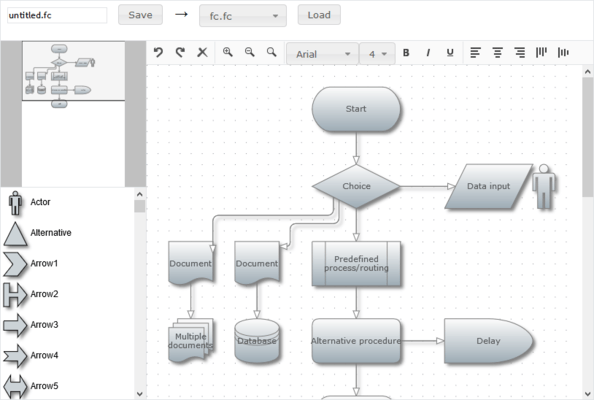
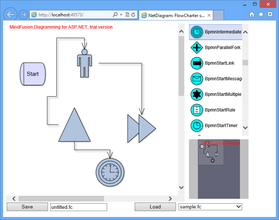
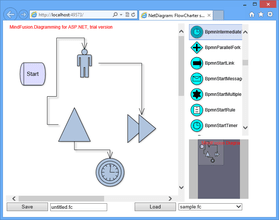
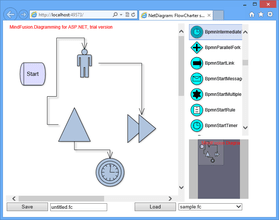
Enhance your web applications with diagramming and graphing capabilities. NetDiagram provides diagramming features to create interactive Web applications by using Internet Information Services (IIS) with ASP.NET WebForms integration and AJAX. NetDiagram is a software component that can be used to display various types of diagrams and charts in web applications. NetDiagram is flexible component that offers a variety of diagram shapes, layout styles, properties, methods and events. It is implemented as a .NET Web control and can be easily integrated into any project targeting the Microsoft ASP.NET platform. NetDiagram control has been tested with the most popular .NET development environments and programming languages( C#, VB.NET and Delphi.NET, etc..). NetDiagram is Visual Studio 2005 and 2008 compatible (VS2005, VS2008 ). Source code available.
NetDiagram is a software component that can be used to display various types of diagrams and charts in web applications. NetDiagram is flexible component that offers a variety of diagram shapes, layout styles, properties, methods and events..
NetDiagram can give graphical representation to:
Workflow processes
Object hierarchies and relationships
Graphs and networks
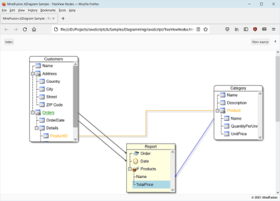
Entity-relationship / database diagrams
IVR systems
Industrial automation processes
Genealogy trees
Algorithms and flowcharts
Organizational charts
XML documents
Classification hierarchies
NetDiagram provides intuitive user-interaction model for creating or editing diagrams. In addition, its programmatic interface places at your disposal many useful functions, ranging from printing and XML serialization to path-finding and automatic layout algorithms.
For optimal convenience you can choose between two usage modes: As a Java applet or As an HTML image map
Java Applet
Browser Compatibility: Internet Explorer, Mozilla Firefox
Interactivity: Fully interactive diagram creation Mouse clicks events on image areas.
Event Handling: Client side events
Software Requirements Java Runtime 1.5 or 1.6 400 KB download of the applet's *.jar file
HTML Image Map Mode
Browser Compatibility: All browsers
Interactivity: Mouse clicks events on image areas.
Event Handling: Only click events - either on server or on client side. Hyperlinks
Software Requirements No special requirements
The control has been tested with the most popular .NET development environments and programming languages, and is used by companies from all around the world to create applications in C#, VB.NET and Delphi.NET.
What's New on NetDiagram V2.0?
Document/view architecture
NetDiagram 2 implements the Model-View-Controller (MVC) architectural pattern. The MVC design pattern as applied to NetDiagram separates the diagram data (model) from its representation to the user (view) and controlling it by the user (controller). According to the MVC design pattern, NetDiagram Version 2 provides two new classes instead of the FlowChart class, namely Diagram and DiagramView.
Containers
The ContainerNode class implements diagram nodes that can function as containers for other nodes. Containers can be folded to hide their content, and unfolded to show it again. Containers can be nested one within another, without limitation on the depth of nesting.
New import and export components
In addition to PdfExporter which is available since version 1, NetDiagram 2 includes the VisioExporter, VisioImporter, SvgExporter and DxfExporter components, which provide support for the Microsoft Visio XML Drawing, W3C's Scalable Vector Graphics and the AutoDesk Drawing Exchange formats.
OrthogonalLayout on the client-side
OrthogonalLayout is a secondary layout algorithm that can be used to arrange links after an initial node arrangement has already been applied. In older versions, it was available only on the server side. Now it can be applied on the client-side as well. Use the createOrthogonalLayout method of ScriptHelper to get an instance of the OrthogonalLayout Java class which can be used from JavaScript.
Arrange multiple graphs
In older versions the layout algorithms placed unconnected subgraphs either in a row or in a column. Now it is possible to place the unconnected subgraphs in such a way that the diagram covers a minimal area. To enable that, set MultipleGraphsPlacement to MinimalArea.
IGraphics interface
Now all drawing is done through the IGraphics interface, for which the control provides GdiGrahics, SvgGraphics and PdfGraphics implementations. Thus the files created by SvgExporter and PdfExporter can contain custom-drawn elements, which you draw either by handling custom drawing events or by implementing the Draw method in your custom item types.
What's New on NetDiagram V1.0.4?
Optimized data transfer in JavaApplet mode
Support for large diagram images in ImageMap mode
Improved link routing
What's New on NetDiagram V1.0.3?
OrthogonalLayout automatic graph layout class
laying out unconnected subgraphs so that the diagram covers a minimal area
Overview control for JavaApplet mode
ShapeListBox control for JavaApplet mode
RoundRectangleTemplate shape definition element
What's New on NetDiagram V1.0.1?
Text wrapping enhancements
Version 1.0 of NetDiagram supported wrapping text to a new line only at word boundaries. Now the default is to split words into multiple parts if there is not enough space to fit a whole word. Now you can disable the automatic text wrapping by enabling the NoWrap flag in the FormatFlags member of TextFormat. If automatic wrapping is disabled and there isn't enough space to fit the whole line, the text is clipped at the node boundaries.
New client-side events
The following JavaApplet mode events have been added:
The ArrowDeleting, BoxDeleting and TableDeleting validation events are raised when the user tries to delete a diagram item
ArrowMouseEnter, BoxMouseEnter and TableMouseEnter are raised when the mouse pointer enters a diagram item
ArrowMouseLeave, BoxMouseLeave and TableMouseLeave are raised when the mouse pointer leaves a diagram item
SelectionMoved is raised when the user moves multiple selected items
Client-side events in ImageMap mode
The following events can be handled on the client-side both in JavaApplet and ImageMap modes: ArrowMouseEnter, BoxMouseEnter, TableMouseEnter, ArrowMouseLeave, BoxMouseLeave, TableMouseLeave, ArrowClicked, BoxClicked, TableClicked, ArrowDblClicked, BoxDblClicked, TableDblClicked. Note that in ImageMap mode, the respective server-side events are not raised when their client-side counterparts are handled via JavaScript. At this time, the arguments passed to the client-side events are JavaScript objects that contain only two fields - ZIndex and Tag. Any of these values can be used to identify the diagram item on the server side, e.g. the former can be used as an index in the Objects collection, and the latter can be passed as parameter to one of the Find* methods.
PartNumbers: PC-517835-157763 517835-157763 PC-517835-157765 517835-157765 PC-517835-157776 517835-157776 PC-517835-157767 517835-157767 PC-517835-157784 517835-157784 PC-517835-157771 517835-157771 PC-517835-157769 517835-157769 PC-517835-157778 517835-157778 PC-517835-157773 517835-157773 PC-517835-157780 517835-157780 PC-517835-157782 517835-157782
PurchaseOptions: NetDiagram V2.0 1 Developer License , NetDiagram V2.0 4 Developer Team License , NetDiagram V2.0 8 Developer Team License , NetDiagram V2.0 1 Site Wide Subscription License (Allows Unlimited Developers at a Single Physical Address) , NetDiagram V2.0 1 Enterprise Subscription License (Unlimited number of developers of an enterprise at all its physical addresses) , NetDiagram V2.0 with Source Code 1 Developer License with Source Code , NetDiagram V2.0 with Source Code 4 Developer License with Source Code , NetDiagram V2.0 with Source Code 8 Developer License with Source Code , NetDiagram V2.0 with Source Code 1 Site Wide License (Allows Unlimited Developers at a Single Physical Address) with Source Code , NetDiagram V2.0 with Source Code 1 Enterprise Subscription License (Unlimited number of developers of an enterprise at all its physical addresses) with Source Code , NetDiagram - Upgrade / Subscription Renewal 1 Upgrade / Subscription Renewal (12 months subscription, for all license types)
Resources: Read the NetDiagram Help File, Read the NetDiagram License Agreement, Download the NetDiagram V2.0 evaluation on to your computer - Displays Nag Screens
Operating System for Deployment: Windows Vista, Windows XP, Windows Server 2003, Windows 2000
Architecture of Product: 32Bit, 64Bit
Product Type: Component
Component Type: ASP.NET WebForms, .NET Class, 100% Managed Code, Source Code
Built Using: Visual C# .NET
Compatible Containers: Microsoft Visual Studio 2008, Microsoft Visual Studio 2005, Microsoft Visual Basic 2008, Microsoft Visual Basic 2005, Microsoft Visual C++ 2008, Microsoft Visual C++ 2005, Microsoft Visual C# 2008, Microsoft Visual C# 2005, Microsoft Internet Information Server 6.0, Microsoft Internet Explorer 7.0, Microsoft Internet Explorer 6.0, Delphi 2007 for Win32, .NET Framework 3.5, .NET Framework 3.0, .NET Framework 2.0, .NET Framework 1.1
Product Class: User Interface Components
Search Items: New Product Oct 03, New Product Mar 04, New Version Mar 04, New Product Apr 04, New Version Apr 04, New Product May 04, New Product June 04, New Product Aug 04, New Product Sep 04, New Product Nov 04, New Product Feb 05, New Product May 05, New Product June 05, New Product Aug 05
Keywords: Flow Diagramming diagram diagrams flowchart Professional Partner NetDiagram, MindFusion NetDiagram, Net Diagram,