by Syncfusion - Product Type: Component / ASP.NET WebForms / ASP.NET AJAX (ATLAS) / .NET WinForms / .NET Class / 100% Managed Code / Source Code / JavaScript / AJAX
Syncfusion Essential Diagram by Syncfusion
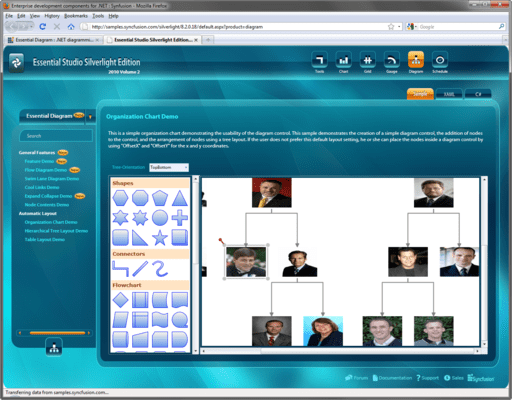
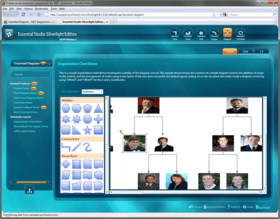
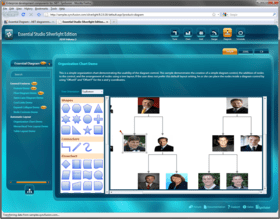
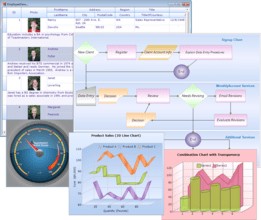
Easily add a wide variety of customizable diagrams to your .NET applications. Essential Diagram is an extensible and high-performance .NET diagramming framework for Windows Forms and ASP.NET applications. It can be used for programmatically creating flowchart, workflow, network, swimlane, maps, org chart, process flow, state transitions and other such diagrams or for developing Microsoft Visio-like interactive graphics and diagramming applications. It stores graphical objects in a node graph and renders those objects onto the screen. Essential Diagram supports both vector and raster graphics on the drawing surface. There are several built-in layout routines that will help you easily create common layout patterns like hierarchical and directed tree layouts. The ASP.Net version uses AJAX internally to perform diagram refresh during user-interaction. Included with every license is a one-year subscription for unlimited technical support and updates.
What’s included:
Graphical Objects: Reuse from a whole variety of primitive shapes like Rectangles, Ellipses, etc., as well as from commonly used symbols such as “flowchart symbols.” You can even host custom controls within the diagram nodes.
Node Linking: Links or connectors with ports can be used to easily connect nodes using lines. Such links stay docked to the nodes even as the nodes get moved around by the end-user. There is also built-in support for Line Routing and Line Bridging features that will let you create user-friendly diagrams.
Diagram Appearance: The look and feel of the nodes can be customized with many fill-style options, such as gradient, hatch, texture, etc. There is also support for Layers within a diagram. A layer organizes graphical objects into groups that share a common set of default properties and more importantly, the Z-order.
Layout Management: The following built-in layout management routines are available while dynamically creating diagrams:
Directed Tree Layout Manager
Radial Tree Layout Manager
Table Tree Layout Manager
Symmetric Layout Manager
Hierarchical Layout Manager
Custom Layout Managers – plug in your own managers into the framework.
Diagram Builder Mode: There are several complementary controls that help you put together a Visio-like Diagram Builder application.
Easily put together “Drawing Tools” using which users can simply drag and drop primitive nodes and connectors into the diagram surface.
A built-in Symbol Palette control can be filled with built-in symbols or custom symbols, from which the end-user can drag and drop nodes into the diagram surface.
Also included are “Editing Tools” for selection, alignment, rotation, etc. to let the end-user further refine the diagram that is being created.
The Document Explorer allows you to explore the objects in a diagram using a hierarchical tree UI.
The Property Editor lets you specify properties on the selected node.
The Pan and Zoom window will let the end-user interactively select portions of the diagram.
The Layout grid will allow the end-user to align nodes accurately.
Rulers let your end-users create nodes of appropriate dimensions.
Support is provided for undoing the user-actions.
The rendered diagram can be persisted in an xml format and can be viewed/edited at a later stage.
Custom Symbols: The Symbol Designer utility lets you create custom symbols with custom ports. You can then reuse such symbols in your diagrams or let your end-user use them to create diagrams. There is also support for importing and converting Visio Stencils into symbols that can be reused in Essential Diagram.
Benefits of working with Syncfusion:
Standardize to simplify: One vendor, one license, one suite of .NET components. Syncfusion’s wide range of solidly built components allows developers to streamline their toolkits and reduce dependence on multiple vendors.
Trusted architects: Industry-leading architects ensure each product is built for the most demanding of environments.
Full source code: 100% C# source code available, enabling seamless integration of our libraries with your projects.
Solid support infrastructure: First-rate tech support is available via Syncfusion’s online tracking system Direct-Trac, email, and phone. No per-incident charges. Syncfusion also provides an extensive knowledgebase, FAQs, and forums.
Built with the future in mind: Syncfusion components are geared towards long-lifecycle applications and architected to meet high standards for flexibility and long-term maintainability.
Flexible licensing model: Straight-forward per-developer licensing, with no runtimes, server deployment fees, or royalties. Each licensee may install on multiple personal machines.
Technical Support - Each Syncfusion license includes a one-year subscription for unlimited technical support and updates. Support for Syncfusion products is available 24 / 5 through a custom-built support system, with responses guaranteed within a single business day. Support is also available by e-mail and phone. Syncfusion’s Direct-Trac system can be used to create support incidents and track them to completion 24 hours a day, 7 days a week and allows Syncfusion licensees to maintain a complete overview of their support history.
Syncfusion packages - Essential Diagram is also available as part of the Essential Studio ASP.NET Edition, Essential Studio Windows Forms Edition and Essential Studio Enterprise Edition packages.
What’s new in Essential Diagram 2008 Vol 2?
Essential Diagram Windows Forms
Performance improvements -Got more data to visualize? This version of Diagram provides further performance improvements for loading large number of nodes and for user manipulation of the nodes.
PolyLine Link Tool -Another tool added to enhance your users’ experience designing diagrams - Check out the new PolyLine Link Tool that can create PolyLine links.
Selection Handle Customization -Improve or customize the look and feel of Diagram node selection handles. You can change the colors and also allow users to show or hide the handles.
Connection Point improvement -Connection Points are now extended to support custom ports and changing the port highlighting color.
Localization support -Easily localize your diagram based User Interfaces as we now support full localization of the Diagram dialogs.
Essential Diagram ASP.NET
Safari Browser support - Essential Diagram for ASP.NET is now compatible with all major browsers on Windows, Macintosh and Linux.
Improved AJAX support and performance - Essential Diagram for ASP.NET integrates AJAX technology to a deeper level and allows for optimized transfers between the client and server to provide a smooth interaction experience when loading a large set of nodes into the Diagram.
Server memory requirements have been reduced by a multi layered rendering technique that uses HTML to render the background.
PolyLine Link Tool -Another tool added to enhance your users’ experience designing diagrams - Check out the new PolyLine Link Tool that can create PolyLine links.
Selection Handle Customization -Improve or customize the look and feel of Diagram node selection handles. You can change the colors and also allow users to show or hide the handles.
Connection Point improvement -Connection Points are now extended to support custom ports and changing the port highlighting color.
Client Side Node Interaction - Now you can get the diagram node information easily through client side scripting. Also improved selection behavior of irregular shapes by optimizing hit-test algorithm on client side. Selected Nodes list can also be accessed through client side script.
PartNumbers: PC-515342-149862 515342-149862 PC-515342-149868 515342-149868 PC-515342-149880 515342-149880 PC-515342-149874 515342-149874 PC-515342-149865 515342-149865 PC-515342-149871 515342-149871 PC-515342-149881 515342-149881 PC-515342-149877 515342-149877
PurchaseOptions: Syncfusion Essential Diagram 2008 Vol. 2 1 Developer License - with 1 Year Subscription , Syncfusion Essential Diagram 2008 Vol. 2 1 Developer Annual Subscription Renewal License (for subscriptions soon to expire or up to 2 weeks past expiration) , Syncfusion Essential Diagram 2008 Vol. 2 1 Developer Reinstatement of Lapsed Subscription License (for subscriptions lapsed longer than 2 weeks) , Syncfusion Essential Diagram 2008 Vol. 2 1 Developer License with (1 Year Subscription) Upgrade from previous version (without subscription) , Syncfusion Essential Diagram 2008 Vol. 2 with Source Code 1 Developer License with Source Code - with 1 Year Subscription , Syncfusion Essential Diagram 2008 Vol. 2 with Source Code 1 Developer Annual Subscription Renewal License (for subscriptions soon to expire or up to 2 weeks past expiration) with Source Code , Syncfusion Essential Diagram 2008 Vol. 2 with Source Code 1 Developer Reinstatement of Lapsed Subscription License (for subscriptions lapsed longer than 2 weeks) with Source Code , Syncfusion Essential Diagram 2008 Vol. 2 with Source Code 1 Developer License with (1 Year Subscription) Upgrade from previous version (without subscription) with Source Code
Resources: Read the Syncfusion Company brochure - Requires Acrobat Reader, Read the Syncfusion Essential Diagram brochure - Requires Acrobat Reader, Read the Syncfusion Essential Studio brochure - Requires Acrobat Reader, View the Syncfusion Studio Matrix - Requires Acrobat Reader, Read the Syncfusion License Agreement - Requires Acrobat Reader, Download the Syncfusion Essential Studio 2008 Vol. 2 evaluation on to your computer - Expires after 30 days
Operating System for Deployment: Windows Vista, Windows XP, Windows Server 2003, Windows 2000
Architecture of Product: 32Bit
Product Type: Component
Component Type: ASP.NET WebForms, ASP.NET AJAX (ATLAS), .NET WinForms, .NET Class, 100% Managed Code, Source Code, JavaScript, AJAX
Built Using: Visual C# .NET
Compatible Containers: Microsoft Visual Studio 2008, Microsoft Visual Studio 2005, Microsoft Visual Basic 2008, Microsoft Visual Basic 2005, Microsoft Visual C++ 2008, Microsoft Visual C++ 2005, Microsoft Visual C# 2008, Microsoft Visual C# 2005, Delphi 8.0, C#Builder, .NET Framework 3.5, .NET Framework 3.0, .NET Framework 2.0
Product Class: User Interface Components
Search Items: New Product Sep 04, New Product Feb 05, New Product May 05, New Product June 05
Keywords: Syncfusion Sync fusion Flow Diagramming diagram diagrams flowchart Corporate Partner Diagramming drawing transform graphics symbol diagram, flowchart, swimlane, workflow, network layouts, org chart, process flow, state transitions, assembly line