Screenshot Preview

Syncfusion Essential Gauge - Summary

by Syncfusion - Product Type: Component / ASP.NET MVC / .NET WPF / Silverlight / Source Code

Summary

Syncfusion Essential Gauge by Syncfusion

URLs: syncfusion-essential-gauge, syncfusion essential gauge, syncfusionessentialgauge, syncfusion

Create stunning gauges for your dashboards. Syncfusion Essential Gauge includes circular, digital and liner gauges. Each has a highly appealing appearance and can be easily customized. Syncfusion Essential Gauge can be used in a variety of applications, including dashboards, and they come with various features that make them easy to use. Syncfusion Essential Gauge allows C# code to be incorporated for drawing gauges of various designs. Syncfusion Essential Gauge includes ASP.NET MVC, WPF and Silverlight components.


Syncfusion Essential Gauge for Silverlight Circular Gauge

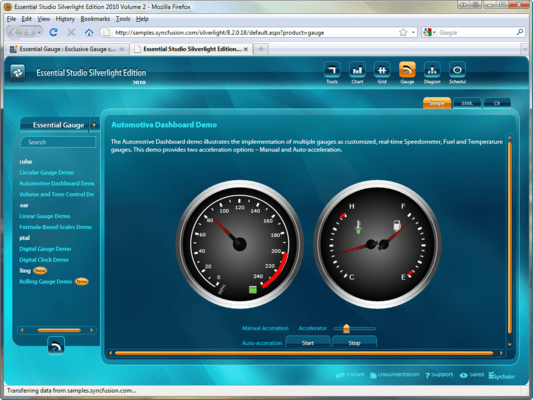
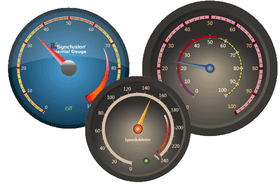
The circular gauge control represents values by visualizing them in a circular scale. It can be used to create applications with a rich look and feel, such as automotive dashboards.

Scaling Features

Range and State Indicators

Pointer Interactivity

Circular Knob

Custom Labels and Images

Circular Gauge Skins

Syncfusion Essential Gauge for Silverlight Digital Gauge

The digital gauge control is used to display values as segments. The data given in the control is clearly depicted in an alphanumeric manner.

Segment Display Type

Segment Features

Segment Brushes

Character Features

Custom Inner Frame Content

Digital Gauge Skins

Syncfusion Essential Gauge for Silverlight Linear Gauge

The linear gauge control represents KPI (key performance indicator) values in a linear scale. It contains a variety of features to suit your business needs.

Gauge Orientation

Scaling Features

Range and State Indicators

Pointer Interactivity

Custom Labels and Images

Formula and Logarithmic Scale Support

Linear Gauge Skins

Syncfusion Essential Gauge for Silverlight Rolling Gauge

The rolling gauge control is used to display values as segments. Data in the control rolls from one value to another.

Segment Count

Units of Measure as Data

Rolling Gauge Skins

Syncfusion Essential Gauge for WPF Circular Gauge

Circular gauges have a highly appealing appearance. They can be used in a variety of applications including dashboards. They also come with various features that make them easy to use.

Circular Frame - Circular Gauge supports circular, semi-circular, and custom-shaped frames. Users can customize a frame to their requirements by using custom control-templates. Endless color customizations can be achieved by using the frame-fill colors property.

Easy Customization - The look and feel of a gauge is completely customizable. Each part of the gauge, such as pointers, pointer caps, scales, ticks, labels, and state indicators, can be customized to the current requirement.

Multi Scale - Essential Gauge can be customized to display multiple scales and multiple pointers within a single gauge. Scale direction can also be reversed using ScaleDirection property. All pointers as well as their respective scales can be customized at run-time using the appropriate properties of the Essential Gauge.

Logarithmic Scales - Circular Gauge can be made to display logarithmic values of a given base by setting the IsLogarithmic property to True. By default, it displays log values by calculating them to the base 10. For other base values, the base can be set by using the LogBase property.

Label Format - The circular gauge supports various formatting options for labels so that they can be displayed in any desirable format. The format can be specified using the NumberFormatInfo property of the LinearLabelTick. For instance, the percent symbol for the label values can be specified using the PercentSymbol property of Number Format Info.

Formula Support - The circular gauge scales can now be based on user-defined formulae. Labels can be defined based on formula given as a string to the CalculateFormula property. To make the labels act on a formula before displaying, the IsCalculateFormulaEnabled property of the LinearLabelTick should be set to True. This is very handy in scenarios where two scales marked by different measuring units are needed. To create two scales of different units with exact markings, one scale should be specified, instead of specifying the other scale manually. A conversion formula to convert from the first scale's unit to the other scale can be specified to the CalculateFromula property. The following illustration was created using the string "x*1.609344" (i.e. a miles to kilometre conversion formula) as input to the CaculateFormula property in order to display the speedometer in kilometres and not miles.

Circular Pointer Cap - In the circular gauge, pointer cap can be specified in two different styles - Default and Custom. The custom shape is specified by setting the PointerCapCustomGeometry property.

Range and State Indicators - Essential Gauge supports range and state indicators, which can be customized with various attributes. A state indicator can be bound with a range indicator so that the state indicator goes into an active state when the pointer reaches a specified range.

Syncfusion Essential Gauge for WPF Rolling Gauge

The Rolling gauge control is used to display values as segments, allowing data to be presented in a rolling manner.

Segment Count

Units of Measure as Data

Syncfusion Essential Gauge for WPF Digital Gauge

Digital gauges are controls that can display digital data. They come with various customization options and have numerous features.

Digital Gauge Brushes

Display Type

Segment Customization

Segment Display

Syncfusion Essential Gauge for WPF Linear Gauge

Linear gauges are highly customizable gauge controls that can be used as sliders for providing input or for displaying output data.

Appearance

Orientation

Logarithmic Scales

Label Format

Formula Support

Indicator Style

Range and State Indicators

Pointer Interactivity

Linear Gauge Brushes

Linear Label Tick Customization

Linear Mark Tick Customization

Syncfusion Essential Gauge for ASP.NET MVC Circular Gauge

Circular gauges are highly customizable gauge controls that can be used in a variety of applications, including dashboards. They come with various customization options and have numerous features.

Easy Customization

State Indicator Styles

Circular Custom Label

Range

Multiple Scales

Circular Label Format

Formula Support

Circular Label Tick Customization

Circular Mark Tick Customization

Interaction and Animation

Gauge Configuration in Aspx Code

Skins

Export

Syncfusion Essential Gauge for ASP.NET MVC Digital Gauge

Digital gauges are controls that can display digital data. They come with various customization options and have numerous features.

Appearance

Display Type

Segment Customization

Segment Display

Skins

Export

Syncfusion Essential Gauge for ASP.NET MVC Linear Gauge

Linear gauges are highly customizable gauge controls that can be used as sliders for providing input or for displaying output data.

Orientation

Appearance

Logarithmic Scales

Label Format

Formula Support

Interaction and Animation

Skins

Export

Syncfusion Essential Gauge for ASP.NET MVC Rolling Gauge

Rolling gauges are controls that can display values as segments, allowing data to be presented in a rolling manner.

SegmentCount

Segment Customization

Units

Skins

Please note: Syncfusion Essential Gauge includes ASP.NET MVC, Silverlight and WPF components.

What’s new in Syncfusion Essential Gauge 2011 Vol 4?

Essential Gauge for ASP.NET

HTML 5-Based Gauge Control - A gauge is a data visualization control that can be used to display several data points or data ranges in a concise and compact area. Linear gauges measure values of scales and represent them in the form of a slider along a linear scale, similar to a thermometer.

Create stunning gauges for your dashboards.

Pricing: Syncfusion Essential Gauge 2012 Vol 1 (V10.1.0.44) - Binary 1 Developer License - with 1 Year Subscription, Syncfusion Essential Gauge 2012 Vol 1 (V10.1.0.44) - Binary 1 Developer Annual Subscription Renewal License (for subscriptions soon to expire or up to 30 days past expiration), Syncfusion Essential Gauge 2012 Vol 1 (V10.1.0.44) - Binary 1 Developer Reinstatement of Lapsed Subscription License (for subscriptions lapsed longer than 30 days up to one year), Syncfusion Essential Gauge 2012 Vol 1 (V10.1.0.44) with Source Code 1 Developer License with Source Code - with 1 Year Subscription, Syncfusion Essential Gauge 2012 Vol 1 (V10.1.0.44) with Source Code 1 Developer Annual Subscription Renewal License (for subscriptions soon to expire or up to 30 days past expiration) with Source Code, Syncfusion Essential Gauge 2012 Vol 1 (V10.1.0.44) with Source Code 1 Developer Reinstatement of Lapsed Subscription License (for subscriptions lapsed longer than 30 days up to one year) with Source Code, Syncfusion Essential Gauge 2012 Vol 1 (V10.1.0.44) - Binary Site License Site License - with 1 Year Subscription - Allows upto 500 Developers at a single address, Syncfusion Essential Gauge 2012 Vol 1 (V10.1.0.44) - Binary Site License Site Annual Subscription Renewal License (for subscriptions soon to expire or up to 30 days past expiration) - Allows upto 500 Developers at a single address, Syncfusion Essential Gauge 2012 Vol 1 (V10.1.0.44) - Binary Site License Site Reinstatement of Lapsed Subscription License (for subscriptions lapsed longer than 30 days up to one year) - Allows upto 500 Developers at a single address, Syncfusion Essential Gauge 2012 Vol 1 (V10.1.0.44) with Source Code Site License Site License with Source Code - with 1 Year Subscription - Allows upto 500 Developers at a single address, Syncfusion Essential Gauge 2012 Vol 1 (V10.1.0.44) with Source Code Site License Site Annual Subscription Renewal License (for subscriptions soon to expire or up to 30 days past expiration) with Source Code - Allows upto 500 Developers at a single address, Syncfusion Essential Gauge 2012 Vol 1 (V10.1.0.44) with Source Code Site License Site Reinstatement of Lapsed Subscription License (for subscriptions lapsed longer than 30 days up to one year) with Source Code - Allows upto 500 Developers at a single address

Evals & Downloads: Read the Syncfusion Site License Agreement, Read the Syncfusion Essential Gauge help file, View the Syncfusion Studio Comparison Matrix - Requires Acrobat Reader, Read the Syncfusion Company brochure - Requires Acrobat Reader, Read the Syncfusion Essential Studio brochure - Requires Acrobat Reader, Read the Syncfusion License Agreement - Requires Acrobat Reader, Download the Syncfusion Essential Studio 2012 Vol 1 (V10.1.0.44) evaluation on to your computer - Expires After 30 Days

Operating System for Deployment: Windows 7, Windows Vista, Windows XP, Windows Server 2003, Windows 2000

Architecture of Product: 32Bit

Product Type: Component

Component Type: ASP.NET MVC, .NET WPF, Silverlight, Source Code

Built Using: Visual C# .NET

Compatible Containers: Microsoft Visual Studio 2010, Microsoft Visual Studio 2008, Microsoft Visual Studio 2005, Microsoft Visual Basic 2010, Microsoft Visual Basic 2008, Microsoft Visual Basic 2005, Microsoft Visual C++ 2010, Microsoft Visual C++ 2008, Microsoft Visual C++ 2005, Microsoft Visual C# 2010, Microsoft Visual C# 2008, Microsoft Visual C# 2005, .NET Framework 4.0, .NET Framework 3.5, .NET Framework 3.0, .NET Framework 2.0, Silverlight 3

Product Class: User Interface Components

Keywords: syncfusion essential gauge, essential gauge

Syncfusion Sync fusion

Instrumentation instrument instruments

Part numbers: PC-518578-435080 518578-435080 PC-518578-435082 518578-435082 PC-518578-435084 518578-435084 PC-518578-435081 518578-435081 PC-518578-435083 518578-435083 PC-518578-435085 518578-435085 PC-518578-435086 518578-435086 PC-518578-435087 518578-435087 PC-518578-435088 518578-435088 PC-518578-435089 518578-435089 PC-518578-435090 518578-435090 PC-518578-435091 518578-435091

Product Search

Enter search words:

Why buy from ComponentSource?

ComponentSource offers a unique global service, used by over 1,000,000 software developers worldwide.

More Info | About Us

Screenshot Gallery

Click for full screen preview

Screenshot of Syncfusion Essential Gauge - .NET - 2012 Screenshot of Syncfusion Essential Gauge - .NET - 2012 Screenshot of Syncfusion Essential Gauge - .NET - 2012 Screenshot of Syncfusion Essential Gauge - .NET - 2012
Award