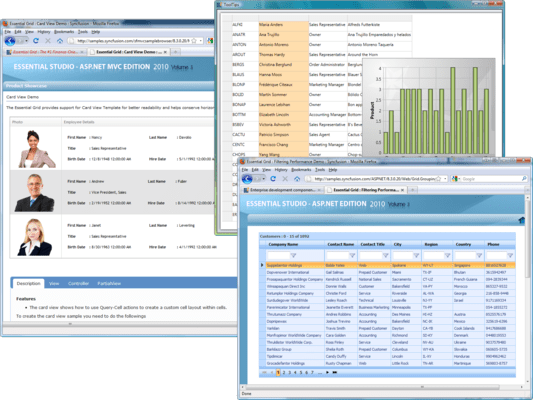
Screenshot Preview

Syncfusion Essential Grid - Summary

by Syncfusion - Product Type: Component / ASP.NET WebForms / ASP.NET AJAX (ATLAS) / ASP.NET MVC / .NET WinForms / .NET WPF / Silverlight / 100% Managed Code

This product is now only available as part of Syncfusion Essential Studio Enterprise Edition

Summary

Syncfusion Essential Grid by Syncfusion

URLs: syncfusion-essential-grid, syncfusion essential grid, syncfusionessentialgrid, syncfusion

Add an Excel-like, cell-oriented, light-weight, virtual, data-bound grid to your Windows Forms, WPF, Silverlight, ASP.NET and ASP.NET MVC applications. Syncfusion Essential Grid offers Microsoft Excel-like grid functionality and high-performance grouping support for both flat and hierarchical data sources. Syncfusion Essential Grid allows extremely detailed customization down to the cell level. Multilevel undo/redo, shared scrollbar support, data/view separation, floating cells, multiple cell types, and extensibility are features that are included. Syncfusion Essential Grid includes Windows Forms, WPF, Silverlight, ASP.NET and ASP.NET MVC controls.


Syncfusion Essential Grid for Windows Forms General Features

Essential Grid for Windows Forms supports all standard grid control features. In addition, Essential Grid also possesses features such as support for Undo/Redo and OLE Drag-and-drop.


Alpha Blend and Background - Essential Grid for Windows Forms supports alpha blending and background bitmaps. The alpha value can be applied to individual cells or base styles by changing the interior cell attribute. Users can also switch the grid to a 'transparent' mode that skips all backgrounds in cells. Only the text inside the cells, borders and grid lines will be displayed.

Banner Cells - Banner cells allow the user to combine the background of neighboring cells to display a background image or gradient brush. Users can load an image from a file on disk and display it in the cell as a gradient among cells or create custom cell backgrounds.

Cell Styles - Essential Grid for Windows Forms is a Cell-Oriented control and allows you to apply styles at the cell level. Individual cells can be customized in different formats. Every cell in a grid control is associated with a list of attributes that affect the appearance of the grid cells.

Covered Cell - Multiple cells can be covered to exhibit the behavior of a single cell. This makes it easy to display special items such as titles and bitmaps such that they occupy multiple cells. Covered cells blend seamlessly with Essential Grid's keyboard navigation model. Covered cells can also host any Essential Grid control type. They can be interactively created and cleared by end users.

Freeze Rows and Columns - Frozen columns and rows stay stationary much like the default headers when the rest of the grid is scrolled. They are very useful when an application requires header rows or columns in addition to default headers. Frozen columns are moved to the far left of the grid and remain there when the grid is scrolled.

GDI+ - All Essential Grid for Windows Forms drawing code is implemented using GDI+. GDI+ is the C++ based version of its predecessor GDI (Graphics Device Interface).GDI+ is an improved 2D graphics environment with advanced features such as anti-aliased 2D graphics, floating point coordinates, gradient shading, more complex path management, and intrinsic support for modern graphics-file formats like JPEG and PNG. This enables Essential Grid cells to display gradients, rotate text and support transparency. Some grid components use GDI interop, with Essential Grid for Windows Forms, users will find no such "hidden" code. Use of GDI+ in all aspects makes Essential Grid more extensible. Users can easily add code that customizes or extends a drawing selectively without any GDI interop issues.

Grid Control Style - The appearance of Essential Grid for Windows Forms can be enhanced by applying one of the several styles available.

Grid List Control and AutoComplete - Essential Grid for Windows Forms can simulate a listbox control. All three listbox modes are supported: One, multi-simple and multi-extended. The listbox can be bound to any collection or ADO.NET table. The grid listbox can be used as the listbox part of a Combo box with auto-complete support. Both the 'Drop-Down with autocomplete support' style and the 'Drop-Down List' style known from regular Combo boxes are supported.

Hide Rows and Columns - Users can resize a row or column until it disappears and then double click the header border to make it re-appear. Rows and columns can be programmatically hidden using method calls. Interactive hiding of rows and columns is a very user-friendly feature that greatly enhances the usability of grids that have extensive details.

Keyboard Interface - Essential Grid for Windows Forms provides extensive support for keyboard handling. Arrow keys-move current cell, PageUp/PageDown key-scroll grid by page, F2-activate/deactivate cell, F4+ALT-Drop-Down/Close-UP cell, CTRL + Arrow keys-move to first/last, row/column, SHIFT + Arrow keys-select cell, DELETE key-delete cell, CTRL+X, CTRL+V, CTRL+C, INSERT key and DELETE key support common clipboard operations etc. All keyboard operations can be customized.

MDI Support - Essential Grid for Windows Forms extends its support to (MDI) Multiple Document Interface by allowing users to work with multiple grid controls at the same time.

Merged Cells - Merged cells allow users to display adjoining cells with like values as a single cell. The merging is dynamic. If a cell's value changes, the grid will automatically adjust the merged cells.

Mouse Operation - Essential Grid for Windows Forms mouse and hit test operations are implemented using a special MouseController pattern. This allows easy plug-in of custom mouse operations pertaining to different hit test contexts. As Cursor Moves Over Button-Button Appearance Changes-Users Get Tactile Feedback This architecture fully supports the Windows Forms Framework with events such as MouseHover, MouseLeave and MouseEnter.

MS Excel Import and Export - The Grid control contents can be exported to MS Excel. Microsoft Excel file contents can also be imported to the Grid control.

PDF Export - Essential Grid for Windows Forms contents can be exported to a PDF file. It also supports drawing custom header and footer.

OLE DND and Clipboard - Essential Grid for Windows Forms provides complete clipboard support. Users can Copy or Paste inside the grid and from or to other OLE (Object Linking and Embedding) DND (Drag-and-Drop)-enabled applications that understand text format. OLE DND between two Essential Grid for Windows Forms includes a custom format that allows users to copy or move complete style information including covered cells. Essential Grid for Windows Forms also provides hooks for the easy addition of support for custom data formats.

Print Support - Essential Grid for Windows Forms provides complete support for printing and print preview. There is a special mode to display the grid in gray scale. This is especially useful when printing a grid using black ink. The gray scale print will exhibit finer discrimination between cells when compared to prints in regular color mode. It also offers options to view the divided layout of a grid into pages at run time.

Property Grid - Essential Grid for Windows Forms cell properties can be set and displayed using the standard Windows Forms 'Property Grid'. Multiple cells can be formatted at one time just as in Microsoft Excel. Wherever possible, Essential Grid takes advantage of existing framework classes. This ensures a consistent user interface and also reduces the effort required to effectively use the product.

Record Navigation Bar- A MS Access-like Record Navigation Bar lets users scroll records in a table. The total number of records can also be displayed in the navigation bar next to the current record number.

Resize Rows and Columns - Columns and rows can be interactively resized. Essential Grid for Windows Forms supports Undo of the Size action. This can be achieved by double-clicking the header borders. Users can also size multiple columns at a time by selecting the required columns and sizing one column from that selection. Resize support for rows and columns is especially useful in light of the excellent support for the Undo/Redo command in Essential Grid for Windows Forms. Users can alter grid layout to suit their needs.

Serialization - Essential Grid for Windows Forms supports versioned serialization of grid data to binary, xml and SOAP (Simple Object Access Protocol) formats.

Split Views - The Grid Control view can be split into different sections using the SplitterControl in Essential Studio.

Virtual Mode - The Grid Control can quickly display huge volumes of data in the virtual mode. The data can be stored in an external data structure and supplied on demand. In virtual mode, users can bind the Grid Control to any external data without having to give it over the data source. The Grid Control can easily support billions of rows without compromising performance. Virtual mode can also be used in combination with a regular grid or a data-bound grid. Users can choose to supply specific cells on-demand whereas other calls can be loaded from the grid internally.

Zooming Grid - The grid content can be zoomed in and out as required. Options available are percent zooming at grid level and zooming at cell level.

Grid Selection Modes - Essential Grid for Windows Forms offers different kinds of selection modes such as RowOnly, ColumnOnly, CellOnly and so on.

Excel-Like Fill Series - Essential Grid for Windows Forms can be enabled with excel like fill series, which will be helpful to manipulate the sequential values, for number, date and time. It has a behavior to choose between copy series and fill series, where as the Copy-Series will copy the number value to other cells and the Fill-Series will fill the sequential numbers or date just like the MS-Excel does.

Essential Grid for Windows Forms supports several cell types, including Header Text, Static, Text Box, Check Box, Numeric Up-Down, Push Button, and Combo Box. Additionally, users may derive more cell types from the classes.

Button Edit Cell

Cell Buttons

Chart Cell

Check Box

Color Picker

Combo Box

Currency Cells

Link Label Cell

Date-Time Picker Cells

Grid Drop-Down

Grid in Cells

Header Text

In-Place Calendars

Mask Edit

Month Calendar

Numeric Up-Down

Password Cell

Picture Box Cell

Progress Bar Cell

DropDown Calculator Cell

Push Button

Radio-Button Cell

Rich-Text Cell

Slider Cell

Static Text

UI-Type Editor Cell

Web-Browser Cell

XHTML Cell

Essential Grid for Windows Forms supports MS Excel-like formulas on each cell. It also supports cross-sheet references and named ranges. You can easily add custom functions to its function library.

Cross-Sheet Reference - A formula cell can be defined with values referenced from another grid. In such cases, multiple grids can either be in worksheet format or individual grids laid out on a form.

Formula Function Library - Essential Grid for Windows Forms comes with an extensive Formula Function Library whose functions can be nested in expressions. In addition to existing functions, custom functions can also be defined and included. The Essential Grid Formula Engine has helper methods that can be used to retrieve lists of values and compute formulas to manage custom functions.

Formula Cell - A Formula in a Grid control refers to a well-defined algebraic expression based on grid cell values or functions of the Function Library enclosed in Grid Framework. Complete formula support is provided in GridControl using Formula Cells. Every cell in a grid (or a few specific cells) can be defined as a Formula Cell. The default setting of the Grid Control treats all Formula cells as Text Boxes unless the cell value is prefixed with an 'equal' sign.

Named Range - Unique names can be assigned to a single cell or cell range and used in formula or cells within a grid.

Syncfusion Essential Grid for Windows Forms MS Office Simulation

Essential Grid simulates popular Microsoft applications. Users will find its interface to be friendly and familiar.

Accelerated Scrolling

Cell Float Mode

Format Cell Dialog

Grid Workbook

IntelliMouse Scrolling

MS Access Simulation

Multilevel Undo-Redo

MS Excel Clipboard

MS Excel Simulation

Scrolling Tip Thumb Tracking

Shared Scroll Bar

Document View Support

Dynamic Splitters

Syncfusion Essential Grid for Windows Forms Cell Attributes

Essential Grid for Windows Forms is implemented using a cell-oriented architecture that allows intricate customization at the cell level.

Cell AutoSize Mode

Cell Allow Enter Mode

Cell Base Style

Cell Borders

Cell Choice List

Cell Format

Cell Image List

Cell Interior

Cell Text Alignment

Cell Text Color

Cell Text Orientation

Cell Types

Cell Wrap Text Mode

Read Only

Show Buttons

Syncfusion Essential Grid for Windows Forms Data Binding

Data binding to the grid can be achieved with a single line of code. The grid supports all kinds of 'lists' from IList-derived types to ADO.NET data source instances. The grid automatically discovers the schema of the data source at run time, including any relations set up between tables in a data source, and renders the grid's content automatically. You can alter the grid's schema to hide columns and include unbound columns.

Conditional Formatting

Custom Collection

Data Source

Date-Time Picker and Boolean Cells

Filter Bar

Sort By Display Member

Foreign Key Drop-Down

Generic Collection

Hierarchy

Hierarchy Index

Image

LINQ Support

Multiple Rows per Record

Multiple Header Cells

Pass-Through Grouping

Syncfusion Essential Grid for Windows Forms Grouping Support

Essential Grid offers flexible support for grouping both flat and hierarchical data sources. It supports expression fields, filters, multicolumn sorting, grouping, nested tables/hierarchies, and custom summaries.

Add New Record

ADO.NET Relation

Base Style

Calculate Summary

Cell Data Serialization

Custom Cell Range

Custom Group Layout

Drag-and-Drop Column Header

Error Indicator

Expression Field

Filter

Foreign Key Relation

Grid Grouping Control Style

Grid Optimization

Grouping

Group by Column

Hierarchical Display

Key Navigation

MS Excel Export

MS Word Export

Multiple Rows and Columns per Record

Multiple Stacked Headers

Parent Record Synchronization

Preview Rows

Record Category Synchronization

Schema Serialization

Sort

Grid Field Chooser

Save or Restore CompareOperator States

Multiple Record Selection

Multiple Record Deletion

Filter On Lost Focus

Excel-Like Filter

Filter Optimization

IList Grouping Optimization

Syncfusion Essential Grid for WPF supports all standard grid control features. It also possesses features such as Virtual Mode, Frozen Rows and Columns and Drag-Drop.

Easy APIs to add/delete/move rows-columns -Easily add, delete and move rows and columns throughout the grid control using its well-defined APIs.

Clipboard Support - Syncfusion Essential Grid for WPF provides clipboard support that allows the users to copy/paste grid cells into text or any format.

Frozen Row and Column Footers - Syncfusion Essential Grid for WPF columns can be made to freeze to the left as well as rows at the top of the grid. Row-footers can be specified to be fixed at the bottom of the grid and column footers to be fixed to the right hand side of the grid.

Resize Rows and Columns - Mouse controllers are implemented for resizing rows and columns. Implementation of similar features is straight forward and can be accomplished by implementing a mouse controller.

Resize to fit Rows and Columns - The grid rows and columns can be resized automatically to fit the content.

Hide Row and Columns - Syncfusion Essential Grid for WPF provides support to hide or unhide a range of rows and columns.

Keyboard Interface - Syncfusion Essential Grid for WPF provides extensive support for keyboard handling. Arrow keys-move current cell, PageUp/PageDown key-scroll grid by page, F2-activate/deactivate cell, F4+ALT-Drop-Down/Close-UP cell, CTRL + Arrow keys-move to first/last, row/column, SHIFT + Arrow keys-select cell, DELETE key-delete cell, CTRL+X, CTRL+V, CTRL+C, INSERT key and DELETE key support common clipboard operations. All keyboard operations can be customized.

Selection Modes - Syncfusion Essential Grid for WPF offers different kinds of selection modes such as RowOnly, ColumnOnly, CellOnly and so on.

Drag Drop - Syncfusion Essential Grid for WPF allows you to drag and drop any column around the grid. This drag-drop feature is animation-enabled.

Virtual Grid – Syncfusion Essential Grid for WPF supports a virtual mode, which lets you dynamically provide data to the grid through an event. This means that the grid does not store any data in its internal data structures. A virtual grid can display millions of rows as easily as it displays a dozen. The grid also exposes a second event that lets you save changes made through the grid's UI back to the external data source. The underlying architecture that facilitates the virtual support in Syncfusion Essential Grid for WPF allows the grid to quickly manage other functionalities, such as hiding rows or setting row-height for an extremely large number of rows.

Print and PrintPreview - Both the grid and the Grid Data control provide built-in support for the Printing and Print Preview dialog. This dialog has options for selecting paper size, zooming in on content, selecting print color, and more.

Excel Export - Syncfusion Essential Grid for WPF provides inherent support for converting its content to XLS format.

CSV Export - Syncfusion Essential Grid for WPF inherently supports converting content into CSV format.

Formula Support - Syncfusion Essential Grid for WPF provides inherent support for including formulas in grid cells alike MS Excel.

Syncfusion Essential Grid for WPF Cell Types

Syncfusion Essential Grid for WPF supports several cell types including Mask Edit, Up-Down, Double Edit, Integer Edit, Percent Edit, Date-Time Edit, Combo Box Drop-Down, and Drop-Down Lists. In addition, users can derive additional cell types from Syncfusion classes.

Combo Box

Currency Edit

Data Template

Double Edit

Integer Edit

Mask Edit

Percent Edit

Rich Text Box

Up-Down

Date-Time

Nested Grid

Custom Drop-Down

Static

Header

Text Box

Check Box

Button

Text Block

Text-Image

Syncfusion Essential Grid for WPF Grid Tree Control

The GridTreeControl is derived from GridControl and displays multi-column tree data. It is populated entirely by handling a single event where the root and child items are provided on demand. This on-demand population allows the control to quickly display selected tree nodes from a large data source without loading all data.

Data Binding

Multicolumn Sorting

Grid Skins

Custom Expand/Contract Glyphs

Node Images

Level Styles

Syncfusion Essential Grid for WPF Cell Style Architecture

Property settings for individual cells (and groups of cells) are stored in a style property. The style allows you to set properties such as background, cell value, and cell type for a particular cell. Syncfusion Essential Grid for WPF holds two different style caches that depend upon how the cell style is being used: a Volatile-style cache and a Render-style cache.

Cell Style Architecture

Base Styles

Cell Interior

Cell Text

Cell Borders

Choice List

Cell Formats

Cell Comments

Spanned Backgrounds

Covered Cells

Syncfusion Essential Grid for WPF Grid Data Control

The GridData control is a derived grid control that handles various types of data sources. The grid can be bound to any IEnumerable source and extends full support for IQueryable sources too. It generates LINQ expressions on all operations and thus easily handles any IQueryable source. It also has an option to automatically generate columns. It supports master-detail nested relations on any kind of collection as well as legacy data tables. The GridDatacontrol provides sorting, filtering, column-row resizing, and dragging funtionalities and lots of customization options to handle the grid in various scenarios.

Data Binding

AutoGenerate Columns

Nested Relations

Sorting and Filtering

Advanced Filter

CollectionView Grouping

Summaries

Complex Property Binding

Grid Skins

Grid Designer

Stacked Headers

Property Settings Through XAML

Notify Property Changes

Handling High-Frequency Updates

Unbound Columns

Expression Columns

Column Options

Data Error Validation

Grid Tooltips

Localization

Autosize Columns

Dynamic Keyword Support

Serialization Support

VS 2010 Designer Support

Syncfusion Essential Grid for Silverlight General Features

Syncfusion Essential Grid for Silverlight supports all standard grid control features. It also possesses features such as Virtual Mode and Frozen Rows and Columns.

Easy APIs to add/delete/move row-columns

Clipboard Support

Frozen Row and Column Footers

Hide Rows and Columns

Virtual Mode

Excel-like Features

Selection Modes

Formula Support

Excel Export

CSV Export

Grid Tooltips

Syncfusion Essential Grid for Silverlight Cell Types

Syncfusion Essential Grid for Silverlight supports several cell types including Combo Box Drop-Down and Data Template cells.

Combo Box

Data Template

Text Box

Check Box

Currency Edit

Double Edit

Integer Edit

Percent Edit

Up-Down Edit

Syncfusion Essential Grid for Silverlight Grid Tree Control

GridTreeControl is derived from Syncfusion Essential Grid for Silverlight and displays multicolumn tree data. It is populated entirely by handling a single event where the root and child items are provided on demand. This on-demand population allows the control to quickly display selected tree nodes from a large data source without loading all data.

Syncfusion Essential Grid for Silverlight Cell Style Architecture

Property settings for individual cells (and groups of cells) are stored in a style property. The style allows you to set properties such as background, cell value, and so on for a particular cell.

Base Styles

Cell Interior

Cell Text

Cell Borders

Cell Formats

Cell Comments

Covered Cells

Syncfusion Essential Grid for Silverlight Grid Data Control

The GridData control is a derived grid control that handles various types of data sources. The grid can be bound to any IEnumerable source and extends full support for IQueryable sources too. It generates LINQ expressions on all operations and thus easily handles any IQueryable source. It also has an option to automatically generate columns. It supports master-detail nested relations on any kind of collection as well as legacy data tables. The GridDatacontrol provides sorting, filtering, column-row resizing, and dragging funtionalities and lots of customization options to handle the grid in various scenarios.

Data Binding

Grouping

Drag Columns

Autosize Columns

Nested Relations

Advanced Filter

Summaries

Conditional Formats

Complex Property Binding

Grid Skins

Grid Designer

Stacked Headers

Notify Property Changes

Unbound Columns

Expression Columns

Serialization

VS 2010 Designer Support

Domain Data Source Support

Syncfusion Essential Grid for ASP.NET Column Types

The columns in Syncfusion Essential Grid for ASP.NET provide various options for customization. The Table Descriptor available for Syncfusion Essential Grid for ASP.NET includes the Columns collection, which is auto-populated by the Fields and Expression Fields collection.

Expression Fields - Expression Fields in Syncfusion Essential Grid for ASP.NET, refer to those fields which take into account the value of another field as an operand and perform arithmetic and relational operations on it. The grouping engine is equipped with its own formula engine for this purpose. Grouping, sorting, filtering, and summary creation can also be performed based on these expression fields.

Templated Columns - The Grid's layout can be customized using templates. Item Template - Used to customize the appearance of items such as Headers, the row being edited, and Form Mode, among others.Control Template - Used to customize the appearance of the Row button and the Expand button.Column Template - Used to customize the appearance of the grid's columns.Button Template - Used to customize the appearance of buttons in the Button Bar.

Unbound Fields - Unbound columns can be associated with a grouping grid. These unbound columns let you evaluate field values at run time similar to expression fields and also participate in all engine-related operations, such as grouping, sorting, summaries, and filters.

Syncfusion Essential Grid for ASP.NET AJAX Features

Syncfusion Essential Grid for ASP.NET comes with built-in AJAX support. By turning on the Enable Callback command, the grid operates in AJAX mode. Sorting, grouping, resizing, and other commands will then operate through AJAX callbacks instead of postbacks.

Before and After Callback Event - There are additional grid functions that need to be processed before or after a callback request is sent to the server. These can be included in the Grid Grouping Control before or after processing the callback results by means of scripting. The Callback Return Event Handler on the client will execute this script.

Load Image on Callback - When the callback is being processed, the grid supports the display of a Loading... indicator to the user. This keeps the user updated on the status.

Refresh via AJAX - The grid has built-in support to use AJAX callbacks to refresh itself with new data while the user sorts, groups or pages. Enable this feature by checking the Enable Callback option. The grid also renders a professionally designed Loading Indicator when the callback is being processed.

Update Panel Compatible - The grid contents can be refreshed via callback without the need for AJAX frameworks. However, if you want to update the grid along with the other controls, then host the grid inside the ASP.NET Essential Tools Callback Panel or ASP.NET AJAX Update Panel.

Syncfusion Essential Grid for ASP.NET Design-Time Features

Syncfusion Essential Grid for ASP.NET comes with fully-functional Design Time options that let you setup the grid's style and grid Behavior. Data binding can be easily setup and previewed and customized through the designer.

AutoFormat

Declarative Datasource Binding

Smart Tag

Syncfusion Essential Grid for ASP.NET Events

Syncfusion Essential Grid for ASP.NET provides numerous events to aid you in the creation of interactive applications. Based on the location of the recreated grid data after the user actions, these events are classified as Server-Side and Client-Side events.

Syncfusion Essential Grid for ASP.NET Grouping and Sorting

Syncfusion Essential Grid for ASP.NET when bound to a datasource can be used to performing engine related operations such as grouping and sorting. Grouping allows you to categorize the records based on a specific column. Through sorting, you can arrange the table data either in ascending or in descending order of values in the selected column.

Group by Columns

Sorting Columns

Syncfusion Essential Grid for ASP.NET Paging and Filtering

The Paging function available in Syncfusion Essential Grid for ASP.NET comes in handy when the grid rows exceed the limits of a single page. The default setting pulls all rows and columns irrespective of the data displayed. The paging function can be used to limit the dimensions of the displayed data. Filters in the Grid Grouping Control, enable users to select and display a subset of records based on user-defined criteria. The criteria can be set using a Filter Bar at run time as well as in Design Time.

Filters with Filter Bar Support

Paging with Pagerbar Support

Syncfusion Essential Grid for ASP.NET Summary Rows and Columns

The Syncfusion Essential Grid for ASP.NET provides options for the inclusion of summary rows for each group. The grid summaries are displayed in the summary rows. The summary rows can be added and defined using the Grid Summary Row Descriptor collection editor available in the Grid Grouping Control. Options for specifying the summary format and summarized columns are also available.

Automatic Summaries

Programmatic Summary Access

Summaries in Group Captions

Page Level Summary

Syncfusion Essential Grid for ASP.NET Appearance

A variety of styling options are available for various sections of the Syncfusion Essential Grid for ASP.NET Control such as group, filter, header, footer, summary and nested cells, and different states such as adding new record, alternate record, and group indent cells.

Alternating Row Styles

Area Selection

Automatic Image Handling

Built-in Skins

Column Resizing and Reordering

Conditional Formatting

Customization Events

Customization via CSS and Styles

Frozen Rows and Columns

Grid Outlook Style

Listbox Mode

Multi-Row Records

Templates Support

ToolTip

Syncfusion Essential Grid for ASP.NET Data Binding

Binding data to the grid has been simplified to a single line of code. The grid supports all kinds of "lists" from IList to Datasource Control derived types. The grid automatically discovers the schema of the datasource at run time, including the relationships setup between tables in a datasource and renders the grid contents automatically. The grid's schema can be altered to hide columns and include unbound columns. The default setting pulls all the records to the server irrespective of the number of records displayed on the page. Alternatively, you can use the Pass-Through Grouping feature to selectively query records from the datasource based on the grid's current view.

AutoGenerated Schema

Datasource Caching Mode

Datasource Options

Foreign Key Constraints

LINQ Support

Pass-Through Grouping

Support for Hierarchies

Syncfusion Essential Grid for ASP.NET Editing

Syncfusion Essential Grid for ASP.NET supports editing of records at run time. It offers different editing modes such as In-place Editing and Editing via Forms to make the editing more user-friendly. Options to add new records and delete existing records are also available. If the datasource can be updated, the grid will automatically save the changes on the underlying datasource.

Automatic Datasource Update

Built-in Editing Modes

Edit Columns Support

Syncfusion Essential Grid for ASP.NET Export Options

Syncfusion Essential Grid for ASP.NET provides different export options that let you save its contents in a number of output formats including Excel.

Syncfusion Essential Grid for ASP.NET Navigation Options

Syncfusion Essential Grid for ASP.NET offers complete navigational support for navigating between the grid cells, rows and pages. This is accomplished with the help of the Navigation and Pager Bars, that can be added in Design Time, using the Button Bars collection.

Customized Button Bars

Grid Keyboard Navigation

Navigation Bar

PagerBar

Syncfusion Essential Grid for ASP.NET Printing

Syncfusion Essential Grid for ASP.NET offers comprehensive support to print complete records including groups, summaries, preview rows, and others.

Syncfusion Essential Grid for ASP.NET MVC Grouping

Syncfusion Essential Grid for ASP.NET MVC has the built-in capability to group data by one or more columns. Grouping is performed on the server; only the required data is sent back to the client using AJAX, so the operation is greatly optimized for speed and data transfer.

Syncfusion Essential Grid for ASP.NET MVC Client-Side Interactivity

Syncfusion Essential Grid for ASP.NET MVC has several client-side interactions that are enabled to enhance the end-user experience.

Selection

Column Resizing

Drag-and-Drop

Syncfusion Essential Grid for ASP.NET MVC Unbound Column Support

An unbound column is not bound to any data. This helps when adding a custom column to a grid.

Syncfusion Essential Grid for ASP.NET MVC Paging

Syncfusion Essential Grid for ASP.NET MVC includes a pager bar that can be used to easily navigate to a required page when a grid has data spanning several pages.

Syncfusion Essential Grid for ASP.NET MVC Filtering

Filters in the grid enable users to select and display a subset of records based on user-defined criteria. The criteria can be set using a filter menu at the column header.

Syncfusion Essential Grid for ASP.NET MVC Binding Complex Objects

Syncfusion Essential Grid for ASP.NET MVC supports binding complex data objects. With this feature, complex property values can be bound to a grid.

Syncfusion Essential Grid for ASP.NET MVC Appearance

Syncfusion Essential Grid for ASP.NET MVC has several built-in skins that make styling extremely easy. It is also possible to format data displayed inside the grid.

Syncfusion Essential Grid for ASP.NET MVC Summaries

Syncfusion Essential Grid for ASP.NET MVC provides options for including summary rows for an entire grid. Grid summaries will be displayed within these summary rows.

Syncfusion Essential Grid for ASP.NET MVC Sorting

Syncfusion Essential Grid for ASP.NET MVC has built-in support for sorting by one or more columns. It is also possible to sort using custom logic.

Sorting Columns

Multicolumn Sorting

JSON-Mode Sorting

Syncfusion Essential Grid for ASP.NET MVC Grid Editing

Syncfusion Essential Grid for ASP.NET MVC has built-in feature for CRUD operations, that can be used to perform add, edit and delete records in grid.

Syncfusion Essential Grid for ASP.NET MVC Scrolling

The scrolling feature allows a grid to be manually scrolled. When the entire grid needs to be seen, enable scrolling so that the entire grid can be viewed with no boundaries.

Please note: Syncfusion Essential Grid includes Windows Forms, ASP.NET, WPF, Silverlight and ASP.NET MVC components.

What's new in Essential Grid 2012 Vol 4?

Unbound Columns - In addition to displaying data from an underlying data source, the GridTree control can display data that is not in an underlying data source via unbound columns. Unbound columns can be used to display expressions that involve manipulating data across columns. These allow custom calculations such as salary and tax calculations. Users can sort unbound columns just like bound columns.

Excel-like Filters - With this feature, users can sort, search, resize, and perform advanced filtering of grid data exactly as it is done in Microsoft Excel.

What's new in Essential Grid 2012 Vol 2?

Merging cells - You can merge adjacent cells in a grid and still perform sorting and grouping on columns containing merged cells. All the support you find in a normal cell can be found in merged cells, giving you better control over the layout of information in a grid.

Data Table Support - Essential Grid supports data tables in two modes: server and JSON. Both modes allow sorting, grouping, and all the other basic functions you would expect in a grid, but with JSON mode, data rendering occurs on the client side, greatly improving grid performance.

What’s new in Essential Grid 2012 Volume 1?

JSON Suppot in ASP.NET - The AJAX Grid control allows you to increase grid performance. It has two modes: server and JSON. The JSON mode can be enabled to handle paging, sorting, grouping and filtering.

Editing via Unbound Columns in ASP.NET MVC - Editing via unbound columns allows you to make changes to multiple fields in a grid at the same time. Editing, updating and deleting are controlled by buttons on the row itself. You can edit or delete fields associated with a single data record by using these buttons instead of the toolbar.

Add an Excel-like, cell-oriented, light-weight, virtual, data-bound grid to your Windows Forms, WPF, Silverlight, ASP.NET and ASP.NET MVC applications.

Evals & Downloads: Read the Syncfusion License Agreement - Requires Acrobat Reader

Operating System for Deployment: Windows 8, Windows 7, Windows Vista, Windows XP, Windows ME, Windows NT 4.0

Architecture of Product: 32Bit, 64Bit

Product Type: Component

Component Type: ASP.NET WebForms, ASP.NET AJAX (ATLAS), ASP.NET MVC, .NET WinForms, .NET WPF, Silverlight, 100% Managed Code

Built Using: Visual C# .NET

Compatible Containers: Microsoft Visual Studio 2012, Microsoft Visual Studio 2010, Microsoft Visual Studio 2008, Microsoft Visual Studio 2005, Microsoft Visual Basic 2012, Microsoft Visual Basic 2010, Microsoft Visual Basic 2008, Microsoft Visual Basic 2005, Microsoft Visual C++ 2012, Microsoft Visual C++ 2010, Microsoft Visual C++ 2008, Microsoft Visual C++ 2005, Microsoft Visual C# 2012, Microsoft Visual C# 2010, Microsoft Visual C# 2008, Microsoft Visual C# 2005, Delphi 8.0, C#Builder, .NET Framework 4.5, .NET Framework 4.0, .NET Framework 3.5, .NET Framework 3.0, .NET Framework 2.0, Silverlight 5, Silverlight 4

Product Class: User Interface Components

Keywords: syncfusion grid, syncfusion datagrid, syncfusion grid control, syncfusion gridcontrol, essential grid, syncfusion essential grid, syncfusion virtual grid, essential grid binary, essential grid source, buy syncfusion grid, buy syncfusion datagrid, buy syncfusion grid control, buy syncfusion gridcontrol, buy essential grid, buy syncfusion essential grid, buy essential grid binary, buy essential grid source, purchase syncfusion grid, purchase essential grid, syncfusion grid upgrade, syncfusion datagrid upgrade, syncfusion grid control upgrade, essential grid upgrade, syncfusion grid reseller, syncfusion datagrid reseller, syncfusion grid control reseller, syncfusion gridcontrol reseller, essential grid reseller, syncfusion grid distributor, syncfusion datagrid distributor, syncfusion grid control distributor, essential grid distributor, syncfusion grid pricing, syncfusion datagrid pricing, syncfusion grid renew, syncfusion datagrid renew, essential grid renew

Syncfusion Sync fusion

datagrid controls, datatable controls, datagrid components, datatable components, datagrid, data grid, data table, net gridview, net datagrid, data grid, grid control, net datatable, c# gridview, c# datagrid, asp.net datagrid, grid asp, vb.net datagrid

Spreadsheet spread sheet worksheet workbook excel lotus 123 1-2-3 xls xl

Product Search

Enter search words:

Why buy from ComponentSource?

ComponentSource offers a unique global service, used by over 1,000,000 software developers worldwide.

More Info | About Us

Screenshot Gallery

Click for full screen preview

Screenshot of Syncfusion Essential Grid - .NET - 2012 Screenshot of Syncfusion Essential Grid - .NET - 2012 Screenshot of Syncfusion Essential Grid - .NET - 2012 Screenshot of Syncfusion Essential Grid - .NET - 2012 Screenshot of Syncfusion Essential Grid - .NET - 2012
Award