by Syncfusion - Product Type: Component / ASP.NET WebForms / .NET WPF / Silverlight / 100% Managed Code / JavaScript / AJAX
This product is now only available as part of Syncfusion Essential Studio Enterprise Edition
Syncfusion Essential Studio Business Intelligence Edition by Syncfusion
URLs: syncfusion-essential-studio-business-intelligence, syncfusion essential studio business intelligence, syncfusionessentialstudiobusinessintelligence, syncfusion
Easily build powerful analysis interfaces into your .NET applications with gauges, charts, and grids - including pivot grids – that give your users the ability to visualize and make sense of your organization’s data. Syncfusion Essential Studio Business Intelligence Edition is a complete data analysis solution with OLAP and in-memory support. Use the suite to create impressive executive summary and slice-and-dice type dashboards. You can bind the controls to OLAP data from any XMLA-compliant OLAP data sources such as MS SSAS, etc., as well as bind them to relational data sources with support for in-memory pivoting. Tap into your data’s power with the following included products: Essential BI PivotGrid, Essential BI Grid, Essential BI Client, Essential BI Chart, and Essential BI Gauge. The suite can be used to develop WPF, Windows Forms, ASP.NET, Silverlight, and ASP.NET MVC applications, with the availability of specific products varying with the platform. Essential Studio BI Edition features simple, hassle-free licensing, with no royalties or server deployment fees. Complete, easy-to-work with source code is available with the Source version of the product. Visual Studio 2008 & 2010 are supported, and the suite is compatible with the Visual Studio 2012 beta. This package features full Visual Studio integration, additional utilities for effectively managing integrating the controls, and an intuitive object model all mean increased productivity. Every Syncfusion license is backed by a 1-year subscription for unlimited technical support and access to frequent new releases (one per quarter), ensuring you can get the answer you need, when you need it.
Essential Studio Business Intelligence Edition includes the following libraries:
Essential PivotGrid for WPF
Essential PivotGrid for WPF is an extensible cell-oriented grid control simulating the pivot-table feature of Microsoft Excel. The PivotGrid pivots data to organize it in a cross-tabulated form. The major advantage with a pivot grid is that you can extract the desired information from a large list within seconds. Along with presenting data, a pivot grid also enables you to summarize and group data. Its main application can be found in the financial domain, where it is used to organize and analyze business information.
Essential PivotGrid for WPF Key Features
Multilevel drilling up and drilling down -- row drill-down, column drill-down, multilevel row/column drill-down
Data-binding support
Auto-calculation of total summaries
Filters
Grouping support
Sorting
Essential PivotGrid for WPF Filtering
Filters are automatically reapplied every time the PivotGrid is refreshed or updated. In the PivotGrid, filters are additive, which means that each additional filter is based on the current filter, further reducing the subset of data. You can apply n number of filtering conditions to the grid at a time.
Essential PivotGrid for WPF Sorting
Sorting data enables you to quickly visualize and understand information better, organize and find the data that you want, and ultimately make more effective decisions. By default, PivotGrid will populate data in ascending order. Sorting order can also be changed.
Essential BI OLAP Grid WPF
General Features - Define an OLAP Data Manager with the dimensions and measures you want to visualize, and bind it to the OLAP Grid. The grid retrieves the relevant information. It lets you customize the look and feel of the control using built-in or custom styles. Interactive capabilities allow the end user to expand and collapse the different levels in a hierarchical dimension (such as time).
ToolTip Information - The OLAP Grid can optionally display drill-down information within a tooltip when pausing over level-headers.
Grid Appearance - The OLAP Grid allows you to provide custom appearances for the following grid elements. Summary Cell, Column Header, Row Header and Font Color.
Drilldown Feature - The OLAP Grid comes with built-in support for drilling down the different levels of a hierarchical dimension. For example, collapsible headers let you visualize data by year, quarter or month in a time dimension. Optionally, it also lets you view drilldown data via tooltips.
Calculate Summaries - The OLAP Grid can display summaries of rows and columns. It also enables you to customize the style.
Loading Indicator - OLAP Grid supports the customization of different loading indicators when performing drillup or drilldown operations.
Essential BI OLAP Grid ASP.NET
General Features - Define an OLAP Data Manager with the dimensions and measures you want to visualize, and bind it to the OLAP Grid. The grid will retrieve the relevant information. It lets you customize the look and feel of the control using built-in or custom styles and also allows you to export the contents to several file formats including Excel. Interactive capabilities allow the end user to expand and collapse the different levels in a hierarchical dimension (such as time).
ToolTip Information - The OLAP Grid can optionally display drill-down information within a tooltip when pausing over level-headers.
Grid Appearance - The OLAP Grid allows you to provide custom appearances for the following grid elements. Value Cell, Summary Cell, Column Header, Row Header, Expandable Cell Table, Expandable Cell, Plus-Minus Elements, Expandable Text Element, ToolTip, ToolTip Pre-Fetch Grid and ToolTip Pre-Fetch Grid's Row Header.
Drilldown Feature - The OLAP Grid comes with built-in support for drilling down the different levels of a hierarchical dimension. For example, collapsible headers let you visualize data by year, quarter or month in a time dimension. Optionally, it also lets you view drill-down data via tooltips.
Calculate Summaries - The OLAP Grid can display summaries of rows and columns. It also enables you to position the summary above or below the table.
Essential BI OLAP Chart WPF
General Features - Define an OLAP Data Manager with the dimensions and measures you want to visualize, and bind it to the Chart. The chart will retrieve the relevant information. Visualize data in various chart types, customize the look and feel of the OLAP Chart using built-in or custom styles, built-in support for displaying dimension members in legends and also export the chart to several file formats. Interactive capabilities allow the end user to expand and collapse the different levels in a hierarchical dimension (such as time).
Chart Types - Visualize chart data using more than 10 different chart types ranging from Column to Scatter charts. All charts can also be rendered with legends.
Chart Appearance - The background, font, border, and other chart elements can be fully customized both at the chart and series level.
ToolTip - OLAP Chart WPF provides series information(measure, primary x and y-axis values, and series names) through series tooltips.
OLAP Gauge WPF - Syncfusion's new Business Intelligence Studio introduces one more new control-OLAP Gauge-that let's you visualize OLAP data from a SSAS database. This control allows you to build interactive reports and visualize OLAP information in meaningful ways.
Drilldown Feature - OLAP Chart comes with built-in support for drilling down the different levels of a hierarchical dimension. For example, collapsible axes labels let you visualize data by year, quarter or month in a time dimension.
Exporting Charts - Easily export OLAP Chart to several image formats such as Bitmap (.bmp), JPG, PNG, XPS, GIF, TIFF and WDP.
Chart Legends - Legends can be automatically displayed for dimensional members and can also be customized with custom content and styles.
Zooming and Scrolling Feature - OLAP Chart WPF lets you zoom-in on a narrower range within the chart. In the Zooming mode, a Zooming toolkit is displayed at the upper-left corner of the chart. Using the buttons of the Zooming toolkit, chart series can be zoomed in, out, reset or closed (to exit zoom mode).
Loading Indicator - Olap Chart WPF allows you to customize the different loading indicators when performing drillup or drilldown operations.
Essential BI OLAP Chart ASP.NET
General Features - Define an OLAP Data Manager with the specific dimensions and measures you want to visualize, and bind it to the OLAP Chart. It retrieves the relevant information. Interactive capabilities allow the end user to expand or collapse the different levels in a hierarchical dimension (such as time).
Chart Types - Visualize chart data using more than 10 different chart types ranging from Column to Pie charts. All Charts can also be rendered in 3D mode.
Chart Appearance - The background, fonts, borders, and other chart elements can be fully customized both at the chart and series levels.
ToolTips - The OLAP Chart provides detailed point information (measure, primary x and y-axes values, and series names) through series tooltips.
Drilldown - OLAP Chart has built-in support for drilling down to the different levels of a hierarchical dimension. For example, collapsible axes labels let you visualize data by year, quarter or month in a time dimension.
Exporting Charts - Easily export OLAP Chart to several file formats. Embed chart images into PDF or Word documents using the BackOffice Studio.
Chart Legend - Chart Legends can be automatically displayed for dimensional members and can also be customized with custom content and styles.
Zooming and Scrolling Feature - OLAP Chart supports interactive zooming features along the x and y-axes. During runtime, the user can simply select the range to be zoomed with a mouse-click and the chart will be zoomed-in accordingly. Scroll bars will be activated to browse the areas that are hidden on zooming-in.
Essential BI Report Builder
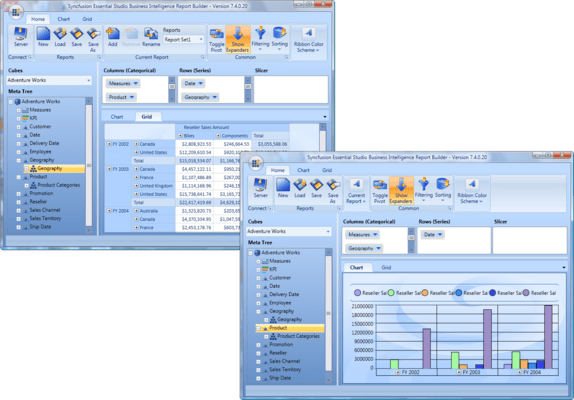
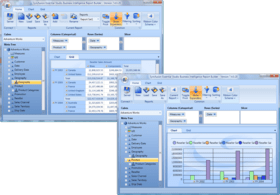
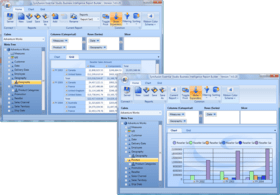
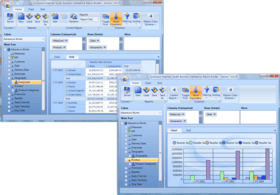
The Report Builder is a tool that lets you visually create chart and grid reports. It is also a good showcase for the OLAP controls. Easily bind this control to any OLAP data and start using its different options to choose dimensions and measures for visualization. Choose any filter or sorting criteria to apply and export to other formats.
Essential Studio Business Intelligence Edition Includes:
Essential BI Grid—Use the BI Grid to summarize, analyze, explore, and present summaries to make informed decisions about critical data in your enterprise. Supports data binding from SQL Server Analysis Services to any XMLA-compatible OLAP database like Mondrian.
Essential BI Client—A great ad-hoc analysis tool that can be easily bound to any OLAP database to give end users all the dimensions, measures, and KPIs they need to perform analyses. Use it as an application (through the Report Builder) or as an embedded control in your ASP.NET, WPF, and Silverlight apps.
Essential BI Chart—Visualize business intelligence data buried in OLAP and relational databases. This interactive control gives you the ability to see big-picture data or drill-down to the data you need. Supported data sources range from SQL Server Analysis Services to any XMLA-compatible OLAP databases like Mondrian.
Essential BI Gauge—Create professional gauges to display key performance indicators from your OLAP data. Include status visualizations (traffic lights, road signs, standard arrow types) to help create executive dashboards.
Essential BI PivotGrid—A powerful pivot table for visualizing relational data in a multidimensional UI. The PivotGrid can organize hundreds of thousands of relational table rows into a comprehensive, cross-tabulated form in seconds. The data can be pivoted, summarized, or grouped as needed, giving you complete oversight of your OLAP data.
Benefits of working with Syncfusion:
Standardize to simplify: One vendor, one license, one suite of .NET components. Syncfusion’s wide range of solidly built components allows developers to streamline their toolkits and reduce dependence on multiple vendors.
Trusted architects: Industry-leading architects ensure each product is built for the most demanding of environments.
Full source code: 100% C# source code available, enabling seamless integration of the libraries with your projects.
Solid support infrastructure: First-rate tech support is available via Syncfusion’s online tracking system Direct-Trac, email, and phone. No per-incident charges. Syncfusion also provides an extensive knowledgebase, FAQs, and forums.
Built with the future in mind: Syncfusion components are geared towards long-lifecycle applications and architected to meet high standards for flexibility and long-term maintainability.
Flexible licensing model: Straight-forward per-developer licensing, with no runtimes, server deployment fees, or royalties. Each licensee may install on multiple personal machines.
Technical Support - Each Syncfusion license includes a one-year subscription for unlimited technical support and updates. Support for Syncfusion products is available 24 / 5 through a custom-built support system, with responses guaranteed within a single business day. Support is also available by e-mail and phone. Syncfusion’s Direct-Trac system can be used to create support incidents and track them to completion 24 hours a day, 7 days a week and allows Syncfusion licensees to maintain a complete overview of their support history.
What's new in Syncfusion Essential Studio Business Intelligence Edition 2012 Vol 4?
Office 2010 and Transparent Themes - The WPF and Silverlight BI controls now support Office 2010 and transparent themes to enhance the look and feel of the controls. The Office 2010 themes feature different color options, such as Office 2010 Blue, Office 2010 Black, and Office 2010 Silver.
SSAS Cube Analysis with GUI Interaction - Tools such as slicers, filters, summaries, etc. have been added to allow users to intuitively drag-and-drop measures and dimensions into horizontal or vertical axes to pivot data as desired.
JSON Mode - In JSON mode, only the necessary cell values are sent for re-rendering on the script side during drill-up and drill-down operations to improve the control's performance.
What’s new in Essential Studio Business Intelligence Edition 2012 Volume 2?
All new support for editing and updating Pivot Grid data
Support for adding calculated measures interactively using the provided OLAP Client UI
Support for Quartet FS' ActivePivot engine
What’s new in Essential Studio Business Intelligence Edition 2012 Volume 1?
Additional Information in OLAP Report Serialization - Users can save additional information in an OLAP report and load it wherever required.
Essential BI Grid for ASP.NET
Hide Summary Elements at Different Levels - Users can hide the summary elements of an OLAP Grid at different levels based on the level name or level number. This feature helps users to view only the necessary details by hiding the unrequired summaries. It also optimizes the visibility of summary elements in Web pages.
Frozen Headers - Users can freeze the header of the grid so that headers are always visible when scrolling through a grid with a large number of rows or columns.
Essential BI PivotGrid
Show or Hide Subtotals - This feature is used to show or hide the subtotals in Essential BI PivotGrid. It enables users to have an abstract view of the data in the case of larger data tables by hiding the subtotals.
Persist Expand/Collapse State - Essential BI PivotGrid’s default behavior is to expand all nodes when a grid’s schema is changed. Support to persist expansion states enables users to maintain the expanded/collapsed state in the PivotGrid control when pivot schema is changed or when the pivot grid is de-serialized from an .xml file.
Disable Grouping by Specific Fields - This feature restricts users from dragging and dropping certain fields in the grouping area, thereby disabling grouping.
Essential BI PivotGrid for WPF
Run-Time Custom Summary Type Setting - Users can set custom and built-in summaries at run time using the Pivot Computation Information dialog. In previous versions, custom summaries could be set to a column only at load time, but the run-time custom summary type setting feature enables switching custom summaries at run time.
Hide Field Support - Users can hide unnecessary fields from the pivot schema designer by using the ShowDisplayFields property.
Essential BI Client for ASP.NET
Paging Support- Paging support helps users view data in larger dimensions by breaking the data into pages.
Easily build powerful analysis interfaces into your .NET applications with gauges, charts, and grids - including pivot grids – that give your users the ability to visualize and make sense of your organization’s data.
Evals & Downloads: Read the Syncfusion License Agreement - Requires Acrobat Reader
Operating System for Deployment: Windows 8, Windows 7, Windows Vista, Windows XP
Architecture of Product: 32Bit, 64Bit
Product Type: Component
Component Type: ASP.NET WebForms, .NET WPF, Silverlight, 100% Managed Code, JavaScript, AJAX
Built Using: Visual C# .NET
Compatible Containers: Microsoft Visual Studio 2012, Microsoft Visual Studio 2010, Microsoft Visual Studio 2008, Microsoft Visual Studio 2005, Microsoft Visual Basic 2012, Microsoft Visual Basic 2010, Microsoft Visual Basic 2008, Microsoft Visual Basic 2005, Microsoft Visual C++ 2012, Microsoft Visual C++ 2010, Microsoft Visual C++ 2008, Microsoft Visual C++ 2005, Microsoft Visual C# 2012, Microsoft Visual C# 2010, Microsoft Visual C# 2008, Microsoft Visual C# 2005, Delphi 8.0, C#Builder, .NET Framework 4.5, .NET Framework 4.0, .NET Framework 3.5, .NET Framework 3.0, .NET Framework 2.0, Silverlight 5, Silverlight 4
Product Class: User Interface Components
Keywords: essential studio business intelligence, syncfusion bi, essential bi, syncfusion business, syncfusion intelligence, syncfusion essential bi, essential studio bi, buy essential studio business intelligence, buy essential bi, buy syncfusion business, buy syncfusion intelligence, buy syncfusion essential bi, buy essential studio bi, renew essential studio business intelligence, renew essential bi, renew syncfusion business, renew syncfusion intelligence, renew syncfusion essential bi, renew essential studio bi, essential studio business intelligence distributor, essential bi distributor, syncfusion business distributor, syncfusion intelligence distributor, syncfusion essential bi distributor, essential studio bi distributor, syncfusion business binary, syncfusion business source, essential studio business binary, essential studio business source
Syncfusion Sync fusion
Product Suites Suite bundles bundle
datagrid controls, datatable controls, datagrid components, datatable components, datagrid, data grid, data table, net gridview, net datagrid, data grid, grid control, net datatable, c# gridview, c# datagrid, asp.net datagrid, grid asp, vb.net datagrid
On-Line Analytical OLAP analysis analyze analyse
Reporting Reports Report
Spreadsheet spread sheet worksheet workbook excel lotus 123 1-2-3 xls xl
Publisher
Primary Category
Related Products
Related Categories
ComponentSource offers a unique global service, used by over 1,000,000 software developers worldwide.