par The Imaging Source - Type de produit : Composant / ActiveX OCX
TX Text Control ActiveX Server by The Imaging Source
Add a server-side ASP word processing control to your classic ASP applications. TX Text Control ActiveX Server is a fully programmable word processing engine for ASP. It is not an editor like TX Text Control Professional, MS Word or Notepad, which lets the end-user type in text and apply formatting options via menus and dialog boxes. Instead, all processing is done from program code. Data from various sources (HTML forms, databases, Word files) can be combined to build documents that can be saved in a number of formats (PDF, DOCX, DOC, RTF, HTML, XML).

TX Text Control ActiveX Server can combine data from various sources (HTML forms, databases, Word files) to build documents that can be saved in a number of formats (PDF, DOC, RTF, HTML, XML). For example, an invoice from an online store can easily be created, combining data from a web user with data from a database. The resulting print-ready file can be sent to the web user who can save or print it.
Generate dynamic content such as quotes or invoices on-the-fly - Using TX Text Control ActiveX Server, a print-ready document can be generated on-the-fly using information from a set of databases and user data from a web browser. The resulting document can be displayed in the browser, saved to disk or sent by e-mail. As documents are generated on-the-fly, it is not physically stored on the server. This reduces redundancy and at the same time, gives users direct access to up-to-date, live information.
Create print-ready PDF files on a web server - Using Abobe's Portable Document Format (PDF), documents immediately becomes compatible to a wide range of end devices - from most PDAs to any desktop PCs.
Convert documents on demand into most word processing formats - TX Text Control ActiveX Server can be used to convert documents on a server into most popular word processing formats, including MS Word, XML, RTF, PDF or HTML.
Use information from databases for mail-merge applications on a server - Assemble documents from sources like a set of databases or physical files. The contents of database fields can be inserted at specified positions in a previously prepared template.
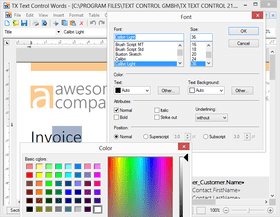
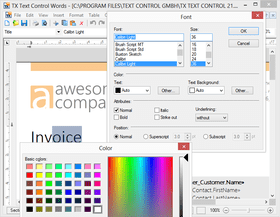
Programmatic word processing - All word processing functions normally available from menu items and dialog boxes can be applied from code. Options include find&replace, fonts, paragraph indents and alignment, inserting tables and images, and many more. Just as a piece of text is selected with the mouse, it can be selected from code, for instance to underline it or change its text color.
One TX Text Control ActiveX Server license is valid for one developer and one server. In addition, the ActiveX Server license includes one Enterprise client license for client-side development.
TX Text Control ActiveX Server is deployed as an automation server on Microsoft Internet Information Server (IIS). Most properties and methods of the approved OCX interface are available in ASP / ASP.NET projects, making TX Text Control ideally suitable for web server applications
What's new in TX Text Control V14?
Section Formatting: A document can be split into several sections to enable different page sizes and margins and different headers and footers in the same document.
Headers and Footers: The contents and the alignment of headers and footers can be different for each section. Also each section can have a special header and a special footer for the section's first page. If a section does not need its own header or footer, its header or footer can be connected with the header or footer of the previous section.
WordprocessingML Format: TX Text Control supports the WordprocessingML part of the Microsoft Office Open XML format. This format is a ZIP compressed XML format for word processing and is used as standard format of Microsoft Word. A TextControl can load and save files (.docx extension) and blocks of memory containing documents formatted with this format.
Import and Export of Heiler HighEdit Fields:TX Text Control also supports the import and export of Heiler HighEdit fields contained in RTF documents. The names of these fields are available through the FieldTypeData property, if the field is of the type txFieldHighEdit.
Import and Export of Microsoft Word Fields: TX Text Control now supports importing and exporting Microsoft Word fields contained in Microsoft Word and RTF documents.
Background Printing: Additional contents such as images or watermarks can be printed on a page of a document. An application can add its own PrintPageEventHandler to a PrintDocument
What's new in TX Text Control V13.0?
True Browser-based Rich Text Editing - Create full featured word processing apps that run in MSIE
Paragraph Formatting - Set multiple new paragraph attributes with shipped dialog box
Horizontal and Vertical Ruler Bars - Set margins, height of headers and footers and width and height of table cells
Contemporary Application Look and Feel - Create slick and highly usable applications with the new styling options
Hypertext Links in PDF Documents - Convert hypertext links to their PDF pendants on export
Clipboard Import - Import HTML formatted text directly from the clipboard
Text Fields and Hypertext Targets - Multiple field handling improvements
New and Updated Features in V12
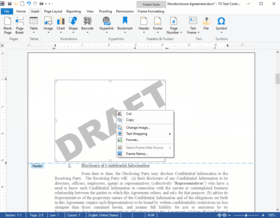
Text Frames - Freely placeable and programmable text frames can be inserted and positioned as characters or geometrically relative to a paragraph or a page
Anchored Images - Images can be anchored to a specific paragraph and thus maintain their geometrical position, in relation to the paragraph to which they are anchored
New Object Attribute Dialog Box - New built-in dialog box for all image, text frame and object attributes. Settings such as size, layout, position, filename, format, resolution and compression can be adjusted Image Improvements - Simply switch between the image position modes: convert an image inserted as character to an image at a fixed position or anchor it to a paragraph using the new dialog box
Table Formatting - Now it is possible to insert page breaks inside of a table, keep table rows together on one page and to specify the table cell height
PartNumbers: PC-514384-162934 514384-162934 PC-514384-162935 514384-162935 PC-514384-162942 514384-162942 PC-514384-162943 514384-162943 PC-514384-162944 514384-162944 PC-514384-162945 514384-162945 PC-514384-162946 514384-162946 PC-514384-162947 514384-162947 PC-514384-162948 514384-162948 PC-514384-162949 514384-162949 PC-514384-162950 514384-162950 PC-514384-162951 514384-162951 PC-514384-162936 514384-162936 PC-514384-162937 514384-162937 PC-514384-162953 514384-162953 PC-514384-162954 514384-162954 PC-514384-162955 514384-162955 PC-514384-162956 514384-162956 PC-514384-162957 514384-162957 PC-514384-162958 514384-162958
Publisher PartNumbers: TX ActiveX Server TX ActiveX Server RT 5 TX ActiveX Server RT 5 Sub TX ActiveX Server RT 5 Sub Post TX ActiveX Server RT 5 Sub Pre TX ActiveX Server RT OEM TX ActiveX Server RT OEM Sub Post TX ActiveX Server RT OEM Sub Pre TX ActiveX Server Sub TX ActiveX Server Sub Post TX ActiveX Server Sub Pre TX ActiveX Server Team TX ActiveX Server Team Sub TX ActiveX Server Team Sub Post TX ActiveX Server Team Sub Pre Upd TX ActiveX Server Upd TX ActiveX Server Sub Upd TX ActiveX Server Team Upd TX ActiveX Server Team Sub
PurchaseOptions: TX Text Control ActiveX Server V14.0 SP2 1 Developer License - Includes 5 Run-time (Server) Licenses , TX Text Control ActiveX Server V14.0 SP2 1 Developer License - Includes 5 Run-time (Server) Licenses - with 1 Year Subscription , TX Text Control ActiveX Server V14.0 SP2 1 Developer License - Includes 5 Run-time (Server) Licenses Upgrade from V10.0 or Higher , TX Text Control ActiveX Server V14.0 SP2 1 Developer License - Includes 5 Run-time (Server) Licenses - with 1 Year Subscription Upgrade from V10.0 or Higher , TX Text Control ActiveX Server V14.0 SP2 4 Developer Team License - Includes 5 Run-time (Server) Licenses , TX Text Control ActiveX Server V14.0 SP2 4 Developer Team License - Includes 5 Run-time (Server) Licenses - with 1 Year Subscription , TX Text Control ActiveX Server V14.0 SP2 4 Developer Team License - Includes 5 Run-time (Server) Licenses Upgrade from V10.0 or Higher , TX Text Control ActiveX Server V14.0 SP2 4 Developer Team License - Includes 5 Run-time (Server) Licenses Upgrade from V10.0 or Higher - with 1 Year Subscription , TX Text Control ActiveX Server V14.0 SP2 Additional Servers 5 Additional Server License , TX Text Control ActiveX Server V14.0 SP2 Additional Servers 5 Additional Server License - with 1 Year Subscription , TX Text Control ActiveX Server V14.0 SP2 Additional Servers Unlimited Additional Server License (OEM) , TX Text Control ActiveX Server V14.0 SP2 Additional Servers Unlimited Additional Server License (OEM) - with 1 Year Subscription , TX Text Control ActiveX Server - Subscription Renewals 1 Developer License Subscription Renewal - Pre Expiry , TX Text Control ActiveX Server - Subscription Renewals 1 Developer License Subscription Renewal - Post Expiry - only available 30 days after the expiry date , TX Text Control ActiveX Server - Subscription Renewals 4 Developer Team License Subscription Renewal - Pre Expiry , TX Text Control ActiveX Server - Subscription Renewals 4 Developer Team License Subscription Renewal - Post Expiry - only available 30 days after the expiry date , TX Text Control ActiveX Server - Subscription Renewals 5 Additional Server License - Pre Expiry , TX Text Control ActiveX Server - Subscription Renewals 5 Additional Server License - Post Expiry - only available 30 days after the expiry date , TX Text Control ActiveX Server - Subscription Renewals Unlimited Additional Server License (OEM) - Pre Expiry , TX Text Control ActiveX Server - Subscription Renewals Unlimited Additional Server License (OEM) - Post Expiry - only available 30 days after the expiry date
Resources: Read the TX Text Control ActiveX help file, Read the TX Text Control Editions Comparison - Requires Acrobat Reader, Browse the TX Text Control ActiveX Server Build a PDF document from web site data online demo, Browse the TX Text Control ActiveX Server Create a web store quotation online demo, Browse the TX Text Control ActiveX Server Using TX Text Control ActiveX Server in ASP.NET online demo, Download the TX Text Control ActiveX Server V14.0 SP2 evaluation on to your computer - Expires After 60 Days
Operating System for Deployment: Windows Vista, Windows XP, Windows ME, Windows 2000, Windows 98, Windows NT 4.0, Windows 95
Architecture of Product: 32Bit, 64Bit
Product Type: Component
Component Type: ActiveX OCX
Built Using: MFC V4.2 / V6.0
Compatible Containers: Microsoft Visual Studio .NET, Microsoft Visual Studio 6.0, Microsoft Visual Studio 97, Microsoft Visual Basic .NET, Microsoft Visual Basic 6.0, Microsoft Visual Basic 5.0, Microsoft Visual Basic 4.0, Microsoft Visual C++ .NET, Microsoft Visual InterDev 6.0, Microsoft SQL Server 2000, Microsoft SQL Server 7.0, Microsoft Internet Information Server 5.0, Microsoft Internet Explorer 6.0, Microsoft Internet Explorer 5.5, Delphi 7.0, Delphi 6.0, Delphi 5.0, .NET Framework 1.0
Product Class: Business Components
Search Items: New Product Sep 03, New Product Oct 03, New Product May 04, New Product June 04, New Product Aug 05
Keywords: The Imaging Source Europe Text word words processing textbox Corporate Partner txtext txtextcontrol word server Rich Text Box MS Word Import Export PDF Mail merge Reporting MS Office Automation Server side word processing ASP.NET WYSIWYG