z/Scope Terminal Emulator - SDK - V6.1

by Cybele Software - 상품타입: Component / ActiveX OCX

주의 : 이 제품정보에는 한글안내가 포함되어 있지 않습니다.
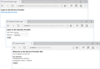
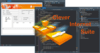
z/Scope Terminal Emulator - SDK - V6.1 의 스크린샷Terminal Emulation Development Kit for accessing to IBM AS/400, IBM Mainframes and Unix Hosts.  z/Scope SDK is an easy-to-use library that allows you to integrate and take advantage of z/Scope Terminal Emulator with your corporate application. Enabling full embedding of its full-featured multi-session terminal emulation allows a tight integration between desktop/Web applications and mainframe systems, even interacting with mainframe screens through the powerful OHIO interface.

130,400₩
통화 선택

일반 적인 소비자 가격은 하기에 표시되어 있습니다. 고객님의 할인가격은 표시 하시려면 로그인 해주시기 바랍니다.

z/Scope SDK V6.1.0.71

주문 ₩ 130,400 1-100 Seats License - price per License - includes Annual Maintenance 다운로드 (15.6 MB)
주문 ₩ 113,100 101-250 Seats License - price per License - includes Annual Maintenance 다운로드 (15.6 MB)
주문 ₩ 92,900 251-500 Seats License - price per License - includes Annual Maintenance 다운로드 (15.6 MB)
주문 ₩ 79,900 501 and up Seats License - price per License - includes Annual Maintenance 다운로드 (15.6 MB)

z/Scope SDK Annual Maintenance Renewal

주문 ₩ 17,000 1-100 Seats License - price per License - Annual Maintenance Renewal 확인 다운로드 (29 KB)
주문 ₩ 14,500 101-250 Seats License - price per License - Annual Maintenance Renewal 확인 다운로드 (29 KB)
주문 ₩ 12,100 251-500 Seats License - price per License - Annual Maintenance Renewal 확인 다운로드 (29 KB)
주문 ₩ 10,400 501 and up Seats License - price per License - Annual Maintenance Renewal 확인 다운로드 (29 KB)

본 제품은 GSA Schedule 가격으로 제공해 드릴수 있습니다.가격에는 ComponentSource의 기술지원 요금이 포함되어 있습니다. 또한 다운로드 판매를 하고 있는 상품의 대부분은 온라인 백업요금이 포함되어 있어서 구입날로부터 30일 이내에 새로운 버전이 발매된 경우 무료로 업그레이드해 드리고 있습니다.  모든 주문에 대해서 당사표준 계약조건 반품조건 의 내용이 적용됩니다. 다음의 경우,고객 서비스로연락하시기 바랍니다. (상기의 리스트에 게재되지 않은 대량의 라이센스나 구 버전 등의 라이센스 옵션이 필요한 경우)

일반 적인 소비자 가격은 상기에 표시되어 있습니다. 고객님의 할인가격은 표시 하시려면 로그인 해주시기 바랍니다.

z/Scope SDK is compatible with any ActiveX-aware development environment and languages: Microsoft Visual Basic, Microsoft Visual Studio,VB.NET, C#, C++, CodeGear's Delphi, etc. It can also be easily embedded into any HTML-based solution as a visual ActiveX control.

New in V6.1

  • Microsoft Windows Vista compatibility
  • File Transfer Enhancements
    • Integrated File Transfer Manager
    • Queue management
    • Transfer services can now work in background
    • Enhanced FTP support for AS/400 IFS and not IFS modes.
    • FTP, IND$FILE, KERMIT, X/Y/Z-MODEM transfers integrated in the same common interface
    • Localization for foreign languages: Available in English, French, German, Italian, Spanish, Portuguese and Swedish!

All features:

  • Support for extended TN3270, TN5250 protocols.
  • Support for VT52, VT100, VT102, VT220, VT320, VT420 and ANSI emulation.
  • Support for SSL 2.0 and 3.0 (Secure Socket Layer Technology) as well as TLS 1.0 (Transport Layer Security) security protocols.
  • Support for SSH1 (Secure Shell), SSH2 security protocols.
  • Integrated printer emulation. z/Scope communicates through standard 3270 and 5250 protocols for display and printer emulations.
  • Open IBM 3812/3287 printer sessions, redirecting them to your local or network printer.
  • Terminal emulation (models 2, 3, 4 and 5), both in normal and extended attribute modes.
  • Terminal emulation in both 24x80 and 27x132 screen resolutions.
  • SCS (SNA Character String) printer support is included in direct, print-to-file and preview modes.
  • Kermit, X-Modem, Y-Modem and Z-Modem transfers.
  • Full multi-session FTP client integrated into the tabbed interface.
  • IND$FILE for VM/TSO/CICS file transfer support.
  • HLLAPI, EHLLAPI, and WinHLLAPI support.
  • OHIO (Open Host Interface Objects) API support. Macro capability through VBScript scripting language and the integrated Active Script debugger. Read more
  • Multi-session/multi-connection terminal emulation capabilities, allowing you to open as many sessions as needed.
  • Multiple emulation modes simultaneously: TN3270, TN5250 and VTxxx.
  • Screen styles management for fonts and color re-mapping over normal and extended attributes.
  • Improved legibility through TN BRIDGE font, well-fit for most terminal and screen resolutions.
  • Enhanced Screen Styles management, including support for 5250 specific attributes.
  • Support for mono-spaced and non-mono-spaced fonts.
  • Enhanced keyboard and mouse functionality.
  • Hotspots enhancements. It's now possible to define multiple rules within the same Hotspot and to create new Hotspots contextually from the screen through the Hotspots wizard.
  • User-defined Hotspots that enable point-and-click operations for faster and more intuitive navigation.
  • Enhanced Web Browser compatibility. Includes IE, Mozilla Firefox/Netscape plug-in.
  • Allows thousands of concurrent users from a single host or server farm for optimal scalability.
  • Integration with Microsoft® Office suite. Export text in the emulation display directly to Word or Outlook® applications.
  • Screen History provides convenient one-click access to previously visited screens. Display any particular screen directly by selecting it from the screen thumbnails menu.
  • Keypads are groups of buttons that simulate keyboard keys.
  • Navigators provide a new way to automate navigation sequences.
  • Auto-Fills automatically fill-in one or more input fields with a simple mouse click.
  • Auto-Suggestion feature easily reproduces previously typed text with only one click.
  • Dynamic toolbar system to organize Navigators, Auto-Fills, Keypads and Hotspots.
  • Advanced edit options let you customize and get full control of copy, cut and paste operations.
  • The settings interface has been redesigned to be more user-friendly.
  • User-friendly keyboard configuration.
  • International character support, including support for custom ASCII/EBCDIC conversion tables.
  • Collapsible panel for quick access to connections, screen styles and macros.

상품검색

검색어를 입력해주세요: