Add interactive charts and images to your Web and Windows applications. Chart FX 7 integrates seamlessly into Visual Studio to provide developers with enterprise level data visualization capabilities. Chart FX 7 takes full advantage of the .NET Framework and cutting-edge technologies such as AJAX to create visually-rich, lightweight and secure charts that will enhance your enterprise application's display layer. A free Chart FX Silverlight Add-on is available to Chart FX 7 users to allow developers to add Chart FX functionality to their Silverlight-based web applications. Chart FX 7 also adds a new DHTML rendering engine that uses AJAX (Asynchronous JavaScript and XML) to produce chart images that allow full interactivity and support state in web applications. Chart FX supports a vast variety of data population methods, including, passing data directly through the API, Resultset Binding, XML Files, Collections, Arrays, Arrays of Arrays, Text Files and Crosstab. Chart FX places an impressive array of data analysis tools at your disposal. Chart FX provides tools such as OLAP, highlighting, statistical analysis, axis sections, conditional attributes and more.
More specific data, less code written. With the Chart FX Extensions Pack developers are no longer required to spend hours configuring a generic charting component to specific data or behavior. Instead, Chart FX Extensions, which are .NET controls, can be added to Chart FX 7 to adapt to these data sources enabling organizations to quickly and economically develop solutions that meet unique business needs. Chart FX Extensions Pack provides four main components, Chart FX Financial, Chart FX OLAP, Chart FX Statistical and Chart FX Maps, as well as supplementary functionality including a Polar gallery type, Accessibility (Section 508), a Flash writer and PSS to maximize server performance in a web server environment.
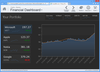
Add feature-packed, interactive, flexible, customizable charts to your Silverlight applications. ComponentArt Charting for Silverlight is a comprehensive set of charting components designed to deliver highly interactive visualization of business data. Featuring brilliant rendering, interactive drill-downs, built-in zooming & scrolling, extremely large dataset handling and integration with the CalcEngine data processing control. ComponentArt Charting for Silverlight includes: XyChart, PieChart, FunnelChart, RadarChart, TreeMap, Legend, DrillDownManager, WcfDataProvider, DashboardLayout, DashboardPanel and DashboardPopup components.
Add advanced charting to your ASP.NET applications. Dundas Chart ASP.NET Enterprise Edition is a fully managed, CLR (Common Language Runtime) compliant charting component designed for ASP.NET development. Included is support for all standard and many advanced chart types, drilldown functionality, full Visual Studio Integrated help, a variety of different image formats and intuitive samples and examples to speed up development time. Graphics take full advantage of GDI+ and the use of transparency, anti-aliasing, gradients and more. Dundas Chart for ASP.NET Enterprise Edition includes many advanced features including: formula support, data grouping, data filtering and advanced chart types.
Fully managed charting for your ASP.NET projects. Dundas Chart for ASP.NET Professional Edition lets you quickly and easily create charts that have the exact look and feel that you require. You can easily create charts and easily bind them to your data with the Chart and Data Wizard. Use it to create new or to edit existing charts. It includes well over 200 interactive sample applications (comes with C# and VB.NET code), and extensive documentation that integrates into your MSDN. The Professional Edition also includes AJAX support for zooming and scrolling.
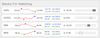
Deliver a simple and concise view of key performance indicators (KPIs) to your users in your Silverlight dashboards. Infragistics xamBulletGraph improves on an everyday bar graph because your users can judge at one glance: progress towards goals, ranges and compare multiple measurements. Infragistics xamBulletGraph will find uses in data visualizations where you might ordinarily use a linear gauge, but want the bullet graph's unique ability to display qualitative ranges and multiple metrics. It's also much more compact in size compared to a comparably informative bar graph. You can enliven its look and feel with visually impressive animations, template and style its look and feel, and data bind it to a value.
Silverlight data visualization chart control. Infragistics xamDataChart is a Silverlight chart that was designed to handle high volumes of data (millions of data points) and perform updates every few milliseconds. Infragistics xamDataChart has also been designed to facilitate the stacking of multiple chart areas in the same chart, and overlay multiple chart layers so that your users can add statistical and technical indicators to their analyses with ease.
Silverlight treemap control. Infragistics xamTreemap lets you add treemaps to your Silverlight applications. Treemaps (a.k.a., heatmaps in the financial industry) appear in applications as diverse as inventory management to "maps of the market" showing hot stocks and cold sectors. Unlike pie charts, treemaps show the relative weight of data points at more than one level with no drilldown required. Infragistics xamTreemap helps you communicate these differences more effectively in color with either a group-based organizational mechanism, or a graduated scale-based mechanism similar to choropleth shading. Infragistics xamTreemap also supports layout algorithms that optimize your treemap for either order or aspect ratio so you can decide which presentation format is more important to your end users. Infragistics xamTreemap displays data in proportion to its weight, enables users to look top-down onto hierarchical relationships in your data, and examines multiple levels of detail like never before.
Animated charting for silverlight. Silverlight advances Web application development with its rich data visualization. In addition to the mapping applications this makes possible, Infragistics has developed the Silverlight Chart control (Infragistics xamWebChart) that can fit into any scene and take advantage of the dynamic graphics available to you on the Silverlight platform, like perspective and animation. xamWebChart includes 28 chart types to choose from including: Area, Bar, Column, Doughnut, Line, Point, Pie, Scatter, Spline and Stack.
Business intelligence chart controls for the display of OLAP data. Syncfusion Essential BI Chart is a great way to visualize business-intelligence data buried in OLAP and relational databases. Syncfusion Essential BI Chart is an interactive control with drill down capabilities that allows you to surface big-picture data and makes it available at your finger tips. All common chart types are supported.